mirror of
https://github.com/yusing/godoxy.git
synced 2026-02-18 08:27:43 +01:00
 9c2051840f
Added sections for Proxmox integration, including automatic route binding, WebUI management, and API endpoints. Updated existing content to reflect LXC lifecycle control and real-time logging capabilities for both Docker and Proxmox environments.
275 lines
8.8 KiB
Markdown
Executable File
275 lines
8.8 KiB
Markdown
Executable File
<div align="center">
|
|
|
|
<img src="assets/godoxy.png" width="200">
|
|
|
|
[](https://sonarcloud.io/summary/new_code?id=yusing_go-proxy)
|
|

|
|
[](https://sonarcloud.io/summary/new_code?id=go-proxy)
|
|
|
|

|
|
[](https://discord.gg/umReR62nRd)
|
|
|
|
A lightweight, simple, and performant reverse proxy with WebUI.
|
|
|
|
<h5>
|
|
<a href="https://docs.godoxy.dev">Website</a> | <a href="https://docs.godoxy.dev/Home.html">Wiki</a> | <a href="https://discord.gg/umReR62nRd">Discord</a>
|
|
</h5>
|
|
|
|
<h5>EN | <a href="README_CHT.md">中文</a></h5>
|
|
|
|
<img src="screenshots/webui.jpg" style="max-width: 650">
|
|
|
|
Have questions? Ask [ChatGPT](https://chatgpt.com/g/g-6825390374b481919ad482f2e48936a1-godoxy-assistant)! (Thanks to [@ismesid](https://github.com/arevindh))
|
|
|
|
</div>
|
|
|
|
## Table of content
|
|
|
|
<!-- TOC -->
|
|
|
|
- [Table of content](#table-of-content)
|
|
- [Running demo](#running-demo)
|
|
- [Key Features](#key-features)
|
|
- [Prerequisites](#prerequisites)
|
|
- [Setup](#setup)
|
|
- [How does GoDoxy work](#how-does-godoxy-work)
|
|
- [Proxmox Integration](#proxmox-integration)
|
|
- [Automatic Route Binding](#automatic-route-binding)
|
|
- [WebUI Management](#webui-management)
|
|
- [API Endpoints](#api-endpoints)
|
|
- [Update / Uninstall system agent](#update--uninstall-system-agent)
|
|
- [Screenshots](#screenshots)
|
|
- [idlesleeper](#idlesleeper)
|
|
- [Metrics and Logs](#metrics-and-logs)
|
|
- [Manual Setup](#manual-setup)
|
|
- [Folder structrue](#folder-structrue)
|
|
- [Build it yourself](#build-it-yourself)
|
|
- [Star History](#star-history)
|
|
|
|
## Running demo
|
|
|
|
<https://demo.godoxy.dev>
|
|
|
|
## Key Features
|
|
|
|
- **Simple**
|
|
- Effortless configuration with [simple labels](https://docs.godoxy.dev/Docker-labels-and-Route-Files) or WebUI
|
|
- [Simple multi-node setup](https://docs.godoxy.dev/Configurations#multi-docker-nodes-setup)
|
|
- Detailed error messages for easy troubleshooting.
|
|
- **ACL**: connection / request level access control
|
|
- IP/CIDR
|
|
- Country **(Maxmind account required)**
|
|
- Timezone **(Maxmind account required)**
|
|
- **Access logging**
|
|
- Periodic notification of access summaries for number of allowed and blocked connections
|
|
- **Advanced Automation**
|
|
- Automatic SSL certificate management with Let's Encrypt ([using DNS-01 Challenge](https://docs.godoxy.dev/DNS-01-Providers))
|
|
- Auto-configuration for Docker containers
|
|
- Hot-reloading of configurations and container state changes
|
|
- **Container Runtime Support**
|
|
- Docker
|
|
- Podman
|
|
- **Idle-sleep**: stop and wake containers based on traffic _(see [screenshots](#idlesleeper))_
|
|
- Docker containers
|
|
- Proxmox LXC containers
|
|
- **Proxmox Integration**
|
|
- **Automatic route binding**: Routes automatically bind to Proxmox nodes or LXC containers by matching hostname, IP, or alias
|
|
- **LXC lifecycle control**: Start, stop, restart containers directly from WebUI
|
|
- **Real-time logs**: Stream journalctl logs from nodes and LXC containers via WebSocket
|
|
- **Traffic Management**
|
|
- HTTP reserve proxy
|
|
- TCP/UDP port forwarding
|
|
- **OpenID Connect support**: SSO and secure your apps easily
|
|
- **ForwardAuth support**: integrate with any auth provider (e.g. TinyAuth)
|
|
- **Customization**
|
|
- [HTTP middlewares](https://docs.godoxy.dev/Middlewares)
|
|
- [Custom error pages support](https://docs.godoxy.dev/Custom-Error-Pages)
|
|
- **Web UI**
|
|
- App Dashboard
|
|
- Config Editor
|
|
- Uptime and System Metrics
|
|
- **Docker**
|
|
- Container lifecycle management (start, stop, restart)
|
|
- Real-time container logs via WebSocket
|
|
- **Proxmox**
|
|
- LXC container lifecycle management (start, stop, restart)
|
|
- Real-time node and LXC journalctl logs via WebSocket
|
|
- **Cross-Platform support**
|
|
- Supports **linux/amd64** and **linux/arm64**
|
|
- **Efficient and Performant**
|
|
- Written in **[Go](https://go.dev)**
|
|
|
|
## Prerequisites
|
|
|
|
Configure Wildcard DNS Record(s) to point to machine running `GoDoxy`, e.g.
|
|
|
|
- A Record: `*.domain.com` -> `10.0.10.1`
|
|
- AAAA Record (if you use IPv6): `*.domain.com` -> `::ffff:a00:a01`
|
|
|
|
## Setup
|
|
|
|
> [!NOTE]
|
|
> GoDoxy is designed to be running in `host` network mode, do not change it.
|
|
>
|
|
> To change listening ports, modify `.env`.
|
|
|
|
1. Prepare a new directory for docker compose and config files.
|
|
|
|
2. Run setup script inside the directory, or [set up manually](#manual-setup)
|
|
|
|
```shell
|
|
/bin/bash -c "$(curl -fsSL https://raw.githubusercontent.com/yusing/godoxy/main/scripts/setup.sh)"
|
|
```
|
|
|
|
3. Start the docker compose service from generated `compose.yml`:
|
|
|
|
```shell
|
|
docker compose up -d
|
|
```
|
|
|
|
4. You may now do some extra configuration on WebUI `https://godoxy.yourdomain.com`
|
|
|
|
## How does GoDoxy work
|
|
|
|
1. List all the containers
|
|
2. Read container name, labels and port configurations for each of them
|
|
3. Create a route if applicable (a route is like a "Virtual Host" in NPM)
|
|
4. Watch for container / config changes and update automatically
|
|
|
|
> [!NOTE]
|
|
> GoDoxy uses the label `proxy.aliases` as the subdomain(s), if unset it defaults to the `container_name` field in docker compose.
|
|
>
|
|
> For example, with the label `proxy.aliases: qbt` you can access your app via `qbt.domain.com`.
|
|
|
|
## Proxmox Integration
|
|
|
|
GoDoxy can automatically discover and manage Proxmox nodes and LXC containers through configured providers.
|
|
|
|
### Automatic Route Binding
|
|
|
|
Routes are automatically linked to Proxmox resources through reverse lookup:
|
|
|
|
1. **Node-level routes** (VMID = 0): When hostname, IP, or alias matches a Proxmox node name or IP
|
|
2. **Container-level routes** (VMID > 0): When hostname, IP, or alias matches an LXC container
|
|
|
|
This enables seamless proxy configuration without manual binding:
|
|
|
|
```yaml
|
|
routes:
|
|
pve-node-01:
|
|
host: pve-node-01.internal
|
|
port: 8006
|
|
# Automatically links to Proxmox node pve-node-01
|
|
```
|
|
|
|
### WebUI Management
|
|
|
|
From the WebUI, you can:
|
|
|
|
- **LXC Lifecycle Control**: Start, stop, restart containers
|
|
- **Node Logs**: Stream real-time journalctl output from nodes
|
|
- **LXC Logs**: Stream real-time journalctl output from containers
|
|
|
|
### API Endpoints
|
|
|
|
```http
|
|
# Node journalctl (WebSocket)
|
|
GET /api/v1/proxmox/journalctl/:node
|
|
|
|
# LXC journalctl (WebSocket)
|
|
GET /api/v1/proxmox/journalctl/:node/:vmid
|
|
|
|
# LXC lifecycle control
|
|
POST /api/v1/proxmox/lxc/:node/:vmid/start
|
|
POST /api/v1/proxmox/lxc/:node/:vmid/stop
|
|
POST /api/v1/proxmox/lxc/:node/:vmid/restart
|
|
```
|
|
|
|
## Update / Uninstall system agent
|
|
|
|
Update:
|
|
|
|
```bash
|
|
bash -c "$(curl -fsSL https://github.com/yusing/godoxy/raw/refs/heads/main/scripts/install-agent.sh)" -- update
|
|
```
|
|
|
|
Uninstall:
|
|
|
|
```bash
|
|
bash -c "$(curl -fsSL https://github.com/yusing/godoxy/raw/refs/heads/main/scripts/install-agent.sh)" -- uninstall
|
|
```
|
|
|
|
## Screenshots
|
|
|
|
### idlesleeper
|
|
|
|

|
|
|
|
### Metrics and Logs
|
|
|
|
<div align="center">
|
|
<table>
|
|
<tr>
|
|
<td align="center"><img src="screenshots/routes.jpg" alt="Routes" width="350"/></td>
|
|
<td align="center"><img src="screenshots/servers.jpg" alt="Servers" width="350"/></td>
|
|
</tr>
|
|
<tr>
|
|
<td align="center"><b>Routes</b></td>
|
|
<td align="center"><b>Servers</b></td>
|
|
</tr>
|
|
</table>
|
|
</div>
|
|
|
|
## Manual Setup
|
|
|
|
1. Make `config` directory then grab `config.example.yml` into `config/config.yml`
|
|
|
|
`mkdir -p config && wget https://raw.githubusercontent.com/yusing/godoxy/main/config.example.yml -O config/config.yml`
|
|
|
|
2. Grab `.env.example` into `.env`
|
|
|
|
`wget https://raw.githubusercontent.com/yusing/godoxy/main/.env.example -O .env`
|
|
|
|
3. Grab `compose.example.yml` into `compose.yml`
|
|
|
|
`wget https://raw.githubusercontent.com/yusing/godoxy/main/compose.example.yml -O compose.yml`
|
|
|
|
### Folder structrue
|
|
|
|
```shell
|
|
├── certs
|
|
│ ├── cert.crt
|
|
│ └── priv.key
|
|
├── compose.yml
|
|
├── config
|
|
│ ├── config.yml
|
|
│ ├── middlewares
|
|
│ │ ├── middleware1.yml
|
|
│ │ ├── middleware2.yml
|
|
│ ├── provider1.yml
|
|
│ └── provider2.yml
|
|
├── data
|
|
│ ├── metrics # metrics data
|
|
│ │ ├── uptime.json
|
|
│ │ └── system_info.json
|
|
└── .env
|
|
```
|
|
|
|
## Build it yourself
|
|
|
|
1. Clone the repository `git clone https://github.com/yusing/godoxy --depth=1`
|
|
|
|
2. Install / Upgrade [go (>=1.22)](https://go.dev/doc/install) and `make` if not already
|
|
|
|
3. Clear cache if you have built this before (go < 1.22) with `go clean -cache`
|
|
|
|
4. get dependencies with `make get`
|
|
|
|
5. build binary with `make build`
|
|
|
|
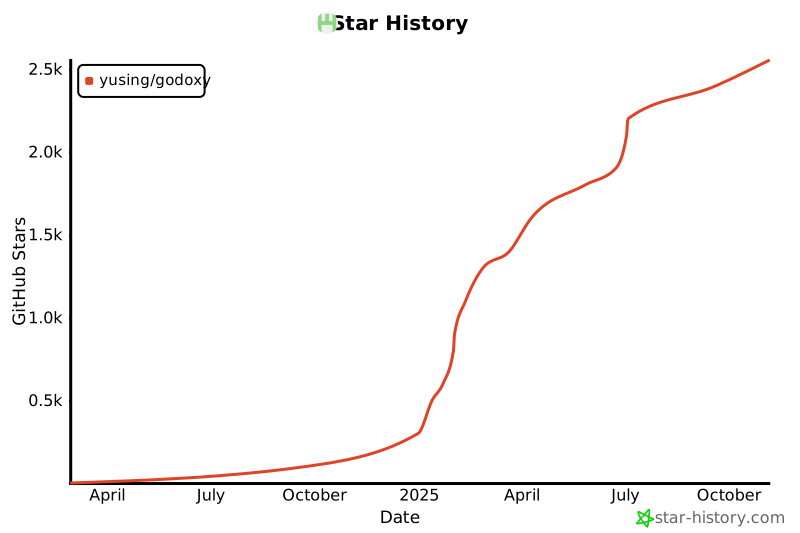
## Star History
|
|
|
|
[](https://www.star-history.com/#yusing/godoxy&Date)
|
|
|
|
[🔼Back to top](#table-of-content)
|