mirror of
https://github.com/yusing/godoxy.git
synced 2026-01-11 14:20:32 +01:00

201 lines
6.3 KiB
Markdown
201 lines
6.3 KiB
Markdown
<div align="center">
|
||
|
||
<img src="assets/godoxy.png" width="200">
|
||
|
||
[](https://sonarcloud.io/summary/new_code?id=yusing_go-proxy)
|
||

|
||
[](https://sonarcloud.io/summary/new_code?id=yusing_go-proxy)
|
||
|
||

|
||
[](https://discord.gg/umReR62nRd)
|
||
|
||
輕量、易用、 高效能,且帶有主頁和配置面板的反向代理
|
||
|
||
<h5>
|
||
<a href="https://docs.godoxy.dev">網站</a> | <a href="https://docs.godoxy.dev/Home.html">文檔</a> | <a href="https://discord.gg/umReR62nRd">Discord</a>
|
||
</h5>
|
||
|
||
<h5><a href="README.md">EN</a> | 中文</h5>
|
||
|
||
<img src="https://github.com/user-attachments/assets/4bb371f4-6e4c-425c-89b2-b9e962bdd46f" style="max-width: 650">
|
||
|
||
有疑問? 問 [ChatGPT](https://chatgpt.com/g/g-6825390374b481919ad482f2e48936a1-godoxy-assistant)!(鳴謝 [@ismesid](https://github.com/arevindh))
|
||
|
||
</div>
|
||
|
||
## 目錄
|
||
|
||
<!-- TOC -->
|
||
|
||
- [目錄](#目錄)
|
||
- [運行示例](#運行示例)
|
||
- [主要特點](#主要特點)
|
||
- [前置需求](#前置需求)
|
||
- [安裝](#安裝)
|
||
- [手動安裝](#手動安裝)
|
||
- [資料夾結構](#資料夾結構)
|
||
- [更新 / 卸載系統代理 (System Agent)](#更新--卸載系統代理-system-agent)
|
||
- [截圖](#截圖)
|
||
- [閒置休眠](#閒置休眠)
|
||
- [監控](#監控)
|
||
- [自行編譯](#自行編譯)
|
||
- [Star History](#star-history)
|
||
|
||
## 運行示例
|
||
|
||
<https://demo.godoxy.dev>
|
||
|
||
[](https://zeabur.com/referral?referralCode=yusing&utm_source=yusing&utm_campaign=oss)
|
||
|
||
## 主要特點
|
||
|
||
- **簡單易用**
|
||
- 透過 Docker[標籤](https://docs.godoxy.dev/Docker-labels-and-Route-Files)或 WebUI 輕鬆設定
|
||
- [簡單的多節點設置](https://docs.godoxy.dev/Configurations#multi-docker-nodes-setup)
|
||
- 詳細的錯誤訊息,便於故障排除
|
||
- **存取控制 (ACL)**:連線/請求層級存取控制
|
||
- IP/CIDR
|
||
- 國家 **(需要 Maxmind 帳戶)**
|
||
- 時區 **(需要 Maxmind 帳戶)**
|
||
- **存取日誌記錄**
|
||
- 定時發送摘要 (允許和拒絕的連線次數)
|
||
- **自動化**
|
||
- 使用 Let's Encrypt 自動管理 SSL 憑證 ([使用 DNS-01 驗證](https://docs.godoxy.dev/DNS-01-Providers))
|
||
- Docker 容器自動配置
|
||
- 設定檔與容器狀態變更時自動熱重載
|
||
- **容器運行時支援**
|
||
- Docker
|
||
- Podman
|
||
- **閒置休眠**:根據流量停止和喚醒容器 _(參見[截圖](#閒置休眠))_
|
||
- Docker 容器
|
||
- Proxmox LXC 容器
|
||
- **流量管理**
|
||
- HTTP 反向代理
|
||
- TCP/UDP 連接埠轉送
|
||
- **OpenID Connect 支援**:輕鬆實現單點登入 (SSO) 並保護您的應用程式
|
||
- **ForwardAuth 支援**:整合任何 auth provider (例如 TinyAuth)
|
||
- **客製化**
|
||
- [HTTP 中介軟體](https://docs.godoxy.dev/Middlewares)
|
||
- [支援自訂錯誤頁面](https://docs.godoxy.dev/Custom-Error-Pages)
|
||
- **網頁使用者介面 (Web UI)**
|
||
- 應用程式一覽
|
||
- 設定編輯器
|
||
- 執行時間與系統指標
|
||
- Docker 日誌檢視器
|
||
- **跨平台支援**
|
||
- 支援 **linux/amd64** 與 **linux/arm64**
|
||
- **高效能**
|
||
- 以 **[Go](https://go.dev)** 語言編寫
|
||
|
||
## 前置需求
|
||
|
||
設置 DNS 記錄指向運行 `GoDoxy` 的機器,例如:
|
||
|
||
- A 記錄:`*.y.z` -> `10.0.10.1`
|
||
- AAAA 記錄:`*.y.z` -> `::ffff:a00:a01`
|
||
|
||
## 安裝
|
||
|
||
> [!NOTE]
|
||
> GoDoxy 僅在 `host` 網路模式下運作,請勿更改。
|
||
>
|
||
> 如需更改監聽埠,請修改 `.env`。
|
||
|
||
1. 準備一個新目錄用於 docker compose 和配置文件。
|
||
|
||
2. 在目錄內運行安裝腳本,或[手動安裝](#手動安裝)
|
||
|
||
```shell
|
||
/bin/bash -c "$(curl -fsSL https://raw.githubusercontent.com/yusing/godoxy/main/scripts/setup.sh)"
|
||
```
|
||
|
||
3. 現在可以在 WebUI `https://godoxy.yourdomain.com` 進行額外配置
|
||
|
||
### 手動安裝
|
||
|
||
1. 建立 `config` 目錄,然後將 `config.example.yml` 下載到 `config/config.yml`
|
||
|
||
`mkdir -p config && wget https://raw.githubusercontent.com/yusing/godoxy/main/config.example.yml -O config/config.yml`
|
||
|
||
2. 將 `.env.example` 下載到 `.env`
|
||
|
||
`wget https://raw.githubusercontent.com/yusing/godoxy/main/.env.example -O .env`
|
||
|
||
3. 將 `compose.example.yml` 下載到 `compose.yml`
|
||
|
||
`wget https://raw.githubusercontent.com/yusing/godoxy/main/compose.example.yml -O compose.yml`
|
||
|
||
### 資料夾結構
|
||
|
||
```shell
|
||
├── certs
|
||
│ ├── cert.crt
|
||
│ └── priv.key
|
||
├── compose.yml
|
||
├── config
|
||
│ ├── config.yml
|
||
│ ├── middlewares
|
||
│ │ ├── middleware1.yml
|
||
│ │ ├── middleware2.yml
|
||
│ ├── provider1.yml
|
||
│ └── provider2.yml
|
||
├── data
|
||
│ ├── metrics # metrics data
|
||
│ │ ├── uptime.json
|
||
│ │ └── system_info.json
|
||
└── .env
|
||
```
|
||
|
||
## 更新 / 卸載系統代理 (System Agent)
|
||
|
||
更新:
|
||
|
||
```bash
|
||
sudo /bin/bash -c "$(curl -fsSL https://github.com/yusing/godoxy/raw/refs/heads/main/scripts/install-agent.sh)" -- update
|
||
```
|
||
|
||
卸載:
|
||
|
||
```bash
|
||
sudo /bin/bash -c "$(curl -fsSL https://github.com/yusing/godoxy/raw/refs/heads/main/scripts/install-agent.sh)" -- uninstall
|
||
```
|
||
|
||
## 截圖
|
||
|
||
### 閒置休眠
|
||
|
||

|
||
|
||
### 監控
|
||
|
||
<div align="center">
|
||
<table>
|
||
<tr>
|
||
<td align="center"><img src="screenshots/routes.jpg" alt="Routes" width="350"/></td>
|
||
<td align="center"><img src="screenshots/servers.jpg" alt="Servers" width="350"/></td>
|
||
</tr>
|
||
<tr>
|
||
<td align="center"><b>路由</b></td>
|
||
<td align="center"><b>伺服器</b></td>
|
||
</tr>
|
||
</table>
|
||
</div>
|
||
|
||
## 自行編譯
|
||
|
||
1. 克隆儲存庫 `git clone https://github.com/yusing/godoxy --depth=1`
|
||
|
||
2. 如果尚未安裝,請安裝/升級 [go (>=1.22)](https://go.dev/doc/install) 和 `make`
|
||
|
||
3. 如果之前編譯過(go < 1.22),請使用 `go clean -cache` 清除快取
|
||
|
||
4. 使用 `make get` 獲取依賴
|
||
|
||
5. 使用 `make build` 編譯二進制檔案
|
||
|
||
## Star History
|
||
|
||
[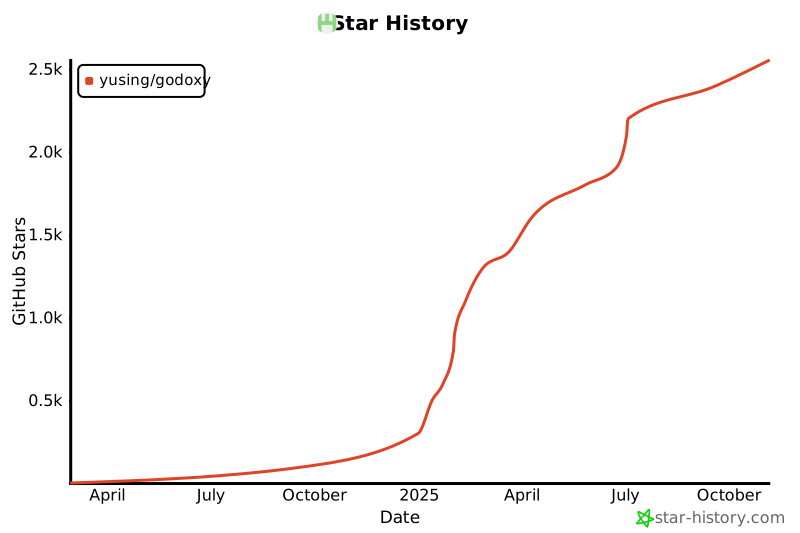](https://www.star-history.com/#yusing/godoxy&Date)
|
||
|
||
[🔼 回到頂部](#目錄)
|