 Benjamin Porter
d9c591b0ea
Benjamin Porter
d9c591b0ea
Fixes #1445

- Added additional options for customizing jump forward/backward.  Instead of just 5,
  10, and 30 seconds, we now have 5s, 10s, 15s, 30s, 60s, 2m, and 5m.
- Switched the jump interval to a list in the settings menu for better UX
- Reordered "Disable auto rewind time" for aesthetics in settings menu (it looked
  out of place after backwards time and forwards time were turned to dropdowns

The only downside of this (afaict), and what created the biggest challenge,
is the lack of numeric glyphs in the Material Symbols font.  They only have 5, 10,
and 30, which we were previously using.  Given that they don't have others, that means
we had to change strategies for displaying.  I switched all to generic backward and
forward icons and added the time interval as a label next to it so the user can still
tell at a glance what the setting is.  For consistency we don't use the numbered
glyphs anymore.  For more info on the Material Symbols font, see:
https://fonts.google.com/icons?icon.query=forward

However this does feel like two steps forward, one step back, though I can't think
of good options.  Other possibility would be to create SVGs, though I'm not skilled
enough to do that.  Personally this feels like a good compromise, but others will
probably differ. I considered using the numbered glyphs when the selected value was
5, 10, or 30, but when testing I found the inconsistency jarring and kind of janky.
Audiobookshelf Mobile App
Audiobookshelf is a self-hosted audiobook and podcast server.
Android (beta)
Get the Android app on the Google Play Store
iOS (early beta)
Beta is currently full. Apple has a hard limit of 10k beta testers. Updates will be posted in Discord.
Using Test Flight: https://testflight.apple.com/join/wiic7QIW (beta is full)
Go to the main project repo github.com/advplyr/audiobookshelf or the project site audiobookshelf.org
Join us on discord
Requires an Audiobookshelf server to connect with

Contributing
This application is built using NuxtJS and Capacitor in order to run on both iOS and Android on the same code base.
Localization
Thank you to Weblate for hosting our localization infrastructure pro-bono. If you want to see Audiobookshelf in your language, please help us localize. Additional information on helping with the translations here. 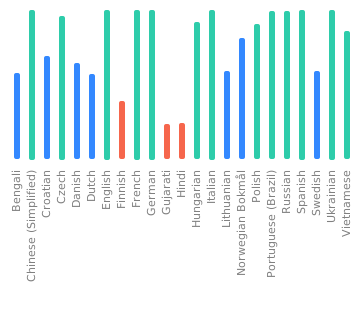
Windows Environment Setup for Android
Required Software:
- Git
- Node.js (version 20)
- Code editor of choice(VSCode, etc)
- Android Studio
- Android SDK
Install the required software with winget
Note: This requires a PowerShell prompt with winget installed. You should be able to copy and paste the code block to install. If you use an elevated PowerShell prompt, UAC will not pop up during the installs.
winget install -e --id Git.Git; `
winget install -e --id Microsoft.VisualStudioCode; `
winget install -e --id  Google.AndroidStudio; `
winget install -e --id OpenJS.NodeJS --version 20.11.0;

Your Windows environment should now be set up and ready to proceed!
Mac Environment Setup for Android
Required Software:
- Android Studio
- Node.js (version 20)
- Cocoapods
- Android SDK
Install the required software with homebrew
brew install android-studio node cocoapods
Start working on the Android app
Clone or fork the project from terminal or powershell and cd into the project directory.
Install the required node packages:
npm install
Expand for screenshot

Generate static web app:
npm run generate
Expand for screenshot

Copy web app into native android/ios folders:
npx cap sync
Expand for screenshot

Open Android Studio:
npx cap open android
Expand for screenshot

Start coding!
After making changes to the JS layer you need to rebuild the nuxt pages and sync them to the native shells:
npm run sync
Mac Environment Setup for iOS
Required Software:
Start working on the iOS app
Clone or fork the project in the terminal and cd into the project directory.
Install the required node packages:
npm install
Expand for screenshot

Generate static web app:
npm run generate
Expand for screenshot

Copy web app into native android/ios folders:
npx cap sync
Expand for screenshot

Open Xcode:
npx cap open ios
Expand for screenshot

Start coding!
After making changes to the JS layer you need to rebuild the nuxt pages and sync them to the native shells:
npm run sync