 Julien Cornebise
4798644bea
Julien Cornebise
4798644bea
The POST /api/items/<id>/play/<episodeId> response inlines every episode
of a podcast with an audioTrack per episode. Server-side, audioTrack.mimeType
is derived from audioFile.mimeType, which is null when the row was created
without a successful audio probe (direct DB inserts, import scripts,
partial probe failures).

The Jackson deserializer hits one null mimeType among the inlined
episodes, throws MissingKotlinParameterException, and the entire
play-session response fails to deserialize. ExoPlayer is never called,
the UI silently stalls.

Make mimeType nullable on the data class to tolerate this. ExoPlayer's
MediaItem.Builder.setMimeType already accepts nullable. Defensively
coerce null to empty string for Cast's MediaInfo.Builder.setContentType,
whose Java signature is non-null.

Fixes #1905
Audiobookshelf Mobile App
Audiobookshelf is a self-hosted audiobook and podcast server.
Android (beta)
Get the Android app on the Google Play Store
iOS (early beta)
Beta is currently full. Apple has a hard limit of 10k beta testers. Updates will be posted in Discord.
Using Test Flight: https://testflight.apple.com/join/wiic7QIW (beta is full)
Go to the main project repo github.com/advplyr/audiobookshelf or the project site audiobookshelf.org
Join us on discord
Requires an Audiobookshelf server to connect with

Contributing
This application is built using NuxtJS and Capacitor in order to run on both iOS and Android on the same code base.
Localization
Thank you to Weblate for hosting our localization infrastructure pro-bono. If you want to see Audiobookshelf in your language, please help us localize. Additional information on helping with the translations here. 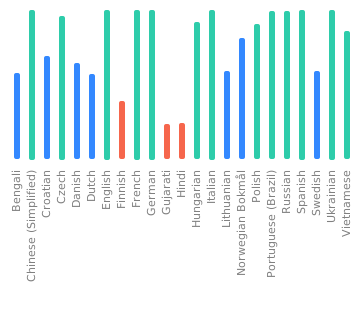
Windows Environment Setup for Android
Required Software:
- Git
- Node.js (version 20)
- Code editor of choice(VSCode, etc)
- Android Studio
- Android SDK
Install the required software with winget
Note: This requires a PowerShell prompt with winget installed. You should be able to copy and paste the code block to install. If you use an elevated PowerShell prompt, UAC will not pop up during the installs.
winget install -e --id Git.Git; `
winget install -e --id Microsoft.VisualStudioCode; `
winget install -e --id  Google.AndroidStudio; `
winget install -e --id OpenJS.NodeJS --version 20.11.0;

Your Windows environment should now be set up and ready to proceed!
Mac Environment Setup for Android
Required Software:
- Android Studio
- Node.js (version 20)
- Cocoapods
- Android SDK
Install the required software with homebrew
brew install android-studio node cocoapods
Start working on the Android app
Clone or fork the project from terminal or powershell and cd into the project directory.
Install the required node packages:
npm install
Expand for screenshot

Generate static web app:
npm run generate
Expand for screenshot

Copy web app into native android/ios folders:
npx cap sync
Expand for screenshot

Open Android Studio:
npx cap open android
Expand for screenshot

Start coding!
After making changes to the JS layer you need to rebuild the nuxt pages and sync them to the native shells:
npm run sync
Mac Environment Setup for iOS
Required Software:
Start working on the iOS app
Clone or fork the project in the terminal and cd into the project directory.
Install the required node packages:
npm install
Expand for screenshot

Generate static web app:
npm run generate
Expand for screenshot

Copy web app into native android/ios folders:
npx cap sync
Expand for screenshot

Open Xcode:
npx cap open ios
Expand for screenshot

Start coding!
After making changes to the JS layer you need to rebuild the nuxt pages and sync them to the native shells:
npm run sync