[Android] Downloading on Android 10 and below (SecurityException: Permission Denial) #498

Closed
opened 2026-04-24 23:26:14 +02:00 by adam · 16 comments
Owner

Originally created by @Demian98 on GitHub (Mar 20, 2023).

Actual behaviour

  • I'm downloading all audiobooks I'm listening on the phone. This works well, but after a phone reboot the app just crashes on opening, without doing anything. When starting the app, it loads the main screen and crashed after around 2 seconds. I can start it again and again, it is an infinite loop.
  • Other people in my family are experiencing the same issue.
  • The only solution is to reinstall the app. Login again and redownload the audiobooks.
  • The exception is: SecurityException: Permission Denial: reading.
  • In the app settings all permissions are still granted, nothing was removed.

Steps to reproduce

  1. Install the app and login.
  2. Download some books and listen to them.
  3. Reboot the phone and open the app.

Expected behaviour

  • It should not crash and still keep the permissions after reboot of the phone.

Environment data

Audiobookshelf Version:

  • Android App?
  • iOS App?

Android Issue

Android version: 10
Device model: SM-N975F

Stock or customized system: Stock

Screenshots

226367494-6dadc3e8-9d6e-4080-9d55-fc4ded63f5d6
226367538-1149ee46-57fe-4a1d-9c0f-4c3364a78344
226367547-133c7deb-3796-4c4b-88f0-1288f669d989

Originally created by @Demian98 on GitHub (Mar 20, 2023). ### Actual behaviour - I'm downloading all audiobooks I'm listening on the phone. This works well, but after a phone reboot the app just crashes on opening, without doing anything. When starting the app, it loads the main screen and crashed after around 2 seconds. I can start it again and again, it is an infinite loop. - Other people in my family are experiencing the same issue. - The only solution is to reinstall the app. Login again and redownload the audiobooks. - The exception is: SecurityException: Permission Denial: reading. - In the app settings all permissions are still granted, nothing was removed. ### Steps to reproduce 1. Install the app and login. 2. Download some books and listen to them. 3. Reboot the phone and open the app. ### Expected behaviour - It should not crash and still keep the permissions after reboot of the phone. ### Environment data Audiobookshelf Version: - [x] Android App? - [ ] iOS App? #### Android Issue Android version: 10 Device model: SM-N975F Stock or customized system: Stock ### Screenshots ![226367494-6dadc3e8-9d6e-4080-9d55-fc4ded63f5d6](https://user-images.githubusercontent.com/77210091/231402070-18ae8381-356c-44a0-a216-6596af009007.jpg) ![226367538-1149ee46-57fe-4a1d-9c0f-4c3364a78344](https://user-images.githubusercontent.com/77210091/231402088-68de8782-065c-47e5-ac50-34b6117d1413.jpg) ![226367547-133c7deb-3796-4c4b-88f0-1288f669d989](https://user-images.githubusercontent.com/77210091/231402090-2bd86206-bdd9-4bc3-9bd2-402fd05ed4d9.jpg)
adam added the bug label 2026-04-24 23:26:14 +02:00
adam closed this issue 2026-04-24 23:26:14 +02:00
Author
Owner

@Demian98 commented on GitHub (Apr 3, 2023):

Update: This always happens after a reboot of the phone. So it does not happen randomly.

Is there something I can provide to get this fixed?

@Demian98 commented on GitHub (Apr 3, 2023): Update: This always happens after a reboot of the phone. So it does not happen randomly. Is there something I can provide to get this fixed?
Author
Owner

@Demian98 commented on GitHub (Apr 12, 2023):

This sounds very related to the issue I'm experiencing: https://stackoverflow.com/questions/34105318/android-app-losing-use-permissions-after-reboot

grafik

@advplyr do you think the solution mentioned there could fix this issue as well?

@Demian98 commented on GitHub (Apr 12, 2023): This sounds very related to the issue I'm experiencing: https://stackoverflow.com/questions/34105318/android-app-losing-use-permissions-after-reboot ![grafik](https://user-images.githubusercontent.com/77210091/231422109-f2e10370-76ed-488a-a332-401f84d5deae.png) @advplyr do you think the solution mentioned there could fix this issue as well?
Author
Owner

@advplyr commented on GitHub (Apr 12, 2023):

I'm not sure, I haven't seen that before. This is the same issue as #608 and is specific to Android 10. Maybe also Android 8 & 9 but I haven't gotten any reports for that.

@advplyr commented on GitHub (Apr 12, 2023): I'm not sure, I haven't seen that before. This is the same issue as #608 and is specific to Android 10. Maybe also Android 8 & 9 but I haven't gotten any reports for that.
Author
Owner

@Demian98 commented on GitHub (Apr 13, 2023):

OK, something that needs to be fixed. Is there any way how I can help you with this?

To the general approach of offline files on ABS: Why is the user required to choose a specific directory for offline files? Most other app (Spotify, Netflix, and a lot more) are saving offline content into the app data, where the user has no access to.

Here are some benefits of the app data approach:

  • Easier to understand/use for most end-users, special for the non-technical people.
  • Most likely easier to handle for the developer, as there should be less security issues (like this one).
  • Much better for privacy, as the offline files can currently be accessed by all apps with storage permission.
  • This would fix the issue to link a book which was downloaded by another installation of the app (#653 #157), as it can't happen any more.

But the most important benefit for me would be easier handling for non-technical users. Like the most in my family :)

@advplyr It would be great to get your opinion on that :)

@Demian98 commented on GitHub (Apr 13, 2023): OK, something that needs to be fixed. Is there any way how I can help you with this? To the general approach of offline files on ABS: Why is the user required to choose a specific directory for offline files? Most other app (Spotify, Netflix, and a lot more) are saving offline content into the app data, where the user has no access to. Here are some benefits of the app data approach: - Easier to understand/use for most end-users, special for the non-technical people. - Most likely easier to handle for the developer, as there should be less security issues (like this one). - Much better for privacy, as the offline files can currently be accessed by all apps with storage permission. - This would fix the issue to link a book which was downloaded by another installation of the app (#653 #157), as it can't happen any more. But the most important benefit for me would be easier handling for non-technical users. Like the most in my family :) @advplyr It would be great to get your opinion on that :)
Author
Owner

@advplyr commented on GitHub (Apr 13, 2023):

We may be able to have a setting for storing in App data.

I took that approach because then it allows the user to manage the files on their device themselves. Some users also download the audio files and use a different app to listen. This was particularly useful in earlier development when the Abs mobile app was still missing a lot of features. I think many users prefer the files be stored where it is accessible to them so if we got rid of it entirely there would be a lot of requests to bring it back I'm sure.

I also had the thought that if we are building the mobile app with all these features for audiobooks then why not also allow it to be a standalone app. This ended up adding more work then I thought (like linking that you mentioned) so I may get rid of this concept.

I think these other media services you mentioned use App data because the content can be DRM protected so they don't want you having access to the files.

Anyway, I think we can try a hybrid approach of allowing users to store library items in app data or shared storage. I'm not sure what the UI/UX would look like for this. Maybe defaulting to app data but adding a prompt for if they want to use shared storage. Since these permission issues happen at Android 10 and below we could force those devices to use app data.

@advplyr commented on GitHub (Apr 13, 2023): We may be able to have a setting for storing in App data. I took that approach because then it allows the user to manage the files on their device themselves. Some users also download the audio files and use a different app to listen. This was particularly useful in earlier development when the Abs mobile app was still missing a lot of features. I think many users prefer the files be stored where it is accessible to them so if we got rid of it entirely there would be a lot of requests to bring it back I'm sure. I also had the thought that if we are building the mobile app with all these features for audiobooks then why not also allow it to be a standalone app. This ended up adding more work then I thought (like linking that you mentioned) so I may get rid of this concept. I think these other media services you mentioned use App data because the content can be DRM protected so they don't want you having access to the files. Anyway, I think we can try a hybrid approach of allowing users to store library items in app data or shared storage. I'm not sure what the UI/UX would look like for this. Maybe defaulting to app data but adding a prompt for if they want to use shared storage. Since these permission issues happen at Android 10 and below we could force those devices to use app data.
Author
Owner

@Demian98 commented on GitHub (Apr 14, 2023):

I'm with you, removing the ability for users to store data in their own paths would cause a lot of complaints, as they are already used to this feature.

I like the idea of a hybrid approach, as it bring the simplicity which is missing currently and all the advanced users are still abele to use the advanced features.

Furthermore, I think I have a good idea for the UI/UX and the concept of how it could work:
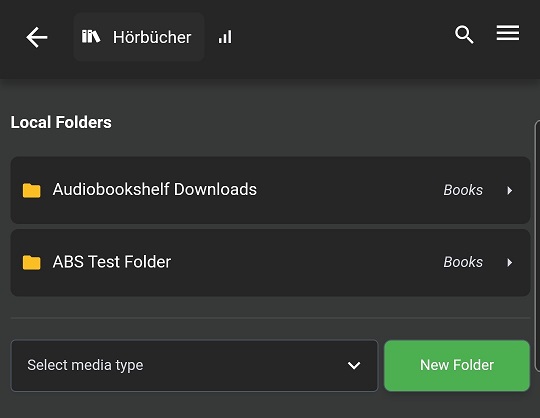
This is the current menu for "Local Media". There could be a folder called "App Data" by default, which cannot get deleted.
SmartSelect_20230414-124714_audiobookshelf

This would then be available in this usual list to select from, when you download something.
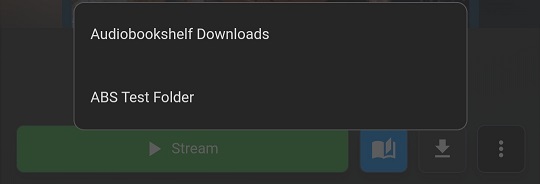
SmartSelect_20230414-124833_audiobookshelf

All the users which don't care, can just leaf it like it is and stay with the default folder "App Data". Brings the benefit that they are abele to start downloading after app setup. All the advanced users can still use the existing setup to do own configuration.

Additionally, you also don't need to care about backwards compatibility, as the existing thing stay like they are :)

@Demian98 commented on GitHub (Apr 14, 2023): I'm with you, removing the ability for users to store data in their own paths would cause a lot of complaints, as they are already used to this feature. I like the idea of a hybrid approach, as it bring the simplicity which is missing currently and all the advanced users are still abele to use the advanced features. Furthermore, I think I have a good idea for the UI/UX and the concept of how it could work: This is the current menu for "Local Media". There could be a folder called "App Data" by default, which cannot get deleted. ![SmartSelect_20230414-124714_audiobookshelf](https://user-images.githubusercontent.com/77210091/232026038-6e40647f-c834-4e43-9a1c-0389f1ae9932.jpg) This would then be available in this usual list to select from, when you download something. ![SmartSelect_20230414-124833_audiobookshelf](https://user-images.githubusercontent.com/77210091/232026537-b8c76c34-f81d-420c-b4f8-ddd4c005c6ef.jpg) All the users which don't care, can just leaf it like it is and stay with the default folder "App Data". Brings the benefit that they are abele to start downloading after app setup. All the advanced users can still use the existing setup to do own configuration. Additionally, you also don't need to care about backwards compatibility, as the existing thing stay like they are :)
Author
Owner

@advplyr commented on GitHub (Apr 14, 2023):

Yep, I like that

@advplyr commented on GitHub (Apr 14, 2023): Yep, I like that
Author
Owner

@Demian98 commented on GitHub (Apr 14, 2023):

Great, I can't wait to use the new feature 👍

@Demian98 commented on GitHub (Apr 14, 2023): Great, I can't wait to use the new feature 👍
Author
Owner

@Demian98 commented on GitHub (Jun 1, 2023):

Hi @advplyr, I hope you are doing well. Is there already a rough time line, when this will be implemented?

@Demian98 commented on GitHub (Jun 1, 2023): Hi @advplyr, I hope you are doing well. Is there already a rough time line, when this will be implemented?
Author
Owner

@advplyr commented on GitHub (Jun 1, 2023):

Hey, I don't have a timeline for this

@advplyr commented on GitHub (Jun 1, 2023): Hey, I don't have a timeline for this
Author
Owner

@advplyr commented on GitHub (Jun 4, 2023):

I've got this working and tested on a Pixel phone Android 9 & 10. By default all android versions will default to internal storage unless you go into Local Media and add a folder.
For Android 10 and below there will be a message saying downloads will go to internal storage but there is an option to override incase someone on Android 10 does have permissions working.

The "Internal App Storage" folders won't be there until something is downloaded there.

image

In this case I didn't have any podcast folders setup yet so it defaults to Internal App Storage.

image

@advplyr commented on GitHub (Jun 4, 2023): I've got this working and tested on a Pixel phone Android 9 & 10. By default all android versions will default to internal storage unless you go into Local Media and add a folder. For Android 10 and below there will be a message saying downloads will go to internal storage but there is an option to override incase someone on Android 10 does have permissions working. The "Internal App Storage" folders won't be there until something is downloaded there. ![image](https://github.com/advplyr/audiobookshelf-app/assets/67830747/ebcc2c9e-c552-4222-a529-cc0b1580a6bd) In this case I didn't have any podcast folders setup yet so it defaults to Internal App Storage. ![image](https://github.com/advplyr/audiobookshelf-app/assets/67830747/1ce73e52-cf40-47ba-9fe6-388b6b36738f)
Author
Owner

@Demian98 commented on GitHub (Jun 5, 2023):

Hi @advplyr, sounds like it is working well. Thanks a lot for the solution, it will bring much benefit to the audiobookshelf. I can't await to use it on my own :)

@Demian98 commented on GitHub (Jun 5, 2023): Hi @advplyr, sounds like it is working well. Thanks a lot for the solution, it will bring much benefit to the audiobookshelf. I can't await to use it on my own :)
Author
Owner

@peveleigh commented on GitHub (Jun 5, 2023):

Came here looking for a fix to this problem and it looks like I just need to wait for the next release. My app crashes trying to access local files after a reboot on Android 9.

@peveleigh commented on GitHub (Jun 5, 2023): Came here looking for a fix to this problem and it looks like I just need to wait for the next release. My app crashes trying to access local files after a reboot on Android 9.
Author
Owner

@advplyr commented on GitHub (Jun 5, 2023):

Yep I should get a release out this week/weekend sometime.

@advplyr commented on GitHub (Jun 5, 2023): Yep I should get a release out this week/weekend sometime.
Author
Owner

@advplyr commented on GitHub (Jun 25, 2023):

Added in v0.9.65-beta

@advplyr commented on GitHub (Jun 25, 2023): Added in [v0.9.65-beta](https://github.com/advplyr/audiobookshelf-app/releases/tag/v0.9.65-beta)
Author
Owner

@KellicTiger commented on GitHub (May 15, 2024):

This issue is not resolved. The problem just occured with me on Samsung Fold 4 with Android 14 and client version: 0.9.73-beta
I've been going alone without issue for months and then Monday the app started crashing on trying to play a downloaded book. Reinstalled the app twice...no luck. Used the process above, made a new folder and gave permissions. Then pointed download to that folder and downloaded again....works. as best I can tell there is no inherent ability to grant permissions to the app for local storage.
Well I am not a programmer I feel like it's possible this app is using a permissions methodology that may have been depreciated by Google and/or Samsung. I know that I've run across permission problems with storage on other apps that are older as well.
Maybe this? https://stackoverflow.com/questions/72948052/android-13-read-external-storage-permission-still-usable

@KellicTiger commented on GitHub (May 15, 2024): This issue is not resolved. The problem just occured with me on Samsung Fold 4 with Android 14 and client version: 0.9.73-beta I've been going alone without issue for months and then Monday the app started crashing on trying to play a downloaded book. Reinstalled the app twice...no luck. Used the process above, made a new folder and gave permissions. Then pointed download to that folder and downloaded again....works. as best I can tell there is no inherent ability to grant permissions to the app for local storage. Well I am not a programmer I feel like it's possible this app is using a permissions methodology that may have been depreciated by Google and/or Samsung. I know that I've run across permission problems with storage on other apps that are older as well. Maybe this? https://stackoverflow.com/questions/72948052/android-13-read-external-storage-permission-still-usable
Sign in to join this conversation.
1 Participants
Notifications
Due Date
No due date set.
Dependencies

No dependencies set.

Reference: starred/audiobookshelf-app#498