mirror of
https://github.com/netbox-community/netbox.git
synced 2026-04-13 20:49:52 +02:00
Error fetching options for field #5466
Closed
opened 2025-12-29 19:28:21 +01:00 by adam
·
7 comments
No Branch/Tag Specified
main
21902-upgrade-django-tables2
21866-sql
release-v4.5.8
feature
post-raw-signal
21157-export-template-public-models
21025-pre-render-config-contexts
21364-swagger
feature-ip-prefix-link
20911-dropdown-3
fix_module_substitution
21160-filterset
20911-dropdown-2
20044-elevation-stuck-lightmode
7604-filter-modifiers-v3
20660-script-load
19724-graphql
14884-script
19720-macaddress-interface-generic-relation
fix-19669-api-image-download
7604-filter-modifiers
19275-fixes-interface-bulk-edit
fix-17794-get_field_value_return_list
11507-show-aggregate-and-rir-on-api
9583-add_column_specific_search_field_to_tables
v4.5.7
v4.5.6
v4.5.5
v4.5.4
v4.5.3
v4.5.2
v4.5.1
v4.5.0
v4.4.10
v4.4.9
v4.5.0-beta1
v4.4.8
v4.4.7
v4.4.6
v4.4.5
v4.4.4
v4.4.3
v4.4.2
v4.4.1
v4.4.0
v4.3.7
v4.4.0-beta1
v4.3.6
v4.3.5
v4.3.4
v4.3.3
v4.3.2
v4.3.1
v4.3.0
v4.2.9
v4.3.0-beta2
v4.2.8
v4.3.0-beta1
v4.2.7
v4.2.6
v4.2.5
v4.2.4
v4.2.3
v4.2.2
v4.2.1
v4.2.0
v4.1.11
v4.1.10
v4.1.9
v4.1.8
v4.2-beta1
v4.1.7
v4.1.6
v4.1.5
v4.1.4
v4.1.3
v4.1.2
v4.1.1
v4.1.0
v4.0.11
v4.0.10
v4.0.9
v4.1-beta1
v4.0.8
v4.0.7
v4.0.6
v4.0.5
v4.0.3
v4.0.2
v4.0.1
v4.0.0
v3.7.8
v3.7.7
v4.0-beta2
v3.7.6
v3.7.5
v4.0-beta1
v3.7.4
v3.7.3
v3.7.2
v3.7.1
v3.7.0
v3.6.9
v3.6.8
v3.6.7
v3.7-beta1
v3.6.6
v3.6.5
v3.6.4
v3.6.3
v3.6.2
v3.6.1
v3.6.0
v3.5.9
v3.6-beta2
v3.5.8
v3.6-beta1
v3.5.7
v3.5.6
v3.5.5
v3.5.4
v3.5.3
v3.5.2
v3.5.1
v3.5.0
v3.4.10
v3.4.9
v3.5-beta2
v3.4.8
v3.5-beta1
v3.4.7
v3.4.6
v3.4.5
v3.4.4
v3.4.3
v3.4.2
v3.4.1
v3.4.0
v3.3.10
v3.3.9
v3.4-beta1
v3.3.8
v3.3.7
v3.3.6
v3.3.5
v3.3.4
v3.3.3
v3.3.2
v3.3.1
v3.3.0
v3.2.9
v3.2.8
v3.3-beta2
v3.2.7
v3.3-beta1
v3.2.6
v3.2.5
v3.2.4
v3.2.3
v3.2.2
v3.2.1
v3.2.0
v3.1.11
v3.1.10
v3.2-beta2
v3.1.9
v3.2-beta1
v3.1.8
v3.1.7
v3.1.6
v3.1.5
v3.1.4
v3.1.3
v3.1.2
v3.1.1
v3.1.0
v3.0.12
v3.0.11
v3.0.10
v3.1-beta1
v3.0.9
v3.0.8
v3.0.7
v3.0.6
v3.0.5
v3.0.4
v3.0.3
v3.0.2
v3.0.1
v3.0.0
v2.11.12
v3.0-beta2
v2.11.11
v2.11.10
v3.0-beta1
v2.11.9
v2.11.8
v2.11.7
v2.11.6
v2.11.5
v2.11.4
v2.11.3
v2.11.2
v2.11.1
v2.11.0
v2.10.10
v2.10.9
v2.11-beta1
v2.10.8
v2.10.7
v2.10.6
v2.10.5
v2.10.4
v2.10.3
v2.10.2
v2.10.1
v2.10.0
v2.9.11
v2.10-beta2
v2.9.10
v2.10-beta1
v2.9.9
v2.9.8
v2.9.7
v2.9.6
v2.9.5
v2.9.4
v2.9.3
v2.9.2
v2.9.1
v2.9.0
v2.9-beta2
v2.8.9
v2.9-beta1
v2.8.8
v2.8.7
v2.8.6
v2.8.5
v2.8.4
v2.8.3
v2.8.2
v2.8.1
v2.8.0
v2.7.12
v2.7.11
v2.7.10
v2.7.9
v2.7.8
v2.7.7
v2.7.6
v2.7.5
v2.7.4
v2.7.3
v2.7.2
v2.7.1
v2.7.0
v2.6.12
v2.6.11
v2.6.10
v2.6.9
v2.7-beta1
Solcon-2020-01-06
v2.6.8
v2.6.7
v2.6.6
v2.6.5
v2.6.4
v2.6.3
v2.6.2
v2.6.1
v2.6.0
v2.5.13
v2.5.12
v2.6-beta1
v2.5.11
v2.5.10
v2.5.9
v2.5.8
v2.5.7
v2.5.6
v2.5.5
v2.5.4
v2.5.3
v2.5.2
v2.5.1
v2.5.0
v2.4.9
v2.5-beta2
v2.4.8
v2.5-beta1
v2.4.7
v2.4.6
v2.4.5
v2.4.4
v2.4.3
v2.4.2
v2.4.1
v2.4.0
v2.3.7
v2.4-beta1
v2.3.6
v2.3.5
v2.3.4
v2.3.3
v2.3.2
v2.3.1
v2.3.0
v2.2.10
v2.3-beta2
v2.2.9
v2.3-beta1
v2.2.8
v2.2.7
v2.2.6
v2.2.5
v2.2.4
v2.2.3
v2.2.2
v2.2.1
v2.2.0
v2.1.6
v2.2-beta2
v2.1.5
v2.2-beta1
v2.1.4
v2.1.3
v2.1.2
v2.1.1
v2.1.0
v2.0.10
v2.1-beta1
v2.0.9
v2.0.8
v2.0.7
v2.0.6
v2.0.5
v2.0.4
v2.0.3
v2.0.2
v2.0.1
v2.0.0
v2.0-beta3
v1.9.6
v1.9.5
v2.0-beta2
v1.9.4-r1
v1.9.3
v2.0-beta1
v1.9.2
v1.9.1
v1.9.0-r1
v1.8.4
v1.8.3
v1.8.2
v1.8.1
v1.8.0
v1.7.3
v1.7.2-r1
v1.7.1
v1.7.0
v1.6.3
v1.6.2-r1
v1.6.1-r1
1.6.1
v1.6.0
v1.5.2
v1.5.1
v1.5.0
v1.4.2
v1.4.1
v1.4.0
v1.3.2
v1.3.1
v1.3.0
v1.2.2
v1.2.1
v1.2.0
v1.1.0
v1.0.7-r1
v1.0.7
v1.0.6
v1.0.5
v1.0.4
v1.0.3-r1
v1.0.3
1.0.0
Labels
Clear labels
beta
breaking change
complexity: high
complexity: low
complexity: medium
needs milestone
netbox
pending closure
plugin candidate
pull-request
severity: high
severity: low
severity: medium
status: accepted
status: backlog
status: blocked
status: duplicate
status: needs owner
status: needs triage
status: revisions needed
status: under review
topic: GraphQL
topic: Internationalization
topic: OpenAPI
topic: UI/UX
topic: cabling
topic: event rules
topic: htmx navigation
topic: industrialization
topic: migrations
topic: plugins
topic: scripts
topic: templating
topic: testing
type: bug
type: deprecation
type: documentation
type: feature
type: housekeeping
type: translation
Mirrored from GitHub Pull Request
Milestone
No items
No Milestone
Projects
Clear projects
No project

Notifications
Due Date
No due date set.
Dependencies
No dependencies set.
Reference: starred/netbox#5466
Reference in New Issue
Block a user
Blocking a user prevents them from interacting with repositories, such as opening or commenting on pull requests or issues. Learn more about blocking a user.
Delete Branch "%!s()"
Deleting a branch is permanent. Although the deleted branch may continue to exist for a short time before it actually gets removed, it CANNOT be undone in most cases. Continue?
Originally created by @dkm77 on GitHub (Oct 4, 2021).
NetBox version
v3.0.4
Python version
3.8
Steps to Reproduce
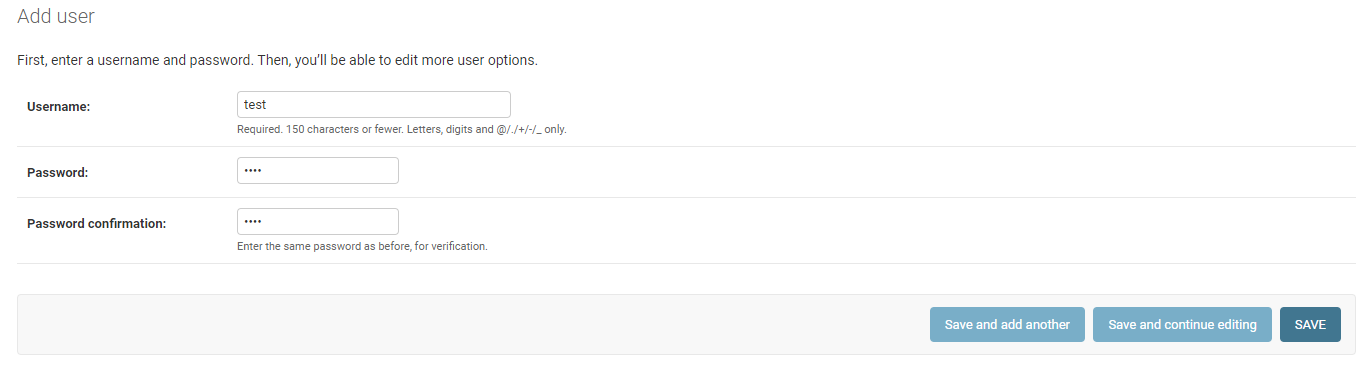
Create a new user:
Create a new permission with full access to "DCIM -> device" and no access to other objects and assign it to the user:

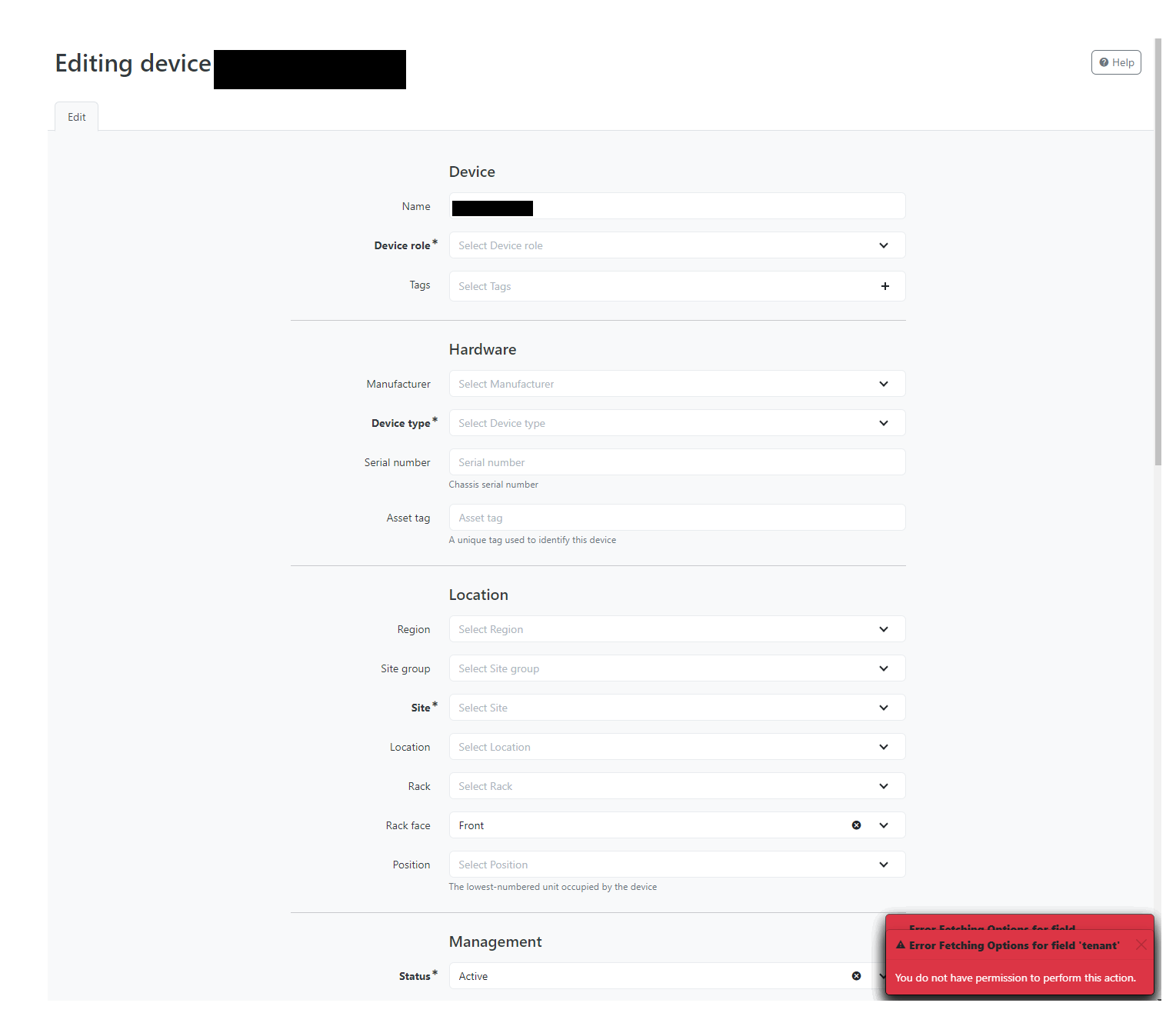
Login as the new user and open the edit dialogue for a device to see multiple overlapping error messages for the fields the user may not access:
Expected Behavior
If a user is not allowed to view values of a drop down like the "site group" or "region" field, the dropdown should either not be displayed when editing a device or the error should only show when the user tries to actually select values from the dropdown.
Before NetBox 3.0 we had the same permission scheme and the error did not show.
Now you get multiple overlapping error messages because we don't use some objects like "regions" and "site groups" so our users have no read access to those objects.
Atm the workound would be give a use read permissions to everything within NetBox so he doesn't get any error messages when opening an edit dialogue.
Observed Behavior
The following error occurs when opening the device edit page:

@jeremystretch commented on GitHub (Oct 4, 2021):
Thank you for opening a bug report. Unfortunately, the information you have provided is not sufficient for someone else to attempt to reproduce the reported behavior. Remember, each bug report must include detailed steps that someone else can follow on a clean, empty NetBox installation to reproduce the exact problem you're experiencing. These instructions should include the creation of any involved objects, any configuration changes, and complete accounting of the actions being taken. Also be sure that your report does not reference data on the public NetBox demo, as that is subject to change at any time by an outside party and cannot be relied upon for bug reports.
@dkm77 commented on GitHub (Oct 5, 2021):
Sorry for that, I was in a hurry yesterday. I now updated the post and hope that you are able to reproduce this issue the way I described.
@trollqaa commented on GitHub (Oct 5, 2021):
I confirm that we also have these "errors" about the lack of permissions.
@jeremystretch commented on GitHub (Oct 6, 2021):
IMO this is correct and desired behavior. You've created a user without permission to view any of the related objects involved when creating a device, so the error message makes sense.
Some of these fields, such as the site, are required. A user without access to view the list of sites will not be able to create a device.
Correct, except this isn't really a "workaround:" It's how NetBox is intended to function. To allow such a user to create devices, you'll need to either grant the use "view" permission for the related objected, or exempt these models using the
EXEMPT_VIEW_PERMISSIONSconfiguration parameter.@dkm77 commented on GitHub (Oct 7, 2021):
I am ok with giving the user read permissions to all objects used within relevant dropdowns so there are no error messages, to basically restore the edit-behaviour before NetBox 3.0.
The one thing that was nicer with not giving read access to objects that are not used / that the user has no business dealing with was that this was indicated in the menu, so the user could easily see which objects he's supposed to work with.
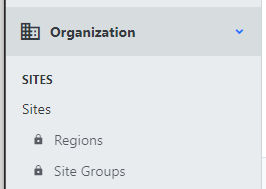
So in our example were we don't use "Regions" and "Site Groups" this would be indicated in the menu to the user with the lock symbol:
One thing that might be a little inconsistent (but that's for you to decide) is that even if a user does not have read access to a region for example, he sees the assigned region of a device when he views the device.
However when he then edits the device, the region field will be empty and the error will be displayed.
Also for me when I just tested this (as I didn't use regions before) it wasn't clear from the UI that assigning a region to a device basically does nothing, as the region dropdown only acts as a filter for the site dropdown and the site is the object that is actually assigned to a device. So this could maybe be made more clear for the user in the UI.
But the way this is heading maybe the actual request would be to have a feature to hide all fields a user does not have read permissions to or have an additional feature to configure hidden fields.
Basically what I am trying to achieve and what worked a little nicer before 3.0 was hiding irrelevant information / fields from the UI to make the user experience easier for the way we are using NetBox (because we don't use all objects/fields available).
For now I will just add read permissions to make the errors disappear but maybe this could be some feature to consider for the future, however I don't think it should have high priority.
@dkm77 commented on GitHub (Oct 7, 2021):
I now added read permissions to the following objects and it seems there a no more errors in edit-dialogues for our users :)
(we are only using the DCIM functionality)
dcim | site group, dcim | region, tenancy | tenant, extras | tag, tenancy | tenant group, dcim | rack role, virtualization | cluster, virtualization | cluster group, dcim | platform, ipam | VLAN, ipam | VLAN group@jeremystretch commented on GitHub (Oct 7, 2021):
Unfortunately I don't think there's anything we can do with the current implementation. If this becomes a more common issue we can re-evaluate.