Users unable to unlock secrets after upgrade to Netbox v2.10.0 #4360

Closed
opened 2025-12-29 18:35:11 +01:00 by adam · 15 comments
Owner

Originally created by @pveronneau on GitHub (Dec 15, 2020).

Originally assigned to: @jeremystretch on GitHub.

Environment

  • Python version: 3.7.9-1
  • NetBox version: 2.10.0

Steps to Reproduce

  1. User that could view secrets in Netbox 2.9.x with a pre existing key valid key, clicks on the Unlock button and gets prompted to enter their private key.
  2. Private key gets entered and submitted.

Expected Behavior

Secret session should be created and the user should be able to unencrypt the device password

Observed Behavior

User recieves a "permission denied error". This happens to all users, including superusers and admins.
Browser log returns the following:
secrets.js?v2.10.0:53 Secret was not decrypted. Prompt user for private key.
jquery-3.5.1.min.js:2 POST https:///api/secrets/get-session-key/ 403
send @ jquery-3.5.1.min.js:2
ajax @ jquery-3.5.1.min.js:2
get_session_key @ secrets.js?v2.10.0:80
(anonymous) @ secrets.js?v2.10.0:35
dispatch @ jquery-3.5.1.min.js:2
v.handle @ jquery-3.5.1.min.js:2

Originally created by @pveronneau on GitHub (Dec 15, 2020). Originally assigned to: @jeremystretch on GitHub. <!-- NOTE: IF YOUR ISSUE DOES NOT FOLLOW THIS TEMPLATE, IT WILL BE CLOSED. This form is only for reporting reproducible bugs. If you need assistance with NetBox installation, or if you have a general question, please start a discussion instead: https://github.com/netbox-community/netbox/discussions Please describe the environment in which you are running NetBox. Be sure that you are running an unmodified instance of the latest stable release before submitting a bug report, and that any plugins have been disabled. --> ### Environment * Python version: 3.7.9-1 * NetBox version: 2.10.0 <!-- Describe in detail the exact steps that someone else can take to reproduce this bug using the current stable release of NetBox. Begin with the creation of any necessary database objects and call out every operation being performed explicitly. If reporting a bug in the REST API, be sure to reconstruct the raw HTTP request(s) being made: Don't rely on a client library such as pynetbox. --> ### Steps to Reproduce 1. User that could view secrets in Netbox 2.9.x with a pre existing key valid key, clicks on the Unlock button and gets prompted to enter their private key. 2. Private key gets entered and submitted. <!-- What did you expect to happen? --> ### Expected Behavior Secret session should be created and the user should be able to unencrypt the device password <!-- What happened instead? --> ### Observed Behavior User recieves a "permission denied error". This happens to all users, including superusers and admins. Browser log returns the following: secrets.js?v2.10.0:53 Secret was not decrypted. Prompt user for private key. secrets.js?v2.10.0:53 Secret was not decrypted. Prompt user for private key. jquery-3.5.1.min.js:2 POST https://<sitename>/api/secrets/get-session-key/ 403 send @ jquery-3.5.1.min.js:2 ajax @ jquery-3.5.1.min.js:2 get_session_key @ secrets.js?v2.10.0:80 (anonymous) @ secrets.js?v2.10.0:35 dispatch @ jquery-3.5.1.min.js:2 v.handle @ jquery-3.5.1.min.js:2
adam added the type: bugstatus: accepted labels 2025-12-29 18:35:11 +01:00
adam closed this issue 2025-12-29 18:35:11 +01:00
Author
Owner

@jeremystretch commented on GitHub (Dec 15, 2020):

I'm not able to reproduce this error. What version did you upgrade from?

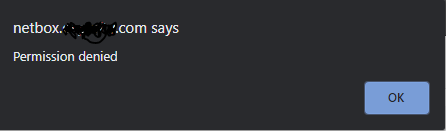
User recieves a "permission denied error".

In what form? Can you provide a screenshot?

@jeremystretch commented on GitHub (Dec 15, 2020): I'm not able to reproduce this error. What version did you upgrade from? > User recieves a "permission denied error". In what form? Can you provide a screenshot?
Author
Owner

@pveronneau commented on GitHub (Dec 15, 2020):

Upgraded from v2.9.10 -> 2.10.0.
The form is the standard private key entry form:
image
Produces this dialog box
image

@pveronneau commented on GitHub (Dec 15, 2020): Upgraded from v2.9.10 -> 2.10.0. The form is the standard private key entry form: ![image](https://user-images.githubusercontent.com/1127208/102276855-ac5a5980-3ee4-11eb-81b3-39b5e2fc4c23.png) Produces this dialog box ![image](https://user-images.githubusercontent.com/1127208/102277019-edeb0480-3ee4-11eb-9cbc-3599368f2e15.png)
Author
Owner

@jeremystretch commented on GitHub (Dec 15, 2020):

It looks like the API request is returning an HTTP 403 error for some reason. Can you inspect the actual network request/response to see if that reveals any clues?

@jeremystretch commented on GitHub (Dec 15, 2020): It looks like the API request is returning an HTTP 403 error for some reason. Can you inspect the actual network request/response to see if that reveals any clues?
Author
Owner

@pveronneau commented on GitHub (Dec 15, 2020):

Post:

POST /api/secrets/get-session-key/ HTTP/1.0..
  X-Forwarded-Host
  : netbox.sitename.com..
  X-Real-IP: <snipped>..
  X-Forwarded-Proto: https..
  Host: localhost.
  .
  Connection: close..
  Content-Length:
  1834..
  X-Forwarded-For:
   <snipped public ip>..
  X-Forwarded-Port
  : 443..
  sec-ch-ua: "Google Chrome";v="87", " Not;A Brand";v="99", "Chromium";v="87"..
  dnt: 1..
  sec-ch-ua-mobile: ?0..
  user-agent: Mozilla/5.0 (Windows NT 10.0; Win64;x64) AppleWebKit/537.36 (KHTML,like Gecko) Chrome/87.0.4280.88 Safari/537.36..
content-type: application/x-www-form-urlencoded;charset=UTF-8..
  accept: application/json, text/javascript, */*;q=0.01..
  x-requested-with: XMLHttpRequest..
  x-csrftoken: undefined..
  origin: https://netbox.sitename.com..
  sec-fetch-site:same-origin..
  sec-fetch-mode:cors..
  sec-fetch-dest: empty..
  referer: https://netbox.sitename.com/dcim/devices/914/..
  accept-encoding:
   gzip, deflate,br..
  accept-language:en-GB,en-US;q=0.9,en;q=0.8..
  cookie: csrftoken=zxskSqOQxpsFOCwlEPOzUYdofEC5nwj5sclZ4w9Bm3PX8JrPz5yyNhoZFawE5cAb; sessionid=hd2mif9me2kknp9vndhxifevco88mas4;AWSALB=agpswU3Pi04XbWgukX4VwXJ16AAW7fyIPQ8GOcMc5sDegsBscCAPxf5s3QGwxH77Vz/XhOVOfll+L3whwBuUABRrCvIwEU4TSpnUadjCYzsiy0yEQ0mEmAbFQubZ; AWSALBCORS=agpswU3Pi04XbWgukX4VwXJ16AAW7fyIPQ8GOcMc5sDegsBscCAPxf5s3QGwxH77Vz/XhOVOfll+L3whwBuUABRrCvIwEU4TSpnUadjCYzsiy0yEQ0mEmAbFQubZ..
  ..
  private_key=----
  -BEGIN+RSA+PRIVATE
 ~SNIPPED~
  --END+RSA+PRIVATE

Response:

 HTTP/1.0 403 Forbidden..
 Server: gunicorn/20.0.4..
 Date: Tue, 15 Dec 2020 22:19:56 GMT..
 Connection: close..
 Content-Type: application/json..
 Vary: Accept, Cookie, Origin..
 Allow: POST, OPTIONS..
 API-Version: 2.10..
 X-Content-Type-Options: nosniff. .
 Referrer-Policy: same-origin..
 X-Frame-Options: SAMEORIGIN..
 Content-Length: 58..
 
 {"detail":"CSRF Failed: CSRF token missing or incorrect."}
@pveronneau commented on GitHub (Dec 15, 2020): Post: ``` POST /api/secrets/get-session-key/ HTTP/1.0.. X-Forwarded-Host : netbox.sitename.com.. X-Real-IP: <snipped>.. X-Forwarded-Proto: https.. Host: localhost. . Connection: close.. Content-Length: 1834.. X-Forwarded-For: <snipped public ip>.. X-Forwarded-Port : 443.. sec-ch-ua: "Google Chrome";v="87", " Not;A Brand";v="99", "Chromium";v="87".. dnt: 1.. sec-ch-ua-mobile: ?0.. user-agent: Mozilla/5.0 (Windows NT 10.0; Win64;x64) AppleWebKit/537.36 (KHTML,like Gecko) Chrome/87.0.4280.88 Safari/537.36.. content-type: application/x-www-form-urlencoded;charset=UTF-8.. accept: application/json, text/javascript, */*;q=0.01.. x-requested-with: XMLHttpRequest.. x-csrftoken: undefined.. origin: https://netbox.sitename.com.. sec-fetch-site:same-origin.. sec-fetch-mode:cors.. sec-fetch-dest: empty.. referer: https://netbox.sitename.com/dcim/devices/914/.. accept-encoding: gzip, deflate,br.. accept-language:en-GB,en-US;q=0.9,en;q=0.8.. cookie: csrftoken=zxskSqOQxpsFOCwlEPOzUYdofEC5nwj5sclZ4w9Bm3PX8JrPz5yyNhoZFawE5cAb; sessionid=hd2mif9me2kknp9vndhxifevco88mas4;AWSALB=agpswU3Pi04XbWgukX4VwXJ16AAW7fyIPQ8GOcMc5sDegsBscCAPxf5s3QGwxH77Vz/XhOVOfll+L3whwBuUABRrCvIwEU4TSpnUadjCYzsiy0yEQ0mEmAbFQubZ; AWSALBCORS=agpswU3Pi04XbWgukX4VwXJ16AAW7fyIPQ8GOcMc5sDegsBscCAPxf5s3QGwxH77Vz/XhOVOfll+L3whwBuUABRrCvIwEU4TSpnUadjCYzsiy0yEQ0mEmAbFQubZ.. .. private_key=---- -BEGIN+RSA+PRIVATE ~SNIPPED~ --END+RSA+PRIVATE ``` Response: ``` HTTP/1.0 403 Forbidden.. Server: gunicorn/20.0.4.. Date: Tue, 15 Dec 2020 22:19:56 GMT.. Connection: close.. Content-Type: application/json.. Vary: Accept, Cookie, Origin.. Allow: POST, OPTIONS.. API-Version: 2.10.. X-Content-Type-Options: nosniff. . Referrer-Policy: same-origin.. X-Frame-Options: SAMEORIGIN.. Content-Length: 58.. {"detail":"CSRF Failed: CSRF token missing or incorrect."} ```
Author
Owner

@jeremystretch commented on GitHub (Dec 16, 2020):

Ok, it's pretty clearly a CSRF failure. This usually points to a configuration error. I notice the presence of AWS load balancing cookies in the request header: are you balancing requests across multiple instances? It may be that one of the instances is either configured with a different secret key or does not have a current version of the sessions database.

@jeremystretch commented on GitHub (Dec 16, 2020): Ok, it's pretty clearly a CSRF failure. This usually points to a configuration error. I notice the presence of AWS load balancing cookies in the request header: are you balancing requests across multiple instances? It may be that one of the instances is either configured with a different secret key or does not have a current version of the sessions database.
Author
Owner

@DanSheps commented on GitHub (Dec 16, 2020):

FYI: I am unable to reproduce this starting with a clean 2.9.11 and migrating to 2.10.1

@DanSheps commented on GitHub (Dec 16, 2020): FYI: I am unable to reproduce this starting with a clean 2.9.11 and migrating to 2.10.1
Author
Owner

@pveronneau commented on GitHub (Dec 16, 2020):

Single instance to a single database. This is a production system that has been in operation for over a year, so configuration issues are extremely unlikely at this point. We have had users managing devices and passwords this entire time without issue. The first time we've encountered this issue was post upgrade.

@pveronneau commented on GitHub (Dec 16, 2020): Single instance to a single database. This is a production system that has been in operation for over a year, so configuration issues are extremely unlikely at this point. We have had users managing devices and passwords this entire time without issue. The first time we've encountered this issue was post upgrade.
Author
Owner

@jeremypng commented on GitHub (Dec 16, 2020):

I've been using 2.10 the last few days with plugin development. I have noticed that when I rebuild the container environment and initialize the admin user secret key (especially if it is the same browser instance as the previous build), it sometimes corrupts the key and I can't unlock secrets in that instance. It may be related to having a browser with a cookie set from a previous Netbox build when you perform secret actions.

Try this to reproduce it all in the same browser instance:

  1. In a new instance of Netbox initialize the admin secret.
  2. Verify that you can unlock secrets.
  3. Stop the Netbox containers, and delete the pg database volume.
  4. Start Netbox again, and initialize the admin secret again.
  5. Create a secret, and then try to unlock it.
@jeremypng commented on GitHub (Dec 16, 2020): I've been using 2.10 the last few days with plugin development. I have noticed that when I rebuild the container environment and initialize the admin user secret key (especially if it is the same browser instance as the previous build), it sometimes corrupts the key and I can't unlock secrets in that instance. It may be related to having a browser with a cookie set from a previous Netbox build when you perform secret actions. Try this to reproduce it all in the same browser instance: 1. In a new instance of Netbox initialize the admin secret. 2. Verify that you can unlock secrets. 3. Stop the Netbox containers, and delete the pg database volume. 4. Start Netbox again, and initialize the admin secret again. 5. Create a secret, and then try to unlock it.
Author
Owner

@itujjp commented on GitHub (Dec 16, 2020):

I have been reproducing this issue on a single instance fresh 2.10.1 build.

It was basically a matter of logging in, creating a secret which works as expected, logging out, logging back in and then attempting to access the secret which fails.

I can then delete the secret, re-create it, and it's fine till I log out and back in.

@itujjp commented on GitHub (Dec 16, 2020): I have been reproducing this issue on a single instance fresh 2.10.1 build. It was basically a matter of logging in, creating a secret which works as expected, logging out, logging back in and then attempting to access the secret which fails. I can then delete the secret, re-create it, and it's fine till I log out and back in.
Author
Owner

@DanSheps commented on GitHub (Dec 16, 2020):

@itujjp

Can you try and reproduce this on master.netbox.dev

Current user key is:

-----BEGIN RSA PRIVATE KEY-----
MIIEowIBAAKCAQEAyP6bqiGnR/LTD5fCOi/fqDEjqDZgz6RHTsLT/8smBVyI8nEW
mysGqT6sDAE3JxdDlO3raV8y14+2PnIcXjTMLNRfBr+RzXKyL+jD+xvie1++cE/G
4epg9DwZ3DB+3+/87pNFNqwpudFYyzHSQTJb+F+5wPDIQrtXtpk8Ct+csB1p6Xjn
oRMhbp/QfyOBClyIRWeSHRp5YQITG8umcTXjHJLdSe+RM7slS5fo/mzWdlWhODii
6Mp8zSskBzdpEs1m7B3DWwuabTtljMyx+Es8FtOAZKpJkaTqDuY8nx2zH+jRd6iV
m+oAuFIsZEAEqz60ofjH3+M168Kd+5niZfWggwIDAQABAoIBAF2avXIBFD+cpZCY
c3rXushAgkOfd3ycHB1g/Iwe1skebCTEZ+vBoOuG5Wb91eqdmfqsxrqe/DWJly0D
xZRV8FRcXxjsdIGCjdtkAolaViJw12bEsHGbzqVPrBdwelXeFSQib9RjX1dLWJfg
zvNP+ab1JbPmLs1tJA9E08KYmwclCBU75Z32rqI/GhH10Cy0tW4fPBZwoULSsUtR
4jCWceF3TdylGZtPKesoJZkURONvz0JjV2j5EzUdBjofFDAX+0cx1ZC085mhhxdR
koZzb2CqennpGIBfw0la+edey5fMEv0yqtTvrF2tlOZ3yUAFiRqLM6UCPubyIdZo
AoqL63ECgYEA15j8njdWF+exeTkQApk0WdcwHoaDST/1bbt2lZp4LBAiYhl4AuWk
FK8exfb/DaGixrZNrSJHB5MFBBNvQsCyDhM/dE8K3LgJ0cNiTQ8ez3yklE/oR8Rj
jyTyjh9fuJARvjKFppXGPI36tTyVMHfaI616WrBkKEIiXO/kWx9Ce7sCgYEA7qkP
NvyLlj9gx5NgvBy4I0SZjUpw+e69lTaRj86xJXkVUj/iRSLPyNofO0JUAmxMxREj
/VA1s+XxdK7qoPjed1wo3EHSfSbC+LET0We10M8TvrV8ZPLN/nbJeQQtcVn4DIp2
okwDXLekCBfq+ut6kOdwqSfUtX+Ldn7uiA0yzdkCgYBUczmoo9ZWYMw0xrRNwEMw
Wckge+IbJDF3vTGTIkGmSN+e+4j14YvnCj2Mn9aCOWkwWyKMCdw2zFDvqskvJZnZ
R5LYdUm08WXvQ5BSzPRto843xiEfU38ICBn2r7Vn7w70KIgPm6Vd/ONScJujs56/
0OkXcvaYimc5bkJNqy34lwKBgQCKibKeTa1Ns06fq2p86ALv3hNwlCTOwIpmgn2u
x+HHCemZjCHx1gpd4lg80vznRyytPIzyr8vsuO8Xt63VcYHaMbI6YS8pnQWSzV/e
r+A37OzeSIWEJ/nx28yKJiWm5f36can5/jv5Z1SdqhyqOWU1llOsrcVo8jfnujkG
2vqByQKBgGdNhRPvGIasY/N9wkKN/uM9IilQe6G4k8dj+YcQgAGsh7J1a4hUQ6+x
OBJSwaZDR8aBXbjTw20mH3AeaVBndYpcf6tsXfdovPRrN+JhszKWpTE/x4hIXhyy
DQRtuUSAYuUltoEuluEP2GgvKqZ+xEOw2LFdBMcJwtilTToDvDf9
-----END RSA PRIVATE KEY-----
@DanSheps commented on GitHub (Dec 16, 2020): @itujjp Can you try and reproduce this on master.netbox.dev Current user key is: ``` -----BEGIN RSA PRIVATE KEY----- MIIEowIBAAKCAQEAyP6bqiGnR/LTD5fCOi/fqDEjqDZgz6RHTsLT/8smBVyI8nEW mysGqT6sDAE3JxdDlO3raV8y14+2PnIcXjTMLNRfBr+RzXKyL+jD+xvie1++cE/G 4epg9DwZ3DB+3+/87pNFNqwpudFYyzHSQTJb+F+5wPDIQrtXtpk8Ct+csB1p6Xjn oRMhbp/QfyOBClyIRWeSHRp5YQITG8umcTXjHJLdSe+RM7slS5fo/mzWdlWhODii 6Mp8zSskBzdpEs1m7B3DWwuabTtljMyx+Es8FtOAZKpJkaTqDuY8nx2zH+jRd6iV m+oAuFIsZEAEqz60ofjH3+M168Kd+5niZfWggwIDAQABAoIBAF2avXIBFD+cpZCY c3rXushAgkOfd3ycHB1g/Iwe1skebCTEZ+vBoOuG5Wb91eqdmfqsxrqe/DWJly0D xZRV8FRcXxjsdIGCjdtkAolaViJw12bEsHGbzqVPrBdwelXeFSQib9RjX1dLWJfg zvNP+ab1JbPmLs1tJA9E08KYmwclCBU75Z32rqI/GhH10Cy0tW4fPBZwoULSsUtR 4jCWceF3TdylGZtPKesoJZkURONvz0JjV2j5EzUdBjofFDAX+0cx1ZC085mhhxdR koZzb2CqennpGIBfw0la+edey5fMEv0yqtTvrF2tlOZ3yUAFiRqLM6UCPubyIdZo AoqL63ECgYEA15j8njdWF+exeTkQApk0WdcwHoaDST/1bbt2lZp4LBAiYhl4AuWk FK8exfb/DaGixrZNrSJHB5MFBBNvQsCyDhM/dE8K3LgJ0cNiTQ8ez3yklE/oR8Rj jyTyjh9fuJARvjKFppXGPI36tTyVMHfaI616WrBkKEIiXO/kWx9Ce7sCgYEA7qkP NvyLlj9gx5NgvBy4I0SZjUpw+e69lTaRj86xJXkVUj/iRSLPyNofO0JUAmxMxREj /VA1s+XxdK7qoPjed1wo3EHSfSbC+LET0We10M8TvrV8ZPLN/nbJeQQtcVn4DIp2 okwDXLekCBfq+ut6kOdwqSfUtX+Ldn7uiA0yzdkCgYBUczmoo9ZWYMw0xrRNwEMw Wckge+IbJDF3vTGTIkGmSN+e+4j14YvnCj2Mn9aCOWkwWyKMCdw2zFDvqskvJZnZ R5LYdUm08WXvQ5BSzPRto843xiEfU38ICBn2r7Vn7w70KIgPm6Vd/ONScJujs56/ 0OkXcvaYimc5bkJNqy34lwKBgQCKibKeTa1Ns06fq2p86ALv3hNwlCTOwIpmgn2u x+HHCemZjCHx1gpd4lg80vznRyytPIzyr8vsuO8Xt63VcYHaMbI6YS8pnQWSzV/e r+A37OzeSIWEJ/nx28yKJiWm5f36can5/jv5Z1SdqhyqOWU1llOsrcVo8jfnujkG 2vqByQKBgGdNhRPvGIasY/N9wkKN/uM9IilQe6G4k8dj+YcQgAGsh7J1a4hUQ6+x OBJSwaZDR8aBXbjTw20mH3AeaVBndYpcf6tsXfdovPRrN+JhszKWpTE/x4hIXhyy DQRtuUSAYuUltoEuluEP2GgvKqZ+xEOw2LFdBMcJwtilTToDvDf9 -----END RSA PRIVATE KEY----- ```
Author
Owner

@jeremystretch commented on GitHub (Dec 16, 2020):

It was basically a matter of logging in, creating a secret which works as expected, logging out, logging back in and then attempting to access the secret which fails.

I am still unable to reproduce this using the following steps:

  1. Create a new 2.10.1 installation.
  2. Create a superuser named admin.
  3. Log in as admin.
  4. Create a user key. (The key is automatically activated as it is the only key.)
  5. Create a secret. Get prompted for my private key, which is accepted.
  6. Log out and log back in
  7. View the secret created previously
  8. Attempt to unlock the secret. Get prompted for my secret key, which is accepted. The secret is unlocked as expected.

I've tried the above across multiple browsers, logging in and out several times on each, and repeatedly modifying the secret. I have not been able to reproduce the 403 error/CSRF failure reported above.

  1. Stop the Netbox containers, and delete the pg database volume.

Please note that any bugs reported here must be reproducible using only the core NetBox code base. We can't address issues which may exist in outside projects, such as the community Docker image.

@jeremystretch commented on GitHub (Dec 16, 2020): > It was basically a matter of logging in, creating a secret which works as expected, logging out, logging back in and then attempting to access the secret which fails. I am still unable to reproduce this using the following steps: 1. Create a new 2.10.1 installation. 2. Create a superuser named admin. 3. Log in as admin. 4. Create a user key. (The key is automatically activated as it is the only key.) 5. Create a secret. Get prompted for my private key, which is accepted. 6. Log out and log back in 7. View the secret created previously 8. Attempt to unlock the secret. Get prompted for my secret key, which is accepted. The secret is unlocked as expected. I've tried the above across multiple browsers, logging in and out several times on each, and repeatedly modifying the secret. I have not been able to reproduce the 403 error/CSRF failure reported above. > 3. Stop the Netbox containers, and delete the pg database volume. Please note that any bugs reported here must be reproducible using only the core NetBox code base. We can't address issues which may exist in outside projects, such as the community Docker image.
Author
Owner

@pveronneau commented on GitHub (Dec 16, 2020):

Okay, I've found something interesting.
If you try to unlock the secret from the actual secret page, it works.
https://netbox.sitename.com/secrets/secrets/6/ for example. Once that is unlocked it will work everywhere until you logout.

However, if you attempt to unlock a secret from the device page (where I was attempting)
https://netbox.sitename.com/dcim/devices/1628/ as an example
image
That fails with the error. It will remain in this error state until you logout. It only does this if you attempt to unlock the secret from a fresh login from the device page. This is probably why we are seeing sporadic issues reproducing this issue.

@pveronneau commented on GitHub (Dec 16, 2020): Okay, I've found something interesting. If you try to unlock the secret from the actual secret page, it works. https://netbox.sitename.com/secrets/secrets/6/ for example. Once that is unlocked it will work everywhere until you logout. However, if you attempt to unlock a secret from the device page (where I was attempting) https://netbox.sitename.com/dcim/devices/1628/ as an example ![image](https://user-images.githubusercontent.com/1127208/102387706-f3505980-3f8d-11eb-89dd-8683281339f0.png) That fails with the error. It will remain in this error state until you logout. It only does this if you attempt to unlock the secret from a fresh login from the device page. This is probably why we are seeing sporadic issues reproducing this issue.
Author
Owner

@jeremypng commented on GitHub (Dec 16, 2020):

I replicated it without deleting the database container like @itujjp described above. I have a browser network log recorded of the issue occurring from the secret user key init if that is helpful.

@jeremypng commented on GitHub (Dec 16, 2020): I replicated it without deleting the database container like @itujjp described above. I have a browser network log recorded of the issue occurring from the secret user key init if that is helpful.
Author
Owner

@jeremystretch commented on GitHub (Dec 16, 2020):

However, if you attempt to unlock a secret from the device page

Okay, now we're getting somewhere! I'm able to reproduce the error now, thanks. Will continue digging into it.

@jeremystretch commented on GitHub (Dec 16, 2020): > However, if you attempt to unlock a secret from the device page Okay, now we're getting somewhere! I'm able to reproduce the error now, thanks. Will continue digging into it.
Author
Owner

@jeremystretch commented on GitHub (Dec 16, 2020):

The problem was a missing CSRF token on the page, which is needed to authenticate the API request for a session key. Once the session key is retrieved successfully (by unlocking a secret via the secret's page instead of the device/VM), further attempts to unlock the secret are successful from any view. Only once the user logs out is the session key invalidated, and the bug recurs.

I've tested the applied fix thoroughly and believe the bug to be resolved, but please comment here if you find otherwise. The fix will be included in the next release (v2.10.2). In the meantime, it can be worked around by first unlocking a secret by navigating to the secret directly after logging in.

@jeremystretch commented on GitHub (Dec 16, 2020): The problem was a missing CSRF token on the page, which is needed to authenticate the API request for a session key. Once the session key is retrieved successfully (by unlocking a secret via the secret's page instead of the device/VM), further attempts to unlock the secret are successful from any view. Only once the user logs out is the session key invalidated, and the bug recurs. I've tested the applied fix thoroughly and believe the bug to be resolved, but please comment here if you find otherwise. The fix will be included in the next release (v2.10.2). In the meantime, it can be worked around by first unlocking a secret by navigating to the secret directly after logging in.
Sign in to join this conversation.
1 Participants
Notifications
Due Date
No due date set.
Dependencies

No dependencies set.

Reference: starred/netbox#4360