Performance degradation after updating to NetBox 2.7 #3385

Closed
opened 2025-12-29 18:28:37 +01:00 by adam · 2 comments
Owner

Originally created by @karlism on GitHub (Feb 24, 2020).

Environment

  • Python version: 3.6.8
  • NetBox version: 2.7.7

Steps to Reproduce

  1. Upgrade from NetBox version 2.6.12 to NetBox 2.7.6 (with subsequent update to 2.7.7)

Expected Behavior

Performance to stay the same or improve.

Observed Behavior

Performance degradation.

Let me show you an example of device list API request by curl:

$ for i in `jot 10 1`; do curl -H "Authorization: Token XXX" -o /dev/null https://netbox1/api/dcim/devices/; done 
  % Total    % Received % Xferd  Average Speed   Time    Time     Time  Current
                                 Dload  Upload   Total   Spent    Left  Speed
100 1506k  100 1506k    0     0  20498      0  0:01:15  0:01:15 --:--:--  354k
  % Total    % Received % Xferd  Average Speed   Time    Time     Time  Current
                                 Dload  Upload   Total   Spent    Left  Speed
100 1506k  100 1506k    0     0   122k      0  0:00:12  0:00:12 --:--:--  309k
  % Total    % Received % Xferd  Average Speed   Time    Time     Time  Current
                                 Dload  Upload   Total   Spent    Left  Speed
100 1506k  100 1506k    0     0   123k      0  0:00:12  0:00:12 --:--:--  402k
  % Total    % Received % Xferd  Average Speed   Time    Time     Time  Current
                                 Dload  Upload   Total   Spent    Left  Speed
100 1506k  100 1506k    0     0   126k      0  0:00:11  0:00:11 --:--:--  442k
  % Total    % Received % Xferd  Average Speed   Time    Time     Time  Current
                                 Dload  Upload   Total   Spent    Left  Speed
100 1506k  100 1506k    0     0   129k      0  0:00:11  0:00:11 --:--:--  356k
  % Total    % Received % Xferd  Average Speed   Time    Time     Time  Current
                                 Dload  Upload   Total   Spent    Left  Speed
100 1506k  100 1506k    0     0   129k      0  0:00:11  0:00:11 --:--:--  358k
  % Total    % Received % Xferd  Average Speed   Time    Time     Time  Current
                                 Dload  Upload   Total   Spent    Left  Speed
100 1506k  100 1506k    0     0   117k      0  0:00:12  0:00:12 --:--:--  348k
  % Total    % Received % Xferd  Average Speed   Time    Time     Time  Current
                                 Dload  Upload   Total   Spent    Left  Speed
100 1506k  100 1506k    0     0   129k      0  0:00:11  0:00:11 --:--:--  360k
  % Total    % Received % Xferd  Average Speed   Time    Time     Time  Current
                                 Dload  Upload   Total   Spent    Left  Speed
100 1506k  100 1506k    0     0   127k      0  0:00:11  0:00:11 --:--:--  443k
  % Total    % Received % Xferd  Average Speed   Time    Time     Time  Current
                                 Dload  Upload   Total   Spent    Left  Speed
100 1506k  100 1506k    0     0   128k      0  0:00:11  0:00:11 --:--:--  347k

As you can see, one of the requests took 1 minute longer than the rest of them. During this API curl query, I can see that gunicorn, and especially redis-server services are utilising lots of CPU resources.

Nginx logs during these requests:

192.168.xx.xx - - [24/Feb/2020:09:39:57 +0000] "GET /api/dcim/devices/ HTTP/2.0" 200 1543090 "-" "curl/7.66.0"
172.16.xx.xx - - [24/Feb/2020:09:39:58 +0000] "GET /metrics HTTP/1.1" 200 30540 "-" "Prometheus/2.15.2"
172.16.xx.xx - - [24/Feb/2020:09:40:01 +0000] "GET /metrics HTTP/1.1" 200 30527 "-" "Prometheus/2.15.2"
192.168.xx.xx - - [24/Feb/2020:09:40:09 +0000] "GET /api/dcim/devices/ HTTP/2.0" 200 1543090 "-" "curl/7.66.0"
192.168.xx.xx - - [24/Feb/2020:09:40:21 +0000] "GET /api/dcim/devices/ HTTP/2.0" 200 1543090 "-" "curl/7.66.0"
192.168.xx.xx - - [24/Feb/2020:09:40:33 +0000] "GET /api/dcim/devices/ HTTP/2.0" 200 1543090 "-" "curl/7.66.0"
192.168.xx.xx - - [24/Feb/2020:09:40:44 +0000] "GET /api/dcim/devices/ HTTP/2.0" 200 1543090 "-" "curl/7.66.0"
192.168.xx.xx - - [24/Feb/2020:09:40:56 +0000] "GET /api/dcim/devices/ HTTP/2.0" 200 1543090 "-" "curl/7.66.0"
172.16.xx.xx - - [24/Feb/2020:09:40:58 +0000] "GET /metrics HTTP/1.1" 200 30544 "-" "Prometheus/2.15.2"
172.16.xx.xx - - [24/Feb/2020:09:41:01 +0000] "GET /metrics HTTP/1.1" 200 30545 "-" "Prometheus/2.15.2"
192.168.xx.xx - - [24/Feb/2020:09:41:09 +0000] "GET /api/dcim/devices/ HTTP/2.0" 200 1543090 "-" "curl/7.66.0"
192.168.xx.xx - - [24/Feb/2020:09:41:20 +0000] "GET /api/dcim/devices/ HTTP/2.0" 200 1543090 "-" "curl/7.66.0"
192.168.xx.xx - - [24/Feb/2020:09:41:32 +0000] "GET /api/dcim/devices/ HTTP/2.0" 200 1543090 "-" "curl/7.66.0"
192.168.xx.xx - - [24/Feb/2020:09:41:44 +0000] "GET /api/dcim/devices/ HTTP/2.0" 200 1543090 "-" "curl/7.66.0"

I'm quite confident that there requests didn't take more than 5 seconds prior to update, but I don't have any precise data to back it up. This NetBox instance currently has 1016 devices.

Relevant NetBox redis configuration is following:

REDIS = {
    'webhooks': {
        'HOST': 'localhost',
        'PORT': 6379,
        'PASSWORD': '',
        'DATABASE': 0,
        'DEFAULT_TIMEOUT': 300,
        'SSL': False,
    },
    'caching': {
        'HOST': 'localhost',
        'PORT': 6379,
        'PASSWORD': '',
        'DATABASE': 1,
        'DEFAULT_TIMEOUT': 300,
        'SSL': False,
    }
}

Redis server configuration is default.

# cat /etc/redhat-release 
CentOS Linux release 7.7.1908 (Core)
# redis-server --version            
Redis server v=3.2.12 sha=00000000:0 malloc=jemalloc-3.6.0 bits=64 build=7897e7d0e13773f
# redis-cli INFO
# Server
redis_version:3.2.12
redis_git_sha1:00000000
redis_git_dirty:0
redis_build_id:7897e7d0e13773f
redis_mode:standalone
os:Linux 3.10.0-1062.12.1.el7.x86_64 x86_64
arch_bits:64
multiplexing_api:epoll
gcc_version:4.8.5
process_id:1208
run_id:a347186355f27833610acdc44633ac600400c52c
tcp_port:6379
uptime_in_seconds:334038
uptime_in_days:3
hz:10
lru_clock:5480347
executable:/usr/bin/redis-server
config_file:/etc/redis.conf

# Clients
connected_clients:8
client_longest_output_list:0
client_biggest_input_buf:0
blocked_clients:1

# Memory
used_memory:3681584
used_memory_human:3.51M
used_memory_rss:10780672
used_memory_rss_human:10.28M
used_memory_peak:8024368
used_memory_peak_human:7.65M
total_system_memory:3954020352
total_system_memory_human:3.68G
used_memory_lua:1289216
used_memory_lua_human:1.23M
maxmemory:0
maxmemory_human:0B
maxmemory_policy:noeviction
mem_fragmentation_ratio:2.93
mem_allocator:jemalloc-3.6.0

# Persistence
loading:0
rdb_changes_since_last_save:7119
rdb_bgsave_in_progress:0
rdb_last_save_time:1582538475
rdb_last_bgsave_status:ok
rdb_last_bgsave_time_sec:0
rdb_current_bgsave_time_sec:-1
aof_enabled:0
aof_rewrite_in_progress:0
aof_rewrite_scheduled:0
aof_last_rewrite_time_sec:-1
aof_current_rewrite_time_sec:-1
aof_last_bgrewrite_status:ok
aof_last_write_status:ok

# Stats
total_connections_received:6203
total_commands_processed:6752359701
instantaneous_ops_per_sec:0
total_net_input_bytes:53371521425
total_net_output_bytes:7092431153
instantaneous_input_kbps:0.00
instantaneous_output_kbps:0.00
rejected_connections:0
sync_full:0
sync_partial_ok:0
sync_partial_err:0
expired_keys:1112469
evicted_keys:0
keyspace_hits:2271519586
keyspace_misses:1072865
pubsub_channels:0
pubsub_patterns:0
latest_fork_usec:472
migrate_cached_sockets:0

# Replication
role:master
connected_slaves:0
master_repl_offset:0
repl_backlog_active:0
repl_backlog_size:1048576
repl_backlog_first_byte_offset:0
repl_backlog_histlen:0

# CPU
used_cpu_sys:1716.82
used_cpu_user:24816.67
used_cpu_sys_children:6.27
used_cpu_user_children:27.66

# Cluster
cluster_enabled:0

# Keyspace
db0:keys=2,expires=2,avg_ttl=327385
db1:keys=1316,expires=1253,avg_ttl=164100

We have second instance of NetBox running on different VM in different datacenter (in maintenance mode on read-only replicated PostgreSQL database) and experience same performance issue after upgrade on that instance as well.

Originally created by @karlism on GitHub (Feb 24, 2020). <!-- NOTE: IF YOUR ISSUE DOES NOT FOLLOW THIS TEMPLATE, IT WILL BE CLOSED. This form is only for reproducible bugs. If you need assistance with NetBox installation, or if you have a general question, DO NOT open an issue. Instead, post to our mailing list: https://groups.google.com/forum/#!forum/netbox-discuss Please describe the environment in which you are running NetBox. Be sure that you are running an unmodified instance of the latest stable release before submitting a bug report. --> ### Environment * Python version: 3.6.8 * NetBox version: 2.7.7 <!-- Describe in detail the exact steps that someone else can take to reproduce this bug using the current stable release of NetBox (or the current beta release where applicable). Begin with the creation of any necessary database objects and call out every operation being performed explicitly. If reporting a bug in the REST API, be sure to reconstruct the raw HTTP request(s) being made: Don't rely on a wrapper like pynetbox. --> ### Steps to Reproduce 1. Upgrade from NetBox version 2.6.12 to NetBox 2.7.6 (with subsequent update to 2.7.7) <!-- What did you expect to happen? --> ### Expected Behavior Performance to stay the same or improve. <!-- What happened instead? --> ### Observed Behavior Performance degradation. Let me show you an example of device list API request by `curl`: ``` $ for i in `jot 10 1`; do curl -H "Authorization: Token XXX" -o /dev/null https://netbox1/api/dcim/devices/; done % Total % Received % Xferd Average Speed Time Time Time Current Dload Upload Total Spent Left Speed 100 1506k 100 1506k 0 0 20498 0 0:01:15 0:01:15 --:--:-- 354k % Total % Received % Xferd Average Speed Time Time Time Current Dload Upload Total Spent Left Speed 100 1506k 100 1506k 0 0 122k 0 0:00:12 0:00:12 --:--:-- 309k % Total % Received % Xferd Average Speed Time Time Time Current Dload Upload Total Spent Left Speed 100 1506k 100 1506k 0 0 123k 0 0:00:12 0:00:12 --:--:-- 402k % Total % Received % Xferd Average Speed Time Time Time Current Dload Upload Total Spent Left Speed 100 1506k 100 1506k 0 0 126k 0 0:00:11 0:00:11 --:--:-- 442k % Total % Received % Xferd Average Speed Time Time Time Current Dload Upload Total Spent Left Speed 100 1506k 100 1506k 0 0 129k 0 0:00:11 0:00:11 --:--:-- 356k % Total % Received % Xferd Average Speed Time Time Time Current Dload Upload Total Spent Left Speed 100 1506k 100 1506k 0 0 129k 0 0:00:11 0:00:11 --:--:-- 358k % Total % Received % Xferd Average Speed Time Time Time Current Dload Upload Total Spent Left Speed 100 1506k 100 1506k 0 0 117k 0 0:00:12 0:00:12 --:--:-- 348k % Total % Received % Xferd Average Speed Time Time Time Current Dload Upload Total Spent Left Speed 100 1506k 100 1506k 0 0 129k 0 0:00:11 0:00:11 --:--:-- 360k % Total % Received % Xferd Average Speed Time Time Time Current Dload Upload Total Spent Left Speed 100 1506k 100 1506k 0 0 127k 0 0:00:11 0:00:11 --:--:-- 443k % Total % Received % Xferd Average Speed Time Time Time Current Dload Upload Total Spent Left Speed 100 1506k 100 1506k 0 0 128k 0 0:00:11 0:00:11 --:--:-- 347k ``` As you can see, one of the requests took 1 minute longer than the rest of them. During this API `curl` query, I can see that `gunicorn`, and especially `redis-server` services are utilising lots of CPU resources. Nginx logs during these requests: ``` 192.168.xx.xx - - [24/Feb/2020:09:39:57 +0000] "GET /api/dcim/devices/ HTTP/2.0" 200 1543090 "-" "curl/7.66.0" 172.16.xx.xx - - [24/Feb/2020:09:39:58 +0000] "GET /metrics HTTP/1.1" 200 30540 "-" "Prometheus/2.15.2" 172.16.xx.xx - - [24/Feb/2020:09:40:01 +0000] "GET /metrics HTTP/1.1" 200 30527 "-" "Prometheus/2.15.2" 192.168.xx.xx - - [24/Feb/2020:09:40:09 +0000] "GET /api/dcim/devices/ HTTP/2.0" 200 1543090 "-" "curl/7.66.0" 192.168.xx.xx - - [24/Feb/2020:09:40:21 +0000] "GET /api/dcim/devices/ HTTP/2.0" 200 1543090 "-" "curl/7.66.0" 192.168.xx.xx - - [24/Feb/2020:09:40:33 +0000] "GET /api/dcim/devices/ HTTP/2.0" 200 1543090 "-" "curl/7.66.0" 192.168.xx.xx - - [24/Feb/2020:09:40:44 +0000] "GET /api/dcim/devices/ HTTP/2.0" 200 1543090 "-" "curl/7.66.0" 192.168.xx.xx - - [24/Feb/2020:09:40:56 +0000] "GET /api/dcim/devices/ HTTP/2.0" 200 1543090 "-" "curl/7.66.0" 172.16.xx.xx - - [24/Feb/2020:09:40:58 +0000] "GET /metrics HTTP/1.1" 200 30544 "-" "Prometheus/2.15.2" 172.16.xx.xx - - [24/Feb/2020:09:41:01 +0000] "GET /metrics HTTP/1.1" 200 30545 "-" "Prometheus/2.15.2" 192.168.xx.xx - - [24/Feb/2020:09:41:09 +0000] "GET /api/dcim/devices/ HTTP/2.0" 200 1543090 "-" "curl/7.66.0" 192.168.xx.xx - - [24/Feb/2020:09:41:20 +0000] "GET /api/dcim/devices/ HTTP/2.0" 200 1543090 "-" "curl/7.66.0" 192.168.xx.xx - - [24/Feb/2020:09:41:32 +0000] "GET /api/dcim/devices/ HTTP/2.0" 200 1543090 "-" "curl/7.66.0" 192.168.xx.xx - - [24/Feb/2020:09:41:44 +0000] "GET /api/dcim/devices/ HTTP/2.0" 200 1543090 "-" "curl/7.66.0" ``` I'm quite confident that there requests didn't take more than 5 seconds prior to update, but I don't have any precise data to back it up. This NetBox instance currently has 1016 devices. Relevant NetBox redis configuration is following: ``` REDIS = { 'webhooks': { 'HOST': 'localhost', 'PORT': 6379, 'PASSWORD': '', 'DATABASE': 0, 'DEFAULT_TIMEOUT': 300, 'SSL': False, }, 'caching': { 'HOST': 'localhost', 'PORT': 6379, 'PASSWORD': '', 'DATABASE': 1, 'DEFAULT_TIMEOUT': 300, 'SSL': False, } } ``` Redis server configuration is default. ``` # cat /etc/redhat-release CentOS Linux release 7.7.1908 (Core) # redis-server --version Redis server v=3.2.12 sha=00000000:0 malloc=jemalloc-3.6.0 bits=64 build=7897e7d0e13773f # redis-cli INFO # Server redis_version:3.2.12 redis_git_sha1:00000000 redis_git_dirty:0 redis_build_id:7897e7d0e13773f redis_mode:standalone os:Linux 3.10.0-1062.12.1.el7.x86_64 x86_64 arch_bits:64 multiplexing_api:epoll gcc_version:4.8.5 process_id:1208 run_id:a347186355f27833610acdc44633ac600400c52c tcp_port:6379 uptime_in_seconds:334038 uptime_in_days:3 hz:10 lru_clock:5480347 executable:/usr/bin/redis-server config_file:/etc/redis.conf # Clients connected_clients:8 client_longest_output_list:0 client_biggest_input_buf:0 blocked_clients:1 # Memory used_memory:3681584 used_memory_human:3.51M used_memory_rss:10780672 used_memory_rss_human:10.28M used_memory_peak:8024368 used_memory_peak_human:7.65M total_system_memory:3954020352 total_system_memory_human:3.68G used_memory_lua:1289216 used_memory_lua_human:1.23M maxmemory:0 maxmemory_human:0B maxmemory_policy:noeviction mem_fragmentation_ratio:2.93 mem_allocator:jemalloc-3.6.0 # Persistence loading:0 rdb_changes_since_last_save:7119 rdb_bgsave_in_progress:0 rdb_last_save_time:1582538475 rdb_last_bgsave_status:ok rdb_last_bgsave_time_sec:0 rdb_current_bgsave_time_sec:-1 aof_enabled:0 aof_rewrite_in_progress:0 aof_rewrite_scheduled:0 aof_last_rewrite_time_sec:-1 aof_current_rewrite_time_sec:-1 aof_last_bgrewrite_status:ok aof_last_write_status:ok # Stats total_connections_received:6203 total_commands_processed:6752359701 instantaneous_ops_per_sec:0 total_net_input_bytes:53371521425 total_net_output_bytes:7092431153 instantaneous_input_kbps:0.00 instantaneous_output_kbps:0.00 rejected_connections:0 sync_full:0 sync_partial_ok:0 sync_partial_err:0 expired_keys:1112469 evicted_keys:0 keyspace_hits:2271519586 keyspace_misses:1072865 pubsub_channels:0 pubsub_patterns:0 latest_fork_usec:472 migrate_cached_sockets:0 # Replication role:master connected_slaves:0 master_repl_offset:0 repl_backlog_active:0 repl_backlog_size:1048576 repl_backlog_first_byte_offset:0 repl_backlog_histlen:0 # CPU used_cpu_sys:1716.82 used_cpu_user:24816.67 used_cpu_sys_children:6.27 used_cpu_user_children:27.66 # Cluster cluster_enabled:0 # Keyspace db0:keys=2,expires=2,avg_ttl=327385 db1:keys=1316,expires=1253,avg_ttl=164100 ``` We have second instance of NetBox running on different VM in different datacenter (in maintenance mode on read-only replicated PostgreSQL database) and experience same performance issue after upgrade on that instance as well.
adam closed this issue 2025-12-29 18:28:37 +01:00
Author
Owner

@karlism commented on GitHub (Feb 24, 2020):

Following NetBox prometheus metric query also shows severe performance degradation after the update:
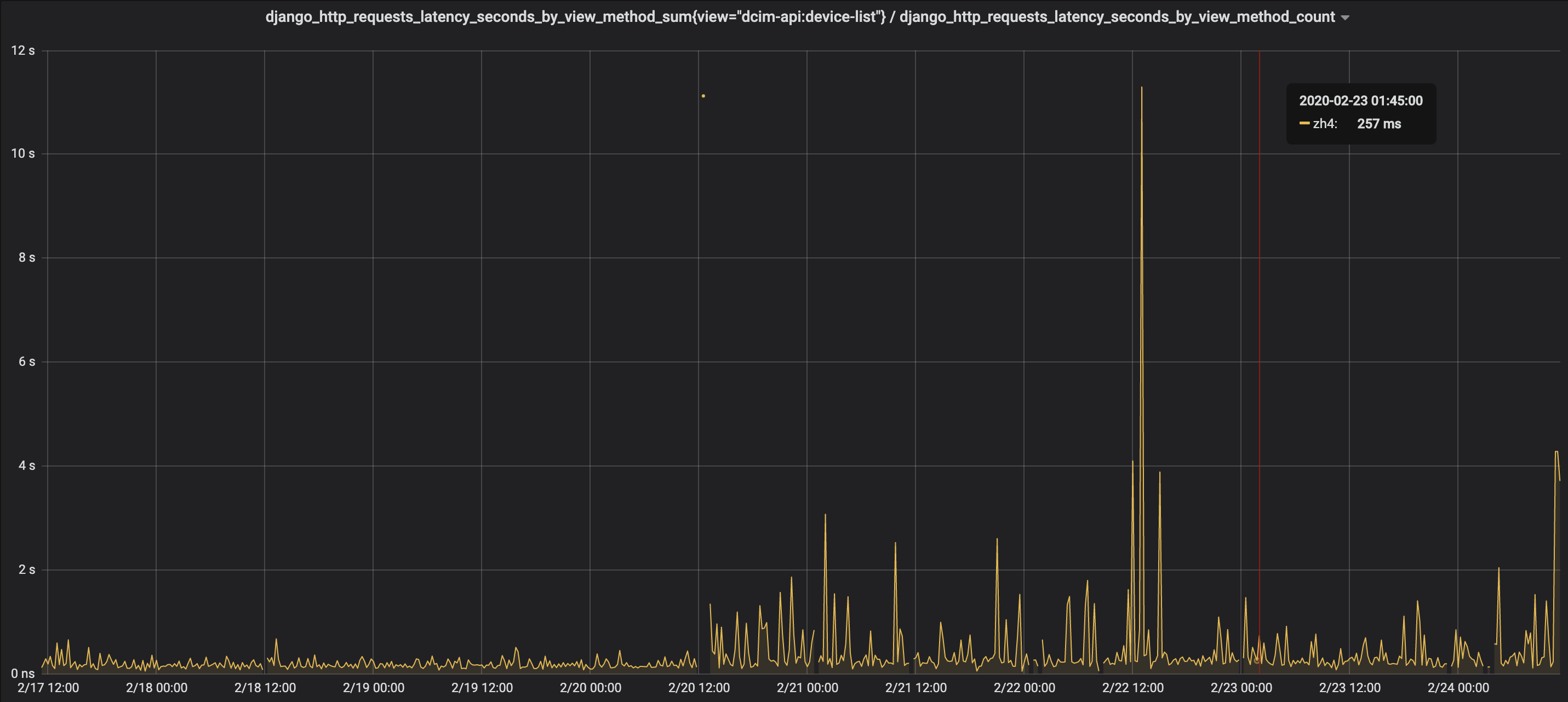
django_http_requests_latency_seconds_by_view_method_sum{view="dcim-api:device-list"} / django_http_requests_latency_seconds_by_view_method_count
image

@karlism commented on GitHub (Feb 24, 2020): Following NetBox prometheus metric query also shows severe performance degradation after the update: `django_http_requests_latency_seconds_by_view_method_sum{view="dcim-api:device-list"} / django_http_requests_latency_seconds_by_view_method_count` ![image](https://user-images.githubusercontent.com/19568035/75144538-6b941880-56f7-11ea-9dd6-359932284da7.png)
Author
Owner

@jeremystretch commented on GitHub (Feb 24, 2020):

Thank you for your interest in NetBox. GitHub issues are intended for reporting reproducible bugs and requesting features, and must be submitted using one of the templates provided here. For general discussion, questions, or assistance with installation issues, please post to our mailing list instead.

@jeremystretch commented on GitHub (Feb 24, 2020): Thank you for your interest in NetBox. GitHub issues are intended for reporting reproducible bugs and requesting features, and must be submitted using one of the templates provided [here](https://github.com/netbox-community/netbox/issues/new/choose). For general discussion, questions, or assistance with installation issues, please post to our [mailing list](https://groups.google.com/forum/#!forum/netbox-discuss) instead.
Sign in to join this conversation.
1 Participants
Notifications
Due Date
No due date set.
Dependencies

No dependencies set.

Reference: starred/netbox#3385