mirror of
https://github.com/netbox-community/netbox.git
synced 2026-02-26 02:35:12 +01:00
Name of parent device of "Device Bays" in connection #1837
Closed
opened 2025-12-29 17:19:38 +01:00 by adam
·
4 comments
No Branch/Tag Specified
main
21524-invlaid-paths-exception
21518-cf-decimal-zero
21356-etags
feature
20787-spectacular
21477-extend-graphql-api-filters-for-cables
21331-deprecate-querystring-tag
21304-deprecate-housekeeping-command
21481-facility-id-doesnt-show-in-rack-page
21429-cable-create-add-another-does-not-carry-over-termination
21364-swagger
20442-callable-audit
feature-ip-prefix-link
20923-dcim-templates
20911-dropdown-3
fix_module_substitution
21203-q-attr-denorm
21160-filterset
21118-site
20911-dropdown-2
21102-fix-graphiql-explorer
20044-elevation-stuck-lightmode
v4.5-beta1-release
20068-import-moduletype-attrs
20766-fix-german-translation-code-literals
20378-del-script
7604-filter-modifiers-v3
circuit-swap
12318-case-insensitive-uniqueness
20637-improve-device-q-filter
20660-script-load
19724-graphql
20614-update-ruff
14884-script
02496-max-page
19720-macaddress-interface-generic-relation
19408-circuit-terminations-export-templates
20203-openapi-check
fix-19669-api-image-download
7604-filter-modifiers
19275-fixes-interface-bulk-edit
fix-17794-get_field_value_return_list
11507-show-aggregate-and-rir-on-api
9583-add_column_specific_search_field_to_tables
v4.5.3
v4.5.2
v4.5.1
v4.5.0
v4.4.10
v4.4.9
v4.5.0-beta1
v4.4.8
v4.4.7
v4.4.6
v4.4.5
v4.4.4
v4.4.3
v4.4.2
v4.4.1
v4.4.0
v4.3.7
v4.4.0-beta1
v4.3.6
v4.3.5
v4.3.4
v4.3.3
v4.3.2
v4.3.1
v4.3.0
v4.2.9
v4.3.0-beta2
v4.2.8
v4.3.0-beta1
v4.2.7
v4.2.6
v4.2.5
v4.2.4
v4.2.3
v4.2.2
v4.2.1
v4.2.0
v4.1.11
v4.1.10
v4.1.9
v4.1.8
v4.2-beta1
v4.1.7
v4.1.6
v4.1.5
v4.1.4
v4.1.3
v4.1.2
v4.1.1
v4.1.0
v4.0.11
v4.0.10
v4.0.9
v4.1-beta1
v4.0.8
v4.0.7
v4.0.6
v4.0.5
v4.0.3
v4.0.2
v4.0.1
v4.0.0
v3.7.8
v3.7.7
v4.0-beta2
v3.7.6
v3.7.5
v4.0-beta1
v3.7.4
v3.7.3
v3.7.2
v3.7.1
v3.7.0
v3.6.9
v3.6.8
v3.6.7
v3.7-beta1
v3.6.6
v3.6.5
v3.6.4
v3.6.3
v3.6.2
v3.6.1
v3.6.0
v3.5.9
v3.6-beta2
v3.5.8
v3.6-beta1
v3.5.7
v3.5.6
v3.5.5
v3.5.4
v3.5.3
v3.5.2
v3.5.1
v3.5.0
v3.4.10
v3.4.9
v3.5-beta2
v3.4.8
v3.5-beta1
v3.4.7
v3.4.6
v3.4.5
v3.4.4
v3.4.3
v3.4.2
v3.4.1
v3.4.0
v3.3.10
v3.3.9
v3.4-beta1
v3.3.8
v3.3.7
v3.3.6
v3.3.5
v3.3.4
v3.3.3
v3.3.2
v3.3.1
v3.3.0
v3.2.9
v3.2.8
v3.3-beta2
v3.2.7
v3.3-beta1
v3.2.6
v3.2.5
v3.2.4
v3.2.3
v3.2.2
v3.2.1
v3.2.0
v3.1.11
v3.1.10
v3.2-beta2
v3.1.9
v3.2-beta1
v3.1.8
v3.1.7
v3.1.6
v3.1.5
v3.1.4
v3.1.3
v3.1.2
v3.1.1
v3.1.0
v3.0.12
v3.0.11
v3.0.10
v3.1-beta1
v3.0.9
v3.0.8
v3.0.7
v3.0.6
v3.0.5
v3.0.4
v3.0.3
v3.0.2
v3.0.1
v3.0.0
v2.11.12
v3.0-beta2
v2.11.11
v2.11.10
v3.0-beta1
v2.11.9
v2.11.8
v2.11.7
v2.11.6
v2.11.5
v2.11.4
v2.11.3
v2.11.2
v2.11.1
v2.11.0
v2.10.10
v2.10.9
v2.11-beta1
v2.10.8
v2.10.7
v2.10.6
v2.10.5
v2.10.4
v2.10.3
v2.10.2
v2.10.1
v2.10.0
v2.9.11
v2.10-beta2
v2.9.10
v2.10-beta1
v2.9.9
v2.9.8
v2.9.7
v2.9.6
v2.9.5
v2.9.4
v2.9.3
v2.9.2
v2.9.1
v2.9.0
v2.9-beta2
v2.8.9
v2.9-beta1
v2.8.8
v2.8.7
v2.8.6
v2.8.5
v2.8.4
v2.8.3
v2.8.2
v2.8.1
v2.8.0
v2.7.12
v2.7.11
v2.7.10
v2.7.9
v2.7.8
v2.7.7
v2.7.6
v2.7.5
v2.7.4
v2.7.3
v2.7.2
v2.7.1
v2.7.0
v2.6.12
v2.6.11
v2.6.10
v2.6.9
v2.7-beta1
Solcon-2020-01-06
v2.6.8
v2.6.7
v2.6.6
v2.6.5
v2.6.4
v2.6.3
v2.6.2
v2.6.1
v2.6.0
v2.5.13
v2.5.12
v2.6-beta1
v2.5.11
v2.5.10
v2.5.9
v2.5.8
v2.5.7
v2.5.6
v2.5.5
v2.5.4
v2.5.3
v2.5.2
v2.5.1
v2.5.0
v2.4.9
v2.5-beta2
v2.4.8
v2.5-beta1
v2.4.7
v2.4.6
v2.4.5
v2.4.4
v2.4.3
v2.4.2
v2.4.1
v2.4.0
v2.3.7
v2.4-beta1
v2.3.6
v2.3.5
v2.3.4
v2.3.3
v2.3.2
v2.3.1
v2.3.0
v2.2.10
v2.3-beta2
v2.2.9
v2.3-beta1
v2.2.8
v2.2.7
v2.2.6
v2.2.5
v2.2.4
v2.2.3
v2.2.2
v2.2.1
v2.2.0
v2.1.6
v2.2-beta2
v2.1.5
v2.2-beta1
v2.1.4
v2.1.3
v2.1.2
v2.1.1
v2.1.0
v2.0.10
v2.1-beta1
v2.0.9
v2.0.8
v2.0.7
v2.0.6
v2.0.5
v2.0.4
v2.0.3
v2.0.2
v2.0.1
v2.0.0
v2.0-beta3
v1.9.6
v1.9.5
v2.0-beta2
v1.9.4-r1
v1.9.3
v2.0-beta1
v1.9.2
v1.9.1
v1.9.0-r1
v1.8.4
v1.8.3
v1.8.2
v1.8.1
v1.8.0
v1.7.3
v1.7.2-r1
v1.7.1
v1.7.0
v1.6.3
v1.6.2-r1
v1.6.1-r1
1.6.1
v1.6.0
v1.5.2
v1.5.1
v1.5.0
v1.4.2
v1.4.1
v1.4.0
v1.3.2
v1.3.1
v1.3.0
v1.2.2
v1.2.1
v1.2.0
v1.1.0
v1.0.7-r1
v1.0.7
v1.0.6
v1.0.5
v1.0.4
v1.0.3-r1
v1.0.3
1.0.0
Labels
Clear labels
beta
breaking change
complexity: high
complexity: low
complexity: medium
needs milestone
netbox
pending closure
plugin candidate
pull-request
severity: high
severity: low
severity: medium
status: accepted
status: backlog
status: blocked
status: duplicate
status: needs owner
status: needs triage
status: revisions needed
status: under review
topic: GraphQL
topic: Internationalization
topic: OpenAPI
topic: UI/UX
topic: cabling
topic: event rules
topic: htmx navigation
topic: industrialization
topic: migrations
topic: plugins
topic: scripts
topic: templating
topic: testing
type: bug
type: deprecation
type: documentation
type: feature
type: housekeeping
type: translation
Mirrored from GitHub Pull Request
No Label
Milestone
No items
No Milestone
Projects
Clear projects
No project

Notifications
Due Date
No due date set.
Dependencies
No dependencies set.
Reference: starred/netbox#1837
Reference in New Issue
Block a user
Blocking a user prevents them from interacting with repositories, such as opening or commenting on pull requests or issues. Learn more about blocking a user.
Delete Branch "%!s()"
Deleting a branch is permanent. Although the deleted branch may continue to exist for a short time before it actually gets removed, it CANNOT be undone in most cases. Continue?
Originally created by @uncleVALERA on GitHub (Jul 13, 2018).
Issue type
[X] Feature request
[ ] Bug report
[ ] Documentation
Environment
Python version: 3.5.2
NetBox version: 2.3.5
Description
Interface table has column "Connection". It displays connection device. If it is "Device Bays" than displays only it's name.
Could you make additional column for displaying parent device of "Device Bays"?
Or use same column but split it for both names by slash.
@jeremystretch commented on GitHub (Jul 20, 2018):
I don't think the interfaces table is an appropriate place for this. The connected device is a link; one click will get you all that information.
Edit: It would also require additional recursive hits to the database. Definitely not worth the expense given the primary purpose of the view.
@uncleVALERA commented on GitHub (Jul 20, 2018):
I'm sorry but i think you didn't understand the issue.
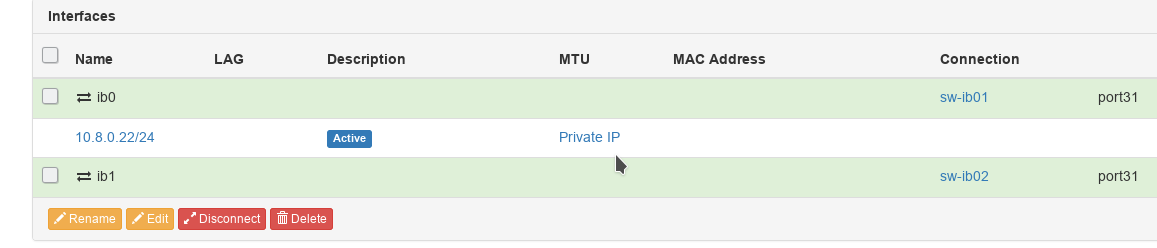


I meant the following...
I have a lot of servers with Infiniband cards. These cards are described as "Device Bays" because it is so convenient for us to do an inventory of the cards.
And if i look on the switch i don't see servers connected to the switch. Only "Device Bays".
Could you make it so that connections show parent device for "Device Bays"?
For example:
@candlerb commented on GitHub (Jul 23, 2018):
That's the wrong way to use Device Bays in Netbox - although I completely understand where you're coming from, because I also thought at first that was the way to do it. It took me a while to "get" how Netbox expects you to work.
Netbox does not model devices with interface cards. It does not even model chassis routers/switches with modular line cards, in the way that you might expect. The documentation could probably be clearer on this point, and it would be really nice to have a modular line card as a new feature (#824) - but it doesn't exist in Netbox today.
What you should do is create interfaces directly on the Device. Then you can use "Inventory Items" to record the type and serial number of the network cards / line cards, if you wish. However there is no direct relationship between specific interfaces and a specific inventory item.
The purpose of the "device bays" feature is to model completely independent devices which are located inside the same rackmount housing: that means basically just blade servers, nothing else. Each of these blades is a "device" in its own right: it has its own management IP address, and its own interfaces, and its own platform (operating system). These interfaces are completely independent from the parent - the parent is nothing more than a housing. Its interfaces belong to the child, not extend the parent. A child device is just like any other independent device, apart from the fact that it physically slots into a blade chassis, rather than fitting directly into a U position in a rack.
So in your particular case:
When you browse the switch ports, you'll see a port connected to Server 01 port ib00, just as you wanted.
Don't add any child devices to Server01 - although of course if Server01 itself is a blade, then it would be a child of the blade chassis.
In the case of a modular chassis switch: you'd create a switch device with no device bays. When you want to add a line card, you add interfaces called (say) Gi1/1 to Gi1/24 directly onto the switch; and you also add an inventory item to record the line card asset. With the next line card, you'd add interfaces Gi2/1 to Gi2/24, or whatever, and another inventory item.
The line cards are not "child devices" in "device bays"; rather, all the interfaces are attached directly to the device. When you start doing things like LAGs across line cards, you'll see why this is the necessary approach.
@uncleVALERA commented on GitHub (Jul 24, 2018):
Hello, @candlerb !
Thank you very much for the detailed response!
I really chose not the best way to describe IB-cards, and I agree with the solution you provided.