Windows Subsystem for Linux create extra windows that is blank - currently fixed by using float rule #61

Closed
opened 2026-01-05 14:48:00 +01:00 by adam · 2 comments
Owner

Originally created by @haininhhoang94 on GitHub (Nov 20, 2021).

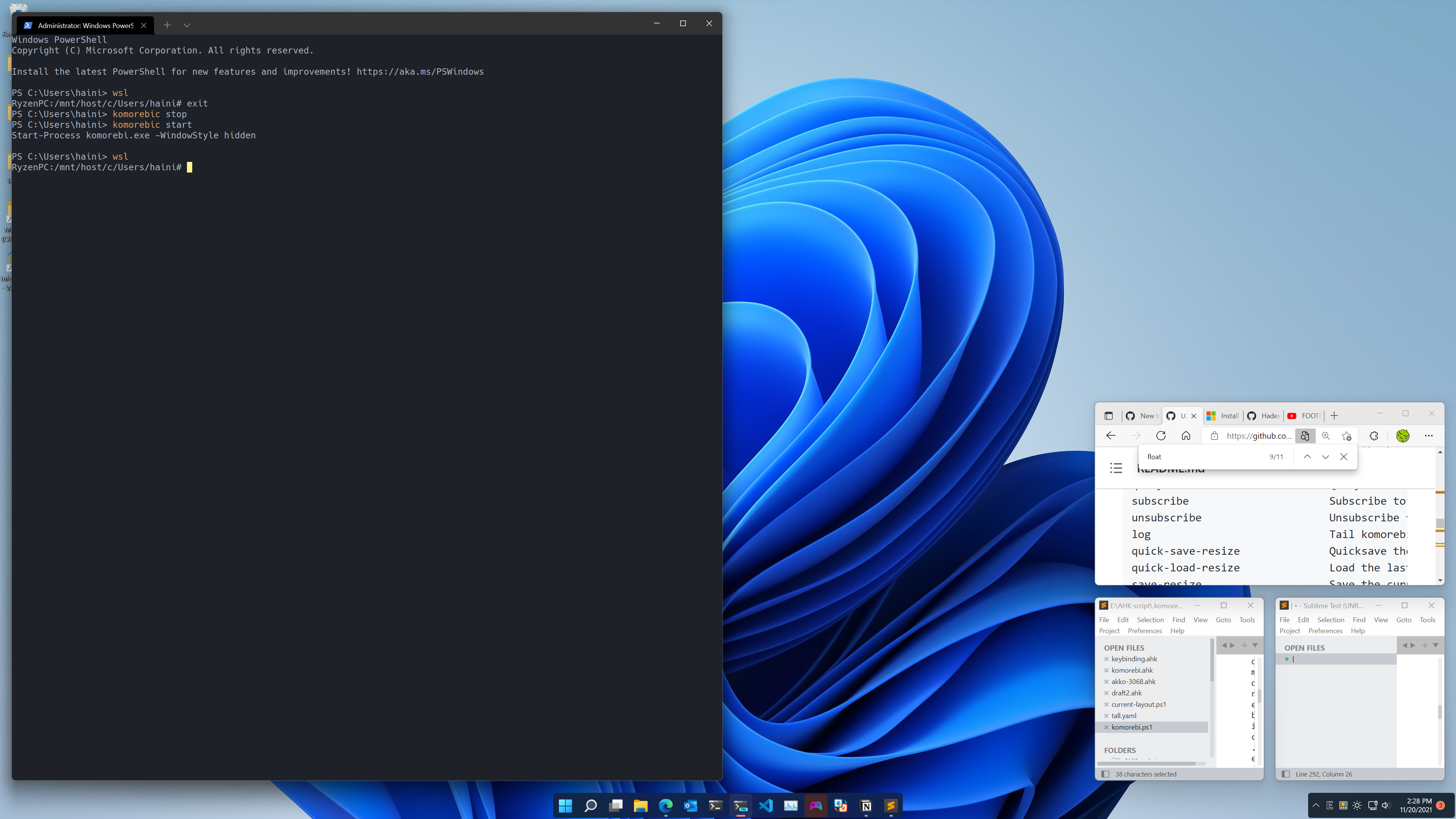
The behaviour can be describe as:
image

  • Simply, when enter WSL Windows create the 2 extra windows to handle input and output of Linux, which is mstsc.exe. The log is investigate here
    "elements": [ { "name": null, "containers": { "elements": [ { "windows": { "elements": [ { "hwnd": 131858, "title": "LGUG2Z/komorebi: A tiling window manager for Windows and 4 more pages - Personal - Microsoft​ Edge", "exe": "msedge.exe", "class": "Chrome_WidgetWin_1", "rect": { "left": 13, "top": 20, "right": 1264, "bottom": 1359 } } ], "focused": 0 } }, { "windows": { "elements": [ { "hwnd": 592228, "title": "Output Painter Window", "exe": "mstsc.exe", "class": "OPContainerClass", "rect": { "left": 427, "top": 298, "right": 2560, "bottom": 1440 } } ], "focused": 0 } }, { "windows": { "elements": [ { "hwnd": 3082274, "title": "Input Capture Window", "exe": "mstsc.exe", "class": "IHWindowClass", "rect": { "left": 427, "top": 298, "right": 2560, "bottom": 1440 } } ], "focused": 0 } },

The current solution is just floating the windows by the following command:
komorebic.exe float-rule exe mstsc.exe
(can be add to the startup Powershell script)

I would like to help and I really love what you are doing here, but I am quite fresh to rust so it may takes some time for me to catch up 👍

Originally created by @haininhhoang94 on GitHub (Nov 20, 2021). The behaviour can be describe as: ![image](https://user-images.githubusercontent.com/34930708/142718448-542aaf67-e7aa-4f01-90bb-377911c7d827.png) - Simply, when enter WSL Windows create the 2 extra windows to handle input and output of Linux, which is mstsc.exe. The log is investigate here `"elements": [ { "name": null, "containers": { "elements": [ { "windows": { "elements": [ { "hwnd": 131858, "title": "LGUG2Z/komorebi: A tiling window manager for Windows and 4 more pages - Personal - Microsoft​ Edge", "exe": "msedge.exe", "class": "Chrome_WidgetWin_1", "rect": { "left": 13, "top": 20, "right": 1264, "bottom": 1359 } } ], "focused": 0 } }, { "windows": { "elements": [ { "hwnd": 592228, "title": "Output Painter Window", "exe": "mstsc.exe", "class": "OPContainerClass", "rect": { "left": 427, "top": 298, "right": 2560, "bottom": 1440 } } ], "focused": 0 } }, { "windows": { "elements": [ { "hwnd": 3082274, "title": "Input Capture Window", "exe": "mstsc.exe", "class": "IHWindowClass", "rect": { "left": 427, "top": 298, "right": 2560, "bottom": 1440 } } ], "focused": 0 } },` The current solution is just floating the windows by the following command: `komorebic.exe float-rule exe mstsc.exe` (can be add to the startup Powershell script) I would like to help and I really love what you are doing here, but I am quite fresh to rust so it may takes some time for me to catch up 👍
adam closed this issue 2026-01-05 14:48:00 +01:00
Author
Owner

@LGUG2Z commented on GitHub (Nov 20, 2021):

Thanks for the bug report! I have just pushed a commit to the master branch which ignores the classes associated with those two mstsc.exe input/output helper windows by default, while still allowing Linux GUI apps that are run through WSLg/mstsc.exe to be tiled by the window manager.

@LGUG2Z commented on GitHub (Nov 20, 2021): Thanks for the bug report! I have just pushed a commit to the master branch which ignores the classes associated with those two mstsc.exe input/output helper windows by default, while still allowing Linux GUI apps that are run through WSLg/mstsc.exe to be tiled by the window manager.
Author
Owner

@meicale commented on GitHub (Jan 8, 2023):

Thanks for the bug report! I have just pushed a commit to the master branch which ignores the classes associated with those two mstsc.exe input/output helper windows by default, while still allowing Linux GUI apps that are run through WSLg/mstsc.exe to be tiled by the window manager.

How can I manage WSL2 GUI apps? I open several apps, but I cannot manage it properly. Occasionally, It works and for most of the time it doesn't. I maybe some config or commands may help. Thx!

@meicale commented on GitHub (Jan 8, 2023): > Thanks for the bug report! I have just pushed a commit to the master branch which ignores the classes associated with those two mstsc.exe input/output helper windows by default, while still allowing Linux GUI apps that are run through WSLg/mstsc.exe to be tiled by the window manager. How can I manage WSL2 GUI apps? I open several apps, but I cannot manage it properly. Occasionally, It works and for most of the time it doesn't. I maybe some config or commands may help. Thx!
Sign in to join this conversation.
1 Participants
Notifications
Due Date
No due date set.
Dependencies

No dependencies set.

Reference: starred/komorebi#61