[BUG]: shadow borders #189

Closed
opened 2026-01-05 14:48:50 +01:00 by adam · 3 comments
Owner

Originally created by @Kibouo on GitHub (Mar 19, 2023).

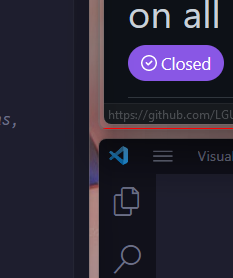
Some applications have shadow borders that cause komorebi colored borders to be misplaced. These shadow borders are also included in the window size when placing the windows. The clearest way of illustrating this is with a screenshot:
image

The windows shown here are:

  • left: vscode
  • top-right: firefox
  • bottom-right: vscode

The red border snugly fits on the vscode windows, while the red border on firefox is offset (offset can be seen in screenshot). Also firefox's tile is smaller due to this.

Other applications that behave similar to firefox:

  • windows terminal
  • [placeholder, haven't tested much more yet]

Other applications that behave similar to vscode (correctly):

  • discord
  • [placeholder, haven't tested much more yet]

This is not related to Windows' universal window shadow settings (already tried turning that off). identify-border-overflow-application also didn't seem to help (maybe I'm using it wrong? I did komorebic identify-border-overflow-application exe "firefox.exe").

My border settings are as follows:

komorebic active-window-border enable
komorebic active-window-border-colour 255 0 0 --window-kind single
komorebic active-window-border-width 2
komorebic active-window-border-offset 0
komorebic invisible-borders 0 0 0 0

Host info:

Edition	Windows 11 Pro N
Version	22H2
Installed on	‎7/‎05/‎2022
OS build	22621.1413
Experience	Windows Feature Experience Pack 1000.22639.1000.0
Originally created by @Kibouo on GitHub (Mar 19, 2023). Some applications have shadow borders that cause komorebi colored borders to be misplaced. These shadow borders are also included in the window size when placing the windows. The clearest way of illustrating this is with a screenshot: ![image](https://user-images.githubusercontent.com/25766329/226181468-a654fba6-971d-4cf1-bcea-c744611e98ed.png) The windows shown here are: - left: vscode - top-right: firefox - bottom-right: vscode The red border snugly fits on the vscode windows, while the red border on firefox is offset (offset can be seen in screenshot). Also firefox's tile is smaller due to this. Other applications that behave similar to firefox: - windows terminal - [placeholder, haven't tested much more yet] Other applications that behave similar to vscode (correctly): - discord - [placeholder, haven't tested much more yet] This is not related to Windows' universal window shadow settings (already tried turning that off). `identify-border-overflow-application` also didn't seem to help (maybe I'm using it wrong? I did `komorebic identify-border-overflow-application exe "firefox.exe"`). My border settings are as follows: ```ps komorebic active-window-border enable komorebic active-window-border-colour 255 0 0 --window-kind single komorebic active-window-border-width 2 komorebic active-window-border-offset 0 komorebic invisible-borders 0 0 0 0 ``` Host info: ``` Edition Windows 11 Pro N Version 22H2 Installed on ‎7/‎05/‎2022 OS build 22621.1413 Experience Windows Feature Experience Pack 1000.22639.1000.0 ```
adam added the bug label 2026-01-05 14:48:50 +01:00
adam closed this issue 2026-01-05 14:48:50 +01:00
Author
Owner

@LGUG2Z commented on GitHub (Apr 16, 2023):

identify-border-overflow-application is generally (but not always!) used with Electron apps, because Electron apps generally try to draw over the invisible borders reserved by the operating system.

The most common applications have generally been handled in this provided file.

In the case of Firefox and Windows Terminal, I don't think you should be using identify-border-overflow-application, which is probably what is resulting in the behaviour you have shown.

@LGUG2Z commented on GitHub (Apr 16, 2023): `identify-border-overflow-application` is generally (but not always!) used with Electron apps, because Electron apps generally try to draw over the invisible borders reserved by the operating system. The most common applications have generally been handled [in this provided file](https://github.com/LGUG2Z/komorebi/blob/master/komorebi.generated.ps1). In the case of Firefox and Windows Terminal, I don't think you should be using `identify-border-overflow-application`, which is probably what is resulting in the behaviour you have shown.
Author
Owner

@Kibouo commented on GitHub (Apr 16, 2023):

Thank you for explaining what the option does.

However, the behavior is identical when not using the option.


From: جاد @.>
Sent: Sunday, April 16, 2023, 06:56
To: LGUG2Z/komorebi @.
>
Cc: Kibouo @.>; Author @.>
Subject: Re: [LGUG2Z/komorebi] [BUG]: shadow borders (Issue #378)

identify-border-overflow-application is generally (but not always!) used with Electron apps, because Electron apps generally try to draw over the invisible borders reserved by the operating system.

The most common applications have generally been handled in this provided filehttps://github.com/LGUG2Z/komorebi/blob/master/komorebi.generated.ps1.

In the case of Firefox and Windows Terminal, I don't think you should be using identify-border-overflow-application, which is probably what is resulting in the behaviour you have shown.


Reply to this email directly, view it on GitHubhttps://github.com/LGUG2Z/komorebi/issues/378#issuecomment-1510058063, or unsubscribehttps://github.com/notifications/unsubscribe-auth/AGESTOKKVT5EBIU2QLKYCRLXBN3YNANCNFSM6AAAAAAWAEMFCM.
You are receiving this because you authored the thread.Message ID: @.***>

@Kibouo commented on GitHub (Apr 16, 2023): Thank you for explaining what the option does. However, the behavior is identical when not using the option. ________________________________ From: جاد ***@***.***> Sent: Sunday, April 16, 2023, 06:56 To: LGUG2Z/komorebi ***@***.***> Cc: Kibouo ***@***.***>; Author ***@***.***> Subject: Re: [LGUG2Z/komorebi] [BUG]: shadow borders (Issue #378) identify-border-overflow-application is generally (but not always!) used with Electron apps, because Electron apps generally try to draw over the invisible borders reserved by the operating system. The most common applications have generally been handled in this provided file<https://github.com/LGUG2Z/komorebi/blob/master/komorebi.generated.ps1>. In the case of Firefox and Windows Terminal, I don't think you should be using identify-border-overflow-application, which is probably what is resulting in the behaviour you have shown. — Reply to this email directly, view it on GitHub<https://github.com/LGUG2Z/komorebi/issues/378#issuecomment-1510058063>, or unsubscribe<https://github.com/notifications/unsubscribe-auth/AGESTOKKVT5EBIU2QLKYCRLXBN3YNANCNFSM6AAAAAAWAEMFCM>. You are receiving this because you authored the thread.Message ID: ***@***.***>
Author
Owner

@LGUG2Z commented on GitHub (May 12, 2024):

I believe this is fixed as of 6a1ed3bcaa, if not before

@LGUG2Z commented on GitHub (May 12, 2024): I believe this is fixed as of https://github.com/LGUG2Z/komorebi/commit/6a1ed3bcaa8d1f6e75535778fc5bd51d9cc3c019, if not before
Sign in to join this conversation.
1 Participants
Notifications
Due Date
No due date set.
Dependencies

No dependencies set.

Reference: starred/komorebi#189