AutoHotkeyGUI does not obey float-rule #165

Closed
opened 2026-01-05 14:48:40 +01:00 by adam · 5 comments
Owner

Originally created by @sayandipdutta on GitHub (Nov 18, 2022).

First of all, really love komorebi !!

Describe the bug
I have an AHK script that I run when the power button is pressed on my laptop (Acer Nitro 5). I am trying to add a float rule for this window, but no matter what identifier I put in it gets tiled in Komorebi.

To Reproduce
Here is the power button script, adapted from here.
And this is what I have tried to make it float:

Run, komorebic.exe identify-tray-application exe "AutoHotkeyU64.exe", , Hide
Run, komorebic.exe identify-tray-application exe "AutoHotkey.exe", , Hide

Run, komorebic.exe float-rule title "Power Menu", , Hide
Run, komorebic.exe float-rule class AutoHotkeyGUI, , Hide
Run, komorebic.exe float-rule exe AutoHotkey.exe, , Hide

Expected behavior
I would expect it to float whenever I press power button, instead of getting tiled.

Screenshots and Videos
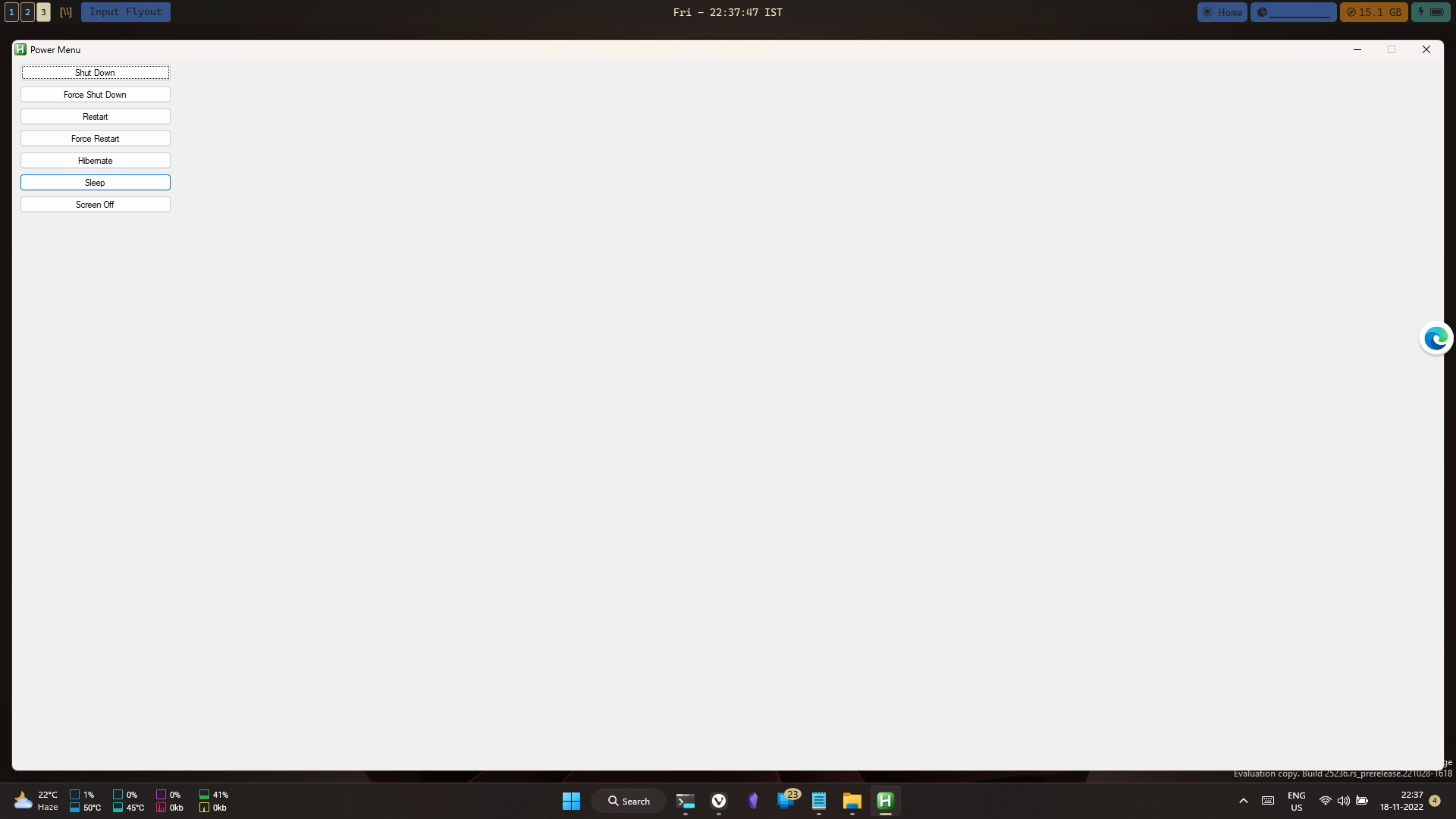
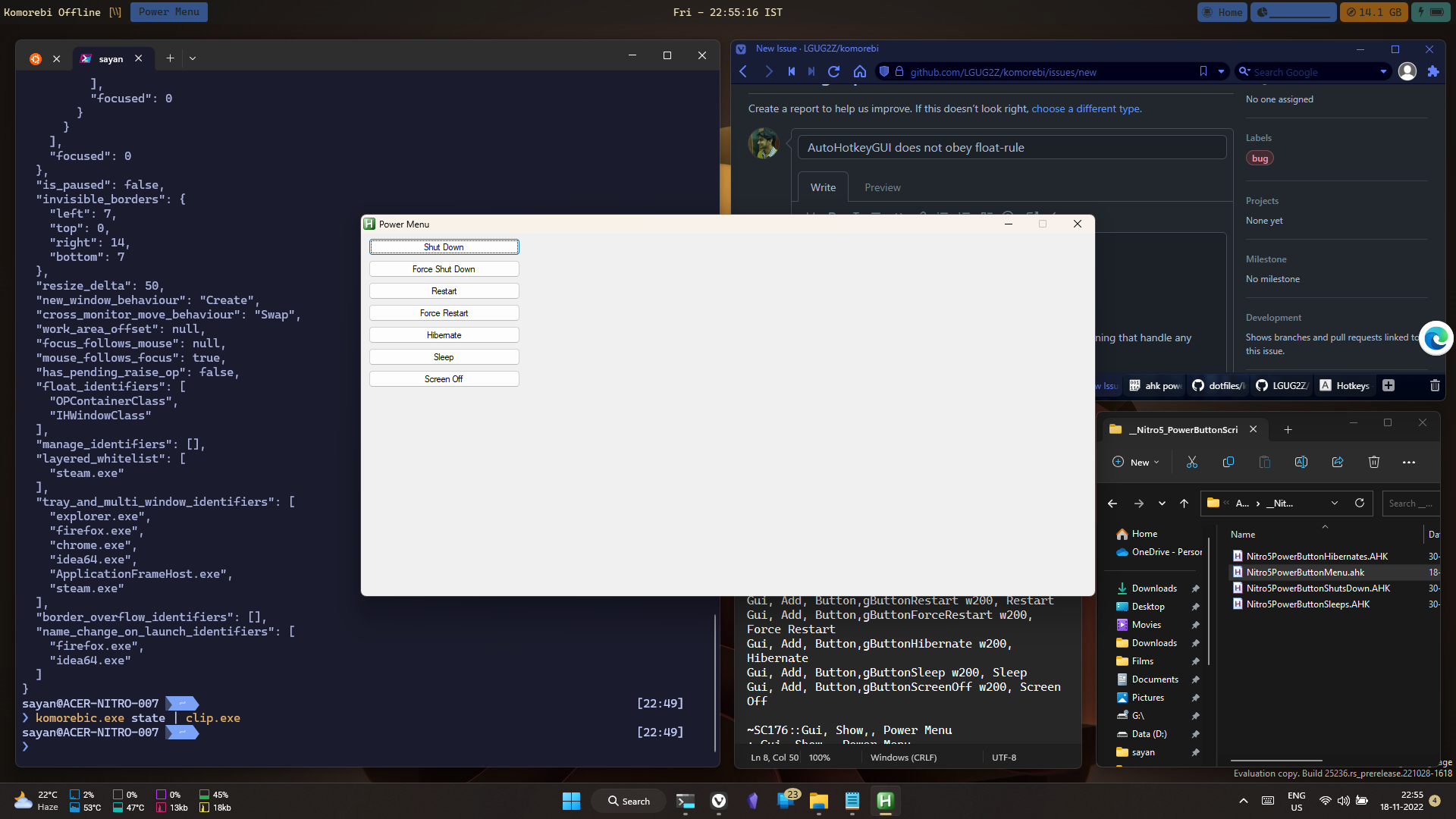
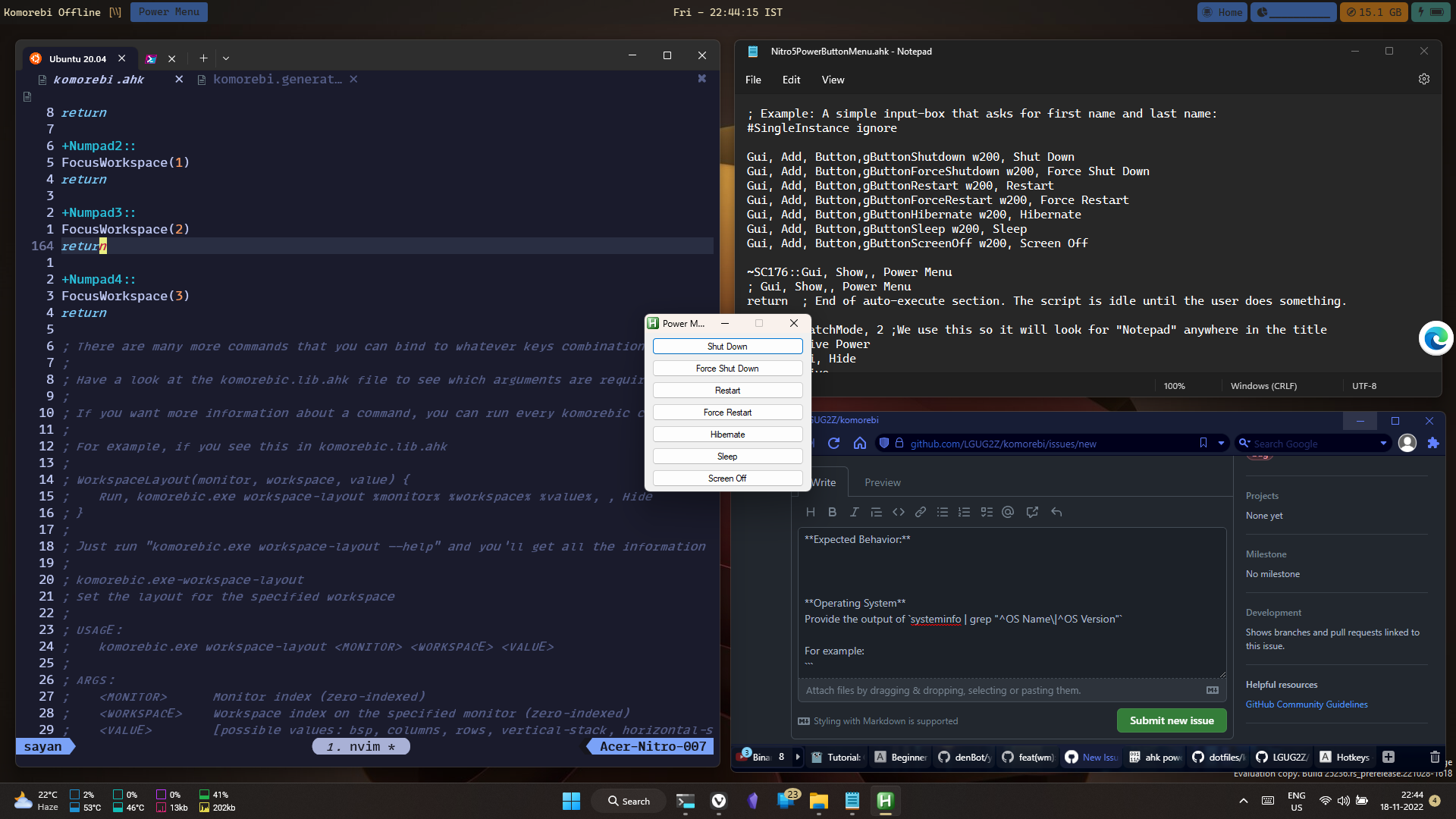
Current Behavior:
image
image
Toggling float:
image

Expected Behavior:
image

Operating System

OS Name:                   Microsoft Windows 11 Home Insider Preview Single Language
OS Version:                10.0.25236 N/A Build 25236

Additional context
Window Spy info

Power Menu
ahk_class AutoHotkeyGUI
ahk_exe AutoHotkey.exe
ahk_pid 21860

komorebic state info

{
  "monitors": {
    "elements": [
      {
        "id": 65537,
        "name": "DISPLAY1",
        "size": {
          "left": 0,
          "top": 0,
          "right": 1920,
          "bottom": 1080
        },
        "work_area_size": {
          "left": 0,
          "top": 32,
          "right": 1920,
          "bottom": 1000
        },
        "workspaces": {
          "elements": [
            {
              "name": null,
              "containers": {
                "elements": [
                  {
                    "windows": {
                      "elements": [
                        {
                          "hwnd": 460164,
                          "title": "sayan",
                          "exe": "WindowsTerminal.exe",
                          "class": "CASCADIA_HOSTING_WINDOW_CLASS",
                          "rect": {
                            "left": 13,
                            "top": 52,
                            "right": 944,
                            "bottom": 967
                          }
                        }
                      ],
                      "focused": 0
                    }
                  },
                  {
                    "windows": {
                      "elements": [
                        {
                          "hwnd": 395090,
                          "title": "New Issue Γö¼Γòû LGUG2Z/komorebi - Vivaldi",
                          "exe": "vivaldi.exe",
                          "class": "Chrome_WidgetWin_1",
                          "rect": {
                            "left": 963,
                            "top": 52,
                            "right": 944,
                            "bottom": 477
                          }
                        }
                      ],
                      "focused": 0
                    }
                  },
                  {
                    "windows": {
                      "elements": [
                        {
                          "hwnd": 1181336,
                          "title": "Nitro5PowerButtonMenu.ahk - Notepad",
                          "exe": "Notepad.exe",
                          "class": "Notepad",
                          "rect": {
                            "left": 963,
                            "top": 542,
                            "right": 469,
                            "bottom": 477
                          }
                        }
                      ],
                      "focused": 0
                    }
                  },
                  {
                    "windows": {
                      "elements": [
                        {
                          "hwnd": 2033790,
                          "title": "__Nitro5_PowerButtonScripts",
                          "exe": "explorer.exe",
                          "class": "CabinetWClass",
                          "rect": {
                            "left": 1438,
                            "top": 542,
                            "right": 469,
                            "bottom": 243
                          }
                        }
                      ],
                      "focused": 0
                    }
                  },
                  {
                    "windows": {
                      "elements": [
                        {
                          "hwnd": 394980,
                          "title": "Power Menu",
                          "exe": "AutoHotkey.exe",
                          "class": "#32770",
                          "rect": {
                            "left": 1438,
                            "top": 787,
                            "right": 469,
                            "bottom": 232
                          }
                        }
                      ],
                      "focused": 0
                    }
                  }
                ],
                "focused": 0
              },
              "monocle_container": null,
              "maximized_window": null,
              "floating_windows": [],
              "layout": {
                "Default": "BSP"
              },
              "layout_rules": [],
              "layout_flip": null,
              "workspace_padding": 10,
              "container_padding": 10,
              "resize_dimensions": [
                null,
                null,
                null,
                null,
                null
              ],
              "tile": true
            }
          ],
          "focused": 0
        }
      }
    ],
    "focused": 0
  },
  "is_paused": false,
  "invisible_borders": {
    "left": 7,
    "top": 0,
    "right": 14,
    "bottom": 7
  },
  "resize_delta": 50,
  "new_window_behaviour": "Create",
  "cross_monitor_move_behaviour": "Swap",
  "work_area_offset": null,
  "focus_follows_mouse": null,
  "mouse_follows_focus": true,
  "has_pending_raise_op": false,
  "float_identifiers": [
    "OPContainerClass",
    "IHWindowClass"
  ],
  "manage_identifiers": [],
  "layered_whitelist": [
    "steam.exe"
  ],
  "tray_and_multi_window_identifiers": [
    "explorer.exe",
    "firefox.exe",
    "chrome.exe",
    "idea64.exe",
    "ApplicationFrameHost.exe",
    "steam.exe"
  ],
  "border_overflow_identifiers": [],
  "name_change_on_launch_identifiers": [
    "firefox.exe",
    "idea64.exe"
  ]
}

Initial setup in my config

#SingleInstance Force

; You can generate a fresh version of this file with "komorebic ahk-library"
#Include %A_ScriptDir%\komorebic.lib.ahk
; https://github.com/LGUG2Z/komorebi/#generating-common-application-specific-configurations
#Include %A_ScriptDir%\komorebi.generated.ahk

; Default to minimizing windows when switching workspaces
WindowHidingBehaviour("minimize")

; Set cross-monitor move behaviour to insert instead of swap
CrossMonitorMoveBehaviour("insert")

; Enable hot reloading of changes to this file
WatchConfiguration("enable")

; Ensure there is 1 workspace created on monitor 0
EnsureWorkspaces(0, 1)

; Configure the invisible border dimensions
InvisibleBorders(7, 0, 14, 7)

; Configure the 1st workspace
WorkspaceName(0, 0, "I")

; Uncomment the next two lines if you want a visual border drawn around the focused window
; ActiveWindowBorderColour(66, 165, 245, "single") ; this is a nice blue colour
; ActiveWindowBorder("enable")

; Allow komorebi to start managing windows
CompleteConfiguration()
Originally created by @sayandipdutta on GitHub (Nov 18, 2022). First of all, really love komorebi !! **Describe the bug** I have an AHK script that I run when the power button is pressed on my laptop (Acer Nitro 5). I am trying to add a float rule for this window, but no matter what identifier I put in it gets tiled in Komorebi. **To Reproduce** Here is the [power button script](https://pastebin.com/428bpqqf), adapted from [here](https://drive.google.com/drive/folders/1_-WY2tdY2PM3DJN5BrezWtH1G4puwcFS). And this is what I have tried to make it float: ```ahk Run, komorebic.exe identify-tray-application exe "AutoHotkeyU64.exe", , Hide Run, komorebic.exe identify-tray-application exe "AutoHotkey.exe", , Hide Run, komorebic.exe float-rule title "Power Menu", , Hide Run, komorebic.exe float-rule class AutoHotkeyGUI, , Hide Run, komorebic.exe float-rule exe AutoHotkey.exe, , Hide ``` **Expected behavior** I would expect it to float whenever I press power button, instead of getting tiled. **Screenshots and Videos** **Current Behavior:** ![image](https://user-images.githubusercontent.com/11913249/202761568-af4ce45a-448e-4f5e-a60b-3e4adcbeaa45.png) ![image](https://user-images.githubusercontent.com/11913249/202761774-7606da12-fb5c-4949-86ec-b053185ab1f8.png) **Toggling float:** ![image](https://user-images.githubusercontent.com/11913249/202765145-f9ebd26b-03c2-4861-a030-c5c353899779.png) **Expected Behavior:** ![image](https://user-images.githubusercontent.com/11913249/202762937-59d01973-008c-4083-a779-d0d89c4507b9.png) **Operating System** ``` OS Name: Microsoft Windows 11 Home Insider Preview Single Language OS Version: 10.0.25236 N/A Build 25236 ``` **Additional context** **Window Spy info** ``` Power Menu ahk_class AutoHotkeyGUI ahk_exe AutoHotkey.exe ahk_pid 21860 ``` **`komorebic state` info** ```json { "monitors": { "elements": [ { "id": 65537, "name": "DISPLAY1", "size": { "left": 0, "top": 0, "right": 1920, "bottom": 1080 }, "work_area_size": { "left": 0, "top": 32, "right": 1920, "bottom": 1000 }, "workspaces": { "elements": [ { "name": null, "containers": { "elements": [ { "windows": { "elements": [ { "hwnd": 460164, "title": "sayan", "exe": "WindowsTerminal.exe", "class": "CASCADIA_HOSTING_WINDOW_CLASS", "rect": { "left": 13, "top": 52, "right": 944, "bottom": 967 } } ], "focused": 0 } }, { "windows": { "elements": [ { "hwnd": 395090, "title": "New Issue Γö¼Γòû LGUG2Z/komorebi - Vivaldi", "exe": "vivaldi.exe", "class": "Chrome_WidgetWin_1", "rect": { "left": 963, "top": 52, "right": 944, "bottom": 477 } } ], "focused": 0 } }, { "windows": { "elements": [ { "hwnd": 1181336, "title": "Nitro5PowerButtonMenu.ahk - Notepad", "exe": "Notepad.exe", "class": "Notepad", "rect": { "left": 963, "top": 542, "right": 469, "bottom": 477 } } ], "focused": 0 } }, { "windows": { "elements": [ { "hwnd": 2033790, "title": "__Nitro5_PowerButtonScripts", "exe": "explorer.exe", "class": "CabinetWClass", "rect": { "left": 1438, "top": 542, "right": 469, "bottom": 243 } } ], "focused": 0 } }, { "windows": { "elements": [ { "hwnd": 394980, "title": "Power Menu", "exe": "AutoHotkey.exe", "class": "#32770", "rect": { "left": 1438, "top": 787, "right": 469, "bottom": 232 } } ], "focused": 0 } } ], "focused": 0 }, "monocle_container": null, "maximized_window": null, "floating_windows": [], "layout": { "Default": "BSP" }, "layout_rules": [], "layout_flip": null, "workspace_padding": 10, "container_padding": 10, "resize_dimensions": [ null, null, null, null, null ], "tile": true } ], "focused": 0 } } ], "focused": 0 }, "is_paused": false, "invisible_borders": { "left": 7, "top": 0, "right": 14, "bottom": 7 }, "resize_delta": 50, "new_window_behaviour": "Create", "cross_monitor_move_behaviour": "Swap", "work_area_offset": null, "focus_follows_mouse": null, "mouse_follows_focus": true, "has_pending_raise_op": false, "float_identifiers": [ "OPContainerClass", "IHWindowClass" ], "manage_identifiers": [], "layered_whitelist": [ "steam.exe" ], "tray_and_multi_window_identifiers": [ "explorer.exe", "firefox.exe", "chrome.exe", "idea64.exe", "ApplicationFrameHost.exe", "steam.exe" ], "border_overflow_identifiers": [], "name_change_on_launch_identifiers": [ "firefox.exe", "idea64.exe" ] } ``` **Initial setup in my config** ```ahk #SingleInstance Force ; You can generate a fresh version of this file with "komorebic ahk-library" #Include %A_ScriptDir%\komorebic.lib.ahk ; https://github.com/LGUG2Z/komorebi/#generating-common-application-specific-configurations #Include %A_ScriptDir%\komorebi.generated.ahk ; Default to minimizing windows when switching workspaces WindowHidingBehaviour("minimize") ; Set cross-monitor move behaviour to insert instead of swap CrossMonitorMoveBehaviour("insert") ; Enable hot reloading of changes to this file WatchConfiguration("enable") ; Ensure there is 1 workspace created on monitor 0 EnsureWorkspaces(0, 1) ; Configure the invisible border dimensions InvisibleBorders(7, 0, 14, 7) ; Configure the 1st workspace WorkspaceName(0, 0, "I") ; Uncomment the next two lines if you want a visual border drawn around the focused window ; ActiveWindowBorderColour(66, 165, 245, "single") ; this is a nice blue colour ; ActiveWindowBorder("enable") ; Allow komorebi to start managing windows CompleteConfiguration() ```
adam added the bug label 2026-01-05 14:48:40 +01:00
adam closed this issue 2026-01-05 14:48:40 +01:00
Author
Owner

@LGUG2Z commented on GitHub (Nov 19, 2022):

@sayandipdutta Can you provide a version of the power script that runs when a specific key combination is pressed that I could use to investigate this? I tried using the script that you shared on pastebin but I can't get a GUI to come up.

@LGUG2Z commented on GitHub (Nov 19, 2022): @sayandipdutta Can you provide a version of the power script that runs when a specific key combination is pressed that I could use to investigate this? I tried using the script that you shared on pastebin but I can't get a GUI to come up.
Author
Owner

@LGUG2Z commented on GitHub (Nov 19, 2022):

Actually nevermind, I was able to get this to bind to F1 to bring up the menu. After adding a float rule for the title "Power Menu" I get what I believe is the expected behaviour:

image

This is the configuration file I'm using:

#SingleInstance Force
#Include %A_ScriptDir%\komorebic.lib.ahk
#Include %A_ScriptDir%\komorebi.generated.ahk

FloatRule("title", "Power Menu")

; Enable hot reloading of changes to this file
WindowHidingBehaviour("minimize")

; Set cross-monitor move behaviour to insert
CrossMonitorMoveBehaviour("insert")

; Enable hot reloading of changes to this file
WatchConfiguration("enable")

; Ensure there is 1 workspace created on monitor 0
EnsureWorkspaces(0, 1)

; Ensure there is 1 workspace created on monitor 0
EnsureWorkspaces(1, 1)

; Configure the invisible border dimensions
InvisibleBorders(7, 0, 14, 7)

; Configure the 1st workspace
WorkspaceName(0, 0, "bsp")

; Configure workspace layout rules
WorkspaceLayoutRule(0, 0, 0, "ultrawide-vertical-stack")
; WorkspaceLayoutRule(0, 0, 0, "bsp") ; for livestreaming in widescreen
WorkspaceCustomLayoutRule(0, 0, 4, "~/custom.yaml")
ContainerPadding(0, 0, 20)

WorkspaceLayout(1, 0, "rows")
ContainerPadding(1, 0, 20)

; Enable active window border
ActiveWindowBorderColour(66, 165, 245, "single")
ActiveWindowBorderColour(245, 165, 66, "stack")
ActiveWindowBorder("enable")

GlobalWorkAreaOffset(0, 5, 0, 0)
MonitorWorkAreaOffset(0, 0, 5, 0, 0) ; for regular use
; MonitorWorkAreaOffset(0, 1000, 0, 1000, 0) ; for livestreaming in widescreen

; Allow komorebi to start managing windows
CompleteConfiguration()

; keybinds here....

And I am starting the window manager with komorebic start -a.

@LGUG2Z commented on GitHub (Nov 19, 2022): Actually nevermind, I was able to get this to bind to F1 to bring up the menu. After adding a float rule for the title "Power Menu" I get what I believe is the expected behaviour: ![image](https://user-images.githubusercontent.com/13164844/202826233-2b4d1aa6-365f-48b8-9603-5016a54de171.png) This is the configuration file I'm using: ```ahk #SingleInstance Force #Include %A_ScriptDir%\komorebic.lib.ahk #Include %A_ScriptDir%\komorebi.generated.ahk FloatRule("title", "Power Menu") ; Enable hot reloading of changes to this file WindowHidingBehaviour("minimize") ; Set cross-monitor move behaviour to insert CrossMonitorMoveBehaviour("insert") ; Enable hot reloading of changes to this file WatchConfiguration("enable") ; Ensure there is 1 workspace created on monitor 0 EnsureWorkspaces(0, 1) ; Ensure there is 1 workspace created on monitor 0 EnsureWorkspaces(1, 1) ; Configure the invisible border dimensions InvisibleBorders(7, 0, 14, 7) ; Configure the 1st workspace WorkspaceName(0, 0, "bsp") ; Configure workspace layout rules WorkspaceLayoutRule(0, 0, 0, "ultrawide-vertical-stack") ; WorkspaceLayoutRule(0, 0, 0, "bsp") ; for livestreaming in widescreen WorkspaceCustomLayoutRule(0, 0, 4, "~/custom.yaml") ContainerPadding(0, 0, 20) WorkspaceLayout(1, 0, "rows") ContainerPadding(1, 0, 20) ; Enable active window border ActiveWindowBorderColour(66, 165, 245, "single") ActiveWindowBorderColour(245, 165, 66, "stack") ActiveWindowBorder("enable") GlobalWorkAreaOffset(0, 5, 0, 0) MonitorWorkAreaOffset(0, 0, 5, 0, 0) ; for regular use ; MonitorWorkAreaOffset(0, 1000, 0, 1000, 0) ; for livestreaming in widescreen ; Allow komorebi to start managing windows CompleteConfiguration() ; keybinds here.... ``` And I am starting the window manager with `komorebic start -a`.
Author
Owner

@sayandipdutta commented on GitHub (Nov 19, 2022):

Ah, I was supposed to await configuration! Thanks a lot!

@sayandipdutta commented on GitHub (Nov 19, 2022): Ah, I was supposed to `await configuration`! Thanks a lot!
Author
Owner

@LGUG2Z commented on GitHub (Nov 19, 2022):

@sayandipdutta Does that mean we can close this issue? 🤞

@LGUG2Z commented on GitHub (Nov 19, 2022): @sayandipdutta Does that mean we can close this issue? 🤞
Author
Owner

@sayandipdutta commented on GitHub (Nov 19, 2022):

Oh, yes! Thanks again!

@sayandipdutta commented on GitHub (Nov 19, 2022): Oh, yes! Thanks again!
Sign in to join this conversation.
1 Participants
Notifications
Due Date
No due date set.
Dependencies

No dependencies set.

Reference: starred/komorebi#165