mirror of
https://github.com/LGUG2Z/komorebi.git
synced 2026-09-03 04:47:13 +02:00
[BUG]: Komorebi acts flakey when monitors are disconnected and reconnected #152
Assignees
 adam (Adam Melkus)
Clear assignees
adam (Adam Melkus)
No Assignees
Notifications
Due Date
No due date set.
Dependencies
No dependencies set.
Reference: starred/komorebi#152
Reference in New Issue
Block a user
Originally created by @maxbane on GitHub (Oct 17, 2022).
Describe the bug
When monitors are removed from the system while komorebi is running, some managed windows become effectively unmanaged with no way to get them back, and various errors appear in the logs whenever the user focuses the affected windows. Restarting the komorebi process seems to be the only fix.
Example error messages from the log:
To Reproduce
Steps to reproduce the behavior:
Another way to reproduce this is to begin with a laptop plugged into a docking station that has multiple monitors connected to it. Start komorebi like normal, then disconnect the laptop from the dock. Window management is now all messed up, and stays that way even if you reconnect the laptop to the dock.
Expected behavior
Komorebi should gracefully handle the loss and/or introduction of monitor(s) while running. Its behavior should be approximately equivalent to running
komorebic stop; komorebic startafter each connection/disconnection of a monitor.Operating System
@maxbane commented on GitHub (Oct 17, 2022):
I have a workaround for anyone else experiencing this. Apparently, whenever a display is added or removed, Windows fires a
WM_DISPLAYCHANGEevent, and it's actually possible to write a handler for this in your AutoHotKey config. So I just added the following snippet to mykomorebi.ahkfile to handle the addition/removal of a display by restarting Komorebi (and forcing a retile for good measure). It's not elegant, but it works!Note that it's important to include this snippet before any HotKey definitions in your
komorebi.ahkfile (i.e. in the so-called Auto-execute section of the script, in AutoHotKey's terminology).@maxbane commented on GitHub (Oct 17, 2022):
This issue is a duplicate of #225 (though I class it as a BUG rather than a FEAT). Sorry about that, didn't see it.
@LGUG2Z commented on GitHub (Oct 20, 2022):
@maxbane Please try out the branch that I have just pushed.
@maxbane commented on GitHub (Oct 20, 2022):
Thanks for looking into it, @LGUG2Z! Any chance you can kick off the build workflow for that branch so that I can grab its binaries from GitHub Actions? (I just checked GitHub Actions, didn't see anything for branch
fix/monitor-state-changes.)@LGUG2Z commented on GitHub (Oct 20, 2022):
Whoops, pushed a branch with the wrong prefix. Updated it to
hotfix/and it is building now. 👌@maxbane commented on GitHub (Oct 20, 2022):
I commented out my workaround in my
komorebi.ahk, and replaced thekomorebi.exeandkomorebic.exebinaries on my path with the ones from the build artifact.Hm, unfortunately it doesn't seem to be working. I'm not even sure it's handling the
WM_DISPLAYCHANGEevent, as far as I can tell. Here's the log right after I turned a monitor off:Same symptoms with unmanaged windows ("there is no container/window" error whenever focusing them). Also, from glancing at the commit, I would have expected to see a configuration reload in the log, but that didn't seem to happen. Is there some way I can be certain that my binary has your change, and that it's receiving the the
WM_DISPLAYCHANGEevent? Maybe push some more debugging output to that branch?@LGUG2Z commented on GitHub (Oct 21, 2022):
From the logs I can see that you're running the right version because the new
DisplayChangeevent is being sent.I don't have a physical second monitor myself; I am using an iPad connected through Duet to test this and then disconnecting the Duet connection from the computer side to trigger
WM_DISPLAYCHANGE. On this setup at least, the configuration reload gets triggered along with the full rescan of the window manager state.Hopefully we can find some other people to test this out and determine whether your theory of DisplayPort connections playing a role in what you are experiencing. 🤔
@maxbane commented on GitHub (Oct 21, 2022):
Ah, very interesting! I did some more testing and have some more results to share. First of all, this is my monitor layout (from Windows Display Settings):
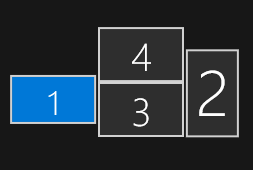
Monitor 1 is the laptop screen. The laptop is attached to a dock, to which Monitor 2 is attached by HDMI, and to which Monitors 3 and 4 are attached by DisplayPort. Monitor 2 is in portrait mode (rotated 90 degrees counterclockwise) and Monitor 4 is in landscape inverted (i.e. rotated 180 degrees). Monitor 3 is in ordinary landscape (not inverted) and is set as the "main" display, i.e. that's where the Start Menu is.
Turning off Monitor 2 (HDMI) has no effect at all, it doesn't event generate the
DisplayChangeevent or cause Windows to refresh the monitor layout. I'm not sure if it's because of the dock being dumb, or because of an inherent limitation of HDMI, but it doesn't seem to generate theWM_DISPLAYCHANGEevent at all. So there's nothing we can do about that.Turning off Monitor 4 (DisplayPort, landscape inverted) does generate
WM_DISPLAYCHANGEand I seeprocess_event{event=DisplayChange(...in the komorebi log, but komorebi does not reload its configuration. Turning it back on is similar:DisplayChangeevent appears, but no reload. This is the monitor I tested with in my previous reply.Here's where things get interesting. Turning off Monitor 3 (the "main" display) does behave as expected. I see the
DisplayChangeevent in the log, followed by athere is no windowerror, followed by a ton ofprocess_commandINFO messages as it reloads configuration. However, when I turn the monitor back on, there is anotherDisplayChangeevent, but no configuration reload. (But maybe it's not necessary in this case; the newly returned monitor works fine with komorebi.)Finally, if I disconnect the laptop from the dock, it is similar to turning off Monitor 3.
DisplayChangefollowed by configuration reload. Plugging the laptop back into the dock givesDisplayChangebut no configuration reload. Komorebi sees and uses all of the new monitors correctly, though.So, taking a step back, it mostly works, but with an apparent edge case when turning off Monitor 4. Some ideas:
DisplayChangecan be processed without a configuration reload implies that you must have some condition in the code that isn't being met... what if it reloaded configuration unconditionally?WM_DISPLAYCHANGE, there are a bunch of other "messages" and "registered messages" (Windows jargon) that you could hook into... maybe worth investigating? (But that answer is from way back in Windows 7 days.) I suppose I could also try out Microsoft Spy++ to investigate exactly what's happening when Monitor 4 turns off.@LGUG2Z commented on GitHub (Oct 21, 2022):
Thanks for all the details!
I have added the additional messages mentioned in the StackOverflow post, hopefully this will more reliably pick up monitor changes and also trigger the condition for reloading the window manager state and configuration. 🤞 (Generally the reloading should only trigger when monitors are detached)
@maxbane commented on GitHub (Oct 24, 2022):
Thanks! It tried it out, and as expected I see a lot more DisplayChange events when turning off the top monitor (like, 10 of them by my count) but the condition for reloading the window manager state is still NOT being triggered. I was looking at the source file that you linked, and I'm wondering if maybe there is no guarantee that Windows will provide the same monitor IDs after removing the monitor as it did before removing the monitor (even for monitors that were not touched), and therefore
overlappingmay be empty even though a reload is needed.Perhaps you could more granularly log the actual monitor IDs of all found monitors in that function, and I could take note of what IDs are logged before and after removing the monitor? That could give some insight into why
overlappingis seemingly always empty in this case.For more context, when I turn off the top monitor, Windows decides to start treating Monitor 3 as an extension monitor, and Monitor 2 as a mirror/duplicate of Monitor 1... i.e., a very different layout, and so maybe the monitor IDs are totally different in a way that invalidate the assumption of that overlapping test. I've also noticed that Komorebi will often change its assignment of
monitor-indexes to physical monitors (as returned byquery focused-monitor-index) before and after adding/removing monitors, which is maybe another clue. (Actually something I want to open a separate issue about because my calls toWorkspaceLayout()inkomorebi.ahkare all wrong if the monitor indexes are not stable.)@LGUG2Z commented on GitHub (Oct 25, 2022):
I have changed some of the internals in https://github.com/LGUG2Z/komorebi/commit/99389f40f9bd927b16dae6b0e9a1088804e86a95 to try to reconcile monitors that have had their HMONITOR ids cycled based on their display names instead of by trying to guess based on which windows are open and where they are located after a display change event.
The display names still change / increment when the same monitor is unplugged and then plugged back in, but this avoids needing to do a full state and configuration reload if an id gets assigned incorrectly to a different Monitor object.