Exit node appears on windows only when both ipv4 and ipv6 0/0 routes are enabled #476

Closed
opened 2025-12-29 01:30:07 +01:00 by adam · 1 comment
Owner

Originally created by @summershrimp on GitHub (Apr 17, 2023).

Bug description

Exit node appears on windows only when both ipv4 and ipv6 0/0 routes are enabled.

To Reproduce

Enable only ipv4 0/0 route, and connect windows client, the exit-node won't show up

On my environment, i have two exit node running,

ubuntu@qcsh1:~$ headscale route ls
An updated version of Headscale has been found (0.22.0-alpha2 vs. your current 0.21.0). Check it out https://github.com/juanfont/headscale/releases
ID | Machine   | Prefix           | Advertised | Enabled | Primary
1  | gw-hz-cyf | 0.0.0.0/0        | true       | true    | -
2  | gw-hz-cyf | ::/0             | true       | true    | -
3  | gw-hz-cyf | 192.168.102.0/24 | true       | true    | true
6  | vuljp     | 0.0.0.0/0        | true       | true    | -
7  | vuljp     | ::/0             | true       | false   | -

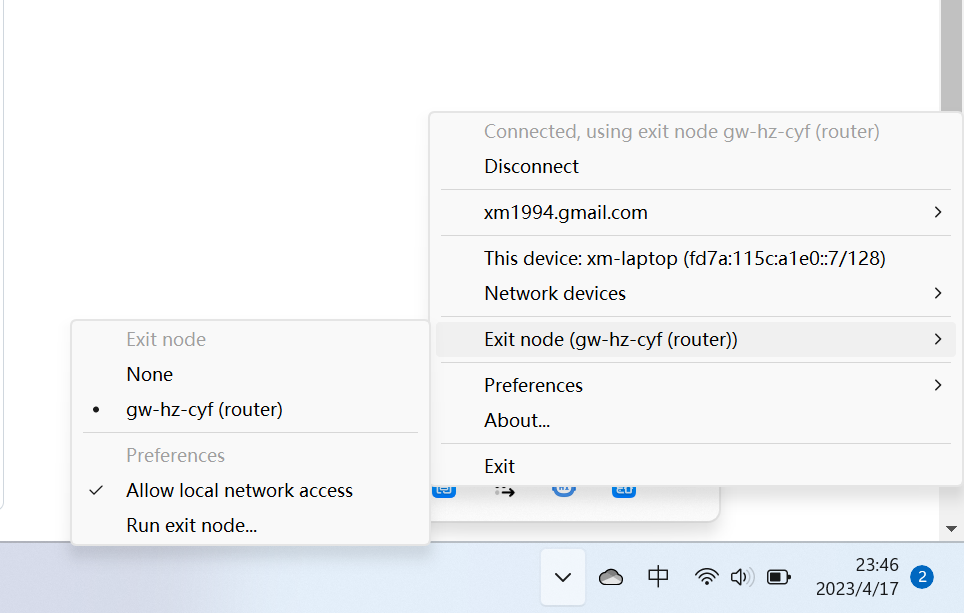
gw-hz-cyf enabled both v4 and v6 /0 routes, vuljp enabled only v4 /0 route.

And here is the screenshot for windows client.
image

Context info

headscale 0.21.0
windows client 1.38.4

Originally created by @summershrimp on GitHub (Apr 17, 2023). <!-- Headscale is a multinational community across the globe. Our common language is English. Please consider raising the bug report in this language. --> **Bug description** Exit node appears on windows only when both ipv4 and ipv6 0/0 routes are enabled. **To Reproduce** Enable only ipv4 0/0 route, and connect windows client, the exit-node won't show up On my environment, i have two exit node running, ``` ubuntu@qcsh1:~$ headscale route ls An updated version of Headscale has been found (0.22.0-alpha2 vs. your current 0.21.0). Check it out https://github.com/juanfont/headscale/releases ID | Machine | Prefix | Advertised | Enabled | Primary 1 | gw-hz-cyf | 0.0.0.0/0 | true | true | - 2 | gw-hz-cyf | ::/0 | true | true | - 3 | gw-hz-cyf | 192.168.102.0/24 | true | true | true 6 | vuljp | 0.0.0.0/0 | true | true | - 7 | vuljp | ::/0 | true | false | - ``` gw-hz-cyf enabled both v4 and v6 /0 routes, vuljp enabled only v4 /0 route. And here is the screenshot for windows client. <img width="482" alt="image" src="https://user-images.githubusercontent.com/10265470/232540051-bbc4132e-52a4-4fea-8587-6cb7a2721f00.png"> **Context info** headscale 0.21.0 windows client 1.38.4 <!-- Please add relevant information about your system. For example: - Version of headscale used - Version of tailscale client - OS (e.g. Linux, Mac, Cygwin, WSL, etc.) and version - Kernel version - The relevant config parameters you used - Log output -->
adam added the bug label 2025-12-29 01:30:07 +01:00
adam closed this issue 2025-12-29 01:30:07 +01:00
Author
Owner

@summershrimp commented on GitHub (Apr 17, 2023):

Oh it's not a bug.
https://github.com/juanfont/headscale/issues/804#issuecomment-1399314002

@summershrimp commented on GitHub (Apr 17, 2023): Oh it's not a bug. https://github.com/juanfont/headscale/issues/804#issuecomment-1399314002
Sign in to join this conversation.
1 Participants
Notifications
Due Date
No due date set.
Dependencies

No dependencies set.

Reference: starred/headscale#476