Originally created by @ianhyzy on GitHub (Nov 26, 2018).
I'm trying to use this script on a Synology NAS and got stuck at this point. I have the config file in the folder I'm running the script in, it prints the correct path but then fails. It worked fine with the setup command.
Originally created by @ianhyzy on GitHub (Nov 26, 2018).
I'm trying to use this script on a Synology NAS and got stuck at this point. I have the config file in the folder I'm running the script in, it prints the correct path but then fails. It worked fine with the setup command.

I think the Synology uses ash as the default shell, rather than bash? In any case, please run the following command and post the output (substitute bash or whatever other shell you're using, as necessary):
ash -x /volume1/Vault/configs/ssl/dehydrated -c
@txr13 commented on GitHub (Nov 26, 2018):
I think the Synology uses ash as the default shell, rather than bash? In any case, please run the following command and post the output (substitute bash or whatever other shell you're using, as necessary):
`ash -x /volume1/Vault/configs/ssl/dehydrated -c`
@ianhyzy commented on GitHub (Nov 26, 2018):
The output was quite long so I put it in a gist here: [https://gist.github.com/ianhyzy/f4be7bfb7423554e0651ec7a30985082](url)
@ianhyzy commented on GitHub (Nov 26, 2018):
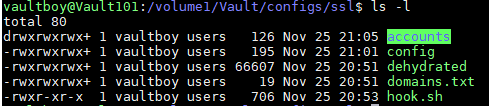
It is there, are the permissions wrong?

There are a couple of possibilities for this error. It could be an incorrect shebang line in the hook. There have also been reports of DOS line endings causing the same error message.
@txr13 commented on GitHub (Nov 26, 2018):
There are a couple of possibilities for this error. It could be an incorrect shebang line in the hook. There have also been reports of DOS line endings causing the same error message.
The Windows line endings were the culprit. There's no systemctl on the machine though (sudo: systemctl: command not found). Is there a way to use /etc/init like HASS does? Thanks for the help as well.
@ianhyzy commented on GitHub (Nov 26, 2018):
The Windows line endings were the culprit. There's no `systemctl` on the machine though (`sudo: systemctl: command not found`). Is there a way to use /etc/init [like HASS does](https://www.home-assistant.io/docs/autostart/synology/)? Thanks for the help as well.
I'm sorry, I don't understand. There's no requirement for systemctl within dehydrated. What are you trying to accomplish?
@txr13 commented on GitHub (Nov 26, 2018):
I'm sorry, I don't understand. There's no requirement for systemctl within dehydrated. What are you trying to accomplish?
To clarify, I'm getting that error when the script runs. It prompts me for a password and then fails:
@ianhyzy commented on GitHub (Nov 26, 2018):
To clarify, I'm getting that error when the script runs. It prompts me for a password and then fails:

OK, that's in your hook script. (Not a dehydrated issue.)
At a guess, though, I'd say you can just customize your hook script to use whatever facilities exist in your environment. I'm not familiar with a Synology environment, so I'm afraid there's not much I can offer in specific.
@txr13 commented on GitHub (Nov 26, 2018):
OK, that's in your hook script. (Not a dehydrated issue.)
At a guess, though, I'd say you can just customize your hook script to use whatever facilities exist in your environment. I'm not familiar with a Synology environment, so I'm afraid there's not much I can offer in specific.
Ah alright, I copied that from here. Thanks for the help!
@ianhyzy commented on GitHub (Nov 26, 2018):
Ah alright, I copied that from [here](https://www.splitbrain.org/blog/2017-08/10-homeassistant_duckdns_letsencrypt). Thanks for the help!
Blocking a user prevents them from interacting with repositories, such as opening or commenting on pull requests or issues. Learn more about blocking a user.
Originally created by @ianhyzy on GitHub (Nov 26, 2018).
I'm trying to use this script on a Synology NAS and got stuck at this point. I have the config file in the folder I'm running the script in, it prints the correct path but then fails. It worked fine with the setup command.

@txr13 commented on GitHub (Nov 26, 2018):
I think the Synology uses ash as the default shell, rather than bash? In any case, please run the following command and post the output (substitute bash or whatever other shell you're using, as necessary):
ash -x /volume1/Vault/configs/ssl/dehydrated -c@ianhyzy commented on GitHub (Nov 26, 2018):
The output was quite long so I put it in a gist here: https://gist.github.com/ianhyzy/f4be7bfb7423554e0651ec7a30985082
@txr13 commented on GitHub (Nov 26, 2018):
It's looking for your hook script at
/volume1/Vault/configs/ssl/hook.shand not finding it.@ianhyzy commented on GitHub (Nov 26, 2018):
It is there, are the permissions wrong?
@txr13 commented on GitHub (Nov 26, 2018):
There are a couple of possibilities for this error. It could be an incorrect shebang line in the hook. There have also been reports of DOS line endings causing the same error message.
@ianhyzy commented on GitHub (Nov 26, 2018):
The Windows line endings were the culprit. There's no
systemctlon the machine though (sudo: systemctl: command not found). Is there a way to use /etc/init like HASS does? Thanks for the help as well.@txr13 commented on GitHub (Nov 26, 2018):
I'm sorry, I don't understand. There's no requirement for systemctl within dehydrated. What are you trying to accomplish?
@ianhyzy commented on GitHub (Nov 26, 2018):
To clarify, I'm getting that error when the script runs. It prompts me for a password and then fails:

@txr13 commented on GitHub (Nov 26, 2018):
OK, that's in your hook script. (Not a dehydrated issue.)
At a guess, though, I'd say you can just customize your hook script to use whatever facilities exist in your environment. I'm not familiar with a Synology environment, so I'm afraid there's not much I can offer in specific.
@ianhyzy commented on GitHub (Nov 26, 2018):
Ah alright, I copied that from here. Thanks for the help!