mirror of
https://github.com/advplyr/audiobookshelf.git
synced 2026-09-02 16:57:24 +02:00
[Bug]: Database lock file not being deleted (Windows) #719
Closed
opened 2026-04-24 23:18:04 +02:00 by adam
·
17 comments
No Branch/Tag Specified
master
auth_sessions_enhancements
account_sessions_table
logout_all_devices
pw_change_invalidates_sessions
book_tags_genres_dedupe
episode_download_fallback
Issue-4540-SortBy-StartedDate-and-FinishedDate
episode_meta_tagging
fix_authorize_race_condition
redirect_transcode_requests
progress_updated_sort
fix_ereader_socket_event
fix_change_empty_root_password
fix_podcast_session_track_index
fix_set_token
session_modal_user
localize_durations
fix_oidc_create_user
jwt_auth_refactor
fix_scanner_deleting_single_file_books
fix_mediaprogress_updatedat_2
experimental_next_client
podcast_episode_duration
episode-timestamps-clickable
book_author_secondary_sort_title
podcast_useragents
pathexists_user_access
fix_pathexists_join
book_author_secondary_sort
clean_duplicate_mediaprogress
sanitize_html_description
trix_prevent_attachments
check_path_api_fix
fix_mediaprogress_updatedat
increase_express_json_limit
fix_dockerfile_nunicode
search_episodes
audiobook_tools_update
episode_secondary_sorts
hls_stream_url_update
new_session_track_endpoint
audiobook_tools_enhancements
watcher_rescans_update
player_track_tooltip
fix_exclude_prefixes_crash
socket_item_events
fix_podcast_episode_scanner_promise
new_stats_controller
count_cache_for_userpermissions
parsing-opf-v3
validate_migration_files
fix-quick-match-all-crash
fix-chapter-end-sleep-timer
stringify_sequelize_query
remove-col-ambiguity
fix_next_prev_edit_description
details_trim_whitespace
fix_content_url_basepath
fix_logger_fatal
progress_bar_visibility
batch-edit-populate-map-details
feed_generator_updates
bookmark-modal-updates
migrate-library-item-in-scanner
migrate-new-library-items
migrate-podcasts-new-library-item-2
migrate-podcasts-new-library-item
fix-remove-episode-from-playlist
playback-session-use-new-library-item
refactor-library-item
fix-heatmap-caption
feed-episodes-upsert
share-media-player-media-session-api
remove-old-playlist
remove_old_collection_object
plugin-implementation-demo
feed_migration
refactor-feeds-from-item
fix_remove_authors_no_books
v2.17.3-fk-constraints-migration
migrations-first-upgrade
sqlite_2
feature/nuxt-target-server
waveform
sqlite
playlists
video
v2.36.0
v2.35.1
v2.35.0
v2.34.0
v2.33.2
v2.33.1
v2.33.0
v2.32.1
v2.32.0
v2.31.0
v2.30.0
v2.29.0
v2.28.0
v2.27.0
v2.26.3
v2.26.2
v2.26.1
v2.26.0
v2.25.1
v2.25.0
v2.24.0
v2.23.0
v2.22.0
v2.21.0
v2.20.0
v2.19.5
v2.19.4
v2.19.3
v2.19.2
v2.19.1
v2.19.0
v2.18.1
v2.18.0
v2.17.7
v2.17.6
v2.17.5
v2.17.4
v2.17.3
v2.17.2
v2.17.1
v2.17.0
v2.16.2
v2.16.1
v2.16.0
v2.15.1
v2.15.0
v2.14.0
v2.13.4
v2.13.3
v2.13.2
v2.13.1
v2.13.0
v2.12.3
v2.12.2
v2.12.1
v2.12.0
v2.11.0
v2.10.1
v2.10.0
v2.9.0
v2.8.1
v2.8.0
v2.7.2
v2.7.1
v2.7.0
v2.6.0
v2.5.0
v2.4.4
v2.4.3
v2.4.2
v2.4.1
v2.4.0
v2.3.5
v2.3.4
v2.3.3
v2.3.2
v2.3.1
v2.3.0
v2.2.23
v2.2.22
v2.2.21
v2.2.20
v2.2.19
v2.2.18
v2.2.17
v2.2.16
v2.2.15
v2.2.14
v2.2.13
v2.2.12
v2.2.11
v2.2.10
v2.2.9
v2.2.8
v2.2.7
v2.2.6
v2.2.5
v2.2.4
v2.2.3
v2.2.2
v2.2.1
v2.2.0
v2.1.5
v2.1.4
v2.1.3
v2.1.2
v2.1.1
v2.1.0
v2.0.24
v2.0.23
v2.0.22
v2.0.21
v2.0.20
v2.0.19
v2.0.18
v2.0.17
v2.0.16
v2.0.15
v2.0.14
v2.0.13
v2.0.12
v2.0.11
v2.0.10
v2.0.9
v2.0.8
v2.0.7
v2.0.6
v2.0.5
v2.0.4
v2.0.3
v2.0.2
v2.0.1
v1.7.2
v1.7.1
v1.7.0
v1.6.0
v1.5.5
v1.5.0
v1.4.11
v1.4.9
v1.4.7
v1.4.6
v1.4.4
v1.4.2
v1.4.0
v1.4.1
v1.3.4
v1.3.3
v1.3.1
v1.2.8
v1.2.6
v1.2.5
v1.2.4
v1.2.1
v1.1.15
v1.1.14
v1.1.13
v1.1.12
v1.1.11
v1.1.10
v1.1.9
v1.1.8
v1.0.0
0.9.61-beta.0
0.9.61-beta
Labels
Clear labels
authentication
backlog
bug
chapter editor
config-issue
ebooks
encoding/embedding
enhancement
help wanted
listening sessions & progress
planned
possible plugin
progress sync
pull-request
sorting/filtering/searching
unable to reproduce
upload
users & permissions
waiting
Mirrored from GitHub Pull Request
No labels
bug
Milestone
No items
No Milestone
Projects
Clear projects
No projects
Assignees
 adam (Adam Melkus)
Clear assignees
adam (Adam Melkus)
No Assignees
Notifications
Due Date
No due date set.
Dependencies
No dependencies set.
Reference: starred/audiobookshelf#719
Reference in New Issue
Block a user
Blocking a user prevents them from interacting with repositories, such as opening or commenting on pull requests or issues. Learn more about blocking a user.
Originally created by @mikehoyle on GitHub (Oct 26, 2022).
Describe the issue
Setup:
Running Audiobookshelf from a Windows 10 Machine via a docker instance. A single library, imported, with no changes after import.
Listening modes:
Web & Android app
Problem:
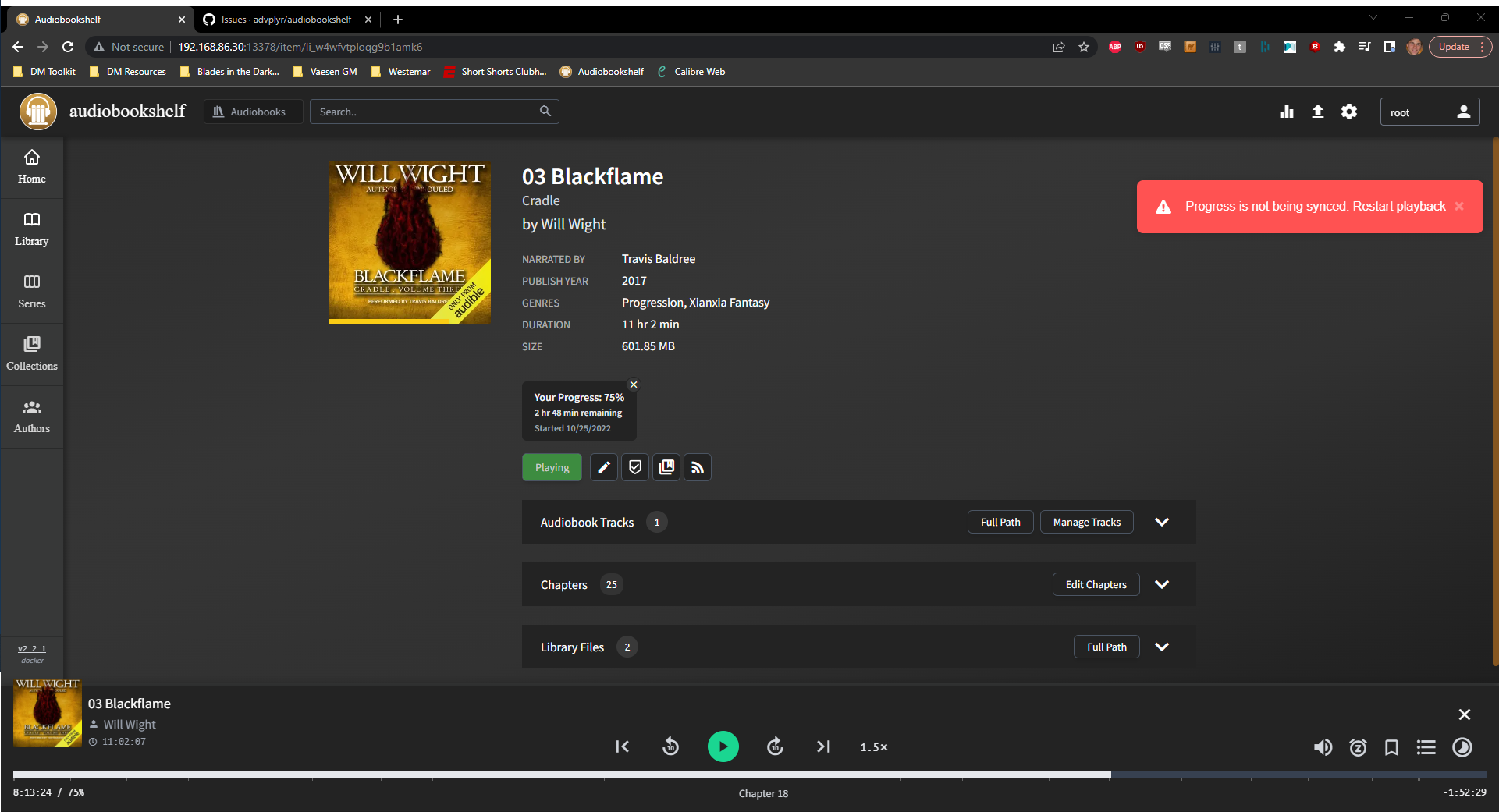
When listening on web, I get continuous popups indicating that my listening progress is not being synced. It appears every few seconds while listening. Following the advice to restart playback does nothing. It seems to sometimes tell the truth -- sometimes my progress actually is synced (despite the message), while other times it is forgotten.
On the Android app, an error also appears in the form of a red exclamation point over the book image. I know this isn't the place to file mobile app bugs, but this likely reinforces that it's a server problem, experienced by both web & app.
Recent logs show a re-occurring error that seems to indicate a file lock is being held preventing updates. I'm not sure what would be holding that lock (or what file is the culprit), as I don't have any files explicitly open.
Steps to reproduce the issue
Audiobookshelf version
v2.2.1
How are you running audiobookshelf?
Docker
@louisjg commented on GitHub (Oct 26, 2022):
Just to chime in, I experience the exact same thing, albeit running in Docker on Linux. It keeps popping up, and sometimes it syncs, sometimes it doesn't. I haven't checked the log files, but will try to remember to do so and post back.
v2.2.1 running in a Linux (Ubuntu) docker.
Browser: Chrome Version 106.0.5249.119
@advplyr commented on GitHub (Oct 26, 2022):
The lock file issue has to do with the database and seems specific to Windows file systems. I develop primarily on Windows and haven't had this happen to me since I fixed some issues about 6 - 9 months ago.
When I could reproduce this error the reason it was happening was because the lock file was not being deleted. The lock files exist in
/config/and get created then deleted to prevent simultaneous writes to a db file.The lock file wasn't being deleted because Windows still had a file handler open for that file. Any software that scans your file system (i.e. antivirus or another media server) could potentially be reading that file preventing them from being deleted by abs.
Most likely the database will be replaced with Sqlite so we won't have to deal with this anymore but in the meantime you can check if anything else could be accessing files inside your
/configfolder.@louisjg yours is most likely a separate issue not relating to the lock files. I haven't seen the lockfile issue reported for anything but Windows users.
@mikehoyle commented on GitHub (Oct 27, 2022):
Interesting. To me in the windows folks system the offending lock shows as
an empty directory. Can I just delete it manually?
On Wed, Oct 26, 2022, 2:18 PM advplyr @.***> wrote:
@advplyr commented on GitHub (Oct 27, 2022):
Yes you can delete it. The lock file is an empty directory
@mikehoyle commented on GitHub (Oct 27, 2022):
Update on this:
Deleting the lock file does seem to work... for a time. However, coming back to the session later, the exact same problem occurred. It seems to only ever happen with the config/user lockfile, so I don't anticipate it's some spurious issue such as a antivirus holding the lock.
@louisjg commented on GitHub (Oct 27, 2022):
OK, I will poke around and see if I can find out what is causing it; if I figure it out, I will make a separate ticket. Thanks!
@louisjg commented on GitHub (Oct 27, 2022):
@mikehoyle You can try to use resmon to see what process has the lock file open. There are other ways, but this is the easiest when it works.
https://www.winhelponline.com/blog/resource-monitor-find-process-locked-file-windows-7/
If you have any of your directories on a windows share, oplocks can cause this as well. SMB doesn't do so well with them sometimes.
@mikehoyle commented on GitHub (Oct 29, 2022):
Alright, I had to wait a while before I got another repro, but this time it's happening with a different lock, the sessions lock.
I can see through Resource Monitor and Process Explorer that nothing is holding a lock on the file. This may well be a repro of #845 and #653 before it, although -- while closed -- those don't seem to offer a concrete solution IMO.
I can also confirm through windows that the file itself is days old, so assuming that fs.mtime is translating properly to docker, it should be considered "stale" by any measure I see in the lockfile code. The default, afaict, is 10,000 millis and I don't see it changed elsewhere. Based on my reading of the code, this error is occurring because it's determined the lockfile isn't stale, when it most definitely is (source).
This is based on first reading and is in vendored code so I don't know that anyone else would have insight there, but based on my reading the lock definitely should be deleted in this scenario, even if it were missed in a past run. My only guess is that for some reason the file stat is misleading due to the Docker context, but I don't know why it would only occur randomly rather than every time.
@advplyr commented on GitHub (Oct 29, 2022):
@mikehoyle that's a good observation, I hadn't even considered that. I haven't looked into it yet but are you passing in a timezone to Docker?
Are you running the server on something other then Windows then mapping in Windows folders?
@mikehoyle commented on GitHub (Oct 30, 2022):
I am running in Docker Desktop via the standard docker steps at https://www.audiobookshelf.org/install#docker. All mounted directories are standard Windows directories with no linking.
Running
$ datein the docker terminal does display the current time zone as UTC (whereas I'm US/West Coast), but I would hope that isn't the problem given it's all stored as epoch time on the backend anyways. I tried running a few$ statcommands in the Docker shell for the container and all seems about right. Unfortunately I currently don't have any offending files, because I keep deleting them after doing a little debugging to keep the project working properly. Next time I get a repro I'll think to check that.When I check Docker logs I do get a little bit of new information that in the audiobookshelf log display:
This is thrown by njodb any time an ECOMPROMISED error bubbles up, and as far as I can tell any lockfile error of that time sources back to this block of code being called. That could be due to a few things (njodb unfortunately black-boxes the source stack-trace of the error), like it being too long between updates, but that still doesn't add any clarity to why this would just be a problem sometimes, for some users. It could be just as you said, a temporary hold due to antivirus or the like causing problems and things get in a bad state from there.
Regardless of how it happens, once it's set as compromised then it's doomed, because it's removed from the global locks list but not from the file system, so we're destined to always think the lock is being held but not ours, leading to the constant stream of errors that never resolve themselves.
Neither proper-lockfile nor njodb github repos have promising-looking bugs filed. I do see another repo addressed a similar issue by significantly increasing the staleness requirements (see here). If you're okay with diverging from njodb upstream, I think this is where you'd make the update. Even better, to not diverge the njodb lib, you could add it as a userproperties parameter in the Database instantiations here. It seems to me like it couldn't hurt to increase the default stale time significantly from 5 seconds (The example above used 5 minutes), that could go a long way to prevent errors like this if, for example, new files get scanned and locked for up to five seconds by Windows and then are stale by the time they're accessible.
@advplyr commented on GitHub (Oct 30, 2022):
When this was happening before with a file handler being left on the lockfile it was throwing a different error message.
I thought 5 minutes felt like a long time so I set it to 2 minutes to try it out. Hopefully this can hold us over until we migrate to sqlite. If you are up for using the edge docker release then you can test this out before the official release.
@mikehoyle commented on GitHub (Oct 30, 2022):
Great, Running on edge now, I'll update with results
@mikehoyle commented on GitHub (Oct 31, 2022):
Unfortunately, this didn't solve the problem :(
I'm about out of ideas for now.
@mikehoyle commented on GitHub (Oct 31, 2022):
Something that just occurred to me is the volumes I am mounting are all on an external drive. I'm not sure how or if that may be contributing, but all my drives including the audiobook one are NTFS file systems.
@advplyr commented on GitHub (Nov 2, 2022):
That is probably it. Network drives have been behind a lot of the weird issues we've had with Windows file systems but I don't know enough about it to explain what is going on.
In order to test that you only need to move the
/configvolume to a local drive.@mikehoyle commented on GitHub (Nov 5, 2022):
Just to clarify, the drive in question is local and external (as in usb-connected), not a network drive.
However I've moved my config to an internal drive and haven't experienced an issue in days, this seems like it was the problem. Closing for now.
@Kuro96 commented on GitHub (Mar 1, 2023):
same issue when running on linux with nfs