Socket failed to connect #127

Closed
opened 2026-04-24 22:59:04 +02:00 by adam · 31 comments
Owner

Originally created by @dietrichmd on GitHub (Dec 14, 2021).

Fresh install using docker-compose and apache2. I can access site and login, but everything I try to do is greeted with a Socket Failed to Connect error.

Please advise.

Thanks

Originally created by @dietrichmd on GitHub (Dec 14, 2021). Fresh install using docker-compose and apache2. I can access site and login, but everything I try to do is greeted with a Socket Failed to Connect error. Please advise. Thanks
adam closed this issue 2026-04-24 22:59:04 +02:00
Author
Owner

@dietrichmd commented on GitHub (Dec 14, 2021):

here is proxypass info

ProxyPreserveHost On
ProxyPass /.well-known/ !
ProxyPass / http://192.168.1.11:4040/
ProxyPassReverse /.well-known/ !
ProxyPassReverse / http://192.168.1.11:4040/
Alias / http://192.168.1.11:4040/
RewriteEngine on
RewriteCond %{HTTP:Upgrade} websocket [NC]
RewriteCond %{HTTP:Connection} upgrade [NC]
RewriteRule ^/?(.*) "ws://localhost:4040/$1" [P,L]

@dietrichmd commented on GitHub (Dec 14, 2021): here is proxypass info ProxyPreserveHost On ProxyPass /.well-known/ ! ProxyPass / http://192.168.1.11:4040/ ProxyPassReverse /.well-known/ ! ProxyPassReverse / http://192.168.1.11:4040/ Alias / http://192.168.1.11:4040/ RewriteEngine on RewriteCond %{HTTP:Upgrade} websocket [NC] RewriteCond %{HTTP:Connection} upgrade [NC] RewriteRule ^/?(.*) "ws://localhost:4040/$1" [P,L]
Author
Owner

@dietrichmd commented on GitHub (Dec 14, 2021):

Solved: proxy_wstunnel_module was not enabled. For those looking, its a2enmod proxy_wstunnel

@dietrichmd commented on GitHub (Dec 14, 2021): Solved: proxy_wstunnel_module was not enabled. For those looking, its a2enmod proxy_wstunnel
Author
Owner

@silentArtifact commented on GitHub (Feb 10, 2022):

I'm having this issue, but only when attempting to stream off the local network. Everything else works. It's running from Docker on a Synology NAS.

@silentArtifact commented on GitHub (Feb 10, 2022): I'm having this issue, but _only_ when attempting to stream off the local network. Everything else works. It's running from Docker on a Synology NAS.
Author
Owner

@advplyr commented on GitHub (Feb 10, 2022):

Running a reverse proxy? SSL?

@advplyr commented on GitHub (Feb 10, 2022): Running a reverse proxy? SSL?
Author
Owner

@silentArtifact commented on GitHub (Feb 11, 2022):

Yeah, reverse proxy set up through the DMS os itself, same with SSL. I've got the same thing done with Plex and a bunch of other containers, so I'm not sure what I should do with this.

@silentArtifact commented on GitHub (Feb 11, 2022): Yeah, reverse proxy set up through the DMS os itself, same with SSL. I've got the same thing done with Plex and a bunch of other containers, so I'm not sure what I should do with this.
Author
Owner

@timbatog commented on GitHub (Feb 11, 2022):

I have they same issue with NGiNX

11 Feb 2022, 15:21 by @.***:

Yeah, reverse proxy set up through the DMS os itself, same with SSL. I've got the same thing done with Plex and a bunch of other containers, so I'm not sure what I should do with this.


Reply to this email directly, > view it on GitHub https://github.com/advplyr/audiobookshelf/issues/241#issuecomment-1036325660> , or > unsubscribe https://github.com/notifications/unsubscribe-auth/AF7CETTI4BQU7OZ6YDDZQHLU2USPFANCNFSM5KA4T4GQ> .
Triage notifications on the go with GitHub Mobile for > iOS https://apps.apple.com/app/apple-store/id1477376905?ct=notification-email&mt=8&pt=524675> or > Android https://play.google.com/store/apps/details?id=com.github.android&referrer=utm_campaign%3Dnotification-email%26utm_medium%3Demail%26utm_source%3Dgithub> .
You are receiving this because you are subscribed to this thread.> Message ID: > <advplyr/audiobookshelf/issues/241/1036325660> @> github> .> com>

@timbatog commented on GitHub (Feb 11, 2022): I have they same issue with NGiNX 11 Feb 2022, 15:21 by ***@***.***: > > > > > Yeah, reverse proxy set up through the DMS os itself, same with SSL. I've got the same thing done with Plex and a bunch of other containers, so I'm not sure what I should do with this. > > > > — > Reply to this email directly, > view it on GitHub <https://github.com/advplyr/audiobookshelf/issues/241#issuecomment-1036325660>> , or > unsubscribe <https://github.com/notifications/unsubscribe-auth/AF7CETTI4BQU7OZ6YDDZQHLU2USPFANCNFSM5KA4T4GQ>> . > Triage notifications on the go with GitHub Mobile for > iOS <https://apps.apple.com/app/apple-store/id1477376905?ct=notification-email&mt=8&pt=524675>> or > Android <https://play.google.com/store/apps/details?id=com.github.android&referrer=utm_campaign%3Dnotification-email%26utm_medium%3Demail%26utm_source%3Dgithub>> . > You are receiving this because you are subscribed to this thread.> Message ID: > <advplyr/audiobookshelf/issues/241/1036325660> @> github> .> com> > > >
Author
Owner

@advplyr commented on GitHub (Feb 11, 2022):

The difference is that audiobookshelf requires a web socket connection, so the reverse proxy config will probably not be the exact same as other media servers. In NGINX proxy manager there is a toggle for web sockets support.
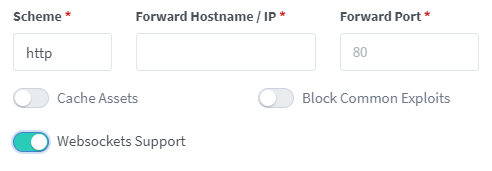
image

@advplyr commented on GitHub (Feb 11, 2022): The difference is that audiobookshelf requires a web socket connection, so the reverse proxy config will probably not be the exact same as other media servers. In NGINX proxy manager there is a toggle for web sockets support. ![image](https://user-images.githubusercontent.com/67830747/153679106-b2a7f5b9-0702-48c6-9740-b26b401986e9.png)
Author
Owner

@timbatog commented on GitHub (Feb 11, 2022):

You did it! thank you!! (this needs to be on a sticky somewhere - it's so helpful)

11 Feb 2022, 22:26 by @.***:

The difference is that audiobookshelf requires a web socket connection, so the reverse proxy config will probably not be the exact same as other media servers. In NGINX proxy manager there is a toggle for web sockets support. https://user-images.githubusercontent.com/67830747/153679106-b2a7f5b9-0702-48c6-9740-b26b401986e9.png


Reply to this email directly, > view it on GitHub https://github.com/advplyr/audiobookshelf/issues/241#issuecomment-1036688673> , or > unsubscribe https://github.com/notifications/unsubscribe-auth/AF7CETXMXVGXIXYN4O3U46TU2WEK5ANCNFSM5KA4T4GQ> .
Triage notifications on the go with GitHub Mobile for > iOS https://apps.apple.com/app/apple-store/id1477376905?ct=notification-email&mt=8&pt=524675> or > Android https://play.google.com/store/apps/details?id=com.github.android&referrer=utm_campaign%3Dnotification-email%26utm_medium%3Demail%26utm_source%3Dgithub> .
You are receiving this because you commented.> Message ID: > <advplyr/audiobookshelf/issues/241/1036688673> @> github> .> com>

@timbatog commented on GitHub (Feb 11, 2022): You did it! thank you!! (this needs to be on a sticky somewhere - it's so helpful) 11 Feb 2022, 22:26 by ***@***.***: > > > > > The difference is that audiobookshelf requires a web socket connection, so the reverse proxy config will probably not be the exact same as other media servers. In NGINX proxy manager there is a toggle for web sockets support. <https://user-images.githubusercontent.com/67830747/153679106-b2a7f5b9-0702-48c6-9740-b26b401986e9.png> > > > > — > Reply to this email directly, > view it on GitHub <https://github.com/advplyr/audiobookshelf/issues/241#issuecomment-1036688673>> , or > unsubscribe <https://github.com/notifications/unsubscribe-auth/AF7CETXMXVGXIXYN4O3U46TU2WEK5ANCNFSM5KA4T4GQ>> . > Triage notifications on the go with GitHub Mobile for > iOS <https://apps.apple.com/app/apple-store/id1477376905?ct=notification-email&mt=8&pt=524675>> or > Android <https://play.google.com/store/apps/details?id=com.github.android&referrer=utm_campaign%3Dnotification-email%26utm_medium%3Demail%26utm_source%3Dgithub>> . > You are receiving this because you commented.> Message ID: > <advplyr/audiobookshelf/issues/241/1036688673> @> github> .> com> > > >
Author
Owner

@silentArtifact commented on GitHub (Feb 12, 2022):

Agreed. For synology, I followed these steps:

  1. Open Control Panel > Application Portal
  2. Change to the Reverse Proxy tab
  3. Select the proxy rule for which you want to enable Websockets and click on Edit
  4. Change to the "Custom Header" tab
  5. Click Create > WebSocket
  6. Click Save

Now it works!

@silentArtifact commented on GitHub (Feb 12, 2022): Agreed. For synology, I followed these steps: 1. Open Control Panel > Application Portal 2. Change to the Reverse Proxy tab 3. Select the proxy rule for which you want to enable Websockets and click on Edit 4. Change to the "Custom Header" tab 5. Click Create > WebSocket 6. Click Save Now it works!
Author
Owner

@advplyr commented on GitHub (Feb 12, 2022):

Awesome, thanks for following up with your steps. It is still a bit messy, but I added your steps for synology and the screenshot for nginx proxy manager in the readme.
https://github.com/advplyr/audiobookshelf/blob/master/readme.md#reverse-proxy-set-up

@advplyr commented on GitHub (Feb 12, 2022): Awesome, thanks for following up with your steps. It is still a bit messy, but I added your steps for synology and the screenshot for nginx proxy manager in the readme. https://github.com/advplyr/audiobookshelf/blob/master/readme.md#reverse-proxy-set-up
Author
Owner

@silentArtifact commented on GitHub (Feb 12, 2022):

Hey, I should be thanking you for all the work you've done on this! It's exactly what I've been looking for, and I seriously appreciate all your effort!

@silentArtifact commented on GitHub (Feb 12, 2022): Hey, I should be thanking _you_ for all the work you've done on this! It's exactly what I've been looking for, and I seriously appreciate all your effort!
Author
Owner

@timbatog commented on GitHub (Feb 12, 2022):

Agreed. This is excellent work!

Can I donate?

11 Feb 2022, 23:23 by @.***:

Hey, I should be thanking > you> for all the work you've done on this! It's exactly what I've been looking for, and I seriously appreciate all your effort!


Reply to this email directly, > view it on GitHub https://github.com/advplyr/audiobookshelf/issues/241#issuecomment-1036751994> , or > unsubscribe https://github.com/notifications/unsubscribe-auth/AF7CETSE6CIUN6TQKNY6WVLU2WK6VANCNFSM5KA4T4GQ> .
Triage notifications on the go with GitHub Mobile for > iOS https://apps.apple.com/app/apple-store/id1477376905?ct=notification-email&mt=8&pt=524675> or > Android https://play.google.com/store/apps/details?id=com.github.android&referrer=utm_campaign%3Dnotification-email%26utm_medium%3Demail%26utm_source%3Dgithub> .
You are receiving this because you commented.> Message ID: > <advplyr/audiobookshelf/issues/241/1036751994> @> github> .> com>

@timbatog commented on GitHub (Feb 12, 2022): Agreed. This is excellent work! Can I donate? 11 Feb 2022, 23:23 by ***@***.***: > > > > > Hey, I should be thanking > you> for all the work you've done on this! It's exactly what I've been looking for, and I seriously appreciate all your effort! > > > > > — > Reply to this email directly, > view it on GitHub <https://github.com/advplyr/audiobookshelf/issues/241#issuecomment-1036751994>> , or > unsubscribe <https://github.com/notifications/unsubscribe-auth/AF7CETSE6CIUN6TQKNY6WVLU2WK6VANCNFSM5KA4T4GQ>> . > Triage notifications on the go with GitHub Mobile for > iOS <https://apps.apple.com/app/apple-store/id1477376905?ct=notification-email&mt=8&pt=524675>> or > Android <https://play.google.com/store/apps/details?id=com.github.android&referrer=utm_campaign%3Dnotification-email%26utm_medium%3Demail%26utm_source%3Dgithub>> . > You are receiving this because you commented.> Message ID: > <advplyr/audiobookshelf/issues/241/1036751994> @> github> .> com> > > > >
Author
Owner

@advplyr commented on GitHub (Feb 12, 2022):

There is nothing setup for donations at the moment, but I appreciate your support!

@advplyr commented on GitHub (Feb 12, 2022): There is nothing setup for donations at the moment, but I appreciate your support!
Author
Owner

@timbatog commented on GitHub (Feb 12, 2022):

Pick a charity maybe? I’ll donate :)

12 Feb 2022, 00:07 by @.***:

There is nothing setup for donations at the moment, but I appreciate your support!


Reply to this email directly, > view it on GitHub https://github.com/advplyr/audiobookshelf/issues/241#issuecomment-1036815054> , or > unsubscribe https://github.com/notifications/unsubscribe-auth/AF7CETQ4WBSSUVHXGE4PBQLU2WQEXANCNFSM5KA4T4GQ> .
Triage notifications on the go with GitHub Mobile for > iOS https://apps.apple.com/app/apple-store/id1477376905?ct=notification-email&mt=8&pt=524675> or > Android https://play.google.com/store/apps/details?id=com.github.android&referrer=utm_campaign%3Dnotification-email%26utm_medium%3Demail%26utm_source%3Dgithub> .
You are receiving this because you commented.> Message ID: > <advplyr/audiobookshelf/issues/241/1036815054> @> github> .> com>

@timbatog commented on GitHub (Feb 12, 2022): Pick a charity maybe? I’ll donate :) 12 Feb 2022, 00:07 by ***@***.***: > > > > > There is nothing setup for donations at the moment, but I appreciate your support! > > > > — > Reply to this email directly, > view it on GitHub <https://github.com/advplyr/audiobookshelf/issues/241#issuecomment-1036815054>> , or > unsubscribe <https://github.com/notifications/unsubscribe-auth/AF7CETQ4WBSSUVHXGE4PBQLU2WQEXANCNFSM5KA4T4GQ>> . > Triage notifications on the go with GitHub Mobile for > iOS <https://apps.apple.com/app/apple-store/id1477376905?ct=notification-email&mt=8&pt=524675>> or > Android <https://play.google.com/store/apps/details?id=com.github.android&referrer=utm_campaign%3Dnotification-email%26utm_medium%3Demail%26utm_source%3Dgithub>> . > You are receiving this because you commented.> Message ID: > <advplyr/audiobookshelf/issues/241/1036815054> @> github> .> com> > > >
Author
Owner

@advplyr commented on GitHub (Feb 12, 2022):

Too much pressure! If you follow the project and donate when that need arrives then that would be ideal.

@advplyr commented on GitHub (Feb 12, 2022): Too much pressure! If you follow the project and donate when that need arrives then that would be ideal.
Author
Owner

@PoepieFloepie commented on GitHub (Jul 1, 2022):

Agreed. For synology, I followed these steps:

  1. Open Control Panel > Application Portal

  2. Change to the Reverse Proxy tab

  3. Select the proxy rule for which you want to enable Websockets and click on Edit

  4. Change to the "Custom Header" tab

  5. Click Create > WebSocket

  6. Click Save

Now it works!

Not working for https,if I do this for the ios app,only http is working ( that I don't want for outside my network)

@PoepieFloepie commented on GitHub (Jul 1, 2022): > Agreed. For synology, I followed these steps: > > > > 1. Open Control Panel > Application Portal > > 2. Change to the Reverse Proxy tab > > 3. Select the proxy rule for which you want to enable Websockets and click on Edit > > 4. Change to the "Custom Header" tab > > 5. Click Create > WebSocket > > 6. Click Save > > > > Now it works! Not working for https,if I do this for the ios app,only http is working ( that I don't want for outside my network)
Author
Owner

@adamk33n3r commented on GitHub (Sep 7, 2022):

Agreed. For synology, I followed these steps:

  1. Open Control Panel > Application Portal
  2. Change to the Reverse Proxy tab
  3. Select the proxy rule for which you want to enable Websockets and click on Edit
  4. Change to the "Custom Header" tab
  5. Click Create > WebSocket
  6. Click Save

Now it works!

Not working for https,if I do this for the ios app,only http is working ( that I don't want for outside my network)

Same, I'm trying to use https through reverse proxy (so the app still receives via http) and in the Android app it fails to ping and replaces what I've typed with http. It works fine if I connect from http but obviously I'd prefer to use https for everything.

Edit: I take it back that "it works fine". It does go to the login screen, but I am getting "Unknown error" when I try to log in.

@adamk33n3r commented on GitHub (Sep 7, 2022): > > Agreed. For synology, I followed these steps: > > > > 1. Open Control Panel > Application Portal > > 2. Change to the Reverse Proxy tab > > 3. Select the proxy rule for which you want to enable Websockets and click on Edit > > 4. Change to the "Custom Header" tab > > 5. Click Create > WebSocket > > 6. Click Save > > > > Now it works! > > Not working for https,if I do this for the ios app,only http is working ( that I don't want for outside my network) Same, I'm trying to use https through reverse proxy (so the app still receives via http) and in the Android app it fails to ping and replaces what I've typed with `http`. It works fine if I connect from `http` but obviously I'd prefer to use `https` for everything. Edit: I take it back that "it works fine". It does go to the login screen, but I am getting "Unknown error" when I try to log in.
Author
Owner

@SyndicatedPillbug commented on GitHub (Feb 1, 2023):

Agreed. For synology, I followed these steps:

  1. Open Control Panel > Application Portal
  2. Change to the Reverse Proxy tab
  3. Select the proxy rule for which you want to enable Websockets and click on Edit
  4. Change to the "Custom Header" tab
  5. Click Create > WebSocket
  6. Click Save

Now it works!

I'm missing the other information for this, though! What ports do I need to use? It's like the first half of the instructions are missing for this reverse proxy thing.

@SyndicatedPillbug commented on GitHub (Feb 1, 2023): > Agreed. For synology, I followed these steps: > > 1. Open Control Panel > Application Portal > 2. Change to the Reverse Proxy tab > 3. Select the proxy rule for which you want to enable Websockets and click on Edit > 4. Change to the "Custom Header" tab > 5. Click Create > WebSocket > 6. Click Save > > Now it works! I'm missing the other information for this, though! What ports do I need to use? It's like the first half of the instructions are missing for this reverse proxy thing.
Author
Owner

@ghost commented on GitHub (Jun 11, 2023):

Agreed. For synology, I followed these steps:

1. Open Control Panel > Application Portal

2. Change to the Reverse Proxy tab

3. Select the proxy rule for which you want to enable Websockets and click on Edit

4. Change to the "Custom Header" tab

5. Click Create > WebSocket

6. Click Save

Now it works!

Thank you this worked immediately!

@ghost commented on GitHub (Jun 11, 2023): > Agreed. For synology, I followed these steps: > > 1. Open Control Panel > Application Portal > > 2. Change to the Reverse Proxy tab > > 3. Select the proxy rule for which you want to enable Websockets and click on Edit > > 4. Change to the "Custom Header" tab > > 5. Click Create > WebSocket > > 6. Click Save > > > Now it works! Thank you this worked immediately!
Author
Owner

@coracoo commented on GitHub (Jun 16, 2023):

great ,It work .

@coracoo commented on GitHub (Jun 16, 2023): great ,It work .
Author
Owner

@guhanmathi commented on GitHub (Aug 16, 2023):

The difference is that audiobookshelf requires a web socket connection, so the reverse proxy config will probably not be the exact same as other media servers. In NGINX proxy manager there is a toggle for web sockets support. image

This helped in fixing my service showing socket errors running through nginx

@guhanmathi commented on GitHub (Aug 16, 2023): > The difference is that audiobookshelf requires a web socket connection, so the reverse proxy config will probably not be the exact same as other media servers. In NGINX proxy manager there is a toggle for web sockets support. ![image](https://user-images.githubusercontent.com/67830747/153679106-b2a7f5b9-0702-48c6-9740-b26b401986e9.png) This helped in fixing my service showing socket errors running through nginx
Author
Owner

@m4tz3 commented on GitHub (Nov 10, 2023):

grafik
grafik
grafik

DSM Changed a bit. could somebody share some screenshots with me? it's still not running at all for me

@m4tz3 commented on GitHub (Nov 10, 2023): ![grafik](https://github.com/advplyr/audiobookshelf/assets/6939489/11a558e6-63d8-4b67-b27f-f20da4c7ede6) ![grafik](https://github.com/advplyr/audiobookshelf/assets/6939489/5d28dc0f-3f6e-47a4-882c-abef015dca29) ![grafik](https://github.com/advplyr/audiobookshelf/assets/6939489/b84ddc93-56b1-41ae-9f99-735188497c8e) DSM Changed a bit. could somebody share some screenshots with me? it's still not running at all for me
Author
Owner

@robinjoseph08 commented on GitHub (Jan 19, 2024):

For posterity, just wanted to recount my experience here too, in case it helps someone else. I'm using a Synology NAS with DSM 7.2. I have ABS deployed using Container Manager, and it all works fine on my local network. I originally had ABS exposed publicly using Web Station (since that's also how I have Jellyfin exposed), but even though I could load it using my domain, it would always show the "Socket failed to connect" error.

Following these instructions, I deleted the entry for ABS in Web Station (since it doesn't seem like Web Station really has support for websockets yet) and instead went to the Reverse Proxy settings (now found in Control Panel > Login Portal > Advanced), and added entries for both HTTP and HTTPS for ABS, making sure to add the Websocket custom headers mentioned in this comment. After doing that, I was able to get ABS to connect to the socket without issue!

One thing I wanted to note though is that for some reason, if I try to access my domain when I'm on my local network, it's painfully slow, sometimes it times out, and the socket connection is very spotty. If I switch to just using the local IP of my NAS, everything is snappy and reliable again, and if I connect to the domain from a different network, it's also snappy. I mention this since it was messing up my testing a little bit because even after I fixed things with the Reverse Proxy settings, using my domain on my local network was still having issues, so I had to test it on a different network to see that it was fixed.

@robinjoseph08 commented on GitHub (Jan 19, 2024): For posterity, just wanted to recount my experience here too, in case it helps someone else. I'm using a Synology NAS with DSM 7.2. I have ABS deployed using Container Manager, and it all works fine on my local network. I originally had ABS exposed publicly using Web Station (since that's also how I have Jellyfin exposed), but even though I could load it using my domain, it would always show the "Socket failed to connect" error. Following these instructions, I deleted the entry for ABS in Web Station (since it doesn't seem like Web Station really has support for websockets yet) and instead went to the Reverse Proxy settings (now found in Control Panel > Login Portal > Advanced), and added entries for both HTTP and HTTPS for ABS, making sure to add the Websocket custom headers mentioned in [this comment](https://github.com/advplyr/audiobookshelf/issues/241#issuecomment-1036732329). After doing that, I was able to get ABS to connect to the socket without issue! One thing I wanted to note though is that for some reason, if I try to access my domain when I'm on my local network, it's painfully slow, sometimes it times out, and the socket connection is very spotty. If I switch to just using the local IP of my NAS, everything is snappy and reliable again, and if I connect to the domain from a different network, it's also snappy. I mention this since it was messing up my testing a little bit because even after I fixed things with the Reverse Proxy settings, using my domain on my local network was still having issues, so I had to test it on a different network to see that it was fixed.
Author
Owner

@rpgdev commented on GitHub (Jul 7, 2024):

The difference is that audiobookshelf requires a web socket connection, so the reverse proxy config will probably not be the exact same as other media servers. In NGINX proxy manager there is a toggle for web sockets support. image

This worked! Needed to wait a few minutes for the setting to take effect and audiobookshelf to tell me that it was able to connect the socket.

@rpgdev commented on GitHub (Jul 7, 2024): > The difference is that audiobookshelf requires a web socket connection, so the reverse proxy config will probably not be the exact same as other media servers. In NGINX proxy manager there is a toggle for web sockets support. ![image](https://user-images.githubusercontent.com/67830747/153679106-b2a7f5b9-0702-48c6-9740-b26b401986e9.png) This worked! Needed to wait a few minutes for the setting to take effect and audiobookshelf to tell me that it was able to connect the socket.
Author
Owner

@soupy-boy commented on GitHub (Nov 15, 2024):

I had the same problem using typical nginx and not nginx proxy manager. Adding the following in the location portion of my .conf file fixed the issue, even when using ssl.

 location / {
        proxy_pass http://192.168.1.mylocalip:13378;
        proxy_http_version 1.1;
        proxy_set_header Upgrade $http_upgrade;
        proxy_set_header Connection 'upgrade';
        proxy_set_header Host $host;
        proxy_cache_bypass $http_upgrade;
        proxy_set_header X-Real-IP $remote_addr;
        proxy_set_header X-Forwarded-For $proxy_add_x_forwarded_for;
        proxy_set_header X-Forwarded-Proto $scheme;
    }
@soupy-boy commented on GitHub (Nov 15, 2024): I had the same problem using typical nginx and not nginx proxy manager. Adding the following in the location portion of my .conf file fixed the issue, even when using ssl. ``` location / { proxy_pass http://192.168.1.mylocalip:13378; proxy_http_version 1.1; proxy_set_header Upgrade $http_upgrade; proxy_set_header Connection 'upgrade'; proxy_set_header Host $host; proxy_cache_bypass $http_upgrade; proxy_set_header X-Real-IP $remote_addr; proxy_set_header X-Forwarded-For $proxy_add_x_forwarded_for; proxy_set_header X-Forwarded-Proto $scheme; } ```
Author
Owner

@kanine commented on GitHub (Nov 22, 2024):

Thanks @loganank these were the lines that made the difference for me:

proxy_http_version 1.1;
proxy_set_header Upgrade $http_upgrade;
proxy_set_header Connection 'upgrade';
proxy_cache_bypass $http_upgrade;
@kanine commented on GitHub (Nov 22, 2024): Thanks @loganank these were the lines that made the difference for me: ``` proxy_http_version 1.1; proxy_set_header Upgrade $http_upgrade; proxy_set_header Connection 'upgrade'; proxy_cache_bypass $http_upgrade; ```
Author
Owner

@not-a-longneck commented on GitHub (Jan 9, 2025):

The difference is that audiobookshelf requires a web socket connection, so the reverse proxy config will probably not be the exact same as other media servers. In NGINX proxy manager there is a toggle for web sockets support. image

Thank you. That worked.

@not-a-longneck commented on GitHub (Jan 9, 2025): > The difference is that audiobookshelf requires a web socket connection, so the reverse proxy config will probably not be the exact same as other media servers. In NGINX proxy manager there is a toggle for web sockets support. ![image](https://user-images.githubusercontent.com/67830747/153679106-b2a7f5b9-0702-48c6-9740-b26b401986e9.png) Thank you. That worked.
Author
Owner

@lakestonelabs commented on GitHub (Jan 20, 2025):

For those using opnsense with the nginx plugin, I could not get my android client to play media. I could connect to the audiobookshelf server and see the bookshelf listing but when I pressed "Stream" I would get an error. What ended up being the root cause for me is that the opnsense nginx plugin automatically has a preset list of bot user agents applied to its auto-ban list. The 'okhttp' http client is being used by audiobookshelf client apps and this was on the bot list for auto-banning. As soon as I removed this from the bot list in the nginx pluygin and reloaded nginx, everything started working.

@lakestonelabs commented on GitHub (Jan 20, 2025): For those using opnsense with the nginx plugin, I could not get my android client to play media. I could connect to the audiobookshelf server and see the bookshelf listing but when I pressed "Stream" I would get an error. What ended up being the root cause for me is that the opnsense nginx plugin automatically has a preset list of bot user agents applied to its auto-ban list. The 'okhttp' http client is being used by audiobookshelf client apps and this was on the bot list for auto-banning. As soon as I removed this from the bot list in the nginx pluygin and reloaded nginx, everything started working.
Author
Owner

@rpgdev commented on GitHub (Jan 28, 2025):

@lakestonelabs thanks for sharing.. I'm setting up opnsense as we speak.

@rpgdev commented on GitHub (Jan 28, 2025): @lakestonelabs thanks for sharing.. I'm setting up opnsense as we speak.
Author
Owner

@kchism2020 commented on GitHub (Feb 3, 2025):

The difference is that audiobookshelf requires a web socket connection, so the reverse proxy config will probably not be the exact same as other media servers. In NGINX proxy manager there is a toggle for web sockets support. image

This fixed the issue for me, nginx rpm

@kchism2020 commented on GitHub (Feb 3, 2025): > The difference is that audiobookshelf requires a web socket connection, so the reverse proxy config will probably not be the exact same as other media servers. In NGINX proxy manager there is a toggle for web sockets support. ![image](https://user-images.githubusercontent.com/67830747/153679106-b2a7f5b9-0702-48c6-9740-b26b401986e9.png) This fixed the issue for me, nginx rpm
Author
Owner

@MilesTEG1 commented on GitHub (Dec 14, 2025):

Hello,

I'm having this issue, but only when attempting to stream off the local network. Everything else works. It's running from Docker on a Synology NAS.

I'm exprimenting the same issue, and like @silentArtifact I only have this message when I'm on my LAN network:
Image

When I accessed from outside, so from internet, websocket is connected:
Image

But for me, Audiobookshelf is installed in docker inside a VM debian 13 (proxmox).

When I use SWAG as reverse proxy, I get the "Websocket failed to connect" message.
I also have AdGuardHome as DNS server inside my LAN, so I rewrite my domain name to point the reverse proxy.

my audiobbokshelf.conf file
## Version 2025/07/18
# make sure that your audiobookshelf container is named audiobookshelf
# make sure that your dns has a cname set for audiobookshelf

server {
  listen 443 ssl;
  listen 443 quic;
  # listen [::]:443 ssl;
#    listen [::]:443 quic;

  server_name my_audiobook_subdomaine.*;

  include /config/nginx/ssl.conf;

  client_max_body_size 10240M;

  # enable for ldap auth (requires ldap-location.conf in the location block)
  #include /config/nginx/ldap-server.conf;

  # enable for Authelia (requires authelia-location.conf in the location block)
  #include /config/nginx/authelia-server.conf;

  # enable for Authentik (requires authentik-location.conf in the location block)
  #include /config/nginx/authentik-server.conf;

  # enable for Tinyauth (requires tinyauth-location.conf in the location block)
  #include /config/nginx/tinyauth-server.conf;

  # GeoIP Blocking with Maxmind Docker-MOD
  include /config/nginx/maxmind-geoblock_and_LAN.conf;

  # Restrict access to some IPs only (LAN & VPNs)
  # include /config/nginx/ACL.IP-LAN.conf;

  # Log général pour tout le reste (optionnel)
  access_log /config/log/nginx/access.log;

  location / {
      # enable the next two lines for http auth
      #auth_basic "Restricted";
      #auth_basic_user_file /config/nginx/.htpasswd;

      # enable for ldap auth (requires ldap-server.conf in the server block)
      #include /config/nginx/ldap-location.conf;

      # enable for Authelia (requires authelia-server.conf in the server block)
      #include /config/nginx/authelia-location.conf;

      # enable for Authentik (requires authentik-server.conf in the server block)
      #include /config/nginx/authentik-location.conf;

      # enable for Tinyauth (requires tinyauth-server.conf in the server block)
      #include /config/nginx/tinyauth-location.conf;

      include /config/nginx/proxy.conf;
      include /config/nginx/resolver.conf;
      set $upstream_app 192.168.2.141;
      set $upstream_port 10880;
      set $upstream_proto http;
      proxy_pass $upstream_proto://$upstream_app:$upstream_port;

      proxy_set_header Upgrade $http_upgrade;
      proxy_set_header Connection 'upgrade';
      proxy_set_header Host $host;
      proxy_cache_bypass $http_upgrade;
      proxy_set_header X-Real-IP $remote_addr;
      proxy_set_header X-Forwarded-For $proxy_add_x_forwarded_for;
      proxy_set_header X-Forwarded-Proto $scheme;
  }
}

But now, I set up a new reverse proxy with NPMplus:

Image

And now, I don't have anymore the message about the websocket failed.

@advplyr Could you add NPMplus configuration in the doc?

@MilesTEG1 commented on GitHub (Dec 14, 2025): Hello, > I'm having this issue, but _only_ when attempting to stream off the local network. Everything else works. It's running from Docker on a Synology NAS. I'm exprimenting the same issue, and like @silentArtifact I only have this message when I'm on my LAN network: <img width="1290" height="204" alt="Image" src="https://github.com/user-attachments/assets/fb4bb471-9880-4879-8102-6ba29ff87512" /> When I accessed from outside, so from internet, websocket is connected: <img width="1290" height="191" alt="Image" src="https://github.com/user-attachments/assets/ee859549-9a43-4e78-ad09-2e5c704fe14b" /> But for me, Audiobookshelf is installed in docker inside a VM debian 13 (proxmox). When I use SWAG as reverse proxy, I get the "Websocket failed to connect" message. **I also have AdGuardHome as DNS server inside my LAN, so I rewrite my domain name to point the reverse proxy.** <details> <summary>my audiobbokshelf.conf file</summary> ```nginx ## Version 2025/07/18 # make sure that your audiobookshelf container is named audiobookshelf # make sure that your dns has a cname set for audiobookshelf server { listen 443 ssl; listen 443 quic; # listen [::]:443 ssl; # listen [::]:443 quic; server_name my_audiobook_subdomaine.*; include /config/nginx/ssl.conf; client_max_body_size 10240M; # enable for ldap auth (requires ldap-location.conf in the location block) #include /config/nginx/ldap-server.conf; # enable for Authelia (requires authelia-location.conf in the location block) #include /config/nginx/authelia-server.conf; # enable for Authentik (requires authentik-location.conf in the location block) #include /config/nginx/authentik-server.conf; # enable for Tinyauth (requires tinyauth-location.conf in the location block) #include /config/nginx/tinyauth-server.conf; # GeoIP Blocking with Maxmind Docker-MOD include /config/nginx/maxmind-geoblock_and_LAN.conf; # Restrict access to some IPs only (LAN & VPNs) # include /config/nginx/ACL.IP-LAN.conf; # Log général pour tout le reste (optionnel) access_log /config/log/nginx/access.log; location / { # enable the next two lines for http auth #auth_basic "Restricted"; #auth_basic_user_file /config/nginx/.htpasswd; # enable for ldap auth (requires ldap-server.conf in the server block) #include /config/nginx/ldap-location.conf; # enable for Authelia (requires authelia-server.conf in the server block) #include /config/nginx/authelia-location.conf; # enable for Authentik (requires authentik-server.conf in the server block) #include /config/nginx/authentik-location.conf; # enable for Tinyauth (requires tinyauth-server.conf in the server block) #include /config/nginx/tinyauth-location.conf; include /config/nginx/proxy.conf; include /config/nginx/resolver.conf; set $upstream_app 192.168.2.141; set $upstream_port 10880; set $upstream_proto http; proxy_pass $upstream_proto://$upstream_app:$upstream_port; proxy_set_header Upgrade $http_upgrade; proxy_set_header Connection 'upgrade'; proxy_set_header Host $host; proxy_cache_bypass $http_upgrade; proxy_set_header X-Real-IP $remote_addr; proxy_set_header X-Forwarded-For $proxy_add_x_forwarded_for; proxy_set_header X-Forwarded-Proto $scheme; } } ``` </details> --- But now, I set up a new reverse proxy with NPMplus: <img width="1021" height="605" alt="Image" src="https://github.com/user-attachments/assets/ffd6b768-0982-4926-b831-1ceed7a5fc52" /> And now, I don't have anymore the message about the websocket failed. @advplyr Could you add NPMplus configuration in the doc?
Sign in to join this conversation.
1 Participants
Notifications
Due Date
No due date set.
Dependencies

No dependencies set.

Reference: starred/audiobookshelf#127