Originally created by @Rdkang on GitHub (Mar 21, 2023).
Steps to reproduce
Below is the setting that i have set for the program to use on the webui.
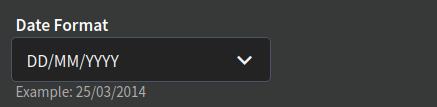
Which works correctly on the webui as shown below
But on the app it doens't use the format i specified as i want DD/MM/YYYY but shows MM/DD/YYYY
Expected behaviour
should show dates in the format chosen in settings
Actual behaviour
shows date in MM/DD/YYYY
Audiobookshelf Version:
Android App?
iOS App?
url
Android Issue
Android version: 0.9.63-beta
Device model: oneplus 7t
Stock or customized system: stock
Originally created by @Rdkang on GitHub (Mar 21, 2023).
### Steps to reproduce
Below is the setting that i have set for the program to use on the webui.

Which works correctly on the webui as shown below
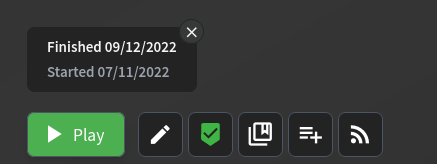
But on the app it doens't use the format i specified as i want `DD/MM/YYYY` but shows `MM/DD/YYYY`
<img src="https://user-images.githubusercontent.com/68774237/226642644-b4ad1e9f-0edf-483c-809d-004b62d59ada.jpg" alt="mobile app screenshot" width="400" height="200">
### Expected behaviour
- should show dates in the format chosen in settings
### Actual behaviour
- shows date in `MM/DD/YYYY`
Audiobookshelf Version:
- [x] Android App?
- [ ] iOS App?
url
#### Android Issue
Android version: 0.9.63-beta
Device model: oneplus 7t
Stock or customized system: stock
adam
added the bug label 2026-04-24 23:26:14 +02:00
Blocking a user prevents them from interacting with repositories, such as opening or commenting on pull requests or issues. Learn more about blocking a user.
Originally created by @Rdkang on GitHub (Mar 21, 2023).
Steps to reproduce
Below is the setting that i have set for the program to use on the webui.

Which works correctly on the webui as shown below

But on the app it doens't use the format i specified as i want
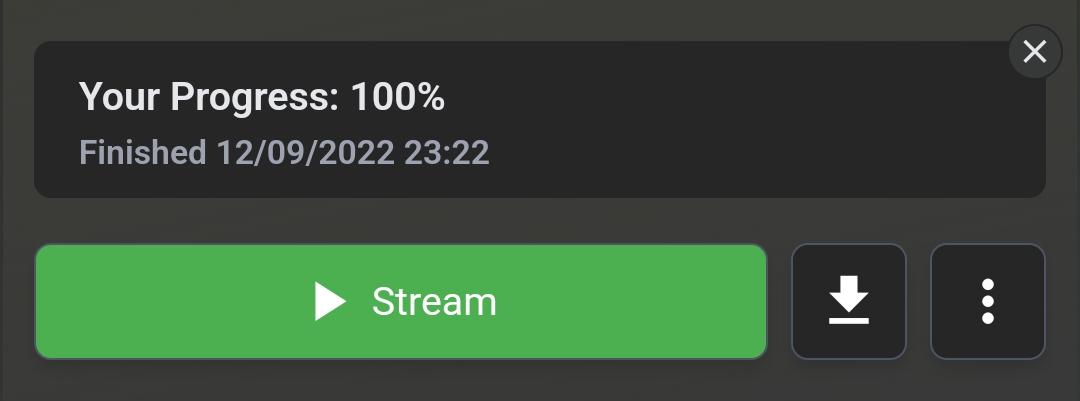
DD/MM/YYYYbut showsMM/DD/YYYYExpected behaviour
Actual behaviour
MM/DD/YYYYAudiobookshelf Version:
url
Android Issue
Android version: 0.9.63-beta
Device model: oneplus 7t
Stock or customized system: stock