Originally created by @ljlongwing on GitHub (Feb 12, 2023).
I'll give you all of the things I did, just in case any of them are relevant
Steps to reproduce
Installed server
Installed Android client and connected, no issue
Started listening to a few books, played with the download setting on one of them
Finished listening to the book in question
Went into 'Local Media' and, I don't remember the option, because I can't get back here, but I told it to clear out the folder (because I had only downloaded the one book)
Went to start listening to another book...wouldn't stream, wouldn't download
Tried another book which previously streamed, no luck....I press the stream button, the phone vibrates, but never starts the stream
Expected behaviour
I would expect to be able to stream or play any other book in my library
Actual behaviour
Nothing I do seems to allow me to use the client at this point. I have cleared data, I deleted the folder, I uninstalled and reinstalled the client...nothing I do seems to be able to allow me to use the client at this point. If I switch the server logs to debug, and start a streaming, I get this in the log
2023-02-11 17:02:56 INFO [Server] Socket Connected qWLgeBw3AwNonX3OAACt
2023-02-11 17:02:56 DEBUG [Server] User Online username
2023-02-11 17:02:56 DEBUG [DB] Updated user: 1
2023-02-11 17:03:00 INFO [PlaybackSessionManager] startSession: Closing open session "Earth Unaware" for user "ljlongwing"
2023-02-11 17:03:00 DEBUG [PlaybackSessionManager] closeSession "play_yzuftnbmkwlw3e0mp1"
2023-02-11 17:03:00 DEBUG [PlaybackSessionManager] Removed session "play_yzuftnbmkwlw3e0mp1"
2023-02-11 17:03:00 DEBUG [PlaybackSessionManager] "ljlongwing" starting direct play session for item "li_zgeezilgc4tiord6i1"
Environment data
Audiobookshelf Version: 2.2.14
[X ] Android App?
iOS App?
Android Issue
Android version: .9.61-beta
Device model: Samsung Galaxy S22+
Stock or customized system: Stock
Originally created by @ljlongwing on GitHub (Feb 12, 2023).
I'll give you all of the things I did, just in case any of them are relevant
### Steps to reproduce
1. Installed server
2. Installed Android client and connected, no issue
3. Started listening to a few books, played with the download setting on one of them
4. Finished listening to the book in question
5. Went into 'Local Media' and, I don't remember the option, because I can't get back here, but I told it to clear out the folder (because I had only downloaded the one book)
6. Went to start listening to another book...wouldn't stream, wouldn't download
7. Tried another book which previously streamed, no luck....I press the stream button, the phone vibrates, but never starts the stream
### Expected behaviour
I would expect to be able to stream or play any other book in my library
### Actual behaviour
Nothing I do seems to allow me to use the client at this point. I have cleared data, I deleted the folder, I uninstalled and reinstalled the client...nothing I do seems to be able to allow me to use the client at this point. If I switch the server logs to debug, and start a streaming, I get this in the log
2023-02-11 17:02:56 INFO [Server] Socket Connected qWLgeBw3AwNonX3OAACt
2023-02-11 17:02:56 DEBUG [Server] User Online username
2023-02-11 17:02:56 DEBUG [DB] Updated user: 1
2023-02-11 17:03:00 INFO [PlaybackSessionManager] startSession: Closing open session "Earth Unaware" for user "ljlongwing"
2023-02-11 17:03:00 DEBUG [PlaybackSessionManager] closeSession "play_yzuftnbmkwlw3e0mp1"
2023-02-11 17:03:00 DEBUG [PlaybackSessionManager] Removed session "play_yzuftnbmkwlw3e0mp1"
2023-02-11 17:03:00 DEBUG [PlaybackSessionManager] "ljlongwing" starting direct play session for item "li_zgeezilgc4tiord6i1"
### Environment data
Audiobookshelf Version: 2.2.14
- [X ] Android App?
- [ ] iOS App?
#### Android Issue
Android version: .9.61-beta
Device model: Samsung Galaxy S22+
Stock or customized system: Stock
adam
added the bug label 2026-04-24 23:23:51 +02:00
How about restarting your server, then uninstalling and reinstalling the app, then starting a stream.
Are you connecting to your server with a local ip address? If the above fails, can you open a browser on your phone and play the same audiobook through the website client?
@advplyr commented on GitHub (Feb 12, 2023):
How about restarting your server, then uninstalling and reinstalling the app, then starting a stream.
Are you connecting to your server with a local ip address? If the above fails, can you open a browser on your phone and play the same audiobook through the website client?
The setup I have 'typically' uses an NGINX Proxy Manager accessible to the internet, but just for testing just now, I'm local on my network and I added the local ip/port but same situation, no ability to do anything. I've restarted the server, uninstalled and reinstalled the app again, still nothing. All of my books are fully streamable via the web, so this appears to be a client only issue.
Is there any logging I can enable at the client side to give any indication what it's doing?
@ljlongwing commented on GitHub (Feb 12, 2023):
The setup I have 'typically' uses an NGINX Proxy Manager accessible to the internet, but just for testing just now, I'm local on my network and I added the local ip/port but same situation, no ability to do anything. I've restarted the server, uninstalled and reinstalled the app again, still nothing. All of my books are fully streamable via the web, so this appears to be a client only issue.
Is there any logging I can enable at the client side to give any indication what it's doing?
My feeling is that when I told it to delete that local cache of the book it successfully downloaded, that it screwed up some pointer or something in relation to its access to the local filesystem. I don't know why uninstall and reinstall wouldn't have fixed it though. I've tried deleting the folder in question and re-creating it, all to no avail.
@ljlongwing commented on GitHub (Feb 12, 2023):
My feeling is that when I told it to delete that local cache of the book it successfully downloaded, that it screwed up some pointer or something in relation to its access to the local filesystem. I don't know why uninstall and reinstall wouldn't have fixed it though. I've tried deleting the folder in question and re-creating it, all to no avail.
The only way to get useful logs would be to build from source right now.
What is confusing me about this is you said at first you could stream from the mobile app, but now even after clearing the data and reinstalling the app you cannot stream.
This suggests something changed with the data coming from the server. Can you try creating a new user on the server and logging into the app with that user?
@advplyr commented on GitHub (Feb 12, 2023):
The only way to get useful logs would be to build from source right now.
What is confusing me about this is you said at first you could stream from the mobile app, but now even after clearing the data and reinstalling the app you cannot stream.
This suggests something changed with the data coming from the server. Can you try creating a new user on the server and logging into the app with that user?
Ok...I just logged into the server via the root user...I tried the same two books that I was trying before, and it didn't work, same symptoms...so I tried another book that I had never tried before, and it started streaming. Logged back into my account and I could stream that same book. But I'm still unable to stream either of the other two. I tried clearing my progress and trying again, but still no joy...so, it seems like there is something that the app is remembering about these specific books that it can't stream for some reason.
@ljlongwing commented on GitHub (Feb 12, 2023):
Ok...I just logged into the server via the root user...I tried the same two books that I was trying before, and it didn't work, same symptoms...so I tried another book that I had never tried before, and it started streaming. Logged back into my account and I could stream that same book. But I'm still unable to stream either of the other two. I tried clearing my progress and trying again, but still no joy...so, it seems like there is something that the app is remembering about these specific books that it can't stream for some reason.
If you cleared the data for the app and reinstalled then the app is not remembering anything about the books. The issue must be on the server side.
I'm also reading this as those two books that are failing to play were both successfully streamed on your first app install. That is important to rule out the audio files are having some issue playing on the device.
My next suggestion would be to remove those 2 books from your server. Pressing edit on them then the red remove button. After removing those 2 then re-scan the library. No need to force re-scan, just regular scan. Before playing them in the web client at all, try playing them on the mobile app.
@advplyr commented on GitHub (Feb 12, 2023):
If you cleared the data for the app and reinstalled then the app is not remembering anything about the books. The issue must be on the server side.
I'm also reading this as those two books that are failing to play were both successfully streamed on your first app install. That is important to rule out the audio files are having some issue playing on the device.
My next suggestion would be to remove those 2 books from your server. Pressing edit on them then the red remove button. After removing those 2 then re-scan the library. No need to force re-scan, just regular scan. Before playing them in the web client at all, try playing them on the mobile app.
Or maybe something the server is remembering? Some failed partial transcode or something. I dunno, just putting ideas out there.
@hobesman commented on GitHub (Feb 12, 2023):
Or maybe something the _server_ is remembering? Some failed partial transcode or something. I dunno, just putting ideas out there.
Yeah something the server is remembering. Restarting the server would clear any open sessions. Removing and re-adding the library items would remove any attached media progress or saved playback sessions.
After that if it does not play then these audio files must be having an issue playing on the device. I would suggest trying another mobile device with those audio files if you have one available.
@advplyr commented on GitHub (Feb 12, 2023):
Yeah something the server is remembering. Restarting the server would clear any open sessions. Removing and re-adding the library items would remove any attached media progress or saved playback sessions.
After that if it does not play then these audio files must be having an issue playing on the device. I would suggest trying another mobile device with those audio files if you have one available.
Ok, I was able to get the client loaded on an old S10 I have....same issue...never been installed on that client before, and I even tried some other books in the same series and it wouldn't play any of them. I'm wondering if I'm remembering streaming it but I'm wrong...I know the MP3 files are good...they stream fine on the web and play fine on the computer....so, maybe something wrong with the transcoding that the Android client does that is different from the web client?
@ljlongwing commented on GitHub (Feb 13, 2023):
Ok, I was able to get the client loaded on an old S10 I have....same issue...never been installed on that client before, and I even tried some other books in the same series and it wouldn't play any of them. I'm wondering if I'm remembering streaming it but I'm wrong...I know the MP3 files are good...they stream fine on the web and play fine on the computer....so, maybe something wrong with the transcoding that the Android client does that is different from the web client?
I updated my server to the latest (v2.2.15) this mornin, still no joy. I collected these logs this morning
2023-02-13 15:20:37 DEBUG [Server] User Offline username
2023-02-13 15:20:37 INFO [Server] Socket ErtE0Z6ObdB3Gt4rAAAF disconnected from client "username" after 46307ms (Reason: transport close)
2023-02-13 15:20:38 INFO [Server] Socket Connected K9OGjRZrCO1EWsGOAAAH
2023-02-13 15:20:38 DEBUG [Server] User Online username
2023-02-13 15:20:38 DEBUG [DB] Updated user: 1
2023-02-13 15:20:44 DEBUG [PlaybackSessionManager] startSessionRequest for device SM-S906U SDK 33 / v0.9.61-beta
2023-02-13 15:20:44 INFO [PlaybackSessionManager] startSession: Closing open session "The Quantum Chain" for user "username" (Device: SM-S906U SDK 33 / v0.9.61-beta)
2023-02-13 15:20:44 DEBUG [PlaybackSessionManager] closeSession "play_ylqstho9t3okavape0"
2023-02-13 15:20:44 DEBUG [PlaybackSessionManager] Removed session "play_ylqstho9t3okavape0"
2023-02-13 15:20:44 DEBUG [PlaybackSessionManager] "username" starting direct play session for item "li_8k46li0keoh5ci03nn" with id play_cfr7g34fqca75ssc2r (Device: SM-S906U SDK 33 / v0.9.61-beta)
I can't help but notice this morning that it's discussing 'direct play' session. What determines direct play vs conversion, I don't see any settings in the client to tell it to transcode or not, quality anything, etc....I don't know if that has anything to do with it or not.
Separately, my clients inability to download anything local seem related, but unsure how...
@ljlongwing commented on GitHub (Feb 13, 2023):
I updated my server to the latest (v2.2.15) this mornin, still no joy. I collected these logs this morning
2023-02-13 15:20:37 DEBUG [Server] User Offline username
2023-02-13 15:20:37 INFO [Server] Socket ErtE0Z6ObdB3Gt4rAAAF disconnected from client "username" after 46307ms (Reason: transport close)
2023-02-13 15:20:38 INFO [Server] Socket Connected K9OGjRZrCO1EWsGOAAAH
2023-02-13 15:20:38 DEBUG [Server] User Online username
2023-02-13 15:20:38 DEBUG [DB] Updated user: 1
2023-02-13 15:20:44 DEBUG [PlaybackSessionManager] startSessionRequest for device SM-S906U SDK 33 / v0.9.61-beta
2023-02-13 15:20:44 INFO [PlaybackSessionManager] startSession: Closing open session "The Quantum Chain" for user "username" (Device: SM-S906U SDK 33 / v0.9.61-beta)
2023-02-13 15:20:44 DEBUG [PlaybackSessionManager] closeSession "play_ylqstho9t3okavape0"
2023-02-13 15:20:44 DEBUG [PlaybackSessionManager] Removed session "play_ylqstho9t3okavape0"
2023-02-13 15:20:44 DEBUG [PlaybackSessionManager] "username" starting direct play session for item "li_8k46li0keoh5ci03nn" with id play_cfr7g34fqca75ssc2r (Device: SM-S906U SDK 33 / v0.9.61-beta)
I can't help but notice this morning that it's discussing 'direct play' session. What determines direct play vs conversion, I don't see any settings in the client to tell it to transcode or not, quality anything, etc....I don't know if that has anything to do with it or not.
Separately, my clients inability to download anything local seem related, but unsure how...
Playing this morning I created a new user, connected it locally, created a new library (pointed at same location), chose a new book I haven't played with before and it downloaded and played without issue...switched back to my main user, same test library, same book streams, switched back to primary library, same book streams...checked books that wouldn't stream before, still won't stream or download....
From this I think I've concluded that my problem is with the audio files in question, although I can't determine why they would work via web (and every other player not related to this server/client combo), but not in the android client...so, there is certainly a bug somewhere, I just don't know in which component the bug is in :(
@ljlongwing commented on GitHub (Feb 13, 2023):
Playing this morning I created a new user, connected it locally, created a new library (pointed at same location), chose a new book I haven't played with before and it downloaded and played without issue...switched back to my main user, same test library, same book streams, switched back to primary library, same book streams...checked books that wouldn't stream before, still won't stream or download....
From this I think I've concluded that my problem is with the audio files in question, although I can't determine why they would work via web (and every other player not related to this server/client combo), but not in the android client...so, there is certainly a bug somewhere, I just don't know in which component the bug is in :(
How big are these mp3 files? Is it a single mp3 file?
The only way I can think to see what the issue is it to check the logcat, so if I can get a copy or replicate the mp3 in some way to reproduce the issue that would help.
@advplyr commented on GitHub (Feb 13, 2023):
How big are these mp3 files? Is it a single mp3 file?
The only way I can think to see what the issue is it to check the logcat, so if I can get a copy or replicate the mp3 in some way to reproduce the issue that would help.
I've got two different books that I'm focused on ATM. One of them as you can see is a single 1.3gb mp3 file that is 55 hours long

the second is 12 mp3 files each around 30 meg in size for a total length of around 13 hours
I have another audiobook player named 'Smart Audiobook Player' which I purchased many years ago that works great with both of these books...I just verified that a copy of these files can be played in Samsung Music player, VLC, and of course the smart player.
I just did an interesting test and I have NO clue what the results of the test mean.
Because we were thinking that it was an issue with the mp3 files, I took file 1 from The Quantum Chain and put it in a folder structure of
Author, Test\Test Book
I then re-scranned my library and the unmatched book showed up...surprisingly the file started streaming and I was able to download it....so I added the rest of the files in and re-scanned the library...it updated the total length of the book to 13 hours, but the playback stayed at 1 hour....so I removed the book from the interface, re-scanned and it added the book at the full length, and still streamed and downloaded....so I matched the book properly with it's proper value, and it still worked...I then tried to stream the original book that wasn't streaming, and now it's working...and then I went to the Outlander book and it's streaming now as well....
I have no clue what any of that means, but it appears my client is now functioning properly, but I have no clue how or why, or what I did to 'fix' things.
@ljlongwing commented on GitHub (Feb 13, 2023):
I've got two different books that I'm focused on ATM. One of them as you can see is a single 1.3gb mp3 file that is 55 hours long

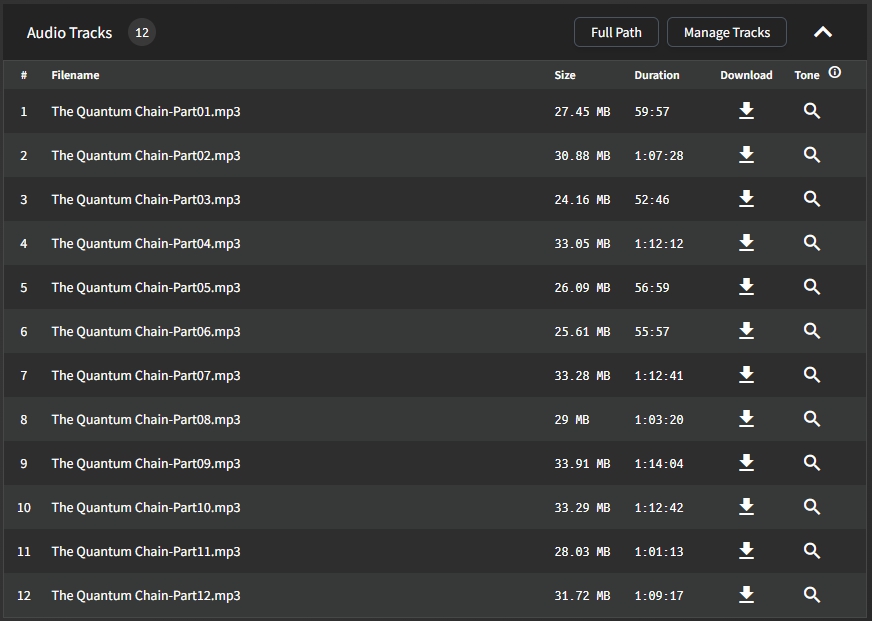
the second is 12 mp3 files each around 30 meg in size for a total length of around 13 hours

I have another audiobook player named 'Smart Audiobook Player' which I purchased many years ago that works great with both of these books...I just verified that a copy of these files can be played in Samsung Music player, VLC, and of course the smart player.
I just did an interesting test and I have NO clue what the results of the test mean.
Because we were thinking that it was an issue with the mp3 files, I took file 1 from The Quantum Chain and put it in a folder structure of
Author, Test\Test Book
I then re-scranned my library and the unmatched book showed up...surprisingly the file started streaming and I was able to download it....so I added the rest of the files in and re-scanned the library...it updated the total length of the book to 13 hours, but the playback stayed at 1 hour....so I removed the book from the interface, re-scanned and it added the book at the full length, and still streamed and downloaded....so I matched the book properly with it's proper value, and it still worked...I then tried to stream the original book that wasn't streaming, and now it's working...and then I went to the Outlander book and it's streaming now as well....
I have no clue what any of that means, but it appears my client is now functioning properly, but I have no clue how or why, or what I did to 'fix' things.
I have no clue either. I'm pretty sure all Android apps use the same audio player, "exoplayer", the only difference would be this is streaming the audio file as opposed to Smart Audiobook Player playing it locally.
The fact that the download also didn't work for this audiobook makes me think the file path on the server got messed up, but if it still played fine in the website then that doesn't make sense either.
I'm glad it is working for you now.
@advplyr commented on GitHub (Feb 13, 2023):
I have no clue either. I'm pretty sure all Android apps use the same audio player, "exoplayer", the only difference would be this is streaming the audio file as opposed to Smart Audiobook Player playing it locally.
The fact that the download also didn't work for this audiobook makes me think the file path on the server got messed up, but if it still played fine in the website then that doesn't make sense either.
I'm glad it is working for you now.
I spoke too soon unfortunately. Later the same day I tried to start streaming another book, found the same symptoms. Convinced there was something wrong with my install I converted from a Debian Linux virtual machine to a Docker Image and did a complete re-setup, just to find that I'm having the same problems with the new install...so, there is definitely a bug somewhere that I'm going to need your help solving.
@ljlongwing commented on GitHub (Feb 15, 2023):
I spoke too soon unfortunately. Later the same day I tried to start streaming another book, found the same symptoms. Convinced there was something wrong with my install I converted from a Debian Linux virtual machine to a Docker Image and did a complete re-setup, just to find that I'm having the same problems with the new install...so, there is definitely a bug somewhere that I'm going to need your help solving.
Well, I have an audio book that it's currently happening on....but I did the same thing I did a few days ago....took the first file from that book and put it into a test folder, rescanned, I could play that new book....removed it from the web, removed it from the filesystem, rescanned to ensure everything was up to date, went back to the original book (that I didn't touch), and now I can play it. My problem is that it keeps happening on successive books that I'm trying to read...I can't do this song and dance f or each book I want to listen to, and neither the server nor the client seems able to provide me with the logging to give you the details needed to tell you what's wrong....but there is certainly something wrong
@ljlongwing commented on GitHub (Feb 15, 2023):
Well, I have an audio book that it's currently happening on....but I did the same thing I did a few days ago....took the first file from that book and put it into a test folder, rescanned, I could play that new book....removed it from the web, removed it from the filesystem, rescanned to ensure everything was up to date, went back to the original book (that I didn't touch), and now I can play it. My problem is that it keeps happening on successive books that I'm trying to read...I can't do this song and dance f or each book I want to listen to, and neither the server nor the client seems able to provide me with the logging to give you the details needed to tell you what's wrong....but there is certainly something wrong
All of the things you are mentioning that are happening isn't making sense to me. Either there are multiple issues you are having or there is some miscommunication happening.
If you can give me specific steps to reproduce this then I'll be able to look into it.
@advplyr commented on GitHub (Feb 15, 2023):
All of the things you are mentioning that are happening isn't making sense to me. Either there are multiple issues you are having or there is some miscommunication happening.
If you can give me specific steps to reproduce this then I'll be able to look into it.
Are they all books in a certain series? Or all added to your library about the same time? All downloaded from the same source? Anything particular you do with encoding the files that other people don't? Anything you do with tagging that other people don't? Special characters or foreign alphabets, unusual format for cover art?
I'm just trying to narrow down which books/files this happens with, why not other files, and why other people aren't mentioning similar problems.
From: advplyr @.>
Sent: Wednesday, February 15, 2023 10:03:10 AM
To: advplyr/audiobookshelf-app @.>
Cc: hobesman @.>; Comment @.>
Subject: Re: [advplyr/audiobookshelf-app] [Bug]: Android Client seemingly unable to download or play any books (Issue #579)
All of the things you are mentioning that are happening isn't making sense to me. Either there are multiple issues you are having or there is some miscommunication happening.
If you can give me specific steps to reproduce this then I'll be able to look into it.
@hobesman commented on GitHub (Feb 15, 2023):
Are they all books in a certain series? Or all added to your library about the same time? All downloaded from the same source? Anything particular you do with encoding the files that other people don't? Anything you do with tagging that other people don't? Special characters or foreign alphabets, unusual format for cover art?
I'm just trying to narrow down which books/files this happens with, why not other files, and why other people aren't mentioning similar problems.
________________________________
From: advplyr ***@***.***>
Sent: Wednesday, February 15, 2023 10:03:10 AM
To: advplyr/audiobookshelf-app ***@***.***>
Cc: hobesman ***@***.***>; Comment ***@***.***>
Subject: Re: [advplyr/audiobookshelf-app] [Bug]: Android Client seemingly unable to download or play any books (Issue #579)
All of the things you are mentioning that are happening isn't making sense to me. Either there are multiple issues you are having or there is some miscommunication happening.
If you can give me specific steps to reproduce this then I'll be able to look into it.
—
Reply to this email directly, view it on GitHub<https://github.com/advplyr/audiobookshelf-app/issues/579#issuecomment-1431788234>, or unsubscribe<https://github.com/notifications/unsubscribe-auth/AHCYJJLGEWX2RBWERA3TR2LWXUK55ANCNFSM6AAAAAAUZNVKWI>.
You are receiving this because you commented.Message ID: ***@***.***>
I just started using AudioBookshelf about 2 weeks ago, so all of the books are 'new' to this product and recently added. Some are in the same series, others are not. I've gotten some of my books from Libby, others through Audible. There doesn't seem to be any rhyme or reason and I agree, nothing is making sense about it.
I can't rule out having multiple issues. A book that I reported about 3 hours ago as working, I listened to the book for about 5 min's no issue...just tried again and it's not streaming.
My standard configuration ATM is my ABS is running in a docker container on a Synology NAS. I have a Nginx Proxy Manager controlling access through my firewall and I have an encrypted connection that I'm using to connect with my Samsung Galaxy S22+
When I started this journey I was running it on a Debian Virtual machine, I've tried it on an old S10 I had laying around. I've tried direct connection over wifi instead of through the reverse proxy...all the same results.
The only thing that seems to make any difference with a specific book is a weird process of copying a single file from a book, loading it up, playing it, deleting it and then the original book will play (maybe for a little while?). I just stood up an Android Emulator (BlueStacks) and tried from there, same symptom as my physical cell phones.
The only thing that's even vaguely weird about my setup is that the filesystem that I have my audiobooks on is not 'local' to the server that's running the ABS. As I said before, the ABS is a Docker on my Synology...but the books are sitting on a network share being shared off of a Windows box I have....I wouldn't expect that to be an issue though, right?
@ljlongwing commented on GitHub (Feb 15, 2023):
I just started using AudioBookshelf about 2 weeks ago, so all of the books are 'new' to this product and recently added. Some are in the same series, others are not. I've gotten some of my books from Libby, others through Audible. There doesn't seem to be any rhyme or reason and I agree, nothing is making sense about it.
I can't rule out having multiple issues. A book that I reported about 3 hours ago as working, I listened to the book for about 5 min's no issue...just tried again and it's not streaming.
My standard configuration ATM is my ABS is running in a docker container on a Synology NAS. I have a Nginx Proxy Manager controlling access through my firewall and I have an encrypted connection that I'm using to connect with my Samsung Galaxy S22+
When I started this journey I was running it on a Debian Virtual machine, I've tried it on an old S10 I had laying around. I've tried direct connection over wifi instead of through the reverse proxy...all the same results.
The only thing that seems to make any difference with a specific book is a weird process of copying a single file from a book, loading it up, playing it, deleting it and then the original book will play (maybe for a little while?). I just stood up an Android Emulator (BlueStacks) and tried from there, same symptom as my physical cell phones.
The only thing that's even vaguely weird about my setup is that the filesystem that I have my audiobooks on is not 'local' to the server that's running the ABS. As I said before, the ABS is a Docker on my Synology...but the books are sitting on a network share being shared off of a Windows box I have....I wouldn't expect that to be an issue though, right?
I'm going to propose a situation here, and I need you to tell me what breaks when this is done....and, why 'this' fixes it.
Book is in Folder 1, it gets scanned
Book is moved to Folder 2, re-scanned
ABS recognizes that book 1 is missing, I mark it removed, I'm not left with the same book in a different folder, all of the other data is the same
Book won't play.
I find the book in the Web UI and choose 'Re-Scan' and it does what it needs to do. The book will now play on the mobile device.
On one of the books, the Re-Scan didn't do it, but when I deleted the metadata.abs file out of the directory, and Re-Scanned again, it will now stream. FYI, I did a compare of the file before and after and they are identical
I didn't have my folder structure setup properly when I first started the server and nothing was working properly. I ended up renaming folders to match the structure recommended and after several scans and rescans I now have the folders in the right place and all of the matching done properly...but there seems to be some sort of mismatch...I don't know enough about how things are structured to find the broken link though.
@ljlongwing commented on GitHub (Feb 15, 2023):
I'm going to propose a situation here, and I need you to tell me what breaks when this is done....and, why 'this' fixes it.
Book is in Folder 1, it gets scanned
Book is moved to Folder 2, re-scanned
ABS recognizes that book 1 is missing, I mark it removed, I'm not left with the same book in a different folder, all of the other data is the same
Book won't play.
I find the book in the Web UI and choose 'Re-Scan' and it does what it needs to do. The book will now play on the mobile device.
On one of the books, the Re-Scan didn't do it, but when I deleted the metadata.abs file out of the directory, and Re-Scanned again, it will now stream. FYI, I did a compare of the file before and after and they are identical
I didn't have my folder structure setup properly when I first started the server and nothing was working properly. I ended up renaming folders to match the structure recommended and after several scans and rescans I now have the folders in the right place and all of the matching done properly...but there seems to be some sort of mismatch...I don't know enough about how things are structured to find the broken link though.
and of course, whatever the issue is, it only affects the 'item' when accessed via the android (maybe ios), but not the web
@ljlongwing commented on GitHub (Feb 15, 2023):
and of course, whatever the issue is, it only affects the 'item' when accessed via the android (maybe ios), but not the web
@hobesman commented on GitHub (Feb 16, 2023):
Once you "fix" a book, does it stay fixed?
And does the broken book stop working for all Android devices when it brakes, or does it still work on some Android devices?
________________________________
From: ljlongwing ***@***.***>
Sent: Wednesday, February 15, 2023 2:19:34 PM
To: advplyr/audiobookshelf-app ***@***.***>
Cc: hobesman ***@***.***>; Comment ***@***.***>
Subject: Re: [advplyr/audiobookshelf-app] [Bug]: Android Client seemingly unable to download or play any books (Issue #579)
and of course, whatever the issue is, it only affects the 'item' when accessed via the android (maybe ios), but not the web
—
Reply to this email directly, view it on GitHub<https://github.com/advplyr/audiobookshelf-app/issues/579#issuecomment-1432123501>, or unsubscribe<https://github.com/notifications/unsubscribe-auth/AHCYJJLEGHUT3DJ6GFBVLADWXVI7NANCNFSM6AAAAAAUZNVKWI>.
You are receiving this because you commented.Message ID: ***@***.***>
it seems to stay fixed once it's fixed. I started playing with the rest api a bit and I did a before and after check on an object that was broken but is now fixed. It seems that the ino for the book, and all of the audioFiles changes.
I noted as well when I rescan and it starts working, the UI informs "Item was updated", but if I re-scan again, or on another book I wasn't having issues with, I get 'Item was up to date'
If it's not working on one android device, it doesn't work on any of them.
@ljlongwing commented on GitHub (Feb 16, 2023):
it seems to stay fixed once it's fixed. I started playing with the rest api a bit and I did a before and after check on an object that was broken but is now fixed. It seems that the ino for the book, and all of the audioFiles changes.
I noted as well when I rescan and it starts working, the UI informs "Item was updated", but if I re-scan again, or on another book I wasn't having issues with, I get 'Item was up to date'
If it's not working on one android device, it doesn't work on any of them.
I continue to have issues, with literally every book I try to start....I must do a little song and dance with rescan and the abs file to get it to play. Should we re-open this defect, or open a new one against the server for this issue?
@ljlongwing commented on GitHub (Feb 23, 2023):
I continue to have issues, with literally every book I try to start....I must do a little song and dance with rescan and the abs file to get it to play. Should we re-open this defect, or open a new one against the server for this issue?
@advplyr commented on GitHub (Feb 23, 2023):
Did you specify which OS you are running your server on and how you are running Abs? Using Docker or the PPA?
Are you using a remote file system for your audiobooks?
Are you having the same issue as https://github.com/advplyr/audiobookshelf/issues/1447
I was originally running on Debian, but have moved to Docker, which is where I am at the moment.
The file system is remote from the container on a network share.
I don't seem to be having the same issues as him...the only thing that seems to be remotely related to their issue is that I inspected the object via API in both the 'broken' and 'fixed' versions and the ino for the files changed.
Symptom wise, it seems that the Android client has everything it needs, but when it tries to stream, or download, it asks the server for the files, but the server can't seem to be able to serve them to the client. After the Re-Scan, the ino changes, and the Android client is able to stream and download
The thing that I don't understand is what the difference between how the Web Client and how the Android Client requests the same resources, I haven't had ANY issues with it working on the web client, even from my Android phone...the same book won't stream in the client, but streams in the web
@ljlongwing commented on GitHub (Feb 23, 2023):
I was originally running on Debian, but have moved to Docker, which is where I am at the moment.
The file system is remote from the container on a network share.
I don't seem to be having the same issues as him...the only thing that seems to be remotely related to their issue is that I inspected the object via API in both the 'broken' and 'fixed' versions and the ino for the files changed.
Symptom wise, it seems that the Android client has everything it needs, but when it tries to stream, or download, it asks the server for the files, but the server can't seem to be able to serve them to the client. After the Re-Scan, the ino changes, and the Android client is able to stream and download
The thing that I don't understand is what the difference between how the Web Client and how the Android Client requests the same resources, I haven't had ANY issues with it working on the web client, even from my Android phone...the same book won't stream in the client, but streams in the web
Is the file system the same OS as where you are hosting the server? Can you find out why your file system is changing the inode values.
@advplyr commented on GitHub (Feb 23, 2023):
Are you connecting to your server locally?
Is the file system the same OS as where you are hosting the server? Can you find out why your file system is changing the inode values.
The files were on a file server, and the ABS is running in a docker on my NAS....I'm moving the library from the file server to the NAS so both will be on the same hardware to see if that helps any....after the move I'll do a rescan of the entire library and see if I have issues.
So...the ino is assigned not by ABS but by the OS serving the files?
@ljlongwing commented on GitHub (Feb 23, 2023):
The files were on a file server, and the ABS is running in a docker on my NAS....I'm moving the library from the file server to the NAS so both will be on the same hardware to see if that helps any....after the move I'll do a rescan of the entire library and see if I have issues.
So...the ino is assigned not by ABS but by the OS serving the files?
I doing a bit of reading on inode numbers and I have a question.
In both situations, both when I was running on Debian, and when I'm running in a docker container, my files were stored on a Windows shared drive. According to what I'm reading, Windows doesn't have inodes, so my question to you is this....what were you using, or how were you getting an inode associated with a file, if the source operating system wasn't providing it? Is it possible that's what was causing all of this hassle?
@ljlongwing commented on GitHub (Feb 23, 2023):
I doing a bit of reading on inode numbers and I have a question.
In both situations, both when I was running on Debian, and when I'm running in a docker container, my files were stored on a Windows shared drive. According to what I'm reading, Windows doesn't have inodes, so my question to you is this....what were you using, or how were you getting an inode associated with a file, if the source operating system wasn't providing it? Is it possible that's what was causing all of this hassle?
It's just not called an "inode" in Windows, but it does have a unique value for each file that is used. Windows is not a problem since that is where I do my development, but remote file systems can be a problem. Especially when it comes to remote file systems across different OS.
I would recommend trying a different file system for testing because I'm pretty sure now this is the problem.
@advplyr commented on GitHub (Feb 23, 2023):
It's just not called an "inode" in Windows, but it does have a unique value for each file that is used. Windows is not a problem since that is where I do my development, but remote file systems can be a problem. Especially when it comes to remote file systems across different OS.
I would recommend trying a different file system for testing because I'm pretty sure now this is the problem.
Well, I just moved the library to be on the NAS along with the Docker container....it's a Synology NAS, so it's Linux based, so hopefully it's not an issue going forward.....I'll report back in a few days as I continue to use the product.
@ljlongwing commented on GitHub (Feb 23, 2023):
Well, I just moved the library to be on the NAS along with the Docker container....it's a Synology NAS, so it's Linux based, so hopefully it's not an issue going forward.....I'll report back in a few days as I continue to use the product.
Ok....I finished a book and started a new one without any issues...so it looks like it was Linux Docker with Remote Windows library that was causing the issue. Do you think this should be re-opened here or a new one opened over there?
@ljlongwing commented on GitHub (Feb 27, 2023):
Ok....I finished a book and started a new one without any issues...so it looks like it was Linux Docker with Remote Windows library that was causing the issue. Do you think this should be re-opened here or a new one opened over there?
There is another issue opened here relating to inode values which if we find a solution for would also solve this I think.
@advplyr commented on GitHub (Feb 27, 2023):
There is another issue opened here relating to inode values which if we find a solution for would also solve this I think.
By any chance did you have pdf files in the folder?
I have ran into exactly the same problem and it was solved for me when I removed the pdf files I had uploaded with the audio files.
The weird thing is, I have other audiobooks with Ebook PDF files in the same folder, that work great in the Android app, but something is different about either some of my pdf files or some of my audio (.mp3 in this case) files to make it not load on android.
@DerLeole commented on GitHub (Sep 30, 2023):
By any chance did you have pdf files in the folder?
I have ran into exactly the same problem and it was solved for me when I removed the pdf files I had uploaded with the audio files.
The weird thing is, I have other audiobooks with Ebook PDF files in the same folder, that work great in the Android app, but something is different about either some of my pdf files or some of my audio (.mp3 in this case) files to make it not load on android.
@Leolele99 It has to do with if the ebook file was added after server v2.4.0. This will be fixed in the server release coming today or tomorrow
@advplyr commented on GitHub (Sep 30, 2023):
@Leolele99 It has to do with if the ebook file was added after server v2.4.0. This will be fixed in the server release coming today or tomorrow
Same here, once I can download the podcast, and other times it can only be downloaded after restarting the app.
@p6002 commented on GitHub (Oct 25, 2023):
Same here, once I can download the podcast, and other times it can only be downloaded after restarting the app.
Blocking a user prevents them from interacting with repositories, such as opening or commenting on pull requests or issues. Learn more about blocking a user.
Originally created by @ljlongwing on GitHub (Feb 12, 2023).
I'll give you all of the things I did, just in case any of them are relevant
Steps to reproduce
Expected behaviour
I would expect to be able to stream or play any other book in my library
Actual behaviour
Nothing I do seems to allow me to use the client at this point. I have cleared data, I deleted the folder, I uninstalled and reinstalled the client...nothing I do seems to be able to allow me to use the client at this point. If I switch the server logs to debug, and start a streaming, I get this in the log
2023-02-11 17:02:56 INFO [Server] Socket Connected qWLgeBw3AwNonX3OAACt
2023-02-11 17:02:56 DEBUG [Server] User Online username
2023-02-11 17:02:56 DEBUG [DB] Updated user: 1
2023-02-11 17:03:00 INFO [PlaybackSessionManager] startSession: Closing open session "Earth Unaware" for user "ljlongwing"
2023-02-11 17:03:00 DEBUG [PlaybackSessionManager] closeSession "play_yzuftnbmkwlw3e0mp1"
2023-02-11 17:03:00 DEBUG [PlaybackSessionManager] Removed session "play_yzuftnbmkwlw3e0mp1"
2023-02-11 17:03:00 DEBUG [PlaybackSessionManager] "ljlongwing" starting direct play session for item "li_zgeezilgc4tiord6i1"
Environment data
Audiobookshelf Version: 2.2.14
Android Issue
Android version: .9.61-beta
Device model: Samsung Galaxy S22+
Stock or customized system: Stock
@advplyr commented on GitHub (Feb 12, 2023):
How about restarting your server, then uninstalling and reinstalling the app, then starting a stream.
Are you connecting to your server with a local ip address? If the above fails, can you open a browser on your phone and play the same audiobook through the website client?
@ljlongwing commented on GitHub (Feb 12, 2023):
The setup I have 'typically' uses an NGINX Proxy Manager accessible to the internet, but just for testing just now, I'm local on my network and I added the local ip/port but same situation, no ability to do anything. I've restarted the server, uninstalled and reinstalled the app again, still nothing. All of my books are fully streamable via the web, so this appears to be a client only issue.
Is there any logging I can enable at the client side to give any indication what it's doing?
@ljlongwing commented on GitHub (Feb 12, 2023):
My feeling is that when I told it to delete that local cache of the book it successfully downloaded, that it screwed up some pointer or something in relation to its access to the local filesystem. I don't know why uninstall and reinstall wouldn't have fixed it though. I've tried deleting the folder in question and re-creating it, all to no avail.
@advplyr commented on GitHub (Feb 12, 2023):
The only way to get useful logs would be to build from source right now.
What is confusing me about this is you said at first you could stream from the mobile app, but now even after clearing the data and reinstalling the app you cannot stream.
This suggests something changed with the data coming from the server. Can you try creating a new user on the server and logging into the app with that user?
@ljlongwing commented on GitHub (Feb 12, 2023):
Ok...I just logged into the server via the root user...I tried the same two books that I was trying before, and it didn't work, same symptoms...so I tried another book that I had never tried before, and it started streaming. Logged back into my account and I could stream that same book. But I'm still unable to stream either of the other two. I tried clearing my progress and trying again, but still no joy...so, it seems like there is something that the app is remembering about these specific books that it can't stream for some reason.
@advplyr commented on GitHub (Feb 12, 2023):
If you cleared the data for the app and reinstalled then the app is not remembering anything about the books. The issue must be on the server side.
I'm also reading this as those two books that are failing to play were both successfully streamed on your first app install. That is important to rule out the audio files are having some issue playing on the device.
My next suggestion would be to remove those 2 books from your server. Pressing edit on them then the red remove button. After removing those 2 then re-scan the library. No need to force re-scan, just regular scan. Before playing them in the web client at all, try playing them on the mobile app.
@hobesman commented on GitHub (Feb 12, 2023):
Or maybe something the server is remembering? Some failed partial transcode or something. I dunno, just putting ideas out there.
@advplyr commented on GitHub (Feb 12, 2023):
Yeah something the server is remembering. Restarting the server would clear any open sessions. Removing and re-adding the library items would remove any attached media progress or saved playback sessions.
After that if it does not play then these audio files must be having an issue playing on the device. I would suggest trying another mobile device with those audio files if you have one available.
@ljlongwing commented on GitHub (Feb 13, 2023):
Ok, I was able to get the client loaded on an old S10 I have....same issue...never been installed on that client before, and I even tried some other books in the same series and it wouldn't play any of them. I'm wondering if I'm remembering streaming it but I'm wrong...I know the MP3 files are good...they stream fine on the web and play fine on the computer....so, maybe something wrong with the transcoding that the Android client does that is different from the web client?
@ljlongwing commented on GitHub (Feb 13, 2023):
I updated my server to the latest (v2.2.15) this mornin, still no joy. I collected these logs this morning
2023-02-13 15:20:37 DEBUG [Server] User Offline username
2023-02-13 15:20:37 INFO [Server] Socket ErtE0Z6ObdB3Gt4rAAAF disconnected from client "username" after 46307ms (Reason: transport close)
2023-02-13 15:20:38 INFO [Server] Socket Connected K9OGjRZrCO1EWsGOAAAH
2023-02-13 15:20:38 DEBUG [Server] User Online username
2023-02-13 15:20:38 DEBUG [DB] Updated user: 1
2023-02-13 15:20:44 DEBUG [PlaybackSessionManager] startSessionRequest for device SM-S906U SDK 33 / v0.9.61-beta
2023-02-13 15:20:44 INFO [PlaybackSessionManager] startSession: Closing open session "The Quantum Chain" for user "username" (Device: SM-S906U SDK 33 / v0.9.61-beta)
2023-02-13 15:20:44 DEBUG [PlaybackSessionManager] closeSession "play_ylqstho9t3okavape0"
2023-02-13 15:20:44 DEBUG [PlaybackSessionManager] Removed session "play_ylqstho9t3okavape0"
2023-02-13 15:20:44 DEBUG [PlaybackSessionManager] "username" starting direct play session for item "li_8k46li0keoh5ci03nn" with id play_cfr7g34fqca75ssc2r (Device: SM-S906U SDK 33 / v0.9.61-beta)
I can't help but notice this morning that it's discussing 'direct play' session. What determines direct play vs conversion, I don't see any settings in the client to tell it to transcode or not, quality anything, etc....I don't know if that has anything to do with it or not.
Separately, my clients inability to download anything local seem related, but unsure how...
@ljlongwing commented on GitHub (Feb 13, 2023):
Playing this morning I created a new user, connected it locally, created a new library (pointed at same location), chose a new book I haven't played with before and it downloaded and played without issue...switched back to my main user, same test library, same book streams, switched back to primary library, same book streams...checked books that wouldn't stream before, still won't stream or download....
From this I think I've concluded that my problem is with the audio files in question, although I can't determine why they would work via web (and every other player not related to this server/client combo), but not in the android client...so, there is certainly a bug somewhere, I just don't know in which component the bug is in :(
@advplyr commented on GitHub (Feb 13, 2023):
How big are these mp3 files? Is it a single mp3 file?
The only way I can think to see what the issue is it to check the logcat, so if I can get a copy or replicate the mp3 in some way to reproduce the issue that would help.
@advplyr commented on GitHub (Feb 13, 2023):
You have tried playing this audio file in other android apps?
@ljlongwing commented on GitHub (Feb 13, 2023):
I've got two different books that I'm focused on ATM. One of them as you can see is a single 1.3gb mp3 file that is 55 hours long


the second is 12 mp3 files each around 30 meg in size for a total length of around 13 hours
I have another audiobook player named 'Smart Audiobook Player' which I purchased many years ago that works great with both of these books...I just verified that a copy of these files can be played in Samsung Music player, VLC, and of course the smart player.
I just did an interesting test and I have NO clue what the results of the test mean.
Because we were thinking that it was an issue with the mp3 files, I took file 1 from The Quantum Chain and put it in a folder structure of
Author, Test\Test Book
I then re-scranned my library and the unmatched book showed up...surprisingly the file started streaming and I was able to download it....so I added the rest of the files in and re-scanned the library...it updated the total length of the book to 13 hours, but the playback stayed at 1 hour....so I removed the book from the interface, re-scanned and it added the book at the full length, and still streamed and downloaded....so I matched the book properly with it's proper value, and it still worked...I then tried to stream the original book that wasn't streaming, and now it's working...and then I went to the Outlander book and it's streaming now as well....
I have no clue what any of that means, but it appears my client is now functioning properly, but I have no clue how or why, or what I did to 'fix' things.
@advplyr commented on GitHub (Feb 13, 2023):
I have no clue either. I'm pretty sure all Android apps use the same audio player, "exoplayer", the only difference would be this is streaming the audio file as opposed to Smart Audiobook Player playing it locally.
The fact that the download also didn't work for this audiobook makes me think the file path on the server got messed up, but if it still played fine in the website then that doesn't make sense either.
I'm glad it is working for you now.
@ljlongwing commented on GitHub (Feb 15, 2023):
I spoke too soon unfortunately. Later the same day I tried to start streaming another book, found the same symptoms. Convinced there was something wrong with my install I converted from a Debian Linux virtual machine to a Docker Image and did a complete re-setup, just to find that I'm having the same problems with the new install...so, there is definitely a bug somewhere that I'm going to need your help solving.
@advplyr commented on GitHub (Feb 15, 2023):
Have you isolated this to certain audiobooks?
@ljlongwing commented on GitHub (Feb 15, 2023):
Well, I have an audio book that it's currently happening on....but I did the same thing I did a few days ago....took the first file from that book and put it into a test folder, rescanned, I could play that new book....removed it from the web, removed it from the filesystem, rescanned to ensure everything was up to date, went back to the original book (that I didn't touch), and now I can play it. My problem is that it keeps happening on successive books that I'm trying to read...I can't do this song and dance f or each book I want to listen to, and neither the server nor the client seems able to provide me with the logging to give you the details needed to tell you what's wrong....but there is certainly something wrong
@advplyr commented on GitHub (Feb 15, 2023):
All of the things you are mentioning that are happening isn't making sense to me. Either there are multiple issues you are having or there is some miscommunication happening.
If you can give me specific steps to reproduce this then I'll be able to look into it.
@hobesman commented on GitHub (Feb 15, 2023):
Are they all books in a certain series? Or all added to your library about the same time? All downloaded from the same source? Anything particular you do with encoding the files that other people don't? Anything you do with tagging that other people don't? Special characters or foreign alphabets, unusual format for cover art?
I'm just trying to narrow down which books/files this happens with, why not other files, and why other people aren't mentioning similar problems.
From: advplyr @.>
Sent: Wednesday, February 15, 2023 10:03:10 AM
To: advplyr/audiobookshelf-app @.>
Cc: hobesman @.>; Comment @.>
Subject: Re: [advplyr/audiobookshelf-app] [Bug]: Android Client seemingly unable to download or play any books (Issue #579)
All of the things you are mentioning that are happening isn't making sense to me. Either there are multiple issues you are having or there is some miscommunication happening.
If you can give me specific steps to reproduce this then I'll be able to look into it.
—
Reply to this email directly, view it on GitHubhttps://github.com/advplyr/audiobookshelf-app/issues/579#issuecomment-1431788234, or unsubscribehttps://github.com/notifications/unsubscribe-auth/AHCYJJLGEWX2RBWERA3TR2LWXUK55ANCNFSM6AAAAAAUZNVKWI.
You are receiving this because you commented.Message ID: @.***>
@ljlongwing commented on GitHub (Feb 15, 2023):
I just started using AudioBookshelf about 2 weeks ago, so all of the books are 'new' to this product and recently added. Some are in the same series, others are not. I've gotten some of my books from Libby, others through Audible. There doesn't seem to be any rhyme or reason and I agree, nothing is making sense about it.
I can't rule out having multiple issues. A book that I reported about 3 hours ago as working, I listened to the book for about 5 min's no issue...just tried again and it's not streaming.
My standard configuration ATM is my ABS is running in a docker container on a Synology NAS. I have a Nginx Proxy Manager controlling access through my firewall and I have an encrypted connection that I'm using to connect with my Samsung Galaxy S22+
When I started this journey I was running it on a Debian Virtual machine, I've tried it on an old S10 I had laying around. I've tried direct connection over wifi instead of through the reverse proxy...all the same results.
The only thing that seems to make any difference with a specific book is a weird process of copying a single file from a book, loading it up, playing it, deleting it and then the original book will play (maybe for a little while?). I just stood up an Android Emulator (BlueStacks) and tried from there, same symptom as my physical cell phones.
The only thing that's even vaguely weird about my setup is that the filesystem that I have my audiobooks on is not 'local' to the server that's running the ABS. As I said before, the ABS is a Docker on my Synology...but the books are sitting on a network share being shared off of a Windows box I have....I wouldn't expect that to be an issue though, right?
@ljlongwing commented on GitHub (Feb 15, 2023):
I'm going to propose a situation here, and I need you to tell me what breaks when this is done....and, why 'this' fixes it.
Book is in Folder 1, it gets scanned
Book is moved to Folder 2, re-scanned
ABS recognizes that book 1 is missing, I mark it removed, I'm not left with the same book in a different folder, all of the other data is the same
Book won't play.
I find the book in the Web UI and choose 'Re-Scan' and it does what it needs to do. The book will now play on the mobile device.
On one of the books, the Re-Scan didn't do it, but when I deleted the metadata.abs file out of the directory, and Re-Scanned again, it will now stream. FYI, I did a compare of the file before and after and they are identical
I didn't have my folder structure setup properly when I first started the server and nothing was working properly. I ended up renaming folders to match the structure recommended and after several scans and rescans I now have the folders in the right place and all of the matching done properly...but there seems to be some sort of mismatch...I don't know enough about how things are structured to find the broken link though.
@ljlongwing commented on GitHub (Feb 15, 2023):
and of course, whatever the issue is, it only affects the 'item' when accessed via the android (maybe ios), but not the web
@hobesman commented on GitHub (Feb 16, 2023):
Once you "fix" a book, does it stay fixed?
And does the broken book stop working for all Android devices when it brakes, or does it still work on some Android devices?
From: ljlongwing @.>
Sent: Wednesday, February 15, 2023 2:19:34 PM
To: advplyr/audiobookshelf-app @.>
Cc: hobesman @.>; Comment @.>
Subject: Re: [advplyr/audiobookshelf-app] [Bug]: Android Client seemingly unable to download or play any books (Issue #579)
and of course, whatever the issue is, it only affects the 'item' when accessed via the android (maybe ios), but not the web
—
Reply to this email directly, view it on GitHubhttps://github.com/advplyr/audiobookshelf-app/issues/579#issuecomment-1432123501, or unsubscribehttps://github.com/notifications/unsubscribe-auth/AHCYJJLEGHUT3DJ6GFBVLADWXVI7NANCNFSM6AAAAAAUZNVKWI.
You are receiving this because you commented.Message ID: @.***>
@ljlongwing commented on GitHub (Feb 16, 2023):
it seems to stay fixed once it's fixed. I started playing with the rest api a bit and I did a before and after check on an object that was broken but is now fixed. It seems that the ino for the book, and all of the audioFiles changes.
I noted as well when I rescan and it starts working, the UI informs "Item was updated", but if I re-scan again, or on another book I wasn't having issues with, I get 'Item was up to date'
If it's not working on one android device, it doesn't work on any of them.
@advplyr commented on GitHub (Feb 16, 2023):
Possibly related to #1447
@ljlongwing commented on GitHub (Feb 16, 2023):
It looks like they don't stay fixed unfortunately
@ljlongwing commented on GitHub (Feb 23, 2023):
I continue to have issues, with literally every book I try to start....I must do a little song and dance with rescan and the abs file to get it to play. Should we re-open this defect, or open a new one against the server for this issue?
@advplyr commented on GitHub (Feb 23, 2023):
Did you specify which OS you are running your server on and how you are running Abs? Using Docker or the PPA?
Are you using a remote file system for your audiobooks?
Are you having the same issue as https://github.com/advplyr/audiobookshelf/issues/1447
@ljlongwing commented on GitHub (Feb 23, 2023):
I was originally running on Debian, but have moved to Docker, which is where I am at the moment.
The file system is remote from the container on a network share.
I don't seem to be having the same issues as him...the only thing that seems to be remotely related to their issue is that I inspected the object via API in both the 'broken' and 'fixed' versions and the ino for the files changed.
Symptom wise, it seems that the Android client has everything it needs, but when it tries to stream, or download, it asks the server for the files, but the server can't seem to be able to serve them to the client. After the Re-Scan, the ino changes, and the Android client is able to stream and download
The thing that I don't understand is what the difference between how the Web Client and how the Android Client requests the same resources, I haven't had ANY issues with it working on the web client, even from my Android phone...the same book won't stream in the client, but streams in the web
@advplyr commented on GitHub (Feb 23, 2023):
Are you connecting to your server locally?
Is the file system the same OS as where you are hosting the server? Can you find out why your file system is changing the inode values.
@ljlongwing commented on GitHub (Feb 23, 2023):
The files were on a file server, and the ABS is running in a docker on my NAS....I'm moving the library from the file server to the NAS so both will be on the same hardware to see if that helps any....after the move I'll do a rescan of the entire library and see if I have issues.
So...the ino is assigned not by ABS but by the OS serving the files?
@ljlongwing commented on GitHub (Feb 23, 2023):
I doing a bit of reading on inode numbers and I have a question.
In both situations, both when I was running on Debian, and when I'm running in a docker container, my files were stored on a Windows shared drive. According to what I'm reading, Windows doesn't have inodes, so my question to you is this....what were you using, or how were you getting an inode associated with a file, if the source operating system wasn't providing it? Is it possible that's what was causing all of this hassle?
@advplyr commented on GitHub (Feb 23, 2023):
It's just not called an "inode" in Windows, but it does have a unique value for each file that is used. Windows is not a problem since that is where I do my development, but remote file systems can be a problem. Especially when it comes to remote file systems across different OS.
I would recommend trying a different file system for testing because I'm pretty sure now this is the problem.
@ljlongwing commented on GitHub (Feb 23, 2023):
Well, I just moved the library to be on the NAS along with the Docker container....it's a Synology NAS, so it's Linux based, so hopefully it's not an issue going forward.....I'll report back in a few days as I continue to use the product.
@ljlongwing commented on GitHub (Feb 27, 2023):
Ok....I finished a book and started a new one without any issues...so it looks like it was Linux Docker with Remote Windows library that was causing the issue. Do you think this should be re-opened here or a new one opened over there?
@advplyr commented on GitHub (Feb 27, 2023):
There is another issue opened here relating to inode values which if we find a solution for would also solve this I think.
@DerLeole commented on GitHub (Sep 30, 2023):
By any chance did you have pdf files in the folder?
I have ran into exactly the same problem and it was solved for me when I removed the pdf files I had uploaded with the audio files.
The weird thing is, I have other audiobooks with Ebook PDF files in the same folder, that work great in the Android app, but something is different about either some of my pdf files or some of my audio (.mp3 in this case) files to make it not load on android.
@advplyr commented on GitHub (Sep 30, 2023):
@Leolele99 It has to do with if the ebook file was added after server v2.4.0. This will be fixed in the server release coming today or tomorrow
@p6002 commented on GitHub (Oct 25, 2023):
Same here, once I can download the podcast, and other times it can only be downloaded after restarting the app.