Server progress isn't being honored for local files. #219

Closed
opened 2026-04-24 23:13:10 +02:00 by adam · 14 comments
Owner

Originally created by @DieselTech on GitHub (Jul 2, 2022).

Steps to reproduce

  1. While still connected to local server, go to a entry that was saved locally
  2. See the progress on the server is the same as the local version says it is
  3. Start playing the downloaded book

Expected behaviour

  • Should resume from the progress it has listed from the server. Especially while still connected to the server.

Actual behaviour

  • Seems to pick a random time to play from, usually many many hours off from what it said it's last progress was.

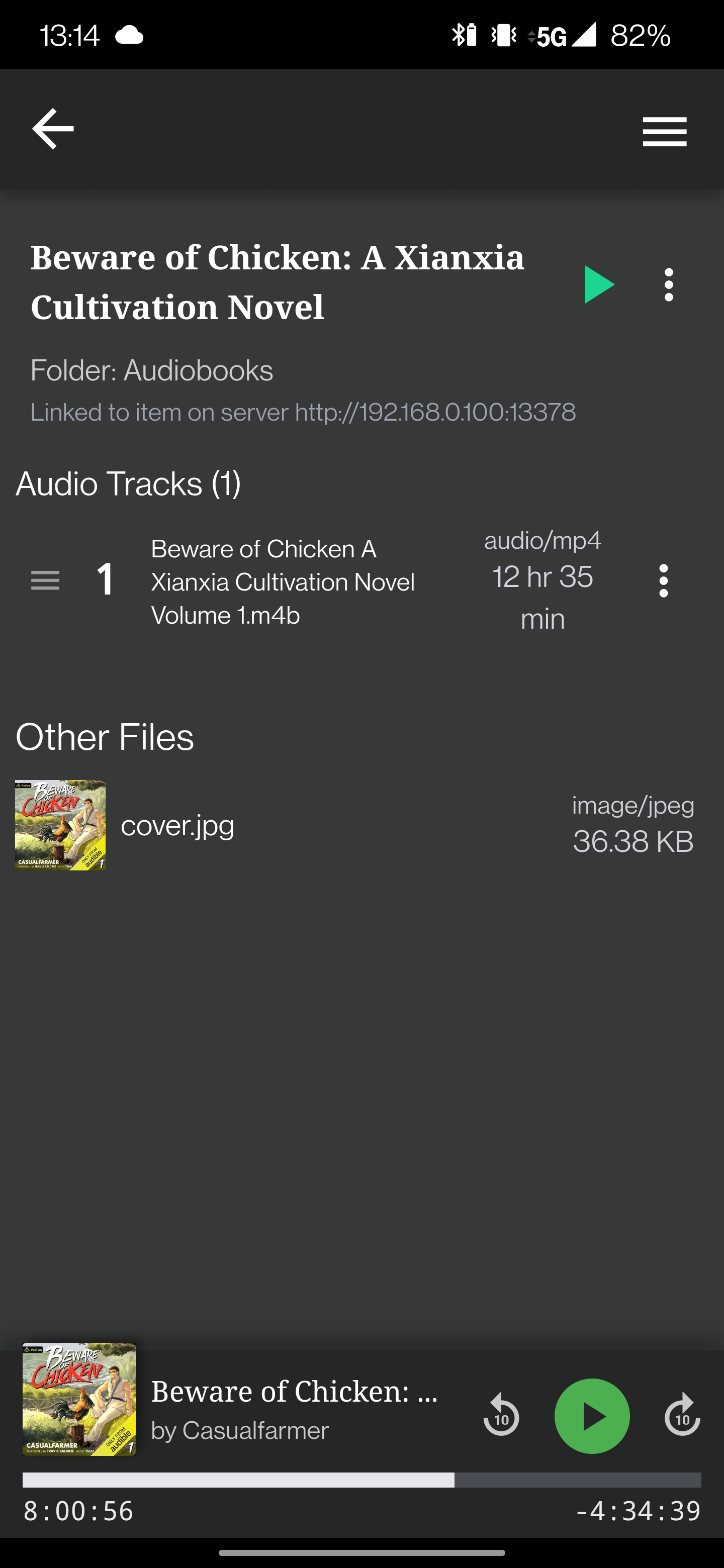
image

Server knows time remaining is 77% (4h 14m) yet when I hit play it starts playing from 11h 1m remaining.

The other problem here is it also overwrites the servers progress with this newly incorrect one. Sometimes leaving me high and dry for trying to figure out where I was in the book.

Environment data

Audiobookshelf Version:

  • Android App?

Android Issue

Android version:

Device model:
OnePlus 7T Pro 5G
Stock or customized system:
Stock

Originally created by @DieselTech on GitHub (Jul 2, 2022). ### Steps to reproduce 1. While still connected to local server, go to a entry that was saved locally 2. See the progress on the server is the same as the local version says it is 3. Start playing the downloaded book ### Expected behaviour - Should resume from the progress it has listed from the server. Especially while still connected to the server. ### Actual behaviour - Seems to pick a random time to play from, usually many many hours off from what it said it's last progress was. ![image](https://user-images.githubusercontent.com/30128380/176976752-22de7adc-0213-4d55-917b-f0d9a0a54a54.png) Server knows time remaining is 77% (4h 14m) yet when I hit play it starts playing from 11h 1m remaining. The other problem here is it also overwrites the servers progress with this newly incorrect one. Sometimes leaving me high and dry for trying to figure out where I was in the book. ### Environment data Audiobookshelf Version: - [x] Android App? #### Android Issue Android version: Device model: OnePlus 7T Pro 5G Stock or customized system: Stock
adam added the bug label 2026-04-24 23:13:10 +02:00
adam closed this issue 2026-04-24 23:13:10 +02:00
Author
Owner

@DieselTech commented on GitHub (Jul 2, 2022):

This is occuring for every book I try to listen to using the app. Screenshot_20220702-110420.jpg
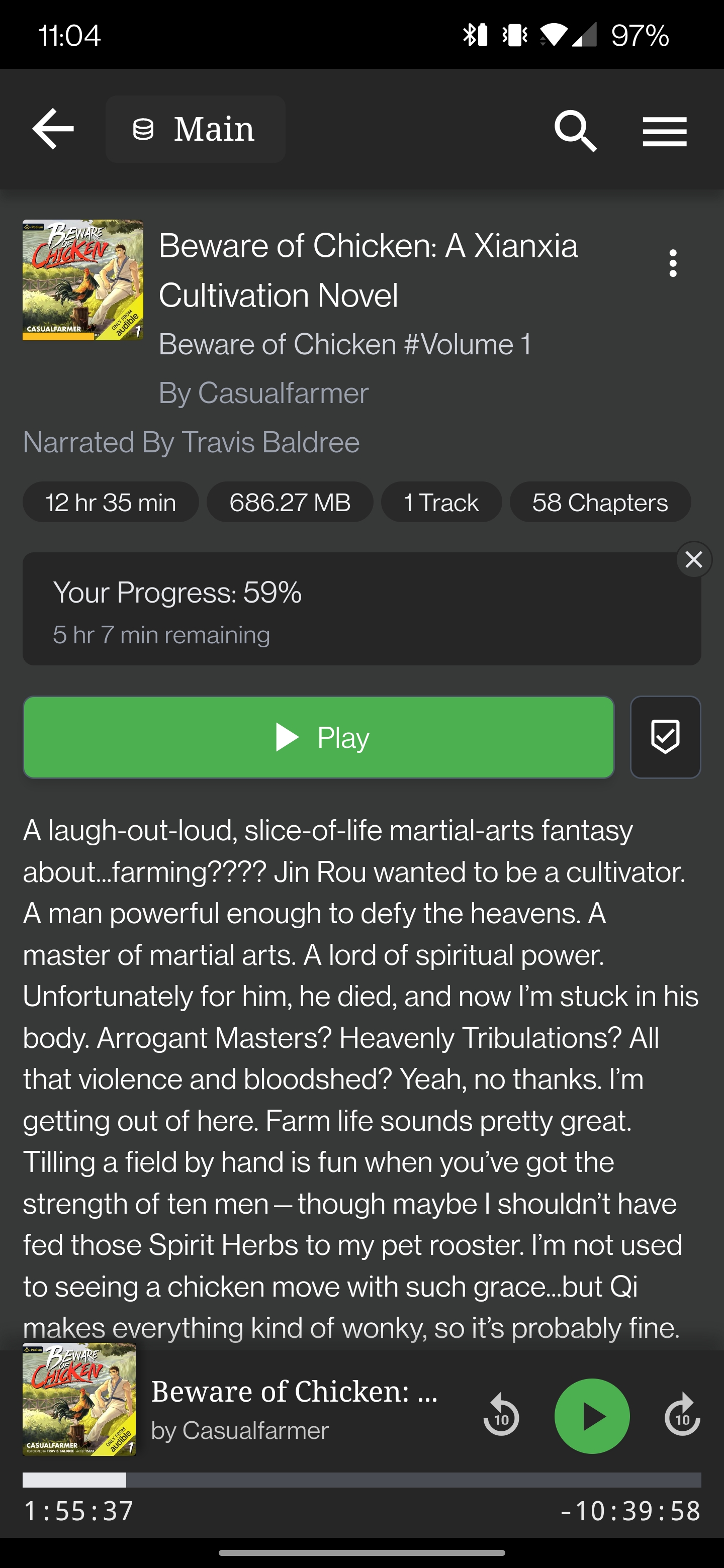
If you need logs from the phone just let me know. This makes the app unusable for me.

@DieselTech commented on GitHub (Jul 2, 2022): This is occuring for every book I try to listen to using the app. ![Screenshot_20220702-110420.jpg](https://user-images.githubusercontent.com/30128380/177006029-b60326e1-b0d3-49df-9d9d-f1f2a62759a6.jpg) If you need logs from the phone just let me know. This makes the app unusable for me.
Author
Owner

@advplyr commented on GitHub (Jul 2, 2022):

Is that still linked to a server item?

@advplyr commented on GitHub (Jul 2, 2022): Is that still linked to a server item?
Author
Owner

@DieselTech commented on GitHub (Jul 2, 2022):

Is that still linked to a server item?

Yes. Screenshot_20220702-131454.jpg

@DieselTech commented on GitHub (Jul 2, 2022): > Is that still linked to a server item? Yes. ![Screenshot_20220702-131454.jpg](https://user-images.githubusercontent.com/30128380/177010084-665aeb3e-4413-4b60-8aba-bd0f933039a8.jpg)
Author
Owner

@advplyr commented on GitHub (Jul 2, 2022):

I just tested this using 2 tests.

  1. I downloaded a book and started listening while also having the web app open and watching the progress update in realtime.
  2. In the mobile app I disconnected from the server and played the book again jumping towards the end. Then I reconnected to the server and watched the progress get updated in the web app.

Are those 2 tests failing for you? You can also watch the logs on the server and see the requests come in from the mobile app for syncing progress.

@advplyr commented on GitHub (Jul 2, 2022): I just tested this using 2 tests. 1. I downloaded a book and started listening while also having the web app open and watching the progress update in realtime. 2. In the mobile app I disconnected from the server and played the book again jumping towards the end. Then I reconnected to the server and watched the progress get updated in the web app. Are those 2 tests failing for you? You can also watch the logs on the server and see the requests come in from the mobile app for syncing progress.
Author
Owner

@DieselTech commented on GitHub (Jul 2, 2022):

I'm mobile only right now so I don't have the web app open at all.

For the second point, it seems to update the web app fine. Except it updates it with a totally wrong time stamp. I don't know where it's getting these points it's starting to play from.

@DieselTech commented on GitHub (Jul 2, 2022): I'm mobile only right now so I don't have the web app open at all. For the second point, it seems to update the web app fine. Except it updates it with a totally wrong time stamp. I don't know where it's getting these points it's starting to play from.
Author
Owner

@DieselTech commented on GitHub (Jul 2, 2022):

As for your second test, it does update the server progress properly. Before I go to start playing the file it will show the right time. But when I hit the play button is when it goes out of whack. As soon as I hit play it just picks a seemingly random time to start from. Not what the server has listed as the time remaining.

@DieselTech commented on GitHub (Jul 2, 2022): As for your second test, it does update the server progress properly. Before I go to start playing the file it will show the right time. But when I hit the play button is when it goes out of whack. As soon as I hit play it just picks a seemingly random time to start from. Not what the server has listed as the time remaining.
Author
Owner

@advplyr commented on GitHub (Jul 2, 2022):

I wasn't able to replicate in my testing so far

@advplyr commented on GitHub (Jul 2, 2022): I wasn't able to replicate in my testing so far
Author
Owner

@MidnightSnowleopard commented on GitHub (Jul 3, 2022):

Haven't seen the behavior of choosing a random location to re-start from when playing local media but I can confirm that when playing local media while connected to the server it isn't updating the location. Logs from the server show the client is still connected but not updating location on pause on the server.

Debug logs show when the android client connects:
[MeController] syncLocalMediaProgress server updates = 0, local updates = 1

Playing a locally downloaded items does not offer the ability to add bookmarks and does not sync its progress to the server despite being connected. Playing media from the server in the same session does allow bookmarks and syncs progress as expected.

@MidnightSnowleopard commented on GitHub (Jul 3, 2022): Haven't seen the behavior of choosing a random location to re-start from when playing local media but I can confirm that when playing local media while connected to the server it isn't updating the location. Logs from the server show the client is still connected but not updating location on pause on the server. Debug logs show when the android client connects: ```[MeController] syncLocalMediaProgress server updates = 0, local updates = 1``` Playing a locally downloaded items does not offer the ability to add bookmarks and does not sync its progress to the server despite being connected. Playing media from the server in the same session does allow bookmarks and syncs progress as expected.
Author
Owner

@advplyr commented on GitHub (Jul 3, 2022):

Are you able to replicate this by connecting to the server and downloading a new audiobook then playing it while also keeping the web app open to watch the progress update on the server every 5s.
Staying connected to the server on your phone the entire time and using a fresh audiobook download. Watching the server logs should show a request coming in from the mobile app every 5s that updates a listening session and progress.

@advplyr commented on GitHub (Jul 3, 2022): Are you able to replicate this by connecting to the server and downloading a new audiobook then playing it while also keeping the web app open to watch the progress update on the server every 5s. Staying connected to the server on your phone the entire time and using a fresh audiobook download. Watching the server logs should show a request coming in from the mobile app every 5s that updates a listening session and progress.
Author
Owner

@MidnightSnowleopard commented on GitHub (Jul 3, 2022):

  • Downloaded unstarted audiobook.
  • Started playing the audiobook in the android app from the main page in the "continue listening" section with the web console open to log. The android app shows player labeled as "local" at the top and the bookmark button not available
  • Verified the player pings every 5 seconds to the server showing it's online.
  • Loading main page on the web app shows open session playing the book.

During all of this reloading the web app shows no progress being synced to it at all. It simply stays at the start. Removing the locally downloaded file from the android app and then playing it then begins syncing it from the last position the server had saved, which in this is the very start of the book as the progress never synced from the android app.

Verified this behavior against four different books. Debug logs show no issues or errors. Haven't tried for logcat from the android app

@MidnightSnowleopard commented on GitHub (Jul 3, 2022): - Downloaded unstarted audiobook. - Started playing the audiobook in the android app from the main page in the "continue listening" section with the web console open to log. The android app shows player labeled as "local" at the top and the bookmark button not available - Verified the player pings every 5 seconds to the server showing it's online. - Loading main page on the web app shows open session playing the book. During all of this reloading the web app shows no progress being synced to it at all. It simply stays at the start. Removing the locally downloaded file from the android app and then playing it then begins syncing it from the last position the server had saved, which in this is the very start of the book as the progress never synced from the android app. Verified this behavior against four different books. Debug logs show no issues or errors. Haven't tried for logcat from the android app
Author
Owner

@advplyr commented on GitHub (Jul 3, 2022):

The pings aren't coming from the mobile app and those shouldn't be every 5 seconds.

When I just tested and watched the server logs with debug logs turned on.

[2022-07-03 14:15:25] DEBUG: [DB] Updated session: 1
[2022-07-03 14:15:25] DEBUG: [DB] Updated user: 1
[2022-07-03 14:15:25] DEBUG: [DB] Updated session: 1
[2022-07-03 14:15:25] DEBUG: [DB] Updated user: 1
[2022-07-03 14:15:30] DEBUG: [DB] Updated session: 1
[2022-07-03 14:15:30] DEBUG: [DB] Updated user: 1

I could see the listening session and the user get updated every 5 seconds.

@advplyr commented on GitHub (Jul 3, 2022): The pings aren't coming from the mobile app and those shouldn't be every 5 seconds. When I just tested and watched the server logs with debug logs turned on. ```[2022-07-03 14:15:20] DEBUG: [DB] Updated user: 1 [2022-07-03 14:15:25] DEBUG: [DB] Updated session: 1 [2022-07-03 14:15:25] DEBUG: [DB] Updated user: 1 [2022-07-03 14:15:25] DEBUG: [DB] Updated session: 1 [2022-07-03 14:15:25] DEBUG: [DB] Updated user: 1 [2022-07-03 14:15:30] DEBUG: [DB] Updated session: 1 [2022-07-03 14:15:30] DEBUG: [DB] Updated user: 1 ``` I could see the listening session and the user get updated every 5 seconds.
Author
Owner

@MidnightSnowleopard commented on GitHub (Jul 4, 2022):

Let me rephrase, the output in the debug I could see was identical to what you posted

2022-07-04 02:35:29 DEBUG [DB] Updated session: 1
2022-07-04 02:35:30 DEBUG [DB] Updated user: 1
2022-07-04 02:35:34 DEBUG [DB] Updated session: 1
2022-07-04 02:35:35 DEBUG [DB] Updated user: 1

It is not the web app producing this output. It is the android app producing the output and there is absolutely no syncing of position to the server from it.

@MidnightSnowleopard commented on GitHub (Jul 4, 2022): Let me rephrase, the output in the debug I could see was identical to what you posted ``` 2022-07-04 02:35:29 DEBUG [DB] Updated session: 1 2022-07-04 02:35:30 DEBUG [DB] Updated user: 1 2022-07-04 02:35:34 DEBUG [DB] Updated session: 1 2022-07-04 02:35:35 DEBUG [DB] Updated user: 1 ``` It is not the web app producing this output. It is the android app producing the output and there is absolutely no syncing of position to the server from it.
Author
Owner

@advplyr commented on GitHub (Jul 17, 2022):

Please update to the latest mobile app version 0.9.52-beta and the latest server version 2.0.24.

I made a bunch of updates to local media progress and fixed some things. Let me know if you are able to reproduce this issue still on the latest.

@advplyr commented on GitHub (Jul 17, 2022): Please update to the latest mobile app version 0.9.52-beta and the latest server version 2.0.24. I made a bunch of updates to local media progress and fixed some things. Let me know if you are able to reproduce this issue still on the latest.
Author
Owner

@advplyr commented on GitHub (Jul 22, 2022):

This is fixed in 0.9.54-beta

@advplyr commented on GitHub (Jul 22, 2022): This is fixed in [0.9.54-beta](https://github.com/advplyr/audiobookshelf-app/releases/tag/v0.9.54-beta)
Sign in to join this conversation.
1 Participants
Notifications
Due Date
No due date set.
Dependencies

No dependencies set.

Reference: starred/audiobookshelf-app#219