Support Local connection switching (dual ip addresses) #165

Open
opened 2026-04-24 23:10:32 +02:00 by adam · 20 comments
Owner

Originally created by @SenorSmartyPants on GitHub (May 27, 2022).

Is your feature request related to a problem? Please describe.

I have a reverse proxy set up to ABS and it works fine. However the network through put is lower than when connected to ABS directly (I'm running on a raspberry pi equivalent so I think all the extra processing slow things down enough to be noticeable). When downloading books (and running librespeed tests) there is a significant speed difference.

Describe the solution you'd like

Similar to what DSub does for subsonic servers. Each server has a main server address https://abs.example.com but then you can also set up a local network address http://abs:13378 and SSID. Local SSID is a comma separated list of SSIDs that when connected to app should use the local network address.

Describe alternatives you've considered

I tried setting up 2 servers in ABS android, but then the book will only be "connected" when the app is logged into the server it was downloaded from.

Additional context

Dsub server setup menu
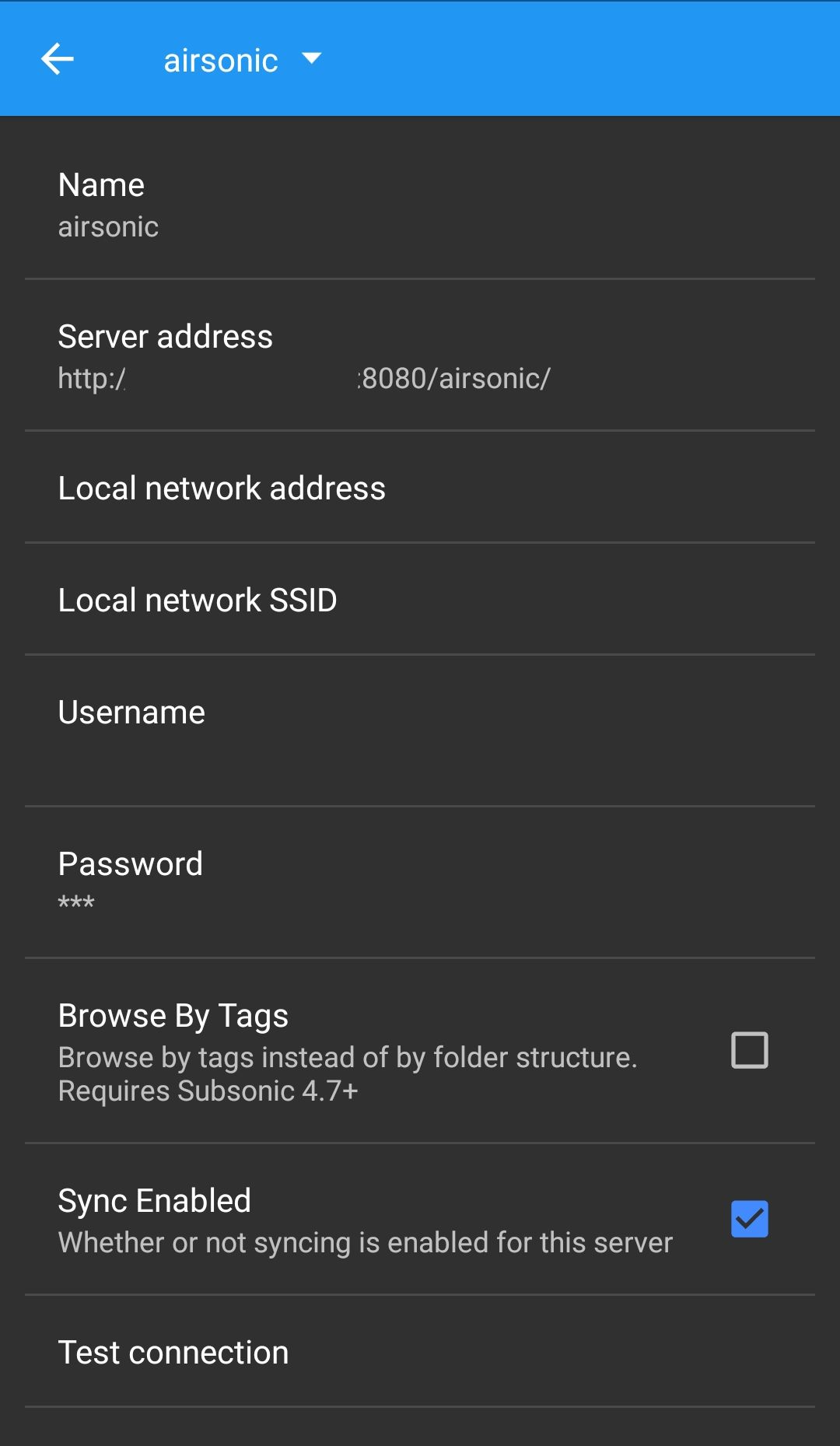
image

Originally created by @SenorSmartyPants on GitHub (May 27, 2022). ### Is your feature request related to a problem? Please describe. I have a reverse proxy set up to ABS and it works fine. However the network through put is lower than when connected to ABS directly (I'm running on a raspberry pi equivalent so I think all the extra processing slow things down enough to be noticeable). When downloading books (and running librespeed tests) there is a significant speed difference. ### Describe the solution you'd like Similar to what DSub does for subsonic servers. Each server has a main server address `https://abs.example.com` but then you can also set up a local network address `http://abs:13378` and SSID. Local SSID is a comma separated list of SSIDs that when connected to app should use the local network address. ### Describe alternatives you've considered I tried setting up 2 servers in ABS android, but then the book will only be "connected" when the app is logged into the server it was downloaded from. ### Additional context Dsub server setup menu ![image](https://user-images.githubusercontent.com/991618/170781167-05f6dc56-2644-4a92-926b-d93414a6f4ab.png)
adam added the enhancement label 2026-04-24 23:10:32 +02:00
Author
Owner

@lukeIam commented on GitHub (Mar 26, 2023):

For this scenario I use split-dns:
The same url is resolved to two different addresses based on if the local oder global dns server is used.

So I have one url in the audiobookshelf app and it is working locally and globally (via tailscale).

@lukeIam commented on GitHub (Mar 26, 2023): For this scenario I use split-dns: The same url is resolved to two different addresses based on if the local oder global dns server is used. So I have one url in the audiobookshelf app and it is working locally and globally (via tailscale).
Author
Owner

@koganei commented on GitHub (Mar 30, 2023):

@lukeIam Can you describe how you do this? Is it something you set up on your Android device?

@koganei commented on GitHub (Mar 30, 2023): @lukeIam Can you describe how you do this? Is it something you set up on your Android device?
Author
Owner

@lukeIam commented on GitHub (Apr 2, 2023):

@lukeIam Can you describe how you do this? Is it something you set up on your Android device?

@koganei Sure - no changes on the devices needed.
The idea is to have two dns servers: one local and one "public".
the same fqdn (e.g. abs.mydomain.com) is resolved to different IPs:

  • the internal dns resolves abs.mydomain.com to an internal ip (e.g. 192.168.0.10)
  • the external dns resolves abs.mydomain.com to an external reachable ip.

There are multiple setups possible:
e.g.

  • using cloudflare dns servers as public dns + using pihole as local dns (for abs.mydomain.com it answers directly and not asking the upstream/public dns)
  • I don't have my systems reachable from the public internet - I'm using tailscale.
    Therefore I have a an additional dnsmasq server resolving abs.mydomain.com to the tailscale client ip and set this up in tailcale to be used by all tailscale clients (MagicDNS) + clients without enabled tailscale at home use my pihole to resolve abs.mydomain.com to the corresponding local ip.

The client automatically chooses the local dns server (in my case pihole) because my DHCP server (I actually use the one from pihole) sends the dns server information together with the ip assignment.
As soon as a client switches to a different network the public dns server is used automatically.

Hope this helps...

@lukeIam commented on GitHub (Apr 2, 2023): > @lukeIam Can you describe how you do this? Is it something you set up on your Android device? @koganei Sure - no changes on the devices needed. The idea is to have two dns servers: one local and one "public". the same fqdn (e.g. `abs.mydomain.com`) is resolved to different IPs: - the internal dns resolves `abs.mydomain.com` to an internal ip (e.g. 192.168.0.10) - the external dns resolves `abs.mydomain.com` to an external reachable ip. There are multiple setups possible: e.g. - using cloudflare dns servers as public dns + using pihole as local dns (for `abs.mydomain.com` it answers directly and not asking the upstream/public dns) - I don't have my systems reachable from the public internet - I'm using tailscale. Therefore I have a an additional dnsmasq server resolving `abs.mydomain.com` to the tailscale client ip and set this up in tailcale to be used by all tailscale clients (MagicDNS) + clients without enabled tailscale at home use my pihole to resolve `abs.mydomain.com` to the corresponding local ip. The client automatically chooses the local dns server (in my case pihole) because my DHCP server (I actually use the one from pihole) sends the dns server information together with the ip assignment. As soon as a client switches to a different network the public dns server is used automatically. Hope this helps...
Author
Owner

@SenorSmartyPants commented on GitHub (Apr 8, 2023):

Split DNS would not work for me as I want to specify different ports and protocols (http vs https) as well.

@SenorSmartyPants commented on GitHub (Apr 8, 2023): Split DNS would not work for me as I want to specify different ports and protocols (http vs https) as well.
Author
Owner

@lukeIam commented on GitHub (Apr 9, 2023):

Split DNS would not work for me as I want to specify different ports and protocols (http vs https) as well.

yes in this case it's not so easy - some dns hosters allow you to do a url redirect (basically they're pointing the dns entry to their web server and send a 301 to redirect the browsers to your target url).
But personally I don't like such hacky solutions and I also don't use non standard ports at all (in most cases they are just not required).

If you host something for "public" networks you should put it behind a reverse proxy anyway -> so why not using the proxy/virtual host feature of it. That way each service has a single unique url no matter where it's hosted or where the client is located. And using auto-trusted lets encrypt certs also for local access is a free bonus.
(I have services that user bowser features that won't work without HTTPS and self signed certs are a hell to maintain on many clients)

@lukeIam commented on GitHub (Apr 9, 2023): > Split DNS would not work for me as I want to specify different ports and protocols (http vs https) as well. yes in this case it's not so easy - some dns hosters allow you to do a url redirect (basically they're pointing the dns entry to their web server and send a 301 to redirect the browsers to your target url). But personally I don't like such hacky solutions and I also don't use non standard ports at all (in most cases they are just not required). If you host something for "public" networks you should put it behind a reverse proxy anyway -> so why not using the proxy/virtual host feature of it. That way each service has a single unique url no matter where it's hosted or where the client is located. And using auto-trusted lets encrypt certs also for local access is a free bonus. (I have services that user bowser features that won't work without HTTPS and self signed certs are a hell to maintain on many clients)
Author
Owner

@fallenczar commented on GitHub (May 28, 2023):

@advplyr is there any progress on this ?

@fallenczar commented on GitHub (May 28, 2023): @advplyr is there any progress on this ?
Author
Owner

@dadino commented on GitHub (Jan 11, 2024):

Is there progress on this? Is this a feature you're willing to work on?
I'm using Cloudflare Tunnel to connect to my home server when outside and it is slooooooooooow, so downloading takes forever, while syncing progress works flawlessly. Being able to connect to a local IP when at home, to sync files, would be ideal.

@dadino commented on GitHub (Jan 11, 2024): Is there progress on this? Is this a feature you're willing to work on? I'm using Cloudflare Tunnel to connect to my home server when outside and it is slooooooooooow, so downloading takes forever, while syncing progress works flawlessly. Being able to connect to a local IP when at home, to sync files, would be ideal.
Author
Owner

@nichwall commented on GitHub (Jan 11, 2024):

There is not an update on this yet.

The best way to show support for a feature is by adding a Thumbs Up reaction to the top comment because feature requests are sorted by that instead of the number of notifications a feature request generates.

https://www.audiobookshelf.org/faq#i-have-a-feature-request-how-should-i-bring-this-up

@nichwall commented on GitHub (Jan 11, 2024): There is not an update on this yet. The best way to show support for a feature is by adding a Thumbs Up reaction to the top comment because feature requests are sorted by that instead of the number of notifications a feature request generates. https://www.audiobookshelf.org/faq#i-have-a-feature-request-how-should-i-bring-this-up
Author
Owner

@windsifter commented on GitHub (May 26, 2024):

Would LOVE to see this. Probably top of my list for an ABS feature.

I logged into Discord for the first time in months just to see what might exist for this issue of local vs remote IP for the android app and was thrilled to see it actively being discussed and linking here.

I run a Cloudflare tunnel that works perfectly for 90% of everything I run, but for downloading a bunch of books onto my android before a trip takes forever and tends to hang. I went down all the same paths discussed here, two servers w/ internal vs external IPs, but then not syncing between them. Run my own DNS for split dns, run reverse proxy, but then got hung up on the SSL certs and gave up. Tried again just now but got stuck at the same point.

The android app nzb360 has implemented this feature well. Screenshot of setup below.

Screenshot_20240525-163414

@windsifter commented on GitHub (May 26, 2024): Would LOVE to see this. Probably top of my list for an ABS feature. I logged into Discord for the first time in months just to see what might exist for this issue of local vs remote IP for the android app and was thrilled to see it actively being discussed and linking here. I run a Cloudflare tunnel that works perfectly for 90% of everything I run, but for downloading a bunch of books onto my android before a trip takes forever and tends to hang. I went down all the same paths discussed here, two servers w/ internal vs external IPs, but then not syncing between them. Run my own DNS for split dns, run reverse proxy, but then got hung up on the SSL certs and gave up. Tried again just now but got stuck at the same point. The android app nzb360 has implemented this feature well. Screenshot of setup below. ![Screenshot_20240525-163414](https://github.com/advplyr/audiobookshelf-app/assets/6476923/28be63af-5df5-41d9-b99c-d585cb2f4620)
Author
Owner

@mkentala commented on GitHub (Dec 3, 2024):

IMO this is a much needed feature. I also use Cloudflare to point to my local system and then use NPM to reverse proxy to my ABS. When downloading through the vanity URL it is extremely slow. I agree with others that it would be great if ABS would allow a way to configure a local and external URL for your server connection (i.e. similar to how Home Assistant does this or like the screenshots windsifter posted). Another option would be to allow you to associate the download with another server like in [Enhancement]: Claim orphaned downloads when server address changes, but server itself is the same #1386.

I'd prefer the option associated with this feature request, but 1386 would solve my problem too (it's just more cumbersome).

@mkentala commented on GitHub (Dec 3, 2024): IMO this is a much needed feature. I also use Cloudflare to point to my local system and then use NPM to reverse proxy to my ABS. When downloading through the vanity URL it is extremely slow. I agree with others that it would be great if ABS would allow a way to configure a local and external URL for your server connection (i.e. similar to how Home Assistant does this or like the screenshots [windsifter](https://github.com/windsifter) posted). Another option would be to allow you to associate the download with another server like in [[Enhancement]: Claim orphaned downloads when server address changes, but server itself is the same #1386](https://github.com/advplyr/audiobookshelf-app/issues/1386). I'd prefer the option associated with this feature request, but 1386 would solve my problem too (it's just more cumbersome).
Author
Owner

@dadino commented on GitHub (Dec 4, 2024):

IMO this is a much needed feature. I also use Cloudflare to point to my local system and then use NPM to reverse proxy to my ABS. When downloading through the vanity URL it is extremely slow. I agree with others that it would be great if ABS would allow a way to configure a local and external URL for your server connection (i.e. similar to how Home Assistant does this or like the screenshots windsifter posted). Another option would be to allow you to associate the download with another server like in [Enhancement]: Claim orphaned downloads when server address changes, but server itself is the same #1386.

I'd prefer the option associated with this feature request, but 1386 would solve my problem too (it's just more cumbersome).

If you have NPM and don't use the Cloudflare Tunnel, but just their DNS, go to the DNS Record page in Cloudflare, uncheck proxied for the ABS url, this way the connection will not go through their servers and you'll have a faster download speed, up to your home connection upload speed.

@dadino commented on GitHub (Dec 4, 2024): > IMO this is a much needed feature. I also use Cloudflare to point to my local system and then use NPM to reverse proxy to my ABS. When downloading through the vanity URL it is extremely slow. I agree with others that it would be great if ABS would allow a way to configure a local and external URL for your server connection (i.e. similar to how Home Assistant does this or like the screenshots [windsifter](https://github.com/windsifter) posted). Another option would be to allow you to associate the download with another server like in [[Enhancement]: Claim orphaned downloads when server address changes, but server itself is the same #1386](https://github.com/advplyr/audiobookshelf-app/issues/1386). > > I'd prefer the option associated with this feature request, but 1386 would solve my problem too (it's just more cumbersome). If you have NPM and don't use the Cloudflare Tunnel, but just their DNS, go to the DNS Record page in Cloudflare, uncheck proxied for the ABS url, this way the connection will not go through their servers and you'll have a faster download speed, up to your home connection upload speed.
Author
Owner

@windsifter commented on GitHub (Dec 4, 2024):

I personally ended up building a reverse proxy and running my own DNS because this feature wasn't available, but that could be a heavier lift for many folks that may not be as technical but could take advantage of this feature if implemented. Obviously that was me when I requested it ;)

(Where I got stuck was trying to use Synology's built in reverse proxy after I had my DNS up and running. My challenge was creating the new certs from LetsEncrypt with Synology's process which meant the ABS mobile app wouldn't trust the connection to my local server. I later installed NPM just to make the certs which I then installed on Synology's interface and am now using that flow.)

@windsifter commented on GitHub (Dec 4, 2024): I personally ended up building a reverse proxy and running my own DNS because this feature wasn't available, but that could be a heavier lift for many folks that may not be as technical but could take advantage of this feature if implemented. Obviously that was me when I requested it ;) (Where I got stuck was trying to use Synology's built in reverse proxy after I had my DNS up and running. My challenge was creating the new certs from LetsEncrypt with Synology's process which meant the ABS mobile app wouldn't trust the connection to my local server. I later installed NPM just to make the certs which I then installed on Synology's interface and am now using that flow.)
Author
Owner

@patrickaclark commented on GitHub (Dec 4, 2024):

I'm running with a Tailscale solution on my NAS that talks to the service in my docker using my internal DNS on a different machine via traefik with a wildcard cert to make things simple as I hate the idea of exposing anything minus tailscale to the internet if I can help it. Even with a full gig connection at home, routing through tailscale seems intermittent(takes forever for the server to come up sometimes, and downloads hang, and the ABS app on my mobile has to be killed and the download restarted). I think that might be more of a tailscale intermediary server issue than ABS though, as when I'm local, it's not an issue at all.

@patrickaclark commented on GitHub (Dec 4, 2024): I'm running with a Tailscale solution on my NAS that talks to the service in my docker using my internal DNS on a different machine via traefik with a wildcard cert to make things simple as I hate the idea of exposing anything minus tailscale to the internet if I can help it. Even with a full gig connection at home, routing through tailscale seems intermittent(takes forever for the server to come up sometimes, and downloads hang, and the ABS app on my mobile has to be killed and the download restarted). I think that might be more of a tailscale intermediary server issue than ABS though, as when I'm local, it's not an issue at all.
Author
Owner

@nichwall commented on GitHub (Dec 4, 2024):

I just opened a new issue to summarize a fix discussed in Discord to make pointing to the discussion simpler. This fixes the root cause of this issue (progress not being synced when downloaded from a different server connection but it is the same server) but doesn't add local connection switching, which could still be something added later.

@nichwall commented on GitHub (Dec 4, 2024): I just opened a new issue to summarize a fix discussed in Discord to make pointing to the discussion simpler. This fixes the root cause of this issue (progress not being synced when downloaded from a different server connection but it is the same server) but doesn't add local connection switching, which could still be something added later.
Author
Owner

@mkentala commented on GitHub (Dec 5, 2024):

IMO this is a much needed feature. I also use Cloudflare to point to my local system and then use NPM to reverse proxy to my ABS. When downloading through the vanity URL it is extremely slow. I agree with others that it would be great if ABS would allow a way to configure a local and external URL for your server connection (i.e. similar to how Home Assistant does this or like the screenshots windsifter posted). Another option would be to allow you to associate the download with another server like in [Enhancement]: Claim orphaned downloads when server address changes, but server itself is the same #1386.
I'd prefer the option associated with this feature request, but 1386 would solve my problem too (it's just more cumbersome).

If you have NPM and don't use the Cloudflare Tunnel, but just their DNS, go to the DNS Record page in Cloudflare, uncheck proxied for the ABS url, this way the connection will not go through their servers and you'll have a faster download speed, up to your home connection upload speed.

Well, that solved my problem! Thank you!

@mkentala commented on GitHub (Dec 5, 2024): > > IMO this is a much needed feature. I also use Cloudflare to point to my local system and then use NPM to reverse proxy to my ABS. When downloading through the vanity URL it is extremely slow. I agree with others that it would be great if ABS would allow a way to configure a local and external URL for your server connection (i.e. similar to how Home Assistant does this or like the screenshots [windsifter](https://github.com/windsifter) posted). Another option would be to allow you to associate the download with another server like in [[Enhancement]: Claim orphaned downloads when server address changes, but server itself is the same #1386](https://github.com/advplyr/audiobookshelf-app/issues/1386). > > I'd prefer the option associated with this feature request, but 1386 would solve my problem too (it's just more cumbersome). > > If you have NPM and don't use the Cloudflare Tunnel, but just their DNS, go to the DNS Record page in Cloudflare, uncheck proxied for the ABS url, this way the connection will not go through their servers and you'll have a faster download speed, up to your home connection upload speed. Well, that solved my problem! Thank you!
Author
Owner

@chyron8472 commented on GitHub (Jun 20, 2025):

I discovered this feature while newly using Immich. That app has the ability to connect to its server based on whether I'm connected to a particular wifi network. They call it "Automatic URL Switching."

This would help download faster while connected locally, and/or solve certain loopback issues.
I used to have loopback problems. When AT&T moved me to fiber, the fiber router they gave me didn't support loopback, so I had to buy a new separate router that did. Having URL switching may also be a solution to other people who experience that.

Here is an example from Immich:

Image

@chyron8472 commented on GitHub (Jun 20, 2025): I discovered this feature while newly using Immich. That app has the ability to connect to its server based on whether I'm connected to a particular wifi network. They call it "Automatic URL Switching." This would help download faster while connected locally, and/or solve certain loopback issues. I used to have loopback problems. When AT&T moved me to fiber, the fiber router they gave me didn't support loopback, so I had to buy a new separate router that did. Having URL switching may also be a solution to other people who experience that. Here is an example from Immich: ![Image](https://github.com/user-attachments/assets/1a287cdd-ab59-451e-a023-7faa94043150)
Author
Owner

@binyaminyblatt commented on GitHub (Jul 16, 2025):

https://github.com/advplyr/audiobookshelf/issues/4501

I just made a request for a similar feature on the server side where the server would store a list of URLs that it’s accessible at and then can pass that list to any client that connects so you can maintain high availability and also it can easily tell any mobile app how to connect to it And it also can define more than just one or two URLs you could have multiple and then the app could figure out the fastest route to the server

If it was defined on the server side, it would be much easier for less tech savvy Users to access it. They wouldn’t need to do anything. The app could handle the entirely transparently

Plex has a similar feature, which allows for high availability or something like it. Basically you can have multiple dynamic DNS’s and other ways to transfer bypass NAT and it would automatically pick the fastest and most stable one.

@binyaminyblatt commented on GitHub (Jul 16, 2025): https://github.com/advplyr/audiobookshelf/issues/4501 I just made a request for a similar feature on the server side where the server would store a list of URLs that it’s accessible at and then can pass that list to any client that connects so you can maintain high availability and also it can easily tell any mobile app how to connect to it And it also can define more than just one or two URLs you could have multiple and then the app could figure out the fastest route to the server If it was defined on the server side, it would be much easier for less tech savvy Users to access it. They wouldn’t need to do anything. The app could handle the entirely transparently Plex has a similar feature, which allows for high availability or something like it. Basically you can have multiple dynamic DNS’s and other ways to transfer bypass NAT and it would automatically pick the fastest and most stable one.
Author
Owner

@TannerFrandsen commented on GitHub (Nov 10, 2025):

I feel like this could be handled on the server side by assigning a unique server ID. The client could then simply compare that ID instead of relying on the network path to identify the server. If the IDs match, it’s the same server regardless of how it’s accessed.

I’m not as familiar with the server-side client identification logic, so this approach might introduce challenges in tracking which device or session the playback originated from — but it could simplify things if that’s manageable.

@TannerFrandsen commented on GitHub (Nov 10, 2025): I feel like this could be handled on the server side by assigning a unique server ID. The client could then simply compare that ID instead of relying on the network path to identify the server. If the IDs match, it’s the same server regardless of how it’s accessed. I’m not as familiar with the server-side client identification logic, so this approach might introduce challenges in tracking which device or session the playback originated from — but it could simplify things if that’s manageable.
Author
Owner

@aWitch-Doctor commented on GitHub (Nov 24, 2025):

I'm not sure how much this makes sense or helps but Home Assistant has this feature. I would assume it wouldn't be too ridiculous to add. When the app is opened, it checks for what network it's connected to. If it is a specific SSID defined in the settings by a user then it connects via local IP set by the user. If it is not the specified SSID then it connects to a user specified external URL. Not sure how Android or IOS handle going from WIFI to cellular data. Might have a check each time the WIFI connects as well?

@aWitch-Doctor commented on GitHub (Nov 24, 2025): I'm not sure how much this makes sense or helps but Home Assistant has this feature. I would assume it wouldn't be too ridiculous to add. When the app is opened, it checks for what network it's connected to. If it is a specific SSID defined in the settings by a user then it connects via local IP set by the user. If it is not the specified SSID then it connects to a user specified external URL. Not sure how Android or IOS handle going from WIFI to cellular data. Might have a check each time the WIFI connects as well?
Author
Owner

@smennig commented on GitHub (Nov 28, 2025):

Lissen App has also implemente this
Screenshot_20251128_140036_Lissen.jpg
Screenshot_20251128_140123_Lissen.jpg

@smennig commented on GitHub (Nov 28, 2025): Lissen App has also implemente this ![Screenshot_20251128_140036_Lissen.jpg](https://github.com/user-attachments/assets/2a2ab9ab-45ea-4161-83e2-d3257877fa80) ![Screenshot_20251128_140123_Lissen.jpg](https://github.com/user-attachments/assets/8dd35335-9459-423a-8ffd-7ddc01620762)
Sign in to join this conversation.
1 Participants
Notifications
Due Date
No due date set.
Dependencies

No dependencies set.

Reference: starred/audiobookshelf-app#165