WireMock.net record or stub support SOAP? #319

Closed
opened 2025-12-29 08:26:04 +01:00 by adam · 20 comments
Owner

Originally created by @ibmer921150 on GitHub (Dec 8, 2020).

Hi there,

May I know if Wiremock.net record support SOAP as endpoint? Also does the stub mode support SOAP response?

If it supports, would you please share examples?

I tried wiremock.net record mode for SOAP as endpoint, but got below errors:

{"The remote server returned an unexpected response: (405) Method Not Allowed."}

Thanks
Yu

Originally created by @ibmer921150 on GitHub (Dec 8, 2020). Hi there, May I know if Wiremock.net record support SOAP as endpoint? Also does the stub mode support SOAP response? If it supports, would you please share examples? I tried wiremock.net record mode for SOAP as endpoint, but got below errors: {"The remote server returned an unexpected response: (405) Method Not Allowed."} Thanks Yu
adam added the question label 2025-12-29 08:26:04 +01:00
adam closed this issue 2025-12-29 08:26:04 +01:00
Author
Owner

@StefH commented on GitHub (Dec 8, 2020):

Recording SOAP is not different as other services. It should work.

Can you provide more details on the (error) message in the console-logging?

@StefH commented on GitHub (Dec 8, 2020): Recording SOAP is not different as other services. It should work. Can you provide more details on the (error) message in the console-logging?
Author
Owner

@ibmer921150 commented on GitHub (Dec 9, 2020):

Hi @StefH , it looks the wiremock.net record in the mappings, but return 405 as response code. Below is the error log I copied from wiremock mappings

    "Response": {
      "StatusCode": 405,
      "Body": "<!DOCTYPE html PUBLIC \"-//W3C//DTD XHTML 1.0 Strict//EN\" \"http://www.w3.org/TR/xhtml1/DTD/xhtml1-strict.dtd\">\r\n<html xmlns=\"http://www.w3.org/1999/xhtml\">\r\n<head>\r\n<meta http-equiv=\"Content-Type\" content=\"text/html; charset=iso-8859-1\"/>\r\n<title>405 - HTTP verb used to access this page is not allowed.</title>\r\n<style type=\"text/css\">\r\n<!--\r\nbody{margin:0;font-size:.7em;font-family:Verdana, Arial, Helvetica, sans-serif;background:#EEEEEE;}\r\nfieldset{padding:0 15px 10px 15px;} \r\nh1{font-size:2.4em;margin:0;color:#FFF;}\r\nh2{font-size:1.7em;margin:0;color:#CC0000;} \r\nh3{font-size:1.2em;margin:10px 0 0 0;color:#000000;} \r\n#header{width:96%;margin:0 0 0 0;padding:6px 2% 6px 2%;font-family:\"trebuchet MS\", Verdana, sans-serif;color:#FFF;\r\nbackground-color:#555555;}\r\n#content{margin:0 0 0 2%;position:relative;}\r\n.content-container{background:#FFF;width:96%;margin-top:8px;padding:10px;position:relative;}\r\n-->\r\n</style>\r\n</head>\r\n<body>\r\n<div id=\"header\"><h1>Server Error</h1></div>\r\n<div id=\"content\">\r\n <div class=\"content-container\"><fieldset>\r\n  <h2>405 - HTTP verb used to access this page is not allowed.</h2>\r\n  <h3>The page you are looking for cannot be displayed because an invalid method (HTTP verb) was used to attempt access.</h3>\r\n </fieldset></div>\r\n</div>\r\n</body>\r\n</html>\r\n",
      "Headers": {
        "Allow": [
          "GET",
          "HEAD",
          "OPTIONS",
          "TRACE"
        ],
        "Content-Type": "text/html",
        "Content-Length": "1293",
        "Server": "Microsoft-IIS/8.5",
        "X-Powered-By": "ASP.NET",
        "Date": "Tue, 08 Dec 2020 23:35:57 GMT"
      }
    }
  }
]
@ibmer921150 commented on GitHub (Dec 9, 2020): Hi @StefH , it looks the wiremock.net record in the mappings, but return 405 as response code. Below is the error log I copied from wiremock mappings ``` json "Response": { "StatusCode": 405, "Body": "<!DOCTYPE html PUBLIC \"-//W3C//DTD XHTML 1.0 Strict//EN\" \"http://www.w3.org/TR/xhtml1/DTD/xhtml1-strict.dtd\">\r\n<html xmlns=\"http://www.w3.org/1999/xhtml\">\r\n<head>\r\n<meta http-equiv=\"Content-Type\" content=\"text/html; charset=iso-8859-1\"/>\r\n<title>405 - HTTP verb used to access this page is not allowed.</title>\r\n<style type=\"text/css\">\r\n<!--\r\nbody{margin:0;font-size:.7em;font-family:Verdana, Arial, Helvetica, sans-serif;background:#EEEEEE;}\r\nfieldset{padding:0 15px 10px 15px;} \r\nh1{font-size:2.4em;margin:0;color:#FFF;}\r\nh2{font-size:1.7em;margin:0;color:#CC0000;} \r\nh3{font-size:1.2em;margin:10px 0 0 0;color:#000000;} \r\n#header{width:96%;margin:0 0 0 0;padding:6px 2% 6px 2%;font-family:\"trebuchet MS\", Verdana, sans-serif;color:#FFF;\r\nbackground-color:#555555;}\r\n#content{margin:0 0 0 2%;position:relative;}\r\n.content-container{background:#FFF;width:96%;margin-top:8px;padding:10px;position:relative;}\r\n-->\r\n</style>\r\n</head>\r\n<body>\r\n<div id=\"header\"><h1>Server Error</h1></div>\r\n<div id=\"content\">\r\n <div class=\"content-container\"><fieldset>\r\n <h2>405 - HTTP verb used to access this page is not allowed.</h2>\r\n <h3>The page you are looking for cannot be displayed because an invalid method (HTTP verb) was used to attempt access.</h3>\r\n </fieldset></div>\r\n</div>\r\n</body>\r\n</html>\r\n", "Headers": { "Allow": [ "GET", "HEAD", "OPTIONS", "TRACE" ], "Content-Type": "text/html", "Content-Length": "1293", "Server": "Microsoft-IIS/8.5", "X-Powered-By": "ASP.NET", "Date": "Tue, 08 Dec 2020 23:35:57 GMT" } } } ] ```
Author
Owner

@StefH commented on GitHub (Dec 9, 2020):

  • What is the exact url form the soap service?
  • How do you use WireMock.Net ?
@StefH commented on GitHub (Dec 9, 2020): - What is the exact url form the soap service? - How do you use WireMock.Net ?
Author
Owner

@ibmer921150 commented on GitHub (Dec 10, 2020):

Hi @StefH, for further investigation, it looks my urls configuration is wrong. After updated the url configuration, I got the wiremock proxy protentional working, which can route the soap request to the real soap endpoint, however failed with authentication issue

SOAP client returns below error:
Message "The HTTP request is unauthorized with client authentication scheme 'Basic'. The authentication header received from the server was 'Negotiate, NTLM, Basic realm=\"xxx\"'." string

Wiremock proxy returns below error

 "Response": {
      "StatusCode": 401,
      "Body": "<!DOCTYPE HTML PUBLIC \"-//W3C//DTD HTML 4.01//EN\"\"http://www.w3.org/TR/html4/strict.dtd\">\r\n<HTML><HEAD><TITLE>Not Authorized</TITLE>\r\n<META HTTP-EQUIV=\"Content-Type\" Content=\"text/html; charset=us-ascii\"></HEAD>\r\n<BODY><h2>Not Authorized</h2>\r\n<hr><p>HTTP Error 401. The requested resource requires user authentication.</p>\r\n</BODY></HTML>\r\n",
      "Headers": {
        "Content-Type": "text/html; charset=us-ascii",
        "Content-Length": "341",
        "Server": "Microsoft-HTTPAPI/2.0",
        "WWW-Authenticate": "NTLM TlRMTVNTUAACAAAADAAMADgAAAAFgomiRIyeETdqgboAAAAAAAAAAPIA8gBEAAAABgOAJQAAAA9BAFAAUABEAEUAVgACAAwAQQBQAFAARABFAFYAAQAYAEsAQgBBAEQASQBOAFQAUwBSAFYANwAwAAQAMABhAHAAcABkAGUAdgAuAGsAaQB3AGkAYgBhAG4AawAuAGkAbgB0AGUAcgBuAGEAbAADAEoASwBCAEEARABJAE4AVABTAFIAVgA3ADAALgBhAHAAcABkAGUAdgAuAGsAaQB3AGkAYgBhAG4AawAuAGkAbgB0AGUAcgBuAGEAbAAFADAAYQBwAHAAZABlAHYALgBrAGkAdwBpAGIAYQBuAGsALgBpAG4AdABlAHIAbgBhAGwABwAIABhlg8idztYBAAAAAA==",
        "Date": "Thu, 10 Dec 2020 02:40:12 GMT"}

If I try to send soap request to real endpoint without wiremock proxy, it works fine.

Do you have any advice how the wiremock proxy handling the authentication? Or how can we config authentication in wiremock settings properly?

Thanks
Yu

@ibmer921150 commented on GitHub (Dec 10, 2020): Hi @StefH, for further investigation, it looks my urls configuration is wrong. After updated the url configuration, I got the wiremock proxy protentional working, which can route the soap request to the real soap endpoint, however failed with authentication issue SOAP client returns below error: `Message "The HTTP request is unauthorized with client authentication scheme 'Basic'. The authentication header received from the server was 'Negotiate, NTLM, Basic realm=\"xxx\"'." string` Wiremock proxy returns below error ``` json "Response": { "StatusCode": 401, "Body": "<!DOCTYPE HTML PUBLIC \"-//W3C//DTD HTML 4.01//EN\"\"http://www.w3.org/TR/html4/strict.dtd\">\r\n<HTML><HEAD><TITLE>Not Authorized</TITLE>\r\n<META HTTP-EQUIV=\"Content-Type\" Content=\"text/html; charset=us-ascii\"></HEAD>\r\n<BODY><h2>Not Authorized</h2>\r\n<hr><p>HTTP Error 401. The requested resource requires user authentication.</p>\r\n</BODY></HTML>\r\n", "Headers": { "Content-Type": "text/html; charset=us-ascii", "Content-Length": "341", "Server": "Microsoft-HTTPAPI/2.0", "WWW-Authenticate": "NTLM TlRMTVNTUAACAAAADAAMADgAAAAFgomiRIyeETdqgboAAAAAAAAAAPIA8gBEAAAABgOAJQAAAA9BAFAAUABEAEUAVgACAAwAQQBQAFAARABFAFYAAQAYAEsAQgBBAEQASQBOAFQAUwBSAFYANwAwAAQAMABhAHAAcABkAGUAdgAuAGsAaQB3AGkAYgBhAG4AawAuAGkAbgB0AGUAcgBuAGEAbAADAEoASwBCAEEARABJAE4AVABTAFIAVgA3ADAALgBhAHAAcABkAGUAdgAuAGsAaQB3AGkAYgBhAG4AawAuAGkAbgB0AGUAcgBuAGEAbAAFADAAYQBwAHAAZABlAHYALgBrAGkAdwBpAGIAYQBuAGsALgBpAG4AdABlAHIAbgBhAGwABwAIABhlg8idztYBAAAAAA==", "Date": "Thu, 10 Dec 2020 02:40:12 GMT"} ``` If I try to send soap request to real endpoint without wiremock proxy, it works fine. Do you have any advice how the wiremock proxy handling the authentication? Or how can we config authentication in wiremock settings properly? Thanks Yu
Author
Owner

@StefH commented on GitHub (Dec 10, 2020):

Can you please show the complete soap-request you are sending?

@StefH commented on GitHub (Dec 10, 2020): Can you please show the complete soap-request you are sending?
Author
Owner

@ibmer921150 commented on GitHub (Dec 14, 2020):

Hi @StefH, below is the soap request and response in wiremock.net mappings, hidden a few real data for security. FYI.

[
    {
        "Guid": "7f211b2c-4615-45b0-811d-90f6eac6bada",
        "Title": "",
        "Request": {
            "Path": {
                "Matchers": [
                    {
                        "Name": "WildcardMatcher",
                        "Pattern": "/xxx/router.svc/basic",
                        "IgnoreCase": false
                    }
                ]
            },
            "Methods": [
                "POST"
            ],
            "Headers": [
                {
                    "Name": "Cache-Control",
                    "Matchers": [
                        {
                            "Name": "WildcardMatcher",
                            "Pattern": "no-cache, max-age=0",
                            "IgnoreCase": true
                        }
                    ]
                },
                {
                    "Name": "Connection",
                    "Matchers": [
                        {
                            "Name": "WildcardMatcher",
                            "Pattern": "Keep-Alive",
                            "IgnoreCase": true
                        }
                    ]
                },
                {
                    "Name": "Content-Type",
                    "Matchers": [
                        {
                            "Name": "WildcardMatcher",
                            "Pattern": "text/xml; charset=utf-8",
                            "IgnoreCase": true
                        }
                    ]
                },
                {
                    "Name": "Accept-Encoding",
                    "Matchers": [
                        {
                            "Name": "WildcardMatcher",
                            "Pattern": "gzip, deflate",
                            "IgnoreCase": true
                        }
                    ]
                },
                {
                    "Name": "Expect",
                    "Matchers": [
                        {
                            "Name": "WildcardMatcher",
                            "Pattern": "100-continue",
                            "IgnoreCase": true
                        }
                    ]
                },
                {
                    "Name": "Host",
                    "Matchers": [
                        {
                            "Name": "WildcardMatcher",
                            "Pattern": "localhost:9091",
                            "IgnoreCase": true
                        }
                    ]
                },
                {
                    "Name": "Content-Length",
                    "Matchers": [
                        {
                            "Name": "WildcardMatcher",
                            "Pattern": "1185",
                            "IgnoreCase": true
                        }
                    ]
                },
                {
                    "Name": "SOAPAction",
                    "Matchers": [
                        {
                            "Name": "WildcardMatcher",
                            "Pattern": "\"www.xxx/V6.0.0.2/xxx/xxx/xxx/xxx/xxx/xxx\"",
                            "IgnoreCase": true
                        }
                    ]
                }
            ],
            "Body": {
                "Matcher": {
                    "Name": "ExactMatcher",
                    "Pattern": "<s:Envelope xmlns:s=\"http://schemas.xmlsoap.org/soap/envelope/\"><s:Body><xxx xmlns=\"xxx\"><request xmlns:a=\"http://schemas.datacontract.org/2004/07/CBIServices.DataContracts\" xmlns:i=\"http://www.w3.org/2001/XMLSchema-instance\"><a:Channel>NOTSPECIFIED</a:Channel><a:Organisations xmlns:b=\"xxx\">..........<remoteSystemDetails>xxx</remoteSystemDetails></xxx></s:Body></s:Envelope>"
                }
            }
        },
        "Response": {
            "StatusCode": 401,
            "Body": "You do not have permission to view this directory or page.",
            "Headers": {
                "Content-Type": "text/html",
                "Content-Length": "58",
                "Server": "Microsoft-IIS/8.5",
                "WWW-Authenticate": "Basic realm=\"xxx\"",
                "X-Powered-By": "ASP.NET",
                "Date": "Sun, 13 Dec 2020 23:05:36 GMT"
            }
        }
    }
]
@ibmer921150 commented on GitHub (Dec 14, 2020): Hi @StefH, below is the soap request and response in wiremock.net mappings, hidden a few real data for security. FYI. ``` json [ { "Guid": "7f211b2c-4615-45b0-811d-90f6eac6bada", "Title": "", "Request": { "Path": { "Matchers": [ { "Name": "WildcardMatcher", "Pattern": "/xxx/router.svc/basic", "IgnoreCase": false } ] }, "Methods": [ "POST" ], "Headers": [ { "Name": "Cache-Control", "Matchers": [ { "Name": "WildcardMatcher", "Pattern": "no-cache, max-age=0", "IgnoreCase": true } ] }, { "Name": "Connection", "Matchers": [ { "Name": "WildcardMatcher", "Pattern": "Keep-Alive", "IgnoreCase": true } ] }, { "Name": "Content-Type", "Matchers": [ { "Name": "WildcardMatcher", "Pattern": "text/xml; charset=utf-8", "IgnoreCase": true } ] }, { "Name": "Accept-Encoding", "Matchers": [ { "Name": "WildcardMatcher", "Pattern": "gzip, deflate", "IgnoreCase": true } ] }, { "Name": "Expect", "Matchers": [ { "Name": "WildcardMatcher", "Pattern": "100-continue", "IgnoreCase": true } ] }, { "Name": "Host", "Matchers": [ { "Name": "WildcardMatcher", "Pattern": "localhost:9091", "IgnoreCase": true } ] }, { "Name": "Content-Length", "Matchers": [ { "Name": "WildcardMatcher", "Pattern": "1185", "IgnoreCase": true } ] }, { "Name": "SOAPAction", "Matchers": [ { "Name": "WildcardMatcher", "Pattern": "\"www.xxx/V6.0.0.2/xxx/xxx/xxx/xxx/xxx/xxx\"", "IgnoreCase": true } ] } ], "Body": { "Matcher": { "Name": "ExactMatcher", "Pattern": "<s:Envelope xmlns:s=\"http://schemas.xmlsoap.org/soap/envelope/\"><s:Body><xxx xmlns=\"xxx\"><request xmlns:a=\"http://schemas.datacontract.org/2004/07/CBIServices.DataContracts\" xmlns:i=\"http://www.w3.org/2001/XMLSchema-instance\"><a:Channel>NOTSPECIFIED</a:Channel><a:Organisations xmlns:b=\"xxx\">..........<remoteSystemDetails>xxx</remoteSystemDetails></xxx></s:Body></s:Envelope>" } } }, "Response": { "StatusCode": 401, "Body": "You do not have permission to view this directory or page.", "Headers": { "Content-Type": "text/html", "Content-Length": "58", "Server": "Microsoft-IIS/8.5", "WWW-Authenticate": "Basic realm=\"xxx\"", "X-Powered-By": "ASP.NET", "Date": "Sun, 13 Dec 2020 23:05:36 GMT" } } } ] ```
Author
Owner

@StefH commented on GitHub (Dec 14, 2020):

At first look it seems that the authentication header is not send by you, or that this header is not recorded?

Can you also post here the complete original soap request ?

@StefH commented on GitHub (Dec 14, 2020): At first look it seems that the authentication header is not send by you, or that this header is not recorded? Can you also post here the complete original soap request ?
Author
Owner

@ibmer921150 commented on GitHub (Dec 15, 2020):

hi @StefH,

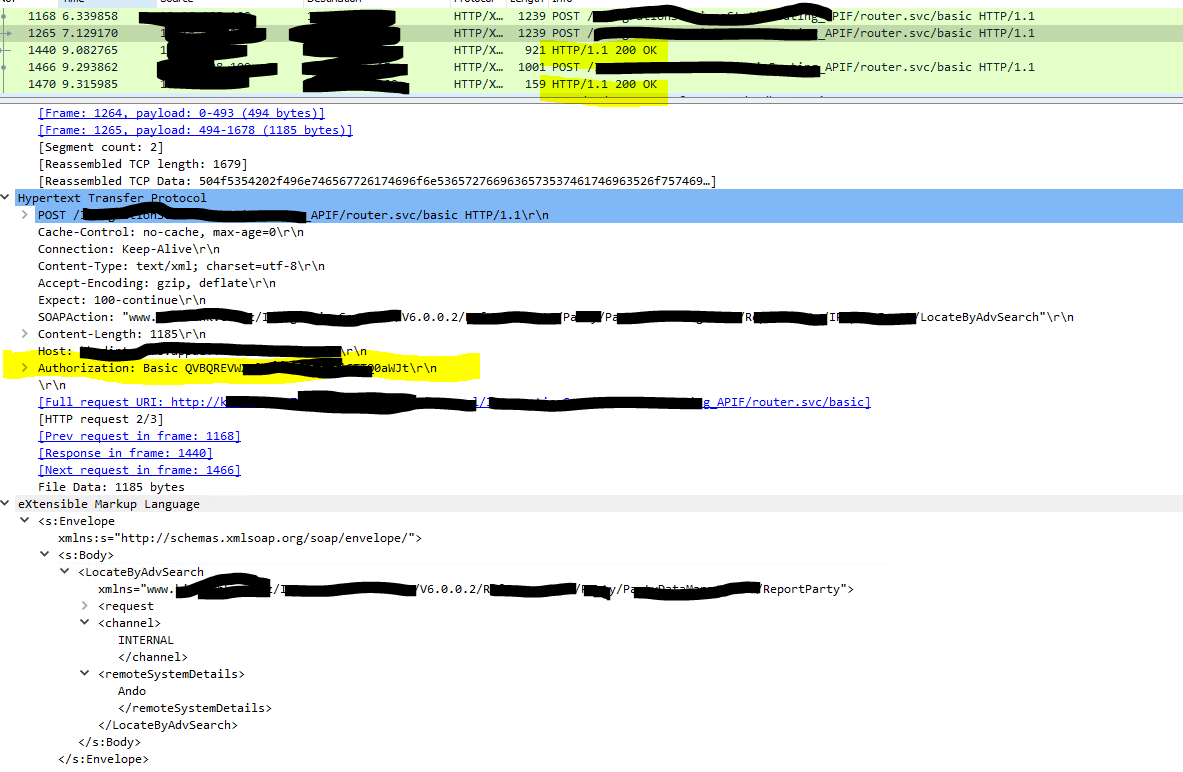
When I monitor the soap transactions sending out from wiremock via fiddler or wireshark. I can see the auth header (Basic xxxxx) has been removed. When the soap transaction sending to endpoint directly, the auth (Basic xxxx) existed in the http header via fiddler or wireshark. I guess the wiremock may do some strange thing for the auth header?

Thanks
Yu

@ibmer921150 commented on GitHub (Dec 15, 2020): hi @StefH, When I monitor the soap transactions sending out from wiremock via fiddler or wireshark. I can see the auth header (Basic xxxxx) has been removed. When the soap transaction sending to endpoint directly, the auth (Basic xxxx) existed in the http header via fiddler or wireshark. I guess the wiremock may do some strange thing for the auth header? Thanks Yu
Author
Owner

@ibmer921150 commented on GitHub (Dec 15, 2020):

Sorry @StefH I can not provide the complete original soap request as it is confidential.

@ibmer921150 commented on GitHub (Dec 15, 2020): Sorry @StefH I can not provide the complete original soap request as it is confidential.
Author
Owner

@StefH commented on GitHub (Dec 15, 2020):

No problem. I'll investigate the code on the basic authentication header.

BTW what framework do you use?

@StefH commented on GitHub (Dec 15, 2020): No problem. I'll investigate the code on the basic authentication header. BTW what framework do you use?
Author
Owner

@StefH commented on GitHub (Dec 15, 2020):

https://github.com/WireMock-Net/WireMock.Net/pull/555

@StefH commented on GitHub (Dec 15, 2020): https://github.com/WireMock-Net/WireMock.Net/pull/555
Author
Owner

@StefH commented on GitHub (Dec 15, 2020):

@ibmer921150 I'm not able to reproduce this problem with a UnitTest, so if you please can post the complete SOAP HTTP request (without confidential data) that would help me a lot.

@StefH commented on GitHub (Dec 15, 2020): @ibmer921150 I'm not able to reproduce this problem with a UnitTest, so if you please can post the complete SOAP HTTP request (without confidential data) that would help me a lot.
Author
Owner

@ibmer921150 commented on GitHub (Dec 15, 2020):

Thanks @StefH. Please review the two SOAP HTTP requests between wiremock and direct endpoint, captured via Wireshark, included header and request.

Wiremock
image

Direct endpoint
image

@ibmer921150 commented on GitHub (Dec 15, 2020): Thanks @StefH. Please review the two SOAP HTTP requests between wiremock and direct endpoint, captured via Wireshark, included header and request. **Wiremock** ![image](https://user-images.githubusercontent.com/13460590/102259422-f5a5ba00-3f73-11eb-830e-2e34012e3f5a.png) **Direct endpoint** ![image](https://user-images.githubusercontent.com/13460590/102259262-c1ca9480-3f73-11eb-81b4-ec5d33d31c4c.png)
Author
Owner

@StefH commented on GitHub (Dec 15, 2020):

@ibmer921150
How do you configure the proxying?

  1. Via global settings & proxy settings?
  2. Via .WithProxy(...)
@StefH commented on GitHub (Dec 15, 2020): @ibmer921150 How do you configure the proxying? 1. Via global settings & proxy settings? 2. Via `.WithProxy(...)`
Author
Owner

@StefH commented on GitHub (Dec 15, 2020):

If I use this code:

var server = WireMockServer.Start(new WireMockServerSettings
{
    Urls = new[] { "http://localhost:9091", "https://localhost:9443" },
    StartAdminInterface = true,
    ReadStaticMappings = false,
    ProxyAndRecordSettings = new ProxyAndRecordSettings
    {
        Url = "http://postman-echo.com/post",
        //ClientX509Certificate2ThumbprintOrSubjectName = "www.yourclientcertname.com OR yourcertificatethumbprint (only if the service you're proxying to requires it)",
        SaveMapping = true,
        SaveMappingToFile = false,
        ExcludedHeaders = new[] { "dnt", "Content-Length" }
    }
});

And send a post request with Authorization to WireMock.Net , the response from postman echo does contain the header:
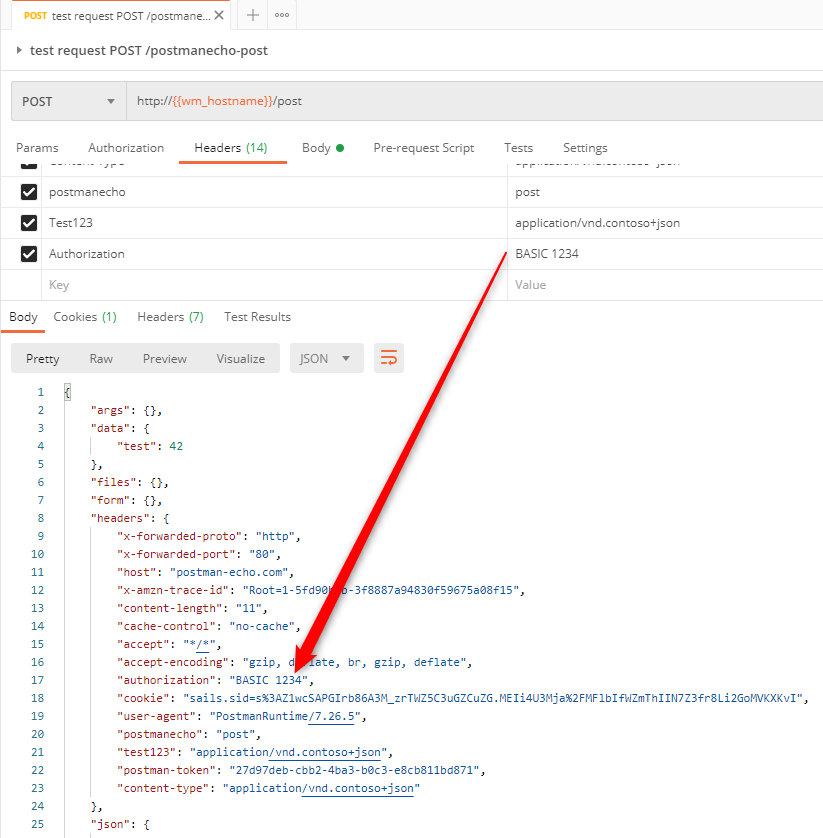
image

@StefH commented on GitHub (Dec 15, 2020): If I use this code: ``` c# var server = WireMockServer.Start(new WireMockServerSettings { Urls = new[] { "http://localhost:9091", "https://localhost:9443" }, StartAdminInterface = true, ReadStaticMappings = false, ProxyAndRecordSettings = new ProxyAndRecordSettings { Url = "http://postman-echo.com/post", //ClientX509Certificate2ThumbprintOrSubjectName = "www.yourclientcertname.com OR yourcertificatethumbprint (only if the service you're proxying to requires it)", SaveMapping = true, SaveMappingToFile = false, ExcludedHeaders = new[] { "dnt", "Content-Length" } } }); ``` And send a post request with Authorization to WireMock.Net , the response from postman echo does contain the header: ![image](https://user-images.githubusercontent.com/249938/102261958-b3985c00-3f12-11eb-8ad6-bb9010aa0a3c.png)
Author
Owner

@ibmer921150 commented on GitHub (Dec 15, 2020):

@StefH here is my configuration, similar like yours. BTW, your example is API JSON request which is not exactly the same as SOAP header, such as content-type should be text/xml, including soapactions and etc. The c# source code setup the header and auth would be different. I am not expert of c#, I will join our dev to look into the source code of wiremock.net. Cheers.

using System;
using Newtonsoft.Json;
using WireMock.Server;
using WireMock.Settings;

namespace WiremockDotnet
{
    class Program
    {

        static void Main(params string[] args)
        {
            var server = WireMockServer.Start(new WireMockServerSettings
            {
       
                Urls = new[] { "http://xxx:9091/" },
                StartAdminInterface = true,
                Logger = new WireMock.Logging.WireMockConsoleLogger(),
                //ReadStaticMappings = false,
                ProxyAndRecordSettings = new ProxyAndRecordSettings
                {
                    Url = "http://xxx/",
                    //ClientX509Certificate2ThumbprintOrSubjectName = "www.yourclientcertname.com OR yourcertificatethumbprint (only if the service you're proxying to requires it)",
                    SaveMapping = true,
                    SaveMappingToFile = true,

                    //ExcludedHeaders = new[] { "dnt", "Content-Length" }
                },
                //Logger = new WireMock.Logging.WireMockNullLogger(),
            });
            System.Console.WriteLine("Press any key to stop the server");
            System.Console.ReadKey();
            server.Stop();
            System.Console.WriteLine("Displaying all requests");
            var allRequests = server.LogEntries;
            System.Console.WriteLine(JsonConvert.SerializeObject(allRequests, Formatting.Indented));
            System.Console.WriteLine("Press any key to quit");
            System.Console.ReadKey();
        }
    }
}
@ibmer921150 commented on GitHub (Dec 15, 2020): @StefH here is my configuration, similar like yours. BTW, your example is API JSON request which is not exactly the same as SOAP header, such as content-type should be text/xml, including soapactions and etc. The c# source code setup the header and auth would be different. I am not expert of c#, I will join our dev to look into the source code of wiremock.net. Cheers. ``` c# using System; using Newtonsoft.Json; using WireMock.Server; using WireMock.Settings; namespace WiremockDotnet { class Program { static void Main(params string[] args) { var server = WireMockServer.Start(new WireMockServerSettings { Urls = new[] { "http://xxx:9091/" }, StartAdminInterface = true, Logger = new WireMock.Logging.WireMockConsoleLogger(), //ReadStaticMappings = false, ProxyAndRecordSettings = new ProxyAndRecordSettings { Url = "http://xxx/", //ClientX509Certificate2ThumbprintOrSubjectName = "www.yourclientcertname.com OR yourcertificatethumbprint (only if the service you're proxying to requires it)", SaveMapping = true, SaveMappingToFile = true, //ExcludedHeaders = new[] { "dnt", "Content-Length" } }, //Logger = new WireMock.Logging.WireMockNullLogger(), }); System.Console.WriteLine("Press any key to stop the server"); System.Console.ReadKey(); server.Stop(); System.Console.WriteLine("Displaying all requests"); var allRequests = server.LogEntries; System.Console.WriteLine(JsonConvert.SerializeObject(allRequests, Formatting.Indented)); System.Console.WriteLine("Press any key to quit"); System.Console.ReadKey(); } } } ```
Author
Owner

@ibmer921150 commented on GitHub (Dec 16, 2020):

@StefH For further investigation today, I constructed the soap request via Postman and sent soap request to wiremock proxy. It can record the request mappings and response mappings successfully. Now the problem is more like our application is doing some strange things which can not be compatible with the wiremock proxy. I will do some further investigations and provide the PR if required. Thanks for your time on the question.

BTW, do we have any examples how to playback the exited mappings(JSON files) in stub mode? I assume it might be like wiremock.org that “Playback” doesn’t require any explicit action. But actually it is not for wiremock.net. Sorry I didn't find the related information in the wiki page, maybe I missed it...

@ibmer921150 commented on GitHub (Dec 16, 2020): @StefH For further investigation today, I constructed the soap request via Postman and sent soap request to wiremock proxy. It can record the request mappings and response mappings successfully. Now the problem is more like our application is doing some strange things which can not be compatible with the wiremock proxy. I will do some further investigations and provide the PR if required. Thanks for your time on the question. BTW, do we have any examples how to playback the exited mappings(JSON files) in stub mode? I assume it might be like wiremock.org that “Playback” doesn’t require any explicit action. But actually it is not for wiremock.net. Sorry I didn't find the related information in the wiki page, maybe I missed it...
Author
Owner

@ibmer921150 commented on GitHub (Dec 16, 2020):

Above issue seems to be fixed after adding below:

AllowPartialMapping = true

@ibmer921150 commented on GitHub (Dec 16, 2020): Above issue seems to be fixed after adding below: AllowPartialMapping = true
Author
Owner

@StefH commented on GitHub (Dec 16, 2020):

  1. Please note that AllowPartialMapping = true is more of a last resort option. You can look at the logging to see which matchers do map or don't map 100% and fix the matching so that they do match.
    (Else you can run into problems in the future when you have a lot of mappings added and maybe the wrong partial matches.)
    See this link for details https://github.com/WireMock-Net/WireMock.Net/wiki/Request-Matching-Tips

  2. Playing back is simple, just start WireMock.Net without any proxy settings and make sure ReadStaticMappings = true,
    Now all the .json mapping files generated in the __/admin folder will be read and used.
    (Maybe I forgot to add a Wiki page on this?)

@StefH commented on GitHub (Dec 16, 2020): 1. Please note that `AllowPartialMapping = true` is more of a last resort option. You can look at the logging to see which matchers do map or don't map 100% and fix the matching so that they do match. (Else you can run into problems in the future when you have a lot of mappings added and maybe the wrong partial matches.) See this link for details https://github.com/WireMock-Net/WireMock.Net/wiki/Request-Matching-Tips 2. Playing back is simple, just start WireMock.Net without any proxy settings and make sure `ReadStaticMappings = true,` Now all the .json mapping files generated in the __/admin folder will be read and used. (Maybe I forgot to add a Wiki page on this?)
Author
Owner

@ibmer921150 commented on GitHub (Dec 16, 2020):

Very useful tips, thanks a lot.

@ibmer921150 commented on GitHub (Dec 16, 2020): Very useful tips, thanks a lot.
Sign in to join this conversation.
1 Participants
Notifications
Due Date
No due date set.
Dependencies

No dependencies set.

Reference: starred/WireMock.Net#319