mirror of
https://github.com/wiremock/WireMock.Net.git
synced 2026-09-03 08:27:14 +02:00
Can static mappings be used in xunit tests? #282
Closed
opened 2025-12-29 08:25:19 +01:00 by adam
·
22 comments
No Branch/Tag Specified
master
1341-mapping-json
stef-aspire-tests-updates
bug/973-TinyMapper
bug/1149-AppendGuidToSavedMappingFile
feature/1150-DockerImageVersion
61
stef-1108
stef-1097
stef-1083-MessageOptions_Type_Conflict
stef-1062-logger
stef-IgnoreOpenApiErrors
stef-928-TypeLoadException-FluentAssertions-net472
nunit
stef-849
stef-847-regex-questionmark
http_verb
WireMockServerContext
webapp
ai
CommandLineArgumentsParser
2.15.0
2.14.0
2.13.0
2.12.0
2.11.0
2.10.0
2.9.0
2.8.0
2.7.0
2.6.0
2.5.0
2.4.0
2.3.0
2.2.0
2.1.0
2.0.0
1.25.0
1.24.0
1.23.0
1.22.0
1.21.0
1.20.0
1.19.0
1.18.0
1.17.0
1.16.0
1.15.0
1.14.0
1.13.0
1.12.0
1.11.2
1.11.0
1.10.1
1.10.0
1.9.1
1.9.0
1.8.18
1.8.17
1.8.16
1.8.15
1.8.14
1.8.13
1.8.12
1.8.11
1.8.10
1.8.9
1.8.8
1.8.7
1.8.6
1.8.5
1.8.3
1.8.2
1.8.1
1.8.0
1.7.4
1.7.3
1.7.2
1.7.1
1.7.0
1.6.12
1.6.11
1.6.10
1.6.9
1.6.8
1.6.7
1.6.6
1.6.5
1.6.4
1.6.3
1.6.2
1.6.1
1.6.0
1.5.62
1.5.61
1.5.60
1.5.59
1.5.58
1.5.57
1.5.56
1.5.55
1.5.54
1.5.53
1.5.52
1.5.51
1.5.50
1.5.49
1.5.48
1.5.47
1.5.46
1.5.45
1.5.44
1.5.43
1.5.42
1.5.41
1.5.40
1.5.39
1.5.38
1.5.37
1.5.36
1.5.35
1.5.34
1.5.33
1.5.32
1.5.31
1.5.30
1.5.29
1.5.28
1.5.27
1.5.26
1.5.25
1.5.24
1.5.23
1.5.22
1.5.21
1.5.20
1.5.19
1.5.18
1.5.17
1.5.16
1.5.15
1.5.14
1.5.13
1.5.12
1.5.11
1.5.10
1.5.9
1.5.8
1.5.7
1.5.6
1.5.5
1.5.4
1.5.3
1.5.2
1.5.1
1.5.0
1.4.43
1.4.42
1.4.41
1.4.40
1.4.39
1.4.38
1.4.37
1.4.36
1.4.35
1.4.34
1.4.33
1.4.32
1.4.31
1.4.30
1.4.29
1.4.28
1.4.27
1.4.26
1.4.25
1.4.24
1.4.23
1.4.22
1.4.21
1.4.20
1.4.19
1.4.18
1.4.17
1.4.16
1.4.15
1.4.14
1.4.13
1.4.12
1.4.11
1.4.10
1.4.9
1.4.8
1.4.7
1.4.6
1.4.5
1.4.4
1.4.3
1.4.2
1.4.1
1.4.0
1.3.10
1.3.9
1.3.8
1.3.6
1.3.5
1.3.4
1.3.3
1.3.2
1.3.1
1.3.0
1.2.18
1.2.17
1.2.16
1.2.15
1.2.14
1.2.13
1.2.12
1.2.11.0
1.2.10
1.2.9.0
1.2.8.0
1.2.7.0
1.2.6.0
1.2.5.0
1.2.4.0
1.2.3.0
1.2.2.0
1.2.1.0
1.2.0.0
1.1.10
1.1.9.0
1.1.8.0
1.1.7.0
1.1.6.0
1.1.5.0
1.1.3.0
1.1.2.0
1.1.1.0
1.1.0.0
1.0.43.0
1.0.42.0
1.0.41.0
1.0.40.0
1.0.39.0
1.0.38.0
1.0.37.0
1.0.36.0
1.0.35.0
1.0.34.0
1.0.33.0
1.0.32.0
1.0.31.0
1.0.29.0
1.0.28.0
1.0.25.0
1.0.24.0
1.0.23.0
1.0.22.0
1.0.21.0
1.0.20.0
1.0.19.0
1.0.18.0
1.0.17.0
1.0.16.0
1.0.15.0
1.0.14.0
1.0.13.0
1.0.12.0
1.0.11.0
1.0.10.0
1.0.9.0
1.0.8.0
1.0.7.0
1.0.6.1
1.0.6
1.0.5
1.0.4.21
1.0.4.20
1.0.4.19
1.0.4.18
1.0.4.17
1.0.4.16
1.0.4.15
1.0.4.14
1.0.4.13
1.0.4.12
1.0.4.11
1.0.4.10
1.0.4.9
1.0.4.8
1.0.4.7
1.0.4.6
1.0.4.5
1.0.4.4
1.0.4.3
1.0.4.2
1.0.4.1
1.0.4.0
1.0.3.20
1.0.3.19
1.0.3.18
1.0.3.17
1.0.3.16
1.0.3.15
1.0.3.14
1.0.3.13
1.0.3.12
1.0.3.11
1.0.3.10
1.0.3.9
1.0.3.8
1.0.3.7
1.0.3.6
1.0.3.5
1.0.3.4
1.0.3.3
1.0.3.2
1.0.3.1
1.0.3.0
1.0.2.13
1.0.2.12
1.0.2.11
1.0.2.10
1.0.2.9
1.0.2.8
1.0.2.7
1.0.2.6
1.0.2.5
1.0.2.4
1.0.2.1
1.0.2.0
1.0.1.5
1.0.1.3
1.0.1.2
1.0.1.1
1.0.0.0
Milestone
No items
No Milestone
Projects
Clear projects
No projects
Assignees
 adam (Adam Melkus)
Clear assignees
adam (Adam Melkus)
No Assignees
Notifications
Due Date
No due date set.
Dependencies
No dependencies set.
Reference: starred/WireMock.Net#282
Reference in New Issue
Block a user
Blocking a user prevents them from interacting with repositories, such as opening or commenting on pull requests or issues. Learn more about blocking a user.
Originally created by @jamoore5 on GitHub (Jun 30, 2020).
Can static mappings be used in xunit tests?
I tried creating a mapping under __admin/mappings in the test directory but the server does not seem to be finding the definitions.
Is it something that is supported?
@StefH commented on GitHub (Jun 30, 2020):
Yes, this is possible.
I use the same logic:
https://github.com/WireMock-Net/WireMock.Net/tree/master/test/WireMock.Net.Tests/__admin/mappings
Note that
CopyToOutputDirectoryshould be set correctly : https://github.com/WireMock-Net/WireMock.Net/blob/master/test/WireMock.Net.Tests/WireMock.Net.Tests.csproj#L89And when running in XUnit, use the correct c# code to get the folder + files:
https://github.com/WireMock-Net/WireMock.Net/blob/5e76a82a219511ca5b54c9b7c62bb9217329458c/test/WireMock.Net.Tests/ResponseBuilders/ResponseWithBodyFromFileTests.cs#L22
@jamoore5 commented on GitHub (Jul 1, 2020):
Thanks, @StefH that was very helpful.
I am seeing the mapping when the server starts, but none of them are matching the request. Any recommendations on how to debug why the mapping is not a match?
@jamoore5 commented on GitHub (Jul 1, 2020):
Loging the request and the response
the mapping
I do not see why these are not matching?
@StefH commented on GitHub (Jul 1, 2020):
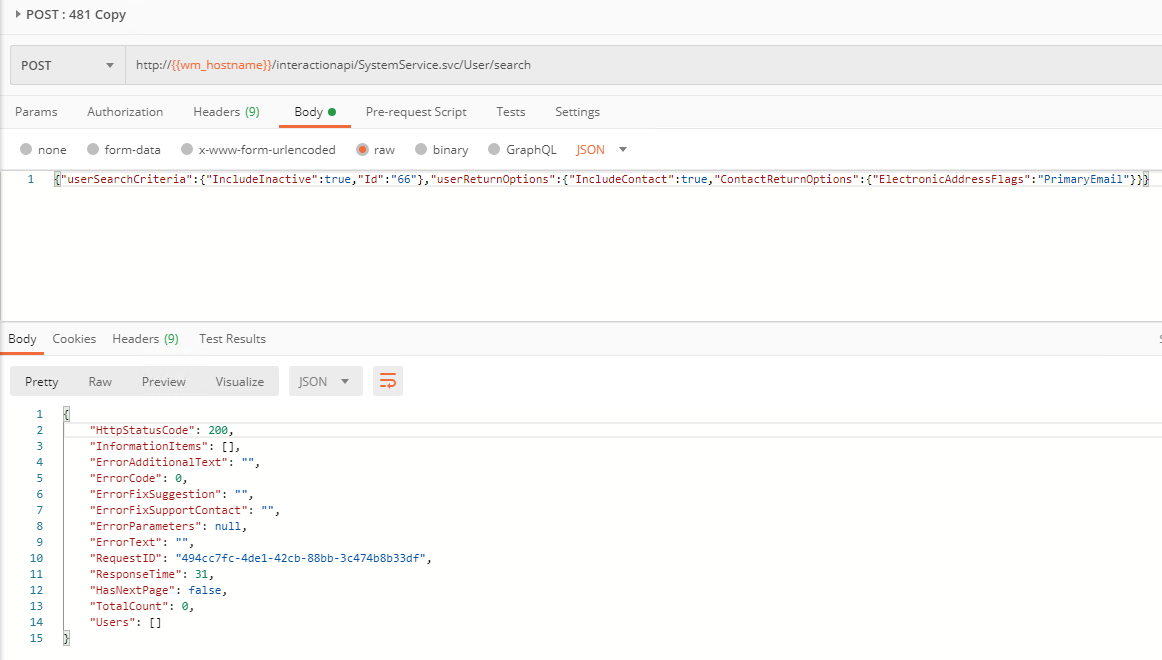
When using postman, it works fine?
@jamoore5 commented on GitHub (Jul 1, 2020):
Yes it seem to work fine when I call it through the code with a standalone server, it is only failing when it is setup in the unit test. I tested the same call and mapping with a stand-alone server and it passes. I confirmed that the static mapping is loaded in the test, it just does not match.
Very confused.
@StefH commented on GitHub (Jul 1, 2020):
https://github.com/WireMock-Net/WireMock.Net/pull/482
@StefH commented on GitHub (Jul 1, 2020):
I've created a new preview version (NuGet : WireMock.Net.1.2.13-ci-13536) --> https://github.com/WireMock-Net/WireMock.Net/wiki/MyGet-preview-versions
This one includes in the LogEntry a Partial which shows which things can match or don't match.
--> https://github.com/WireMock-Net/WireMock.Net/blob/master/src/WireMock.Net/Server/WireMockServer.LogEntries.cs#L42
@StefH commented on GitHub (Jul 4, 2020):
@jamoore5
See this wiki page to help you finding your matching issue when you use the specified preview version.
(https://github.com/WireMock-Net/WireMock.Net/wiki/Request-Matching-Tips)
@jamoore5 commented on GitHub (Jul 8, 2020):
Thank, the directions were very helpful. The problem looks to be that the body is not being included in the
WireMock.RequestMessage. I added a logger to the HttpClient handler and do see the body is being passed.Is there an easy way to print the LogEntry to console?
@jamoore5 commented on GitHub (Jul 8, 2020):
@StefH commented on GitHub (Jul 8, 2020):
Can you post your full unit test code?
@jamoore5 commented on GitHub (Jul 8, 2020):
Sorry code is in a privarte repo, so I cannot just share the branch. I will see if I can simply the test without the production code and still reproduce the error I am seeing.
Edit so far when I smipfy it to just make an http call it works. going to have to make a mock project to call to see if the calling through WebApplicationFactory is the problem.
@StefH commented on GitHub (Jul 8, 2020):
Can you please post the c# code for "Fetch_User_By_Id_66" ? Because that's the one which gives issues.
And indeed, just use
new HttpClient()instead of the WebApplicationFactory.@jamoore5 commented on GitHub (Jul 8, 2020):
I
am trying to integration test my applications api that makes external calls to another api. That is why I am using WebApplicationFactory.
Maybe it is the wrong approach to integration tests?
await Client.GetAsync("/api/v1.0/entities/6/User/2");call my web app, which then makes an external call to the mock server.It works when I make the direct call to the webserver but does not work when I make the indirect call through my api.
I will try to make a mock project and see if I can reproduce the issue.
@StefH commented on GitHub (Jul 8, 2020):
You want to test
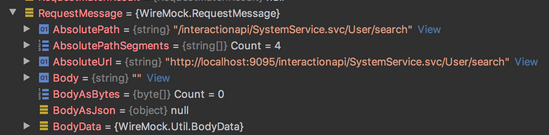
a client --> web app --> external API = WireMockAre you sure the web-app does a POST request to /interactionapi/SystemService.svc/User/search ?
And how does BodyData look?
@jamoore5 commented on GitHub (Jul 8, 2020):
I added this handler on the HttpClient
and it is outputing
So I am confident that there is a body and some bug is causing the mock server not to see it.
But so far I cannot simplify the code and still reproduce the error. However I am still trying to make a simpler project that reproduces the bug.
@jamoore5 commented on GitHub (Jul 8, 2020):
I finally reproduced the issue
The cause of the problem
AppContext.SetSwitch("System.Net.Http.UseSocketsHttpHandler", false);If you comment tnat line out the test passes.
Link to sample solution
Is this a bug in the plugin?
@StefH commented on GitHub (Jul 9, 2020):
Do you use windows operating system for running the tests + WireMock?
I guess you already have read this page ? --> https://docs.microsoft.com/en-us/dotnet/core/run-time-config/networking
@jamoore5 commented on GitHub (Jul 9, 2020):
MacOS
it seems that we need to turn off SocketsHttpHandler because
@StefH commented on GitHub (Jul 11, 2020):
Can this issue be closed?
@jamoore5 commented on GitHub (Jul 13, 2020):
I figured out the cause of the issue, but am not sure what to do to fix that mapping do not with my project. I guess if the configuration we are using is not supported, this can be closed.
@StefH commented on GitHub (Jul 13, 2020):
Yes sorry, it seems that using the
SocketsHttpHandleras you do is not supported by WireMock.NetSo I will close this issue now.