mirror of
https://github.com/wiremock/WireMock.Net.git
synced 2026-09-03 16:37:14 +02:00
Is it possible using post method with query parameters request matching? #261
Closed
opened 2025-12-29 08:25:00 +01:00 by adam
·
9 comments
No Branch/Tag Specified
master
1341-mapping-json
stef-aspire-tests-updates
bug/973-TinyMapper
bug/1149-AppendGuidToSavedMappingFile
feature/1150-DockerImageVersion
61
stef-1108
stef-1097
stef-1083-MessageOptions_Type_Conflict
stef-1062-logger
stef-IgnoreOpenApiErrors
stef-928-TypeLoadException-FluentAssertions-net472
nunit
stef-849
stef-847-regex-questionmark
http_verb
WireMockServerContext
webapp
ai
CommandLineArgumentsParser
2.15.0
2.14.0
2.13.0
2.12.0
2.11.0
2.10.0
2.9.0
2.8.0
2.7.0
2.6.0
2.5.0
2.4.0
2.3.0
2.2.0
2.1.0
2.0.0
1.25.0
1.24.0
1.23.0
1.22.0
1.21.0
1.20.0
1.19.0
1.18.0
1.17.0
1.16.0
1.15.0
1.14.0
1.13.0
1.12.0
1.11.2
1.11.0
1.10.1
1.10.0
1.9.1
1.9.0
1.8.18
1.8.17
1.8.16
1.8.15
1.8.14
1.8.13
1.8.12
1.8.11
1.8.10
1.8.9
1.8.8
1.8.7
1.8.6
1.8.5
1.8.3
1.8.2
1.8.1
1.8.0
1.7.4
1.7.3
1.7.2
1.7.1
1.7.0
1.6.12
1.6.11
1.6.10
1.6.9
1.6.8
1.6.7
1.6.6
1.6.5
1.6.4
1.6.3
1.6.2
1.6.1
1.6.0
1.5.62
1.5.61
1.5.60
1.5.59
1.5.58
1.5.57
1.5.56
1.5.55
1.5.54
1.5.53
1.5.52
1.5.51
1.5.50
1.5.49
1.5.48
1.5.47
1.5.46
1.5.45
1.5.44
1.5.43
1.5.42
1.5.41
1.5.40
1.5.39
1.5.38
1.5.37
1.5.36
1.5.35
1.5.34
1.5.33
1.5.32
1.5.31
1.5.30
1.5.29
1.5.28
1.5.27
1.5.26
1.5.25
1.5.24
1.5.23
1.5.22
1.5.21
1.5.20
1.5.19
1.5.18
1.5.17
1.5.16
1.5.15
1.5.14
1.5.13
1.5.12
1.5.11
1.5.10
1.5.9
1.5.8
1.5.7
1.5.6
1.5.5
1.5.4
1.5.3
1.5.2
1.5.1
1.5.0
1.4.43
1.4.42
1.4.41
1.4.40
1.4.39
1.4.38
1.4.37
1.4.36
1.4.35
1.4.34
1.4.33
1.4.32
1.4.31
1.4.30
1.4.29
1.4.28
1.4.27
1.4.26
1.4.25
1.4.24
1.4.23
1.4.22
1.4.21
1.4.20
1.4.19
1.4.18
1.4.17
1.4.16
1.4.15
1.4.14
1.4.13
1.4.12
1.4.11
1.4.10
1.4.9
1.4.8
1.4.7
1.4.6
1.4.5
1.4.4
1.4.3
1.4.2
1.4.1
1.4.0
1.3.10
1.3.9
1.3.8
1.3.6
1.3.5
1.3.4
1.3.3
1.3.2
1.3.1
1.3.0
1.2.18
1.2.17
1.2.16
1.2.15
1.2.14
1.2.13
1.2.12
1.2.11.0
1.2.10
1.2.9.0
1.2.8.0
1.2.7.0
1.2.6.0
1.2.5.0
1.2.4.0
1.2.3.0
1.2.2.0
1.2.1.0
1.2.0.0
1.1.10
1.1.9.0
1.1.8.0
1.1.7.0
1.1.6.0
1.1.5.0
1.1.3.0
1.1.2.0
1.1.1.0
1.1.0.0
1.0.43.0
1.0.42.0
1.0.41.0
1.0.40.0
1.0.39.0
1.0.38.0
1.0.37.0
1.0.36.0
1.0.35.0
1.0.34.0
1.0.33.0
1.0.32.0
1.0.31.0
1.0.29.0
1.0.28.0
1.0.25.0
1.0.24.0
1.0.23.0
1.0.22.0
1.0.21.0
1.0.20.0
1.0.19.0
1.0.18.0
1.0.17.0
1.0.16.0
1.0.15.0
1.0.14.0
1.0.13.0
1.0.12.0
1.0.11.0
1.0.10.0
1.0.9.0
1.0.8.0
1.0.7.0
1.0.6.1
1.0.6
1.0.5
1.0.4.21
1.0.4.20
1.0.4.19
1.0.4.18
1.0.4.17
1.0.4.16
1.0.4.15
1.0.4.14
1.0.4.13
1.0.4.12
1.0.4.11
1.0.4.10
1.0.4.9
1.0.4.8
1.0.4.7
1.0.4.6
1.0.4.5
1.0.4.4
1.0.4.3
1.0.4.2
1.0.4.1
1.0.4.0
1.0.3.20
1.0.3.19
1.0.3.18
1.0.3.17
1.0.3.16
1.0.3.15
1.0.3.14
1.0.3.13
1.0.3.12
1.0.3.11
1.0.3.10
1.0.3.9
1.0.3.8
1.0.3.7
1.0.3.6
1.0.3.5
1.0.3.4
1.0.3.3
1.0.3.2
1.0.3.1
1.0.3.0
1.0.2.13
1.0.2.12
1.0.2.11
1.0.2.10
1.0.2.9
1.0.2.8
1.0.2.7
1.0.2.6
1.0.2.5
1.0.2.4
1.0.2.1
1.0.2.0
1.0.1.5
1.0.1.3
1.0.1.2
1.0.1.1
1.0.0.0
Milestone
No items
No Milestone
Projects
Clear projects
No projects
Assignees
 adam (Adam Melkus)
Clear assignees
adam (Adam Melkus)
No Assignees
Notifications
Due Date
No due date set.
Dependencies
No dependencies set.
Reference: starred/WireMock.Net#261
Reference in New Issue
Block a user
Blocking a user prevents them from interacting with repositories, such as opening or commenting on pull requests or issues. Learn more about blocking a user.
Originally created by @shockliang on GitHub (Mar 22, 2020).
I'm implementing create group for gitlab server [doc] and trying write tests to verify some cases.
Above simple code that doesn't work when using
WithParamas request matching .So... Any way to verify post with query parameters?
@StefH commented on GitHub (Mar 22, 2020):
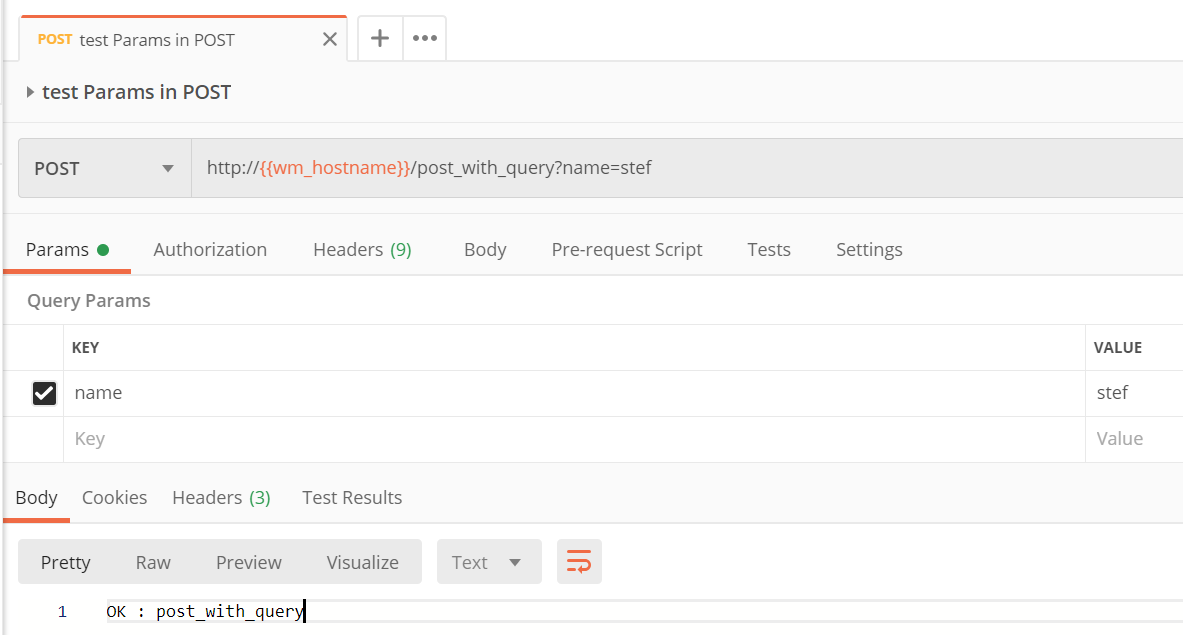
This should be possible, see https://github.com/WireMock-Net/WireMock.Net/blob/master/examples/WireMock.Net.Console.Net452.Classic/MainApp.cs#L496
Result:
@shockliang commented on GitHub (Mar 22, 2020):
My environment:
OS: mac os 10.14.6
dotnet version: dotnet core 3.0.
I got the response with
Not Foundand content{"Status":"No matching mapping found"}@StefH commented on GitHub (Mar 22, 2020):
What you can do to debug, is set
AllowPartialMappingto true in the WireMockServerSettingshttps://github.com/WireMock-Net/WireMock.Net/wiki/Settings#allowpartialmapping
When you look at the logging from the running application, you can see which elements have a score from 1.0 (=100% match)
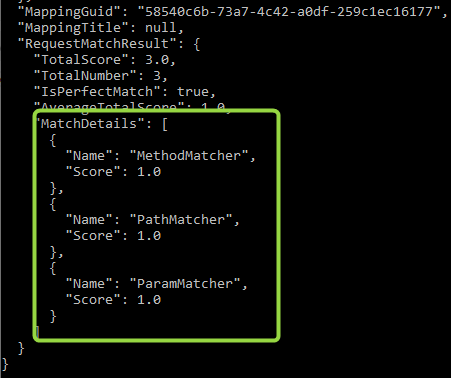
(I just added a netcore3.1 example to this repository, that one also does work fine.)
@shockliang commented on GitHub (Mar 22, 2020):
It's work after setting
AllowPartialMappingto be true.But the request matching doesn't work. The match details show me the score of
RequestMessageParamMatcherstill zero.Is it normally when setting
AllowPartialMappingto be true?@StefH commented on GitHub (Mar 22, 2020):
Can you please provide details on the complete request you send? Because from the logging it seems you provide multiple parameters?
@shockliang commented on GitHub (Mar 23, 2020):
Yes, the actual code I'm using 4 parameters. I'm sorry about that.
I'm using RestSharp as http client.
This is my actual code.
@StefH commented on GitHub (Mar 23, 2020):
When using 4 params (see updated code https://github.com/WireMock-Net/WireMock.Net/blob/master/examples/WireMock.Net.Console.Net452.Classic/MainApp.cs#L496)
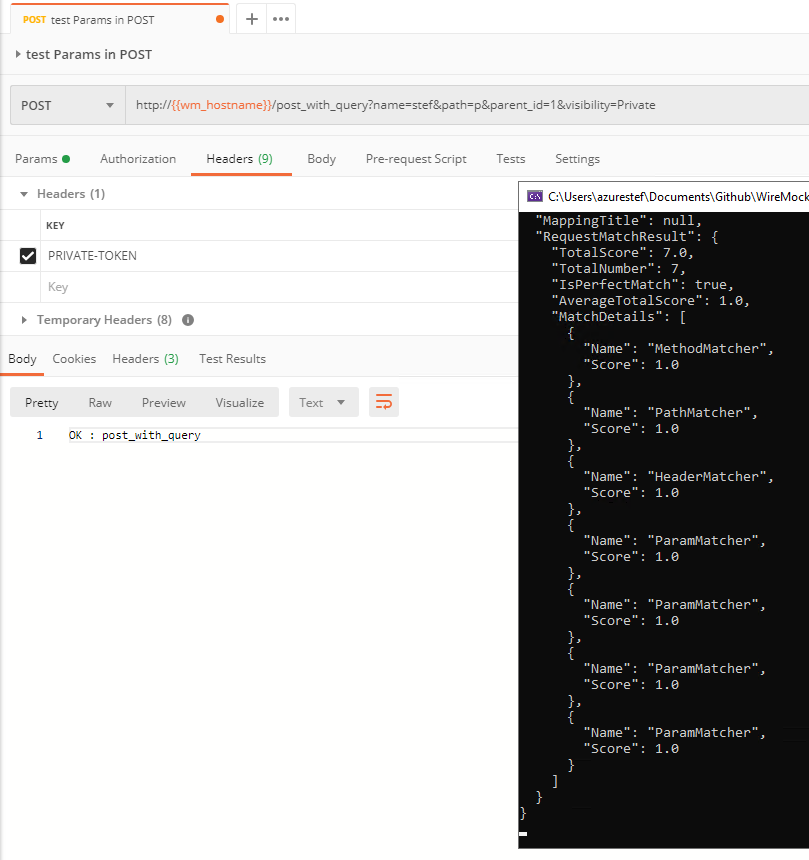
And using postman, this works fine:
@shockliang commented on GitHub (Mar 24, 2020):
OK! I will keeping investigate my cases. Thank for your helping! 👍
@StefH commented on GitHub (Apr 1, 2020):
Closing this issue.
If you still have problems, just reply here or create a new issue.