Switching to Wayland #292

Open
opened 2025-12-29 00:23:26 +01:00 by adam · 10 comments
Owner

Originally created by @iMonZ on GitHub (Dec 14, 2021).

Is it possible to support wayland? Since X11 is nearly dead maybe it has a year or so until the final grave.
And xwayland isn’t a very good experience so a native Wayland solution would be insane!

thanks!

Originally created by @iMonZ on GitHub (Dec 14, 2021). Is it possible to support wayland? Since X11 is nearly dead maybe it has a year or so until the final grave. And xwayland isn’t a very good experience so a native Wayland solution would be insane! thanks!
Author
Owner

@sickcodes commented on GitHub (Dec 15, 2021):

Good idea I just tried it and it's smooth as butter!

Thank you for bringing this up!!

Terminal 1: wayfire

Terminal 2:

change DISPLAY to :1
    -e "DISPLAY=:1" \

https://user-images.githubusercontent.com/65906298/146274213-2195f541-cf10-4c7e-b4aa-5ffd54baf337.mp4

https://user-images.githubusercontent.com/65906298/146272994-106c1425-9cc9-4858-913d-098df227fd0a.mp4

@sickcodes commented on GitHub (Dec 15, 2021): Good idea I just tried it and it's smooth as butter! Thank you for bringing this up!! Terminal 1: `wayfire` Terminal 2: ``` change DISPLAY to :1 -e "DISPLAY=:1" \ ``` https://user-images.githubusercontent.com/65906298/146274213-2195f541-cf10-4c7e-b4aa-5ffd54baf337.mp4 https://user-images.githubusercontent.com/65906298/146272994-106c1425-9cc9-4858-913d-098df227fd0a.mp4
Author
Owner

@iMonZ commented on GitHub (Jan 3, 2022):

Great thanks! But you need WAYLAND_DISPLAY instead of DISPLAY.

@iMonZ commented on GitHub (Jan 3, 2022): Great thanks! But you need WAYLAND_DISPLAY instead of DISPLAY.
Author
Owner

@iMonZ commented on GitHub (Jan 4, 2022):

Could you add Wayland to the readme tutorial? This would be really nice!

@iMonZ commented on GitHub (Jan 4, 2022): Could you add Wayland to the readme tutorial? This would be really nice!
Author
Owner

@Julioevm commented on GitHub (Mar 10, 2022):

Hey, I use Fedora 35 which defaults to wayland and Im having issues with GTK initialization that I suspect could come from using WAYLAND, as otherwise I've followed the steps. Could you share the command you use to start it with wayland? I tried to change DISPLAY for WAYLAND_DISPLAY without luck.
I can make it work through VNC for now tough. Thanks!

@Julioevm commented on GitHub (Mar 10, 2022): Hey, I use Fedora 35 which defaults to wayland and Im having issues with GTK initialization that I suspect could come from using WAYLAND, as otherwise I've followed the steps. Could you share the command you use to start it with wayland? I tried to change DISPLAY for WAYLAND_DISPLAY without luck. I can make it work through VNC for now tough. Thanks!
Author
Owner

@sickcodes commented on GitHub (Mar 11, 2022):

these variables may help:

-e XDG_RUNTIME_DIR=/run/user/1000
-e XDG_SESSION_TYPE=wayland
-e WAYLAND_DISPLAY=wayland-1

or

-e WAYLAND_DISPLAY=wayland-1

for testing purposes only, can you set /run/user/1000 to chmod 777, and then when you're finished change it back to 700.

If that works, Ill add the chown to the Dockerfile and support wayland naturally :)

@sickcodes commented on GitHub (Mar 11, 2022): these variables may help: ``` -e XDG_RUNTIME_DIR=/run/user/1000 -e XDG_SESSION_TYPE=wayland -e WAYLAND_DISPLAY=wayland-1 ``` or `-e WAYLAND_DISPLAY=wayland-1` for **testing purposes only**, can you set `/run/user/1000` to chmod 777, and then when you're finished change it back to 700. If that works, Ill add the chown to the Dockerfile and support wayland naturally :)
Author
Owner

@boredland commented on GitHub (May 22, 2022):

I can confirm this did the trick for me! 🥳

@boredland commented on GitHub (May 22, 2022): I can confirm this did the trick for me! 🥳
Author
Owner

@iMonZ commented on GitHub (May 22, 2022):

these variables may help:

-e XDG_RUNTIME_DIR=/run/user/1000
-e XDG_SESSION_TYPE=wayland
-e WAYLAND_DISPLAY=wayland-1

or

-e WAYLAND_DISPLAY=wayland-1

for testing purposes only, can you set /run/user/1000 to chmod 777, and then when you're finished change it back to 700.

If that works, Ill add the chown to the Dockerfile and support wayland naturally :)

So this two lines can be removed:
-v /tmp/.X11-unix:/tmp/.X11-unix
-e "DISPLAY=${DISPLAY:-:0.0}" \

?

@iMonZ commented on GitHub (May 22, 2022): > these variables may help: > > ``` > -e XDG_RUNTIME_DIR=/run/user/1000 > -e XDG_SESSION_TYPE=wayland > -e WAYLAND_DISPLAY=wayland-1 > ``` > > or > > `-e WAYLAND_DISPLAY=wayland-1` > > for **testing purposes only**, can you set `/run/user/1000` to chmod 777, and then when you're finished change it back to 700. > > If that works, Ill add the chown to the Dockerfile and support wayland naturally :) So this two lines can be removed: -v /tmp/.X11-unix:/tmp/.X11-unix \ -e "DISPLAY=${DISPLAY:-:0.0}" \ ?
Author
Owner

@gotjoshua commented on GitHub (Oct 9, 2022):

for testing purposes only, can you set /run/user/1000 to chmod 777

@sickcodes i think that this helped for me, but there a couple confounding factors i'm trying to suss out.

  1. Fedora 36 wayland
  2. user with uid 501 instead of 1000

this comment was mega helpful:
https://github.com/sickcodes/Docker-OSX/issues/419#issuecomment-1011401905
most important was to properly mount my /run/user folder
$XDG_RUNTIME_DIR/$WAYLAND_DISPLAY:/tmp/$WAYLAND_DISPLAY

then for permissions i needed to:

sudo chmod 777 $XDG_RUNTIME_DIR/wayland-*
# which in my case is:
# sudo chmod 777 /run/user/501/wayland-*

i use docker-compose (nearly religiously) so here is my yml

osx:
    privileged: true
    devices: 
      - /dev/kvm
      - /dev/snd
    ports:
      - 50922:10022
    volumes:
      # - /tmp/.X11-unix:/tmp/.X11-unix
      - $XDG_RUNTIME_DIR/$WAYLAND_DISPLAY:/tmp/$WAYLAND_DISPLAY
    environment:
      # GENERATE_UNIQUE: true
      RAM: 8
      XDG_RUNTIME_DIR: /tmp
      WAYLAND_DISPLAY: "${WAYLAND_DISPLAY:-wayland-0}"
      QT_QPA_PLATFORM: wayland
      GDK_BACKEND: wayland
      CLUTTER_BACKEND: wayland
      DISPLAY: ":1"  # "${DISPLAY:-:0}"
      XDG_SESSION_TYPE: wayland
      # EXTRA: "-display none" 

    image: sickcodes/docker-osx:big-sur

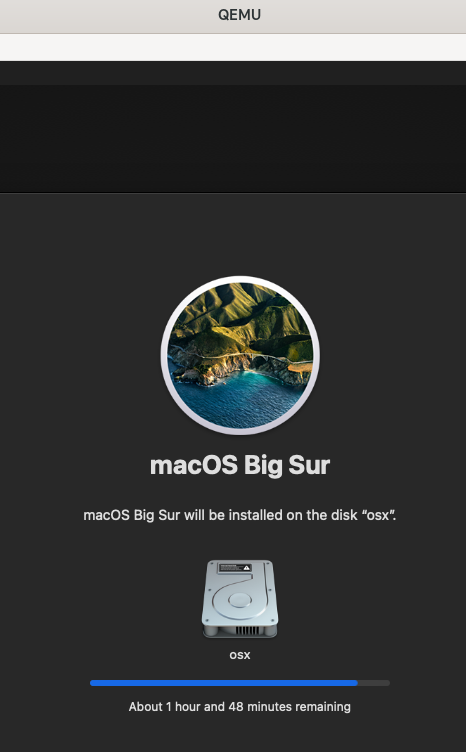
install is underway!
image

@gotjoshua commented on GitHub (Oct 9, 2022): > for **testing purposes only**, can you set `/run/user/1000` to chmod 777 @sickcodes i think that this helped for me, but there a couple confounding factors i'm trying to suss out. 1. Fedora 36 wayland 2. user with uid 501 instead of 1000 this comment was mega helpful: https://github.com/sickcodes/Docker-OSX/issues/419#issuecomment-1011401905 most important was to properly mount my /run/user folder `$XDG_RUNTIME_DIR/$WAYLAND_DISPLAY:/tmp/$WAYLAND_DISPLAY` then for permissions i needed to: ```sh sudo chmod 777 $XDG_RUNTIME_DIR/wayland-* # which in my case is: # sudo chmod 777 /run/user/501/wayland-* ``` i use docker-compose (nearly religiously) so here is my yml ```yml osx: privileged: true devices: - /dev/kvm - /dev/snd ports: - 50922:10022 volumes: # - /tmp/.X11-unix:/tmp/.X11-unix - $XDG_RUNTIME_DIR/$WAYLAND_DISPLAY:/tmp/$WAYLAND_DISPLAY environment: # GENERATE_UNIQUE: true RAM: 8 XDG_RUNTIME_DIR: /tmp WAYLAND_DISPLAY: "${WAYLAND_DISPLAY:-wayland-0}" QT_QPA_PLATFORM: wayland GDK_BACKEND: wayland CLUTTER_BACKEND: wayland DISPLAY: ":1" # "${DISPLAY:-:0}" XDG_SESSION_TYPE: wayland # EXTRA: "-display none" image: sickcodes/docker-osx:big-sur ``` install is underway! ![image](https://user-images.githubusercontent.com/8686454/194750577-7454c006-489a-4479-9ad3-762a02fcfb15.png)
Author
Owner

@mroyme commented on GitHub (Nov 30, 2022):

for testing purposes only, can you set /run/user/1000 to chmod 777

@sickcodes i think that this helped for me, but there a couple confounding factors i'm trying to suss out.

1. Fedora 36 wayland

2. user with uid 501 instead of 1000

this comment was mega helpful: #419 (comment) most important was to properly mount my /run/user folder $XDG_RUNTIME_DIR/$WAYLAND_DISPLAY:/tmp/$WAYLAND_DISPLAY

then for permissions i needed to:

sudo chmod 777 $XDG_RUNTIME_DIR/wayland-*
# which in my case is:
# sudo chmod 777 /run/user/501/wayland-*

i use docker-compose (nearly religiously) so here is my yml

osx:
    privileged: true
    devices: 
      - /dev/kvm
      - /dev/snd
    ports:
      - 50922:10022
    volumes:
      # - /tmp/.X11-unix:/tmp/.X11-unix
      - $XDG_RUNTIME_DIR/$WAYLAND_DISPLAY:/tmp/$WAYLAND_DISPLAY
    environment:
      # GENERATE_UNIQUE: true
      RAM: 8
      XDG_RUNTIME_DIR: /tmp
      WAYLAND_DISPLAY: "${WAYLAND_DISPLAY:-wayland-0}"
      QT_QPA_PLATFORM: wayland
      GDK_BACKEND: wayland
      CLUTTER_BACKEND: wayland
      DISPLAY: ":1"  # "${DISPLAY:-:0}"
      XDG_SESSION_TYPE: wayland
      # EXTRA: "-display none" 

    image: sickcodes/docker-osx:big-sur

install is underway! image

I used your docker-compose file and turns out the crucial part was running:

chmod 777 $XDG_RUNTIME_DIR/wayland-*

I can rule out a few factors:

  1. I'm running Arch Linux (Wayland/Sway) and with UID 1000.
  2. Didn't need to run chmod 700 /run/user/1000 # $XDG_RUNTIME_DIR.

I tested with Mac OS Ventura by adding these two environment variables as mentioned in the readme:

   ...
    -e GENERATE_UNIQUE=true \
    -e MASTER_PLIST_URL='https://raw.githubusercontent.com/sickcodes/osx-serial-generator/master/config-custom.plist' \
@mroyme commented on GitHub (Nov 30, 2022): > > for **testing purposes only**, can you set `/run/user/1000` to chmod 777 > > @sickcodes i think that this helped for me, but there a couple confounding factors i'm trying to suss out. > > 1. Fedora 36 wayland > > 2. user with uid 501 instead of 1000 > > > this comment was mega helpful: [#419 (comment)](https://github.com/sickcodes/Docker-OSX/issues/419#issuecomment-1011401905) most important was to properly mount my /run/user folder `$XDG_RUNTIME_DIR/$WAYLAND_DISPLAY:/tmp/$WAYLAND_DISPLAY` > > then for permissions i needed to: > > ```shell > sudo chmod 777 $XDG_RUNTIME_DIR/wayland-* > # which in my case is: > # sudo chmod 777 /run/user/501/wayland-* > ``` > > i use docker-compose (nearly religiously) so here is my yml > > ```yaml > osx: > privileged: true > devices: > - /dev/kvm > - /dev/snd > ports: > - 50922:10022 > volumes: > # - /tmp/.X11-unix:/tmp/.X11-unix > - $XDG_RUNTIME_DIR/$WAYLAND_DISPLAY:/tmp/$WAYLAND_DISPLAY > environment: > # GENERATE_UNIQUE: true > RAM: 8 > XDG_RUNTIME_DIR: /tmp > WAYLAND_DISPLAY: "${WAYLAND_DISPLAY:-wayland-0}" > QT_QPA_PLATFORM: wayland > GDK_BACKEND: wayland > CLUTTER_BACKEND: wayland > DISPLAY: ":1" # "${DISPLAY:-:0}" > XDG_SESSION_TYPE: wayland > # EXTRA: "-display none" > > image: sickcodes/docker-osx:big-sur > ``` > > install is underway! ![image](https://user-images.githubusercontent.com/8686454/194750577-7454c006-489a-4479-9ad3-762a02fcfb15.png) I used your docker-compose file and turns out the crucial part was running: ```bash chmod 777 $XDG_RUNTIME_DIR/wayland-* ``` I can rule out a few factors: 1. I'm running Arch Linux (Wayland/Sway) and with UID 1000. 2. Didn't need to run `chmod 700 /run/user/1000 # $XDG_RUNTIME_DIR`. I tested with Mac OS Ventura by adding these two environment variables as mentioned in the readme: ``` ... -e GENERATE_UNIQUE=true \ -e MASTER_PLIST_URL='https://raw.githubusercontent.com/sickcodes/osx-serial-generator/master/config-custom.plist' \ ```
Author
Owner

@nktnet1 commented on GitHub (Aug 4, 2024):

On Arch Linux, Hyprland, using podman-compose.

Can confirm that after running

chmod o+w $XDG_RUNTIME_DIR/wayland-*

and, in a directory containing the docker-compose.yaml below (note the prefix docker.io/ in the image)

osx:
    image: docker.io/sickcodes/docker-osx:big-sur
    privileged: true
    devices: 
      - /dev/kvm
      - /dev/snd
    ports:
      - 50922:10022
    volumes:
      # - /tmp/.X11-unix:/tmp/.X11-unix
      - $XDG_RUNTIME_DIR/$WAYLAND_DISPLAY:/tmp/$WAYLAND_DISPLAY
    environment:
      # GENERATE_UNIQUE: true
      RAM: 8
      XDG_RUNTIME_DIR: /tmp
      WAYLAND_DISPLAY: "${WAYLAND_DISPLAY:-wayland-0}"
      QT_QPA_PLATFORM: wayland
      GDK_BACKEND: wayland
      CLUTTER_BACKEND: wayland
      DISPLAY: ":1"  # "${DISPLAY:-:0}"
      XDG_SESSION_TYPE: wayland
      # EXTRA: "-display none" 

Running

podman-compose up

works as expected.

@nktnet1 commented on GitHub (Aug 4, 2024): On Arch Linux, Hyprland, using podman-compose. Can confirm that after running ```sh chmod o+w $XDG_RUNTIME_DIR/wayland-* ``` and, in a directory containing the `docker-compose.yaml` below (note the prefix `docker.io/` in the image) ```yaml osx: image: docker.io/sickcodes/docker-osx:big-sur privileged: true devices: - /dev/kvm - /dev/snd ports: - 50922:10022 volumes: # - /tmp/.X11-unix:/tmp/.X11-unix - $XDG_RUNTIME_DIR/$WAYLAND_DISPLAY:/tmp/$WAYLAND_DISPLAY environment: # GENERATE_UNIQUE: true RAM: 8 XDG_RUNTIME_DIR: /tmp WAYLAND_DISPLAY: "${WAYLAND_DISPLAY:-wayland-0}" QT_QPA_PLATFORM: wayland GDK_BACKEND: wayland CLUTTER_BACKEND: wayland DISPLAY: ":1" # "${DISPLAY:-:0}" XDG_SESSION_TYPE: wayland # EXTRA: "-display none" ``` Running ```sh podman-compose up ``` works as expected.
Sign in to join this conversation.
1 Participants
Notifications
Due Date
No due date set.
Dependencies

No dependencies set.

Reference: starred/Docker-OSX#292