iMessage Testers! Merged into master and instructions here :) #119

Closed
opened 2025-12-28 23:25:13 +01:00 by adam · 18 comments
Owner

Originally created by @sickcodes on GitHub (Feb 26, 2021).

iMessage security research features added today: https://github.com/sickcodes/Docker-OSX/pull/155

When I mention "serial" this means, Serial, Board Serial, UUID and Mac Address together.

This is your set.

  1. Generate ONE serial number set.
git clone https://github.com/sickcodes/Docker-OSX.git
cd ./Docker-OSX
./custom/generate-unique-machine-values.sh \
        --count 1 \
        --tsv ~/my_permanent_serial_number.tsv \
        --output-env ~/my_permanent_serial_number.sh
  1. Inspect the result
cat  ~/my_permanent_serial_number.tsv

cat ~/my_permanent_serial_number.sh
  1. Use source command to load variables into your current set.
source ~/my_permanent_serial_numbers.sh
echo "${DEVICE_MODEL}"
echo "${SERIAL}"
echo "${BOARD_SERIAL}"
echo "${UUID}"
echo "${MAC_ADDRESS}"
  1. Find your favourite disk image and supply that image file name as a -v argument.
docker pull sickcodes/docker-osx:naked

stat existing_disk.img # change to whatever image name is


docker run -it \
    --device /dev/kvm \
    -e "DISPLAY=${DISPLAY:-:0.0}" \
    -v /tmp/.X11-unix:/tmp/.X11-unix \
    -p 50922:10022 \
    -e GENERATE_SPECIFIC=true \
    -e DEVICE_MODEL="${DEVICE_MODEL}" \
    -e SERIAL="${SERIAL}" \
    -e BOARD_SERIAL="${BOARD_SERIAL}" \
    -e UUID="${UUID}" \
    -e MAC_ADDRESS="${MAC_ADDRESS}" \
    -v "${PWD}/existing_disk.img:/image" \
    sickcodes/docker-osx:naked
  1. Once booted up, check that your serial number matches the once you just created.

This number inside OSX

# inside OSX
ioreg -l | grep IOPlatformSerialNumber

Should match the number in these:

# outside OSX
cat ~/my_permanent_serial_number.tsv

cat ~/my_permanent_serial_number.sh

This serial number will STAY ON YOUR ACCOUNT.

Be extra careful where you use it, where you paste it, where you store it.

Keep these two files somewhere:
~/my_permanent_serial_number.tsv
~/my_permanent_serial_number.sh

Because to use iMessage on that machine again, you will need that serial or you will need to generate new ones and logout and in again.

Originally created by @sickcodes on GitHub (Feb 26, 2021). iMessage security research features added today: https://github.com/sickcodes/Docker-OSX/pull/155 When I mention "serial" this means, `Serial, Board Serial, UUID and Mac Address` together. This is your set. 1. Generate ONE serial number set. ```bash git clone https://github.com/sickcodes/Docker-OSX.git cd ./Docker-OSX ./custom/generate-unique-machine-values.sh \ --count 1 \ --tsv ~/my_permanent_serial_number.tsv \ --output-env ~/my_permanent_serial_number.sh ``` 2. Inspect the result ```bash cat ~/my_permanent_serial_number.tsv cat ~/my_permanent_serial_number.sh ``` 3. Use source command to load variables into your current set. ```bash source ~/my_permanent_serial_numbers.sh echo "${DEVICE_MODEL}" echo "${SERIAL}" echo "${BOARD_SERIAL}" echo "${UUID}" echo "${MAC_ADDRESS}" ``` 4. Find your favourite disk image and supply that image file name as a -v argument. ```bash docker pull sickcodes/docker-osx:naked stat existing_disk.img # change to whatever image name is docker run -it \ --device /dev/kvm \ -e "DISPLAY=${DISPLAY:-:0.0}" \ -v /tmp/.X11-unix:/tmp/.X11-unix \ -p 50922:10022 \ -e GENERATE_SPECIFIC=true \ -e DEVICE_MODEL="${DEVICE_MODEL}" \ -e SERIAL="${SERIAL}" \ -e BOARD_SERIAL="${BOARD_SERIAL}" \ -e UUID="${UUID}" \ -e MAC_ADDRESS="${MAC_ADDRESS}" \ -v "${PWD}/existing_disk.img:/image" \ sickcodes/docker-osx:naked ``` 5. Once booted up, check that your serial number matches the once you just created. This number inside OSX ```bash # inside OSX ioreg -l | grep IOPlatformSerialNumber ``` Should match the number in these: ```bash # outside OSX cat ~/my_permanent_serial_number.tsv cat ~/my_permanent_serial_number.sh ``` This serial number will STAY ON YOUR ACCOUNT. Be extra careful where you use it, where you paste it, where you store it. Keep these two files somewhere: `~/my_permanent_serial_number.tsv` `~/my_permanent_serial_number.sh` Because to use iMessage on that machine again, you will need that serial or you will need to generate new ones and logout and in again.
adam added the help wanted label 2025-12-28 23:25:13 +01:00
adam closed this issue 2025-12-28 23:25:13 +01:00
Author
Owner

@sickcodes commented on GitHub (Feb 28, 2021):

Works on BigSur, flawlessly 💥

@sickcodes commented on GitHub (Feb 28, 2021): Works on BigSur, flawlessly 💥
Author
Owner

@sintaxx commented on GitHub (Mar 12, 2021):

On your step 3 you have "source ~/my_permanent_serial_numbers.sh" and it should read "source ~/my_permanent_serial_number.sh", script outputs with number.sh and you have numbers.sh

So I have an image that works really good so far and I want to get iMessage working, i've done everything and generated a launch script to help with all these run flags and i'm running into an issue since introducing the bootdisk image parameter, here's the error i'm getting

### creating and adding disk image
# disk-create /bootdisk qcow2 384M
libguestfs: error: qemu-img: /bootdisk: qemu-img exited with error status 1.
To see full error messages you may need to enable debugging.
Do:
  export LIBGUESTFS_DEBUG=1 LIBGUESTFS_TRACE=1
and run the command again.  For further information, read:
  http://libguestfs.org/guestfs-faq.1.html#debugging-libguestfs
You can also run 'libguestfs-test-tool' and post the *complete* output
into a bug report or message to the libguestfs mailing list.
### cleaning up ...
ssh-keygen: generating new host keys: RSA DSA ECDSA ED25519 
nohup: appending output to 'nohup.out'
qemu-system-x86_64: -drive id=OpenCoreBoot,if=none,snapshot=on,format=qcow2,file=/bootdisk: A regular file was expected by the 'file' driver, but something else was given

heres my docker run info

docker run -it \
    --privileged \
    --device /dev/kvm \
    -p 50922:10022 \
    -v /tmp/.X11-unix:/tmp/.X11-unix \
    -v "${PWD}/mac_hdd_ng.img:/image" \
    -e "DISPLAY=${DISPLAY:-:0.0}" \
    -e WIDTH="1280" \
    -e HEIGHT="768" \
    -e NOPICKER=true \
    -e GENERATE_SPECIFIC=true \
    -e DEVICE_MODEL="${DEVICE_MODEL}" \
    -e SERIAL="${SERIAL}" \
    -e BOARD_SERIAL="${BOARD_SERIAL}" \
    -e UUID="${UUID}" \
    -e MAC_ADDRESS="${MAC_ADDRESS}" \
    -e BOOTDISK=/bootdisk \
    -v "${PWD}/bootdisk.qcow:/bootdisk" \
    sickcodes/docker-osx:naked

i might be overlooking something, i've been at this all day.

I also just tried running generate-specific-bootdisk and am getting the same error message.
Tried running generate-specific-bootdisk as root and it worked fine but after moving the generated image over and plugging it into my docker run script, same error from above.

@sintaxx commented on GitHub (Mar 12, 2021): On your step 3 you have "source ~/my_permanent_serial_number**s**.sh" and it should read "source ~/my_permanent_serial_number.sh", script outputs with number.sh and you have numbers.sh So I have an image that works really good so far and I want to get iMessage working, i've done everything and generated a launch script to help with all these run flags and i'm running into an issue since introducing the bootdisk image parameter, here's the error i'm getting ``` ### creating and adding disk image # disk-create /bootdisk qcow2 384M libguestfs: error: qemu-img: /bootdisk: qemu-img exited with error status 1. To see full error messages you may need to enable debugging. Do: export LIBGUESTFS_DEBUG=1 LIBGUESTFS_TRACE=1 and run the command again. For further information, read: http://libguestfs.org/guestfs-faq.1.html#debugging-libguestfs You can also run 'libguestfs-test-tool' and post the *complete* output into a bug report or message to the libguestfs mailing list. ### cleaning up ... ssh-keygen: generating new host keys: RSA DSA ECDSA ED25519 nohup: appending output to 'nohup.out' qemu-system-x86_64: -drive id=OpenCoreBoot,if=none,snapshot=on,format=qcow2,file=/bootdisk: A regular file was expected by the 'file' driver, but something else was given ``` heres my docker run info ``` docker run -it \ --privileged \ --device /dev/kvm \ -p 50922:10022 \ -v /tmp/.X11-unix:/tmp/.X11-unix \ -v "${PWD}/mac_hdd_ng.img:/image" \ -e "DISPLAY=${DISPLAY:-:0.0}" \ -e WIDTH="1280" \ -e HEIGHT="768" \ -e NOPICKER=true \ -e GENERATE_SPECIFIC=true \ -e DEVICE_MODEL="${DEVICE_MODEL}" \ -e SERIAL="${SERIAL}" \ -e BOARD_SERIAL="${BOARD_SERIAL}" \ -e UUID="${UUID}" \ -e MAC_ADDRESS="${MAC_ADDRESS}" \ -e BOOTDISK=/bootdisk \ -v "${PWD}/bootdisk.qcow:/bootdisk" \ sickcodes/docker-osx:naked ``` i might be overlooking something, i've been at this all day. I also just tried running generate-specific-bootdisk and am getting the same error message. Tried running generate-specific-bootdisk as root and it worked fine but after moving the generated image over and plugging it into my docker run script, same error from above.
Author
Owner

@sickcodes commented on GitHub (Mar 12, 2021):

Remove the BOOTDISK argument it's not required

@sickcodes commented on GitHub (Mar 12, 2021): Remove the BOOTDISK argument it's not required
Author
Owner

@sintaxx commented on GitHub (Mar 12, 2021):

Remove the BOOTDISK argument it's not required

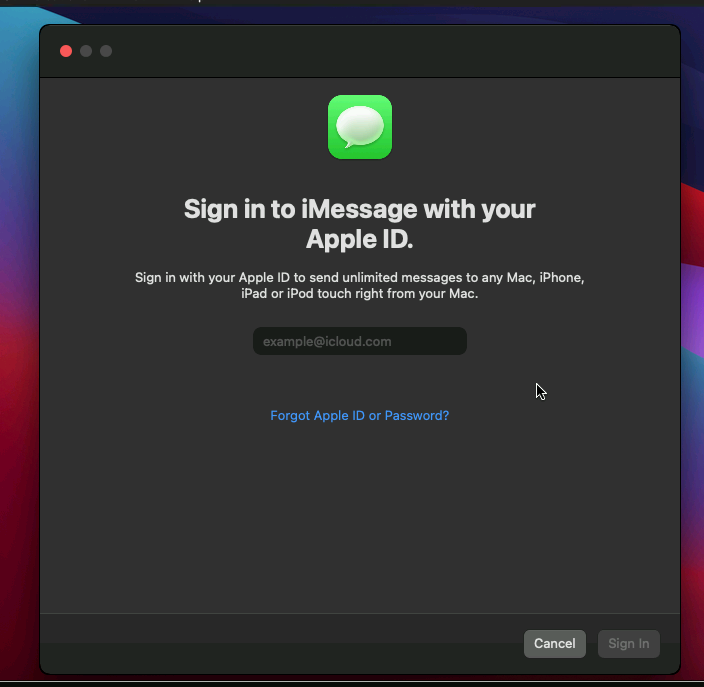
ahhh wow, that seems to have done the trick... now my only issue is, once i try to use imessage it just disappears after a moment and shoots me back to login to my icloud account.. all my serial numbers match up too.

docker run -it \
    --privileged \
    --device /dev/kvm \
    -p 50922:10022 \
    -v /tmp/.X11-unix:/tmp/.X11-unix \
    -e "DISPLAY=${DISPLAY:-:0.0}" \
    -e WIDTH="1280" \
    -e HEIGHT="768" \
    -e GENERATE_SPECIFIC=true \
    -e DEVICE_MODEL="${DEVICE_MODEL}" \
    -e SERIAL="${SERIAL}" \
    -e BOARD_SERIAL="${BOARD_SERIAL}" \
    -e UUID="${UUID}" \
    -e MAC_ADDRESS="${MAC_ADDRESS}" \
    -v "${PWD}/mac_hdd_ng.img:/image" \
    sickcodes/docker-osx:naked

is it supposed to generate a new bootimage every time i launch the container ?
image

@sintaxx commented on GitHub (Mar 12, 2021): > > > Remove the BOOTDISK argument it's not required ahhh wow, that seems to have done the trick... now my only issue is, once i try to use imessage it just disappears after a moment and shoots me back to login to my icloud account.. all my serial numbers match up too. ``` docker run -it \ --privileged \ --device /dev/kvm \ -p 50922:10022 \ -v /tmp/.X11-unix:/tmp/.X11-unix \ -e "DISPLAY=${DISPLAY:-:0.0}" \ -e WIDTH="1280" \ -e HEIGHT="768" \ -e GENERATE_SPECIFIC=true \ -e DEVICE_MODEL="${DEVICE_MODEL}" \ -e SERIAL="${SERIAL}" \ -e BOARD_SERIAL="${BOARD_SERIAL}" \ -e UUID="${UUID}" \ -e MAC_ADDRESS="${MAC_ADDRESS}" \ -v "${PWD}/mac_hdd_ng.img:/image" \ sickcodes/docker-osx:naked ``` is it supposed to generate a new bootimage every time i launch the container ? ![image](https://user-images.githubusercontent.com/23103088/110991378-8d802d80-8342-11eb-8384-0c1d22ffacaf.png)
Author
Owner

@sickcodes commented on GitHub (Mar 12, 2021):

Change GENERATE_SPECIFIC=true to GENERATE_UNIQUE=true.

Or did you set the serials yourself?

@sickcodes commented on GitHub (Mar 12, 2021): Change GENERATE_SPECIFIC=true to GENERATE_UNIQUE=true. Or did you set the serials yourself?
Author
Owner

@sickcodes commented on GitHub (Mar 12, 2021):

Try another set, if it doesn't work, it's probably the Apple ID. New Apple ids do not work. They need to be warmed up in a way I don't know except for that if you have other devices on the account, you'll be able to log straight in

@sickcodes commented on GitHub (Mar 12, 2021): Try another set, if it doesn't work, it's probably the Apple ID. New Apple ids do not work. They need to be warmed up in a way I don't know except for that if you have other devices on the account, you'll be able to log straight in
Author
Owner

@sintaxx commented on GitHub (Mar 13, 2021):

I generated my own and sourced them from the my_permanent_number file, if i try another set do i need to reinstall at all or just log out of everything icloud related first?

also, maybe that is my issue, not having any actual apple products on my icloud account... i had a really old account i tried but then i was like ok let me just make a fresh one, i didnt know that might cause issues.. can i have someone i know with real apple hardware login to icloud/imessage for me ? would that maybe do the trick ? im not familiar with much apple related things just windows/linux

@sintaxx commented on GitHub (Mar 13, 2021): I generated my own and sourced them from the my_permanent_number file, if i try another set do i need to reinstall at all or just log out of everything icloud related first? also, maybe that is my issue, not having any actual apple products on my icloud account... i had a really old account i tried but then i was like ok let me just make a fresh one, i didnt know that might cause issues.. can i have someone i know with real apple hardware login to icloud/imessage for me ? would that maybe do the trick ? im not familiar with much apple related things just windows/linux
Author
Owner

@sickcodes commented on GitHub (Mar 13, 2021):

Try your old one, it only works for me if I have another device available to receive an Apple security code

@sickcodes commented on GitHub (Mar 13, 2021): Try your old one, it only works for me if I have another device available to receive an Apple security code
Author
Owner

@sintaxx commented on GitHub (Mar 14, 2021):

No matter what I've tried i can't seem to get it working, guess it might have something to do with having a real apple device?
I've tried booting up 2 fresh images, one Big Sur and one Catalina with new serials as well as logging them both into an iCloud account and using one of them for apple security codes, hopefully someone can figure out the specifics so there's a way to guarantee this works every time, I'd love to be able to use iMessage.

https://www.reddit.com/r/hackintosh/comments/c613ia/how_to_run_imessagefacetime_on_vmware_or_should_i/
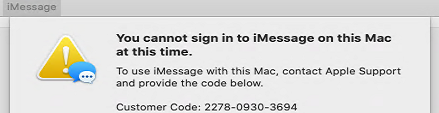
i'm going to see if i can incorporate some of these methods and see if i can get it to work.
image

@sintaxx commented on GitHub (Mar 14, 2021): No matter what I've tried i can't seem to get it working, guess it might have something to do with having a real apple device? I've tried booting up 2 fresh images, one Big Sur and one Catalina with new serials as well as logging them both into an iCloud account and using one of them for apple security codes, hopefully someone can figure out the specifics so there's a way to guarantee this works every time, I'd love to be able to use iMessage. https://www.reddit.com/r/hackintosh/comments/c613ia/how_to_run_imessagefacetime_on_vmware_or_should_i/ i'm going to see if i can incorporate some of these methods and see if i can get it to work. ![image](https://user-images.githubusercontent.com/23103088/111057927-fc4faa80-8458-11eb-8e51-6a485a0a4103.png)
Author
Owner

@sickcodes commented on GitHub (Mar 14, 2021):

This means your Apple ID isn't good enough. Can you DM me on Twitter the exact commands that you used? Or send me via email? https://sick.codes/contact

@sickcodes commented on GitHub (Mar 14, 2021): This means your Apple ID isn't good enough. Can you DM me on Twitter the exact commands that you used? Or send me via email? https://sick.codes/contact
Author
Owner

@sickcodes commented on GitHub (Mar 16, 2021):

Readers, sintaxx tried on a real physical hardware Mac and still received the error, which means the Apple ID is not primed for iMessage.

Having at least one other product and not a brand new account works fine.

@sickcodes commented on GitHub (Mar 16, 2021): Readers, sintaxx tried on a real physical hardware Mac and still received the error, which means the Apple ID is not primed for iMessage. Having at least one other product and not a brand new account works fine.
Author
Owner

@airvb commented on GitHub (Mar 18, 2021):

Hello all
Trying following instructions without success :(
trying 5 different s/n kits !

Same snag as sintaxx

For information, as i haven't other "apple" device , i receive the code by text on y phone.

imessage

@airvb commented on GitHub (Mar 18, 2021): Hello all Trying following instructions without success :( trying 5 different s/n kits ! Same snag as sintaxx For information, as i haven't other "apple" device , i receive the code by text on y phone. ![imessage](https://user-images.githubusercontent.com/18460569/111612331-a9ba1980-87dd-11eb-93a3-cfefd5bc9adb.png)
Author
Owner

@sickcodes commented on GitHub (Mar 18, 2021):

Accounts at that stage usually have to ring Apple

@sickcodes commented on GitHub (Mar 18, 2021): Accounts at that stage usually have to ring Apple
Author
Owner

@sintaxx commented on GitHub (Mar 18, 2021):

Something really weird is going on with my account because I just set mine up on an iphone and imessage still won't work on my real Mac, I'm going to try to call apple today

@sintaxx commented on GitHub (Mar 18, 2021): Something really weird is going on with my account because I just set mine up on an iphone and imessage still won't work on my real Mac, I'm going to try to call apple today
Author
Owner

@airvb commented on GitHub (Mar 18, 2021):

Accounts at that stage usually have to ring Apple

Hello miss Apple i try to get an Imac pro for free, can u help me ??? ...

@airvb commented on GitHub (Mar 18, 2021): > Accounts at that stage usually have to ring Apple Hello miss Apple i try to get an Imac pro for free, can u help me ??? ...
Author
Owner

@sickcodes commented on GitHub (Mar 19, 2021):

Maybe explain you're participating in Apple Bug Bounty like I am: https://sick.codes/is-hackintosh-osx-kvm-or-docker-osx-legal/

@sickcodes commented on GitHub (Mar 19, 2021): Maybe explain you're participating in Apple Bug Bounty like I am: https://sick.codes/is-hackintosh-osx-kvm-or-docker-osx-legal/
Author
Owner

@sintaxx commented on GitHub (Mar 19, 2021):

Apple support said there was a block on my account for spam or something unusual like that and it was cleared, so this evening I'll test everything out on the container/vm

@sintaxx commented on GitHub (Mar 19, 2021): Apple support said there was a block on my account for spam or something unusual like that and it was cleared, so this evening I'll test everything out on the container/vm
Author
Owner

@sickcodes commented on GitHub (Jun 16, 2021):

Closing the issue for now as this is completely solved :)

If anyone receives the Apple support message, multiple users have confirmed to me privately that they were able call phone support and have their issue resolved 👍 I will also confirm nobody has been unable to use it.

@sickcodes commented on GitHub (Jun 16, 2021): Closing the issue for now as this is completely solved :) If anyone receives the Apple support message, multiple users have confirmed to me privately that they were able call phone support and have their issue resolved 👍 I will also confirm nobody has been unable to use it.
Sign in to join this conversation.
1 Participants
Notifications
Due Date
No due date set.
Dependencies

No dependencies set.

Reference: starred/Docker-OSX#119