Originally created by @iMonZ on GitHub (Dec 14, 2021).
Is it possible to support wayland? Since X11 is nearly dead maybe it has a year or so until the final grave.
And xwayland isn’t a very good experience so a native Wayland solution would be insane!
thanks!
Originally created by @iMonZ on GitHub (Dec 14, 2021).
Is it possible to support wayland? Since X11 is nearly dead maybe it has a year or so until the final grave.
And xwayland isn’t a very good experience so a native Wayland solution would be insane!
thanks!
@sickcodes commented on GitHub (Dec 15, 2021):
Good idea I just tried it and it's smooth as butter!
Thank you for bringing this up!!
Terminal 1: `wayfire`
Terminal 2:
```
change DISPLAY to :1
-e "DISPLAY=:1" \
```
https://user-images.githubusercontent.com/65906298/146274213-2195f541-cf10-4c7e-b4aa-5ffd54baf337.mp4
https://user-images.githubusercontent.com/65906298/146272994-106c1425-9cc9-4858-913d-098df227fd0a.mp4
Hey, I use Fedora 35 which defaults to wayland and Im having issues with GTK initialization that I suspect could come from using WAYLAND, as otherwise I've followed the steps. Could you share the command you use to start it with wayland? I tried to change DISPLAY for WAYLAND_DISPLAY without luck.
I can make it work through VNC for now tough. Thanks!
@Julioevm commented on GitHub (Mar 10, 2022):
Hey, I use Fedora 35 which defaults to wayland and Im having issues with GTK initialization that I suspect could come from using WAYLAND, as otherwise I've followed the steps. Could you share the command you use to start it with wayland? I tried to change DISPLAY for WAYLAND_DISPLAY without luck.
I can make it work through VNC for now tough. Thanks!
for testing purposes only, can you set /run/user/1000 to chmod 777, and then when you're finished change it back to 700.
If that works, Ill add the chown to the Dockerfile and support wayland naturally :)
@sickcodes commented on GitHub (Mar 11, 2022):
these variables may help:
```
-e XDG_RUNTIME_DIR=/run/user/1000
-e XDG_SESSION_TYPE=wayland
-e WAYLAND_DISPLAY=wayland-1
```
or
`-e WAYLAND_DISPLAY=wayland-1`
for **testing purposes only**, can you set `/run/user/1000` to chmod 777, and then when you're finished change it back to 700.
If that works, Ill add the chown to the Dockerfile and support wayland naturally :)
for testing purposes only, can you set /run/user/1000 to chmod 777, and then when you're finished change it back to 700.
If that works, Ill add the chown to the Dockerfile and support wayland naturally :)
So this two lines can be removed:
-v /tmp/.X11-unix:/tmp/.X11-unix
-e "DISPLAY=${DISPLAY:-:0.0}" \
?
@iMonZ commented on GitHub (May 22, 2022):
> these variables may help:
>
> ```
> -e XDG_RUNTIME_DIR=/run/user/1000
> -e XDG_SESSION_TYPE=wayland
> -e WAYLAND_DISPLAY=wayland-1
> ```
>
> or
>
> `-e WAYLAND_DISPLAY=wayland-1`
>
> for **testing purposes only**, can you set `/run/user/1000` to chmod 777, and then when you're finished change it back to 700.
>
> If that works, Ill add the chown to the Dockerfile and support wayland naturally :)
So this two lines can be removed:
-v /tmp/.X11-unix:/tmp/.X11-unix \
-e "DISPLAY=${DISPLAY:-:0.0}" \
?
@gotjoshua commented on GitHub (Oct 9, 2022):
> for **testing purposes only**, can you set `/run/user/1000` to chmod 777
@sickcodes i think that this helped for me, but there a couple confounding factors i'm trying to suss out.
1. Fedora 36 wayland
2. user with uid 501 instead of 1000
this comment was mega helpful:
https://github.com/sickcodes/Docker-OSX/issues/419#issuecomment-1011401905
most important was to properly mount my /run/user folder
`$XDG_RUNTIME_DIR/$WAYLAND_DISPLAY:/tmp/$WAYLAND_DISPLAY`
then for permissions i needed to:
```sh
sudo chmod 777 $XDG_RUNTIME_DIR/wayland-*
# which in my case is:
# sudo chmod 777 /run/user/501/wayland-*
```
i use docker-compose (nearly religiously) so here is my yml
```yml
osx:
privileged: true
devices:
- /dev/kvm
- /dev/snd
ports:
- 50922:10022
volumes:
# - /tmp/.X11-unix:/tmp/.X11-unix
- $XDG_RUNTIME_DIR/$WAYLAND_DISPLAY:/tmp/$WAYLAND_DISPLAY
environment:
# GENERATE_UNIQUE: true
RAM: 8
XDG_RUNTIME_DIR: /tmp
WAYLAND_DISPLAY: "${WAYLAND_DISPLAY:-wayland-0}"
QT_QPA_PLATFORM: wayland
GDK_BACKEND: wayland
CLUTTER_BACKEND: wayland
DISPLAY: ":1" # "${DISPLAY:-:0}"
XDG_SESSION_TYPE: wayland
# EXTRA: "-display none"
image: sickcodes/docker-osx:big-sur
```
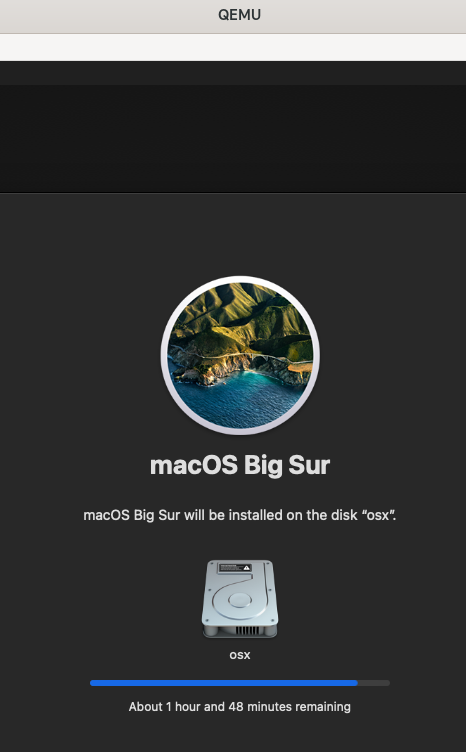
install is underway!

for testing purposes only, can you set /run/user/1000 to chmod 777
@sickcodes i think that this helped for me, but there a couple confounding factors i'm trying to suss out.
1. Fedora 36 wayland
2. user with uid 501 instead of 1000
this comment was mega helpful: #419 (comment) most important was to properly mount my /run/user folder $XDG_RUNTIME_DIR/$WAYLAND_DISPLAY:/tmp/$WAYLAND_DISPLAY
then for permissions i needed to:
sudo chmod 777$XDG_RUNTIME_DIR/wayland-*
# which in my case is:# sudo chmod 777 /run/user/501/wayland-*
i use docker-compose (nearly religiously) so here is my yml
@mroyme commented on GitHub (Nov 30, 2022):
> > for **testing purposes only**, can you set `/run/user/1000` to chmod 777
>
> @sickcodes i think that this helped for me, but there a couple confounding factors i'm trying to suss out.
>
> 1. Fedora 36 wayland
>
> 2. user with uid 501 instead of 1000
>
>
> this comment was mega helpful: [#419 (comment)](https://github.com/sickcodes/Docker-OSX/issues/419#issuecomment-1011401905) most important was to properly mount my /run/user folder `$XDG_RUNTIME_DIR/$WAYLAND_DISPLAY:/tmp/$WAYLAND_DISPLAY`
>
> then for permissions i needed to:
>
> ```shell
> sudo chmod 777 $XDG_RUNTIME_DIR/wayland-*
> # which in my case is:
> # sudo chmod 777 /run/user/501/wayland-*
> ```
>
> i use docker-compose (nearly religiously) so here is my yml
>
> ```yaml
> osx:
> privileged: true
> devices:
> - /dev/kvm
> - /dev/snd
> ports:
> - 50922:10022
> volumes:
> # - /tmp/.X11-unix:/tmp/.X11-unix
> - $XDG_RUNTIME_DIR/$WAYLAND_DISPLAY:/tmp/$WAYLAND_DISPLAY
> environment:
> # GENERATE_UNIQUE: true
> RAM: 8
> XDG_RUNTIME_DIR: /tmp
> WAYLAND_DISPLAY: "${WAYLAND_DISPLAY:-wayland-0}"
> QT_QPA_PLATFORM: wayland
> GDK_BACKEND: wayland
> CLUTTER_BACKEND: wayland
> DISPLAY: ":1" # "${DISPLAY:-:0}"
> XDG_SESSION_TYPE: wayland
> # EXTRA: "-display none"
>
> image: sickcodes/docker-osx:big-sur
> ```
>
> install is underway! 
I used your docker-compose file and turns out the crucial part was running:
```bash
chmod 777 $XDG_RUNTIME_DIR/wayland-*
```
I can rule out a few factors:
1. I'm running Arch Linux (Wayland/Sway) and with UID 1000.
2. Didn't need to run `chmod 700 /run/user/1000 # $XDG_RUNTIME_DIR`.
I tested with Mac OS Ventura by adding these two environment variables as mentioned in the readme:
```
...
-e GENERATE_UNIQUE=true \
-e MASTER_PLIST_URL='https://raw.githubusercontent.com/sickcodes/osx-serial-generator/master/config-custom.plist' \
```
Blocking a user prevents them from interacting with repositories, such as opening or commenting on pull requests or issues. Learn more about blocking a user.
Originally created by @iMonZ on GitHub (Dec 14, 2021).
Is it possible to support wayland? Since X11 is nearly dead maybe it has a year or so until the final grave.
And xwayland isn’t a very good experience so a native Wayland solution would be insane!
thanks!
@sickcodes commented on GitHub (Dec 15, 2021):
Good idea I just tried it and it's smooth as butter!
Thank you for bringing this up!!
Terminal 1:
wayfireTerminal 2:
https://user-images.githubusercontent.com/65906298/146274213-2195f541-cf10-4c7e-b4aa-5ffd54baf337.mp4
https://user-images.githubusercontent.com/65906298/146272994-106c1425-9cc9-4858-913d-098df227fd0a.mp4
@iMonZ commented on GitHub (Jan 3, 2022):
Great thanks! But you need WAYLAND_DISPLAY instead of DISPLAY.
@iMonZ commented on GitHub (Jan 4, 2022):
Could you add Wayland to the readme tutorial? This would be really nice!
@Julioevm commented on GitHub (Mar 10, 2022):
Hey, I use Fedora 35 which defaults to wayland and Im having issues with GTK initialization that I suspect could come from using WAYLAND, as otherwise I've followed the steps. Could you share the command you use to start it with wayland? I tried to change DISPLAY for WAYLAND_DISPLAY without luck.
I can make it work through VNC for now tough. Thanks!
@sickcodes commented on GitHub (Mar 11, 2022):
these variables may help:
or
-e WAYLAND_DISPLAY=wayland-1for testing purposes only, can you set
/run/user/1000to chmod 777, and then when you're finished change it back to 700.If that works, Ill add the chown to the Dockerfile and support wayland naturally :)
@boredland commented on GitHub (May 22, 2022):
I can confirm this did the trick for me! 🥳
@iMonZ commented on GitHub (May 22, 2022):
So this two lines can be removed:
-v /tmp/.X11-unix:/tmp/.X11-unix
-e "DISPLAY=${DISPLAY:-:0.0}" \
?
@gotjoshua commented on GitHub (Oct 9, 2022):
@sickcodes i think that this helped for me, but there a couple confounding factors i'm trying to suss out.
this comment was mega helpful:
https://github.com/sickcodes/Docker-OSX/issues/419#issuecomment-1011401905
most important was to properly mount my /run/user folder
$XDG_RUNTIME_DIR/$WAYLAND_DISPLAY:/tmp/$WAYLAND_DISPLAYthen for permissions i needed to:
i use docker-compose (nearly religiously) so here is my yml
install is underway!
@mroyme commented on GitHub (Nov 30, 2022):
I used your docker-compose file and turns out the crucial part was running:
I can rule out a few factors:
chmod 700 /run/user/1000 # $XDG_RUNTIME_DIR.I tested with Mac OS Ventura by adding these two environment variables as mentioned in the readme:
@nktnet1 commented on GitHub (Aug 4, 2024):
On Arch Linux, Hyprland, using podman-compose.
Can confirm that after running
and, in a directory containing the
docker-compose.yamlbelow (note the prefixdocker.io/in the image)Running
works as expected.