Originally created by @dtln820 on GitHub (Nov 5, 2021).
While trying to archive my project, its results in errors from CoreStore. Running same project on device compiles successfully.
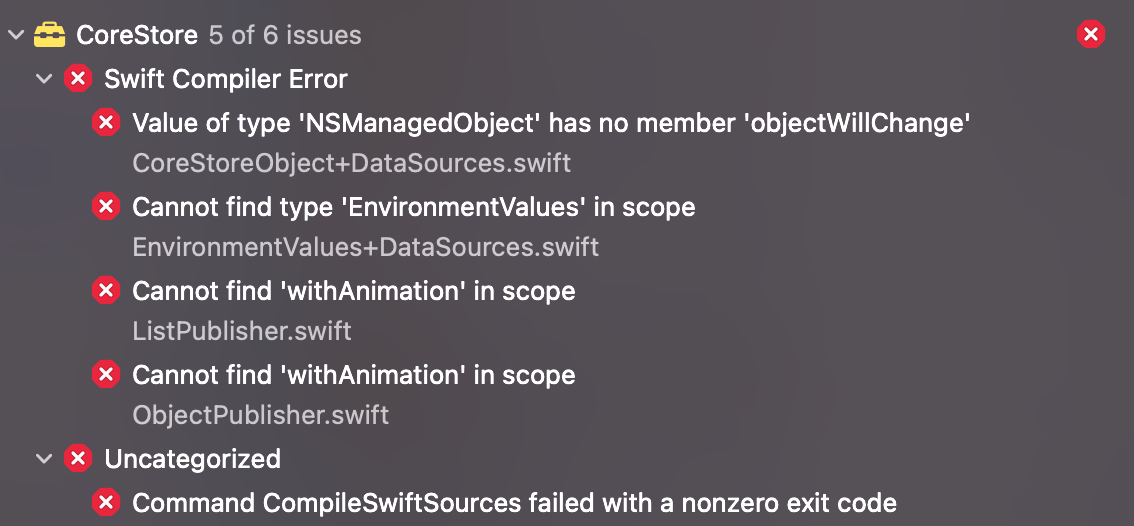
XCode: 13.1
CoreStore: 7.3.0
Tried to clean build folder, to delete DerivedData, etc.
Originally created by @dtln820 on GitHub (Nov 5, 2021).
While trying to archive my project, its results in errors from CoreStore. Running same project on device compiles successfully.
XCode: 13.1
CoreStore: 7.3.0
<img width="567" alt="Screen Shot 2021-11-05 at 3 38 46 PM" src="https://user-images.githubusercontent.com/25442606/140519235-49f6e320-2a3d-45bd-b514-bdfcbfb7d1c2.png">
Tried to clean build folder, to delete DerivedData, etc.
adam
added the question label 2025-12-29 15:30:31 +01:00
@dtln820 @Desmuz
Xcode 13.1 compiles using Swift 5.5 so I recommend updating first to CoreStore 8.1.x.
Afterwards, let me know how it goes for you.
@JohnEstropia commented on GitHub (Nov 8, 2021):
@dtln820 @Desmuz
Xcode 13.1 compiles using Swift 5.5 so I recommend updating first to CoreStore 8.1.x.
Afterwards, let me know how it goes for you.
@dtln820 Is there any reason you cannot update to the latest CoreStore version? I don't think there is any large migration work,just small syntax changes that the compiler would be able to point out for you.
@JohnEstropia commented on GitHub (Nov 12, 2021):
@dtln820 Is there any reason you cannot update to the latest CoreStore version? I don't think there is any large migration work,just small syntax changes that the compiler would be able to point out for you.
Unfortunately I use other pods that haven't been updated for some time, so after updating CoreStore - other pods resulted in compile errors. So that's why I need to keep the versions as they're now, and the only solution that I see is use and older XCode version.
@dtln820 commented on GitHub (Nov 12, 2021):
Unfortunately I use other pods that haven't been updated for some time, so after updating CoreStore - other pods resulted in compile errors. So that's why I need to keep the versions as they're now, and the only solution that I see is use and older XCode version.
Blocking a user prevents them from interacting with repositories, such as opening or commenting on pull requests or issues. Learn more about blocking a user.
Originally created by @dtln820 on GitHub (Nov 5, 2021).
While trying to archive my project, its results in errors from CoreStore. Running same project on device compiles successfully.

XCode: 13.1
CoreStore: 7.3.0
Tried to clean build folder, to delete DerivedData, etc.
@Desmuz commented on GitHub (Nov 8, 2021):
Same problem. Did you manage to fix it?
@JohnEstropia commented on GitHub (Nov 8, 2021):
@dtln820 @Desmuz
Xcode 13.1 compiles using Swift 5.5 so I recommend updating first to CoreStore 8.1.x.
Afterwards, let me know how it goes for you.
@Desmuz commented on GitHub (Nov 8, 2021):
Everything is archived well after upgrading to 8.1.x, thanks.
@dtln820 commented on GitHub (Nov 11, 2021):
Yep, that works. But what if I need the old version? Should I just use another version of XCode?
@JohnEstropia commented on GitHub (Nov 12, 2021):
@dtln820 Is there any reason you cannot update to the latest CoreStore version? I don't think there is any large migration work,just small syntax changes that the compiler would be able to point out for you.
@dtln820 commented on GitHub (Nov 12, 2021):
Unfortunately I use other pods that haven't been updated for some time, so after updating CoreStore - other pods resulted in compile errors. So that's why I need to keep the versions as they're now, and the only solution that I see is use and older XCode version.
@dtln820 commented on GitHub (Nov 12, 2021):
So yeah, anyway updating to CoreStore 8.1.x for XCode 13.1 solves the issue, thank you.