Originally created by @TheJustikar on GitHub (Feb 17, 2021).
Hi,
I am using this block to clear my data before adding my test data for unit and ui tests:
extension DataStack {
func addTestData() {
clearCurrentData()
//add test data ...
}
func clearCurrentData() {
do {
try perform { transaction in
try transaction.deleteAll(From<Class1>())
try transaction.deleteAll(From<Class2>())
try transaction.deleteAll(From<Class3>())
//...
}
} catch {
fatalError(error.localizedDescription)
}
}
}
This gets called in the setUp() method of 2 of my unit tests. The 1. one work fine, but the second one just gets stuck without an error, but the tests don't start.
Am I doing anything wrong?
Originally created by @TheJustikar on GitHub (Feb 17, 2021).
Hi,
I am using this block to clear my data before adding my test data for unit and ui tests:
```
extension DataStack {
func addTestData() {
clearCurrentData()
//add test data ...
}
func clearCurrentData() {
do {
try perform { transaction in
try transaction.deleteAll(From<Class1>())
try transaction.deleteAll(From<Class2>())
try transaction.deleteAll(From<Class3>())
//...
}
} catch {
fatalError(error.localizedDescription)
}
}
}
```
This gets called in the `setUp()` method of 2 of my unit tests. The 1. one work fine, but the second one just gets stuck without an error, but the tests don't start.
Am I doing anything wrong?
Do you have your Unit Test project running in parallel?
@JohnEstropia commented on GitHub (Feb 18, 2021):
Do you have your Unit Test project running in parallel?
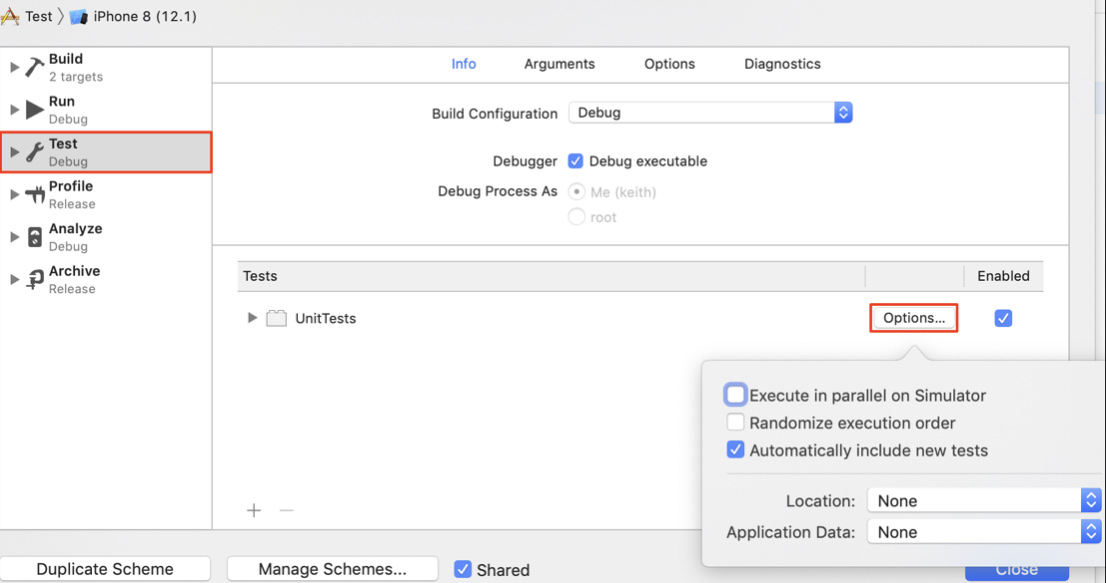
If so then it's likely you are mixing sync and async transactions. Make sure you don't have unfinished async transactions when running sync ones. You can inspect the stack trace when you hit a deadlock, that should show you which other transaction it's waiting for.
@JohnEstropia commented on GitHub (Feb 19, 2021):
If so then it's likely you are mixing sync and async transactions. Make sure you don't have unfinished async transactions when running sync ones. You can inspect the stack trace when you hit a deadlock, that should show you which other transaction it's waiting for.
Blocking a user prevents them from interacting with repositories, such as opening or commenting on pull requests or issues. Learn more about blocking a user.
Originally created by @TheJustikar on GitHub (Feb 17, 2021).
Hi,
I am using this block to clear my data before adding my test data for unit and ui tests:
This gets called in the
setUp()method of 2 of my unit tests. The 1. one work fine, but the second one just gets stuck without an error, but the tests don't start.Am I doing anything wrong?
@JohnEstropia commented on GitHub (Feb 18, 2021):
Do you have your Unit Test project running in parallel?

@TheJustikar commented on GitHub (Feb 19, 2021):
No
@JohnEstropia commented on GitHub (Feb 19, 2021):
If so then it's likely you are mixing sync and async transactions. Make sure you don't have unfinished async transactions when running sync ones. You can inspect the stack trace when you hit a deadlock, that should show you which other transaction it's waiting for.
@TheJustikar commented on GitHub (Feb 19, 2021):
Thanks, yeah I missed some async-transactions in one of the tests and waiting for the fixed it