High CPU Consumption #86

Closed
opened 2025-12-30 01:33:24 +01:00 by adam · 55 comments
Owner

Originally created by @bobouc on GitHub (Feb 22, 2021).

Macbook Pro 2017 without tourch bar.
Mac OS 11.2.1
sometimes with the high CPU consumption and fan with high speed and noise.
Screen Shot 2021-02-23 at 00 06 31

Originally created by @bobouc on GitHub (Feb 22, 2021). Macbook Pro 2017 without tourch bar. Mac OS 11.2.1 sometimes with the high CPU consumption and fan with high speed and noise. <img width="1026" alt="Screen Shot 2021-02-23 at 00 06 31" src="https://user-images.githubusercontent.com/24564616/108736210-5d781280-756c-11eb-9e74-4096ba7cacec.png">
adam closed this issue 2025-12-30 01:33:24 +01:00
Author
Owner

@B4nanaBean commented on GitHub (Feb 22, 2021):

I have a similar issue on M1 MBA. It's nowhere severe as yours, but the CPU consumption gradually goes up as the time goes on. AlDente seems to consume quite high resources for what it does.

@B4nanaBean commented on GitHub (Feb 22, 2021): I have a similar issue on M1 MBA. It's nowhere severe as yours, but the CPU consumption gradually goes up as the time goes on. AlDente seems to consume quite high resources for what it does.
Author
Owner

@hansibansix commented on GitHub (Feb 23, 2021):

same on macbook air m1, cpu consumption starts with 0.5% and gradually rises up to 30%.
clicking the app icon in menu bar also reacts slower the longer al dente runs.
shouldn't this run as a once per wake up script and then pretty much sleep?

@hansibansix commented on GitHub (Feb 23, 2021): same on macbook air m1, cpu consumption starts with 0.5% and gradually rises up to 30%. clicking the app icon in menu bar also reacts slower the longer al dente runs. shouldn't this run as a once per wake up script and then pretty much sleep?
Author
Owner

@leeummm commented on GitHub (Feb 23, 2021):

Agreed. CPU and energy consumption seems high. It appears to be worse when under your charge limit, as if it is constantly checking to see if you have hit your charge limit. Unsure if that is true.

Other thing that is clear: the longer it's running, the more energy and CPU it uses.

MBA M1

@leeummm commented on GitHub (Feb 23, 2021): Agreed. CPU and energy consumption seems high. It appears to be worse when under your charge limit, as if it is constantly checking to see if you have hit your charge limit. Unsure if that is true. Other thing that is clear: the longer it's running, the more energy and CPU it uses. MBA M1
Author
Owner

@B4nanaBean commented on GitHub (Feb 23, 2021):

Ok, so I've been running the program for straight 12 hours today, and it shows a different behavior. Yesterday the CPU usage went up. Today it stays ~0.3% usage (update frequency 5sec) throughout the whole day. I don't know why it is acting differently. Just a note, I did turn off the computer last night and boot up in the morning.

@B4nanaBean commented on GitHub (Feb 23, 2021): Ok, so I've been running the program for straight 12 hours today, and it shows a different behavior. Yesterday the CPU usage went up. Today it stays ~0.3% usage (update frequency 5sec) throughout the whole day. I don't know why it is acting differently. Just a note, I did turn off the computer last night and boot up in the morning.
Author
Owner

@leeummm commented on GitHub (Feb 23, 2021):

Ok, so I've been running the program for straight 12 hours today, and it shows a different behavior. Yesterday the CPU usage went up. Today it stays ~0.3% usage (update frequency 5sec) throughout the whole day. I don't know why it is acting differently. Just a note, I did turn off the computer last night and boot up in the morning.

Have you been plugged in all day? At or below your desired charge level?

How has energy usage trended?

@leeummm commented on GitHub (Feb 23, 2021): > Ok, so I've been running the program for straight 12 hours today, and it shows a different behavior. Yesterday the CPU usage went up. Today it stays ~0.3% usage (update frequency 5sec) throughout the whole day. I don't know why it is acting differently. Just a note, I did turn off the computer last night and boot up in the morning. Have you been plugged in all day? At or below your desired charge level? How has energy usage trended?
Author
Owner

@B4nanaBean commented on GitHub (Feb 23, 2021):

Screen Shot 2021-02-22 at 8 01 26 PM

Exactly at the desired charge level.

@B4nanaBean commented on GitHub (Feb 23, 2021): <img width="274" alt="Screen Shot 2021-02-22 at 8 01 26 PM" src="https://user-images.githubusercontent.com/79472872/108800732-cb124780-7548-11eb-8dac-b782830845b9.png"> Exactly at the desired charge level.
Author
Owner

@leeummm commented on GitHub (Feb 23, 2021):

Screen Shot 2021-02-22 at 8 01 26 PM

Exactly at the desired charge level.

Interesting. My anecdotal experience has been that energy use stays low when you are both plugged in and at your desired charge level.

@leeummm commented on GitHub (Feb 23, 2021): > <img alt="Screen Shot 2021-02-22 at 8 01 26 PM" width="274" src="https://user-images.githubusercontent.com/79472872/108800732-cb124780-7548-11eb-8dac-b782830845b9.png"> > > Exactly at the desired charge level. Interesting. My anecdotal experience has been that energy use stays low when you are both plugged in and at your desired charge level.
Author
Owner

@B4nanaBean commented on GitHub (Feb 23, 2021):

For the energy usage trend, I don't know since I didn't monitor it.

@B4nanaBean commented on GitHub (Feb 23, 2021): For the energy usage trend, I don't know since I didn't monitor it.
Author
Owner

@B4nanaBean commented on GitHub (Feb 23, 2021):

M1 Mac fellas, I have a theory for establishing a stable cpu consumption of AlDente. It seems that if you give AlDente a good 3 minutes (or more) BEFORE you plug in the charger, it uses low resources. If you were already running AlDente with high cpu usage, quit the program and restart it. If you see somewhere between 0.1%-0.3% cpu usage after plugging in the charger, I think you are good.

@B4nanaBean commented on GitHub (Feb 23, 2021): M1 Mac fellas, I have a theory for establishing a stable cpu consumption of AlDente. It seems that if you give AlDente a good 3 minutes (or more) BEFORE you plug in the charger, it uses low resources. If you were already running AlDente with high cpu usage, quit the program and restart it. If you see somewhere between 0.1%-0.3% cpu usage after plugging in the charger, I think you are good.
Author
Owner

@qfettes commented on GitHub (Feb 23, 2021):

M1 Macbook Pro 13: the cpu usage and total cpu time seems abnormally high for me; see image. When actually opening the application, CPU% can jump above 10% quickly.

Screen Shot 2021-02-23 at 4 15 41 PM
@qfettes commented on GitHub (Feb 23, 2021): M1 Macbook Pro 13: the cpu usage and total cpu time seems abnormally high for me; see image. When actually opening the application, CPU% can jump above 10% quickly. <img width="843" alt="Screen Shot 2021-02-23 at 4 15 41 PM" src="https://user-images.githubusercontent.com/8574075/108909651-cd30e080-75f2-11eb-826d-933750ed7aeb.png">
Author
Owner

@LeshawnG commented on GitHub (Feb 24, 2021):

AlDente lingers around 5-7% CPU use for me and it does take longer to open the longer it's running.

About to power off and wait a while before plugging in the charger as mentioned above.
M1 MBP 13
Screen Shot 2021-02-23 at 7 12 23 PM

@LeshawnG commented on GitHub (Feb 24, 2021): AlDente lingers around 5-7% CPU use for me and it does take longer to open the longer it's running. About to power off and wait a while before plugging in the charger as mentioned above. M1 MBP 13 <img width="1097" alt="Screen Shot 2021-02-23 at 7 12 23 PM" src="https://user-images.githubusercontent.com/73793035/108920662-6d92ff00-760b-11eb-9f57-0e36056c58d9.png">
Author
Owner

@Tim675 commented on GitHub (Feb 24, 2021):

I seem to be unfortunately having the same issue as others. The longer the app is open the CPU usage slowly creeps upwards unless I restart the app which seems to temporarily reset it.

@Tim675 commented on GitHub (Feb 24, 2021): I seem to be unfortunately having the same issue as others. The longer the app is open the CPU usage slowly creeps upwards unless I restart the app which seems to temporarily reset it.
Author
Owner

@leeummm commented on GitHub (Feb 24, 2021):

I haven't tested this enough but I am convinced the issue has to do with AlDente checking if you have hit the charge limit...

@leeummm commented on GitHub (Feb 24, 2021): I haven't tested this enough but I am convinced the issue has to do with AlDente checking if you have hit the charge limit...
Author
Owner

@Limeybastid commented on GitHub (Feb 24, 2021):

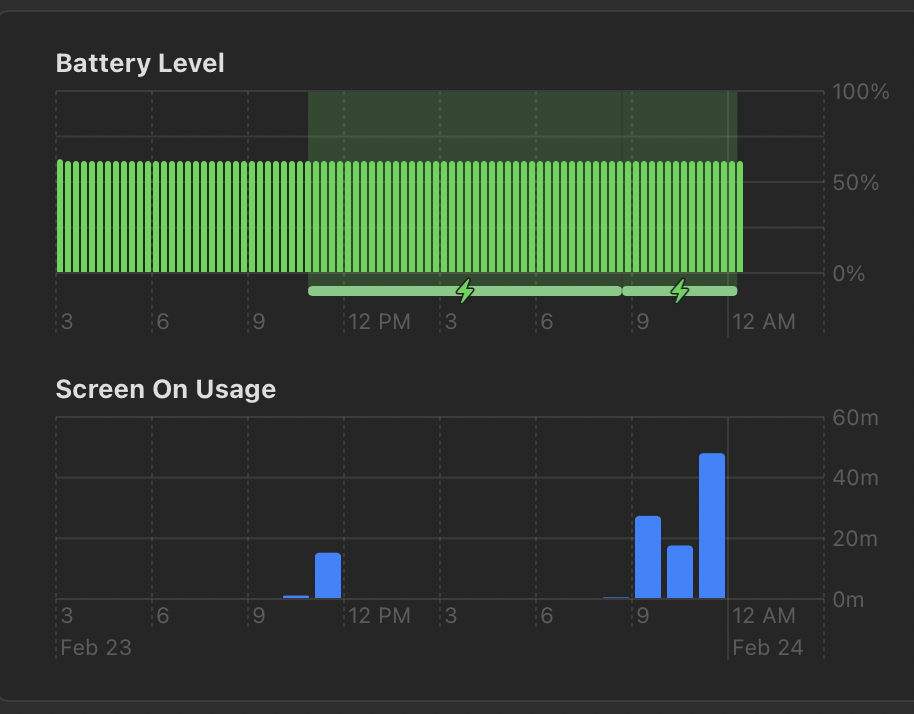
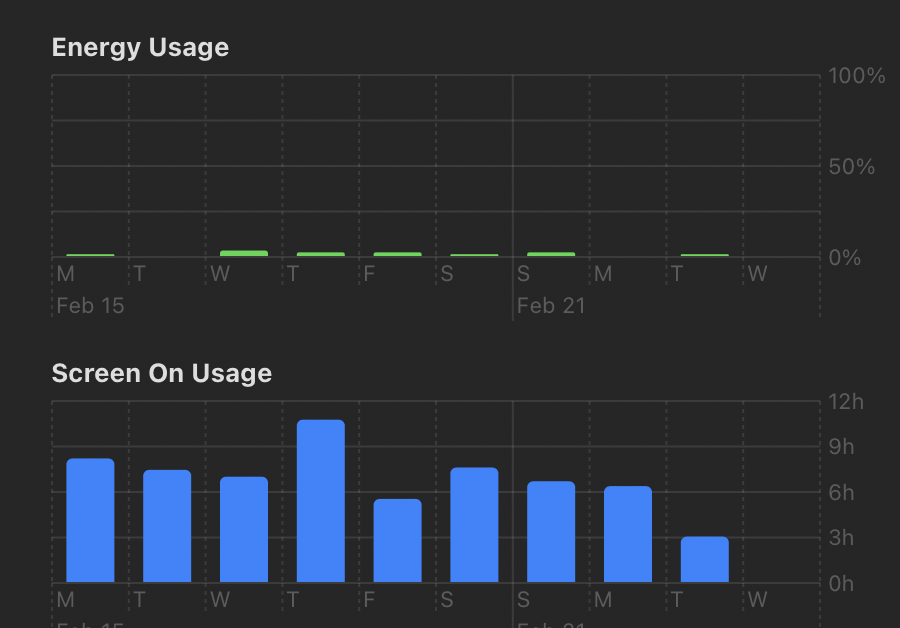
Not bad slight charging occurs as can be see on the attached, but that is to be expected since my MBP is off charge sometimes and in standby. CPU usage seems good.
Screen Shot 2021-02-24 at 12 22 59 AM
Screen Shot 2021-02-24 at 12 22 49 AM
Screen Shot 2021-02-24 at 12 22 21 AM

@Limeybastid commented on GitHub (Feb 24, 2021): Not bad slight charging occurs as can be see on the attached, but that is to be expected since my MBP is off charge sometimes and in standby. CPU usage seems good. <img width="457" alt="Screen Shot 2021-02-24 at 12 22 59 AM" src="https://user-images.githubusercontent.com/79114686/108951803-aa282000-7636-11eb-9f3c-363178235874.png"> <img width="450" alt="Screen Shot 2021-02-24 at 12 22 49 AM" src="https://user-images.githubusercontent.com/79114686/108951809-ac8a7a00-7636-11eb-951d-351c9415cf52.png"> <img width="1028" alt="Screen Shot 2021-02-24 at 12 22 21 AM" src="https://user-images.githubusercontent.com/79114686/108951813-ae543d80-7636-11eb-9cb8-688a4ffcd73e.png">
Author
Owner

@MasterOfMouse commented on GitHub (Feb 24, 2021):

Are you on 2.0 or 2.1?

@MasterOfMouse commented on GitHub (Feb 24, 2021): Are you on 2.0 or 2.1?
Author
Owner

@Tim675 commented on GitHub (Feb 24, 2021):

I am on 2.1 and having the issue. Interestingly when I enabled "allow discharge" the (feature in beta) the cpu usage hasn't yet began to creep up as of yet.

@Tim675 commented on GitHub (Feb 24, 2021): I am on 2.1 and having the issue. Interestingly when I enabled "allow discharge" the (feature in beta) the cpu usage hasn't yet began to creep up as of yet.
Author
Owner

@bobouc commented on GitHub (Feb 24, 2021):

When I use the big application like Parallels Desktop, Photoshop and so on, CPU usage of it start to creep up. I wonder if there's some reason for this issue.

@bobouc commented on GitHub (Feb 24, 2021): When I use the big application like Parallels Desktop, Photoshop and so on, CPU usage of it start to creep up. I wonder if there's some reason for this issue.
Author
Owner

@MasterOfMouse commented on GitHub (Feb 24, 2021):

I am on 2.1 and having the issue. Interestingly when I enabled "allow discharge" the (feature in beta) the cpu usage hasn't yet began to creep up as of yet.

I'm on 2.0 by the way. But I doubt its something in 2.1.

@MasterOfMouse commented on GitHub (Feb 24, 2021): > I am on 2.1 and having the issue. Interestingly when I enabled "allow discharge" the (feature in beta) the cpu usage hasn't yet began to creep up as of yet. I'm on 2.0 by the way. But I doubt its something in 2.1.
Author
Owner

@MasterOfMouse commented on GitHub (Feb 25, 2021):

I have updated to 2.1. I will update on the CPU usage.

@MasterOfMouse commented on GitHub (Feb 25, 2021): I have updated to 2.1. I will update on the CPU usage.
Author
Owner

@Tim675 commented on GitHub (Feb 26, 2021):

Ive been running with the option to "allow discharge" enabled now for a few days now and my CPU use has remained low. Maybe a bug that occurred when enabling the new feature? I'll just leave it on for now. I'm on 2.1 BTW.

@Tim675 commented on GitHub (Feb 26, 2021): Ive been running with the option to "allow discharge" enabled now for a few days now and my CPU use has remained low. Maybe a bug that occurred when enabling the new feature? I'll just leave it on for now. I'm on 2.1 BTW.
Author
Owner

@MasterOfMouse commented on GitHub (Feb 26, 2021):

I have used 2.1 for two days now CPU usage is usually between 0.2 and 0.5. The energy over 12 hours is 0.43. I guess its fine for now

@MasterOfMouse commented on GitHub (Feb 26, 2021): I have used 2.1 for two days now CPU usage is usually between 0.2 and 0.5. The energy over 12 hours is 0.43. I guess its fine for now
Author
Owner

@lpla commented on GitHub (Feb 26, 2021):

@bobouc @B4nanaBean @hansibansix @leeummm @qfettes @LeshawnG , in which version of AlDente are you having this CPU usage issue? 2.0 or 2.1?

@lpla commented on GitHub (Feb 26, 2021): @bobouc @B4nanaBean @hansibansix @leeummm @qfettes @LeshawnG , in which version of AlDente are you having this CPU usage issue? 2.0 or 2.1?
Author
Owner

@bobouc commented on GitHub (Feb 26, 2021):

2.1

On Feb 26, 2021, at 21:45, Leopoldo Pla notifications@github.com wrote:


@bobouc @B4nanaBean @hansibansix @leeummm @qfettes @LeshawnG , in which version of AlDente are you having this CPU usage issue? 2.0 or 2.1?


You are receiving this because you were mentioned.
Reply to this email directly, view it on GitHub, or unsubscribe.

@bobouc commented on GitHub (Feb 26, 2021): 2.1 > On Feb 26, 2021, at 21:45, Leopoldo Pla <notifications@github.com> wrote: > >  > @bobouc @B4nanaBean @hansibansix @leeummm @qfettes @LeshawnG , in which version of AlDente are you having this CPU usage issue? 2.0 or 2.1? > > — > You are receiving this because you were mentioned. > Reply to this email directly, view it on GitHub, or unsubscribe.
Author
Owner

@qfettes commented on GitHub (Feb 26, 2021):

@bobouc @B4nanaBean @hansibansix @leeummm @qfettes @LeshawnG , in which version of AlDente are you having this CPU usage issue? 2.0 or 2.1?

I'm also on 2.1

@qfettes commented on GitHub (Feb 26, 2021): > @bobouc @B4nanaBean @hansibansix @leeummm @qfettes @LeshawnG , in which version of AlDente are you having this CPU usage issue? 2.0 or 2.1? I'm also on 2.1
Author
Owner

@leeummm commented on GitHub (Feb 27, 2021):

It was present on 2.0 and 2.1 for me.

@leeummm commented on GitHub (Feb 27, 2021): It was present on 2.0 and 2.1 for me.
Author
Owner

@Tim675 commented on GitHub (Feb 28, 2021):

Just to offer an update CPU usage has begun to increase again as well with "Allow discharge enabled". Before it had only increased when this was disabled for me. I'm on 2.1 here.

@Tim675 commented on GitHub (Feb 28, 2021): Just to offer an update CPU usage has begun to increase again as well with "Allow discharge enabled". Before it had only increased when this was disabled for me. I'm on 2.1 here.
Author
Owner

@patperek commented on GitHub (Feb 28, 2021):

M1 MBP, my CPU usage seems to jump between 0 and 15.2% every 2 seconds in Activity Monitor. If the battery management itself is supposed to be handled by the SMC (or whatever the equivalent is in M1 Macs), then what could explain these CPU jumps? I don't see what else it should be doing after writing to the SMC, does anyone have any idea?

@patperek commented on GitHub (Feb 28, 2021): M1 MBP, my CPU usage seems to jump between 0 and 15.2% every 2 seconds in Activity Monitor. If the battery management itself is supposed to be handled by the SMC (or whatever the equivalent is in M1 Macs), then what could explain these CPU jumps? I don't see what else it should be doing after writing to the SMC, does anyone have any idea?
Author
Owner

@qfettes commented on GitHub (Feb 28, 2021):

It's probably somewhat similar to what @leeummm suggested; rather than sleeping, the application is probably spinning silently and eating a lot of cpu time.

@qfettes commented on GitHub (Feb 28, 2021): It's probably somewhat similar to what @leeummm suggested; rather than sleeping, the application is probably spinning silently and eating a lot of cpu time.
Author
Owner

@patperek commented on GitHub (Mar 2, 2021):

I've started setting the charge limit, waiting for it to reach the limit and start running off AC, and quitting Al Dente (using the Quit button in the app). The charge limit stays and the CPU consumption is a non issue as the app is closed. Could there be any issues with this approach while the CPU usage issue isn't fixed?

@patperek commented on GitHub (Mar 2, 2021): I've started setting the charge limit, waiting for it to reach the limit and start running off AC, and quitting Al Dente (using the Quit button in the app). The charge limit stays and the CPU consumption is a non issue as the app is closed. Could there be any issues with this approach while the CPU usage issue isn't fixed?
Author
Owner

@patperek commented on GitHub (Mar 2, 2021):

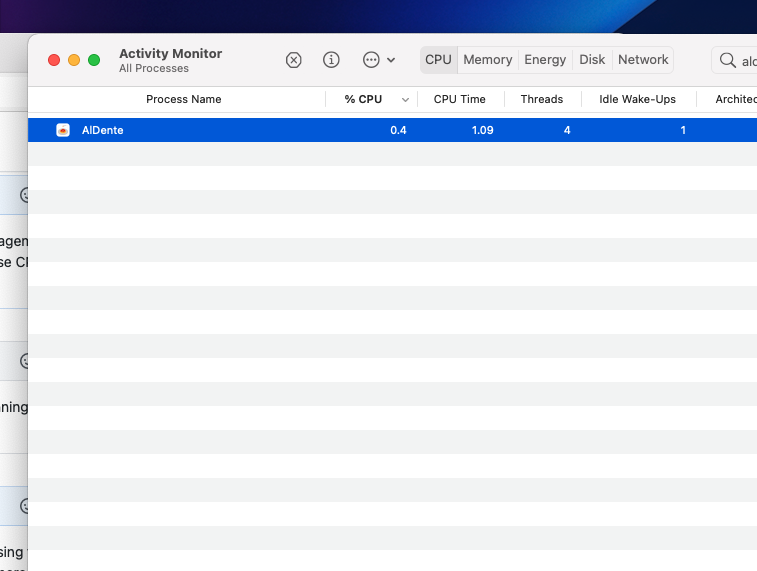
Additionally, restarting the app 5 minutes after closing it and my CPU usage has gone down from 10-15% to 0.4% while idling, on my M1 Macbook Pro. The charge is still being limited as desired.
Screenshot 2021-03-02 at 14 12 15

@patperek commented on GitHub (Mar 2, 2021): Additionally, restarting the app 5 minutes after closing it and my CPU usage has gone down from 10-15% to 0.4% while idling, on my M1 Macbook Pro. The charge is still being limited as desired. ![Screenshot 2021-03-02 at 14 12 15](https://user-images.githubusercontent.com/77973304/109661008-6e72e600-7b61-11eb-8386-5f877b5be07b.png)
Author
Owner

@bobouc commented on GitHub (Mar 2, 2021):

Additionally, restarting the app 5 minutes after closing it and my CPU usage has gone down from 10-15% to 0.4% while idling, on my M1 Macbook Pro. The charge is still being limited as desired.
Screenshot 2021-03-02 at 14 12 15

I've started setting the charge limit, waiting for it to reach the limit and start running off AC, and quitting Al Dente (using the Quit button in the app). The charge limit stays and the CPU consumption is a non issue as the app is closed. Could there be any issues with this approach while the CPU usage issue isn't fixed?

You are right. Quitting the AIDente(using the Quit button in the app) is a better way for resolving "High CPU Consumption". I do that like you mentioned above, and it works ( still has the charge limit ).

@bobouc commented on GitHub (Mar 2, 2021): > Additionally, restarting the app 5 minutes after closing it and my CPU usage has gone down from 10-15% to 0.4% while idling, on my M1 Macbook Pro. The charge is still being limited as desired. > ![Screenshot 2021-03-02 at 14 12 15](https://user-images.githubusercontent.com/77973304/109661008-6e72e600-7b61-11eb-8386-5f877b5be07b.png) > I've started setting the charge limit, waiting for it to reach the limit and start running off AC, and quitting Al Dente (using the Quit button in the app). The charge limit stays and the CPU consumption is a non issue as the app is closed. Could there be any issues with this approach while the CPU usage issue isn't fixed? You are right. Quitting the AIDente(using the Quit button in the app) is a better way for resolving "High CPU Consumption". I do that like you mentioned above, and it works ( still has the charge limit ).
Author
Owner

@qfettes commented on GitHub (Mar 3, 2021):

If the app can be turned off and the full functionality is maintained, what could it possibly be doing in the background to use so much CPU?

@qfettes commented on GitHub (Mar 3, 2021): If the app can be turned off and the full functionality is maintained, what could it possibly be doing in the background to use so much CPU?
Author
Owner

@maiksd commented on GitHub (Mar 5, 2021):

Same here with 2.1 on an MBP 15" 2018. Just noticed that AlDente ate 9 hours of CPU time since I last rebooted 7 days ago...

@maiksd commented on GitHub (Mar 5, 2021): Same here with 2.1 on an MBP 15" 2018. Just noticed that AlDente ate 9 hours of CPU time since I last rebooted 7 days ago...
Author
Owner

@qfettes commented on GitHub (Mar 7, 2021):

I don't think this should be closed. There wasn't really a resolution; there was only somewhat of a workaround.

@qfettes commented on GitHub (Mar 7, 2021): I don't think this should be closed. There wasn't really a resolution; there was only somewhat of a workaround.
Author
Owner

@Tim675 commented on GitHub (Mar 7, 2021):

Yea issue is ongoing. Definitely not closed.

@Tim675 commented on GitHub (Mar 7, 2021): Yea issue is ongoing. Definitely not closed.
Author
Owner

@bobouc commented on GitHub (Mar 7, 2021):

Reopen now.

@bobouc commented on GitHub (Mar 7, 2021): Reopen now.
Author
Owner

@MatthiasKerbl commented on GitHub (Mar 7, 2021):

Hi Guys,

Thank you very much for observing this issue in such detail. @davidwernhart and I are aware of it and working on fixing it. However, we are not completely sure what the cause of the high CPU consumption is since we currently cannot replicate the issue on our systems.

Best regards,
Matthias and David

@MatthiasKerbl commented on GitHub (Mar 7, 2021): Hi Guys, Thank you very much for observing this issue in such detail. @davidwernhart and I are aware of it and working on fixing it. However, we are not completely sure what the cause of the high CPU consumption is since we currently cannot replicate the issue on our systems. Best regards, Matthias and David
Author
Owner

@davebuilt commented on GitHub (Mar 8, 2021):

I'm getting the same issue on a MacBook Pro 13" M1 with v2.1. Never installed v2.0.

Quitting and re-opening the app every few days seems to solve the issue, but ideally you shouldn't have to quit at all.

Edit: Issue back again after a few days:

image

@davebuilt commented on GitHub (Mar 8, 2021): I'm getting the same issue on a MacBook Pro 13" M1 with v2.1. Never installed v2.0. Quitting and re-opening the app every few days seems to solve the issue, but ideally you shouldn't have to quit at all. Edit: Issue back again after a few days: ![image](https://user-images.githubusercontent.com/2051778/110616182-2caef480-818c-11eb-9524-ca6e5f281dbe.png)
Author
Owner

@firru commented on GitHub (Mar 12, 2021):

I had the same problem with version version 2.1 on MacOS 11.2.2.
I tried using the "classic smc" option but this had only a minor effect reducing the cpu usage to 2 to 7 %.

After updating to 11.2.3 the app shows (when running in background) a cpu usage of 0.x %.

I hope this helps solving this issue. Maybe other users can share their impressions after updating to 11.2.3.

@firru commented on GitHub (Mar 12, 2021): I had the same problem with version version 2.1 on MacOS 11.2.2. I tried using the "classic smc" option but this had only a minor effect reducing the cpu usage to 2 to 7 %. After updating to 11.2.3 the app shows (when running in background) a cpu usage of 0.x %. I hope this helps solving this issue. Maybe other users can share their impressions after updating to 11.2.3.
Author
Owner

@maiksd commented on GitHub (Mar 12, 2021):

For me the CPU consumption stopped after updating AlDente to 2.1.2.

@maiksd commented on GitHub (Mar 12, 2021): For me the CPU consumption stopped after updating AlDente to 2.1.2.
Author
Owner

@firru commented on GitHub (Mar 12, 2021):

I had the same problem with version version 2.1 on MacOS 11.2.2.
I tried using the "classic smc" option but this had only a minor effect reducing the cpu usage to 2 to 7 %.

After updating to 11.2.3 the app shows (when running in background) a cpu usage of 0.x %.

I hope this helps solving this issue. Maybe other users can share their impressions after updating to 11.2.3.

I was to enthusiastic: Later today the cpu usage is again at about 6 %.
I will try to update to 2.1.2.

@firru commented on GitHub (Mar 12, 2021): > I had the same problem with version version 2.1 on MacOS 11.2.2. > I tried using the "classic smc" option but this had only a minor effect reducing the cpu usage to 2 to 7 %. > > After updating to 11.2.3 the app shows (when running in background) a cpu usage of 0.x %. > > I hope this helps solving this issue. Maybe other users can share their impressions after updating to 11.2.3. I was to enthusiastic: Later today the cpu usage is again at about 6 %. I will try to update to 2.1.2.
Author
Owner

@tristangrichard commented on GitHub (Mar 12, 2021):

Seeing same issue on 2018 15" MacBook Pro i9 running MacOS 11.2.3 with AlDente 2.1.2

image
@tristangrichard commented on GitHub (Mar 12, 2021): Seeing same issue on 2018 15" MacBook Pro i9 running MacOS 11.2.3 with AlDente 2.1.2 <img width="930" alt="image" src="https://user-images.githubusercontent.com/13846439/110984204-16ab5a80-836b-11eb-84c1-fbe8897b9796.png">
Author
Owner

@SunDiego1 commented on GitHub (Mar 14, 2021):

Macbook Pro 2017 without tourch bar.
Mac OS 11.2.1
sometimes with the high CPU consumption and fan with high speed and noise.
Screen Shot 2021-02-23 at 00 06 31

I have the same issue with AlDente 2.1.2, as a temp fix, I reverted back to AlDente 1.2 and it fixed the issue. I'm on a 2020 intel MacBook Air

@SunDiego1 commented on GitHub (Mar 14, 2021): > Macbook Pro 2017 without tourch bar. > Mac OS 11.2.1 > sometimes with the high CPU consumption and fan with high speed and noise. > <img alt="Screen Shot 2021-02-23 at 00 06 31" width="1026" src="https://user-images.githubusercontent.com/24564616/108736210-5d781280-756c-11eb-9e74-4096ba7cacec.png"> I have the same issue with AlDente 2.1.2, as a temp fix, I reverted back to AlDente 1.2 and it fixed the issue. I'm on a 2020 intel MacBook Air
Author
Owner

@qfettes commented on GitHub (Mar 16, 2021):

I just wanted to jump in and update on my M1 Macbook Pro. Usually I just turn off AlDente while I'm not charging to avoid this issue. I wanted to test and see if I could still observe the issue, so I let the app run for 24 hours consecutively. When first starting, CPU usage is reasonable (usually 0.x%). After 24 hours CPU usage bounces between 6% and 20% (!!) with over 31 hours of CPU time over the last 12 hours (more than my web browser in the same period).

@qfettes commented on GitHub (Mar 16, 2021): I just wanted to jump in and update on my M1 Macbook Pro. Usually I just turn off AlDente while I'm not charging to avoid this issue. I wanted to test and see if I could still observe the issue, so I let the app run for 24 hours consecutively. When first starting, CPU usage is reasonable (usually 0.x%). After 24 hours CPU usage bounces between 6% and 20% (!!) with over 31 hours of CPU time over the last 12 hours (more than my web browser in the same period).
Author
Owner

@osianSmith commented on GitHub (Mar 16, 2021):

I've run into this on my MacBook pro 2019. Seems to be a relaunch is enough to fix it. It was open for about 5 days before I notice it happened.

It was a high single-threaded load. My instinct tells me its an infinitive loop that is linking back to recursive data? I haven't been able to try to debug it myself though

@osianSmith commented on GitHub (Mar 16, 2021): I've run into this on my MacBook pro 2019. Seems to be a relaunch is enough to fix it. It was open for about 5 days before I notice it happened. It was a high single-threaded load. My instinct tells me its an infinitive loop that is linking back to recursive data? I haven't been able to try to debug it myself though
Author
Owner

@vassudanagunta commented on GitHub (Mar 17, 2021):

@MatthiasKerbl

However, we are not completely sure what the cause of the high CPU consumption is since we currently cannot replicate the issue on our systems.

Best regards,
Matthias and David

Even if you don't se CPU consumption over a few percent, does AlDente rank as one of the top consumers on your systems? As you can see on mine it is in the top 5, ranking above and using many times more CPU than Safari, mds and even DropBox which is a non-native Python client constantly monitoring file system events.

Screen Shot 2021-03-16 at 10 26 00 PM
@vassudanagunta commented on GitHub (Mar 17, 2021): @MatthiasKerbl > However, we are not completely sure what the cause of the high CPU consumption is since we currently cannot replicate the issue on our systems. > > Best regards, > Matthias and David Even if you don't se CPU consumption over a few percent, does AlDente rank as one of the top consumers on your systems? As you can see on mine it is in the top 5, ranking above and using many times more CPU than Safari, mds and even DropBox which is a non-native Python client constantly monitoring file system events. <img width="770" alt="Screen Shot 2021-03-16 at 10 26 00 PM" src="https://user-images.githubusercontent.com/2830093/111405424-cdc70f00-86a6-11eb-8c9c-7bfcb4907507.png">
Author
Owner

@firru commented on GitHub (Mar 18, 2021):

I had the same problem with version version 2.1 on MacOS 11.2.2.
I tried using the "classic smc" option but this had only a minor effect reducing the cpu usage to 2 to 7 %.
After updating to 11.2.3 the app shows (when running in background) a cpu usage of 0.x %.
I hope this helps solving this issue. Maybe other users can share their impressions after updating to 11.2.3.

I was to enthusiastic: Later today the cpu usage is again at about 6 %.
I will try to update to 2.1.2.

2.1.2 has the same issue.
But I have more/new infos now:

1. I had the high cpu usage.
2. I quit the app and restarted it.
3. No high cpu usage (about 35 min. cpu time for a whole work day).
4. I opened the app dialog and opened the settings (and closed it).
5. I did other things and after a while I had the higher cpu usage again.

It seems that the app only has higher cpu usage if there was in interaction with the app dialogs. If the app is (re)started and no interaction with the app dialogs there is no higher cpu consumption.

@firru commented on GitHub (Mar 18, 2021): > > I had the same problem with version version 2.1 on MacOS 11.2.2. > > I tried using the "classic smc" option but this had only a minor effect reducing the cpu usage to 2 to 7 %. > > After updating to 11.2.3 the app shows (when running in background) a cpu usage of 0.x %. > > I hope this helps solving this issue. Maybe other users can share their impressions after updating to 11.2.3. > > I was to enthusiastic: Later today the cpu usage is again at about 6 %. > I will try to update to 2.1.2. 2.1.2 has the same issue. But I have _more/new_ infos now: _1. I had the high cpu usage. 2. I quit the app and restarted it. 3. No high cpu usage (about 35 min. cpu time for a whole work day). 4. I opened the app dialog and opened the settings (and closed it). 5. I did other things and after a while I had the higher cpu usage again._ **It seems that the app only has higher cpu usage if there was in interaction with the app dialogs. If the app is (re)started and no interaction with the app dialogs there is no higher cpu consumption.**
Author
Owner

@bobouc commented on GitHub (Mar 18, 2021):

I had the same problem with version version 2.1 on MacOS 11.2.2.

I tried using the "classic smc" option but this had only a minor effect reducing the cpu usage to 2 to 7 %.

After updating to 11.2.3 the app shows (when running in background) a cpu usage of 0.x %.

I hope this helps solving this issue. Maybe other users can share their impressions after updating to 11.2.3.

I was to enthusiastic: Later today the cpu usage is again at about 6 %.

I will try to update to 2.1.2.

2.1.2 has the same issue.

But I have more/new infos now:

_1. I had the high cpu usage.

  1. I quit the app and restarted it.

  2. No high cpu usage (about 35 min. cpu time for a whole work day).

  3. I opened the app dialog and opened the settings (and closed it).

  4. I did other things and after a while I had the higher cpu usage again._

It seems that the app only has higher cpu usage if there was in interaction with the app dialogs. If the app is (re)started and no interaction with the app dialogs there is no higher cpu consumption.

The issue can be easily reproduced(in my own try). And the developer should pay attention to this heavy issue that occurred in many many people's mac. Obviously this issue has become the most discussed issue on issues list. In my view, it should be on the first priority.

@bobouc commented on GitHub (Mar 18, 2021): > > > I had the same problem with version version 2.1 on MacOS 11.2.2. > > > > I tried using the "classic smc" option but this had only a minor effect reducing the cpu usage to 2 to 7 %. > > > > After updating to 11.2.3 the app shows (when running in background) a cpu usage of 0.x %. > > > > I hope this helps solving this issue. Maybe other users can share their impressions after updating to 11.2.3. > > > > > > I was to enthusiastic: Later today the cpu usage is again at about 6 %. > > > I will try to update to 2.1.2. > > > > 2.1.2 has the same issue. > > But I have _more/new_ infos now: > > > > _1. I had the high cpu usage. > > 2. I quit the app and restarted it. > > 3. No high cpu usage (about 35 min. cpu time for a whole work day). > > 4. I opened the app dialog and opened the settings (and closed it). > > 5. I did other things and after a while I had the higher cpu usage again._ > > > > **It seems that the app only has higher cpu usage if there was in interaction with the app dialogs. If the app is (re)started and no interaction with the app dialogs there is no higher cpu consumption.** The issue can be easily reproduced(in my own try). And the developer should pay attention to this heavy issue that occurred in many many people's mac. Obviously this issue has become the most discussed issue on issues list. In my view, it should be on the first priority.
Author
Owner

@davidwernhart commented on GitHub (Mar 18, 2021):

Hi guys,

Thanks for keeping us updated on your findings on this issue. We have also made some progress and did some profiling. The issue seems to come from SwiftUI taking up more and more CPU resources to redraw the view as time goes on. Sadly, this does not make any sense to us, since the rate at which AlDente updates the variables that are relevant for the view remains constant. To make it even harder to debug, this issue does not occur in every system, which is even more puzzling to us. Any help and extra info regarding this is appreciated!
Nevertheless, we think we might have found a way to avoid this issue, but we need more time to implement and test it properly. We will keep you updated and release the fixed version as soon as possible.

Best regards,
David and Matthias

@davidwernhart commented on GitHub (Mar 18, 2021): Hi guys, Thanks for keeping us updated on your findings on this issue. We have also made some progress and did some profiling. The issue seems to come from SwiftUI taking up more and more CPU resources to redraw the view as time goes on. Sadly, this does not make any sense to us, since the rate at which AlDente updates the variables that are relevant for the view remains constant. To make it even harder to debug, this issue does not occur in every system, which is even more puzzling to us. Any help and extra info regarding this is appreciated! Nevertheless, we think we might have found a way to avoid this issue, but we need more time to implement and test it properly. We will keep you updated and release the fixed version as soon as possible. Best regards, David and Matthias
Author
Owner

@leeummm commented on GitHub (Mar 18, 2021):

I had the same problem with version version 2.1 on MacOS 11.2.2.
I tried using the "classic smc" option but this had only a minor effect reducing the cpu usage to 2 to 7 %.
After updating to 11.2.3 the app shows (when running in background) a cpu usage of 0.x %.
I hope this helps solving this issue. Maybe other users can share their impressions after updating to 11.2.3.

I was to enthusiastic: Later today the cpu usage is again at about 6 %.
I will try to update to 2.1.2.

2.1.2 has the same issue.
But I have more/new infos now:

1. I had the high cpu usage. 2. I quit the app and restarted it. 3. No high cpu usage (about 35 min. cpu time for a whole work day). 4. I opened the app dialog and opened the settings (and closed it). 5. I did other things and after a while I had the higher cpu usage again.

It seems that the app only has higher cpu usage if there was in interaction with the app dialogs. If the app is (re)started and no interaction with the app dialogs there is no higher cpu consumption.

I also believe the experience is the same on my side. If I don't ever open the menu bar view, the CPU consumptions stays close to 0.

@leeummm commented on GitHub (Mar 18, 2021): > > > I had the same problem with version version 2.1 on MacOS 11.2.2. > > > I tried using the "classic smc" option but this had only a minor effect reducing the cpu usage to 2 to 7 %. > > > After updating to 11.2.3 the app shows (when running in background) a cpu usage of 0.x %. > > > I hope this helps solving this issue. Maybe other users can share their impressions after updating to 11.2.3. > > > > > > I was to enthusiastic: Later today the cpu usage is again at about 6 %. > > I will try to update to 2.1.2. > > 2.1.2 has the same issue. > But I have _more/new_ infos now: > > _1. I had the high cpu usage. 2. I quit the app and restarted it. 3. No high cpu usage (about 35 min. cpu time for a whole work day). 4. I opened the app dialog and opened the settings (and closed it). 5. I did other things and after a while I had the higher cpu usage again._ > > **It seems that the app only has higher cpu usage if there was in interaction with the app dialogs. If the app is (re)started and no interaction with the app dialogs there is no higher cpu consumption.** I also believe the experience is the same on my side. If I don't ever open the menu bar view, the CPU consumptions stays close to 0.
Author
Owner

@leechaojie commented on GitHub (Mar 23, 2021):

Same problem.
CPU usage rises after opening for a while, getting higher over time and having to exit and restart.
Interestingly, versions prior to 2.1.2 did not encounter this problem.
MacBook Pro (16-inch, 2019)

@leechaojie commented on GitHub (Mar 23, 2021): Same problem. CPU usage rises after opening for a while, getting higher over time and having to exit and restart. Interestingly, versions prior to 2.1.2 did not encounter this problem. MacBook Pro (16-inch, 2019)
Author
Owner

@MatthiasKerbl commented on GitHub (Mar 24, 2021):

Hi Guys,

we have finally managed to fix the high CPU consumption issue with our new version AlDente 2.2 which was just released. We also added an update function for future updates.

Hope you like it,
David & Matthias

@MatthiasKerbl commented on GitHub (Mar 24, 2021): Hi Guys, we have finally managed to fix the high CPU consumption issue with our new version AlDente 2.2 which was just released. We also added an update function for future updates. Hope you like it, David & Matthias
Author
Owner

@Tim675 commented on GitHub (Mar 25, 2021):

CPU now running at 0.0 percent for me and holding steady. Great work! Very happy. Can't wait for pro version!

@Tim675 commented on GitHub (Mar 25, 2021): CPU now running at 0.0 percent for me and holding steady. Great work! Very happy. Can't wait for pro version!
Author
Owner

@firru commented on GitHub (Mar 26, 2021):

CPU now running at 0.0 percent for me and holding steady. Great work! Very happy. Can't wait for pro version!

Same for me! After updating 0.0 % and very low cpu time (as expected).
Great job!

@firru commented on GitHub (Mar 26, 2021): > CPU now running at 0.0 percent for me and holding steady. Great work! Very happy. Can't wait for pro version! Same for me! After updating 0.0 % and very low cpu time (as expected). Great job!
Author
Owner

@bobouc commented on GitHub (Mar 26, 2021):

Awesome Man! Great work for the latest version 2.2.

@bobouc commented on GitHub (Mar 26, 2021): Awesome Man! Great work for the latest version 2.2.
Sign in to join this conversation.
1 Participants
Notifications
Due Date
No due date set.
Dependencies

No dependencies set.

Reference: starred/AlDente-Battery_Care_and_Monitoring#86
