Macbook shut down thinking batteries are drained, when it is actually at 65% #70

Closed
opened 2025-12-30 01:33:17 +01:00 by adam · 1 comment
Owner

Originally created by @johnz133 on GitHub (Feb 2, 2021).

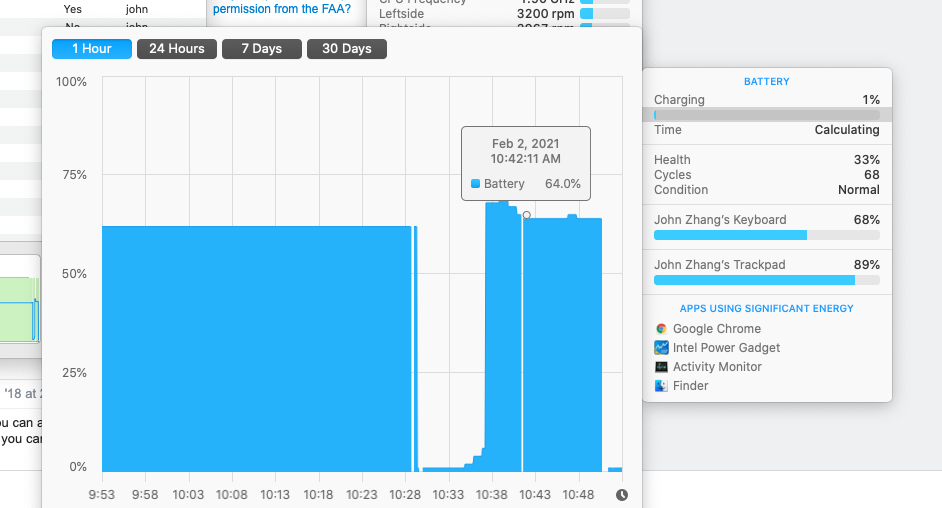
I have my max battery charge level set to 50%, and the battery status says the battery is sitting at 65%, not charging.

I wanted it to drain it down to below 50%, then have it sit around there. But a few minutes after unplugging, my macbook shuts down, and wouldn't wake up unless it was plugged in. After restarting, the computer thinks there's only 1% battery charge left.
Screen Shot 2021-02-02 at 10 53 00 AM
Screen Shot 2021-02-02 at 10 53 17 AM

After a minute, I disconnected the charger from the macbook and reconnected it, then the batteries jumped back up to 65%.

Screen Shot 2021-02-02 at 11 02 41 AM

Screen Shot 2021-02-02 at 11 01 31 AM

I am using a 2018 Macbook Pro. AlDente was working fine until this issue. I have tried reinstalling the helper and resetting the SMC.

Originally created by @johnz133 on GitHub (Feb 2, 2021). I have my max battery charge level set to 50%, and the battery status says the battery is sitting at 65%, not charging. I wanted it to drain it down to below 50%, then have it sit around there. But a few minutes after unplugging, my macbook shuts down, and wouldn't wake up unless it was plugged in. After restarting, the computer thinks there's only 1% battery charge left. ![Screen Shot 2021-02-02 at 10 53 00 AM](https://user-images.githubusercontent.com/457545/106649072-f0152b00-6545-11eb-8026-71114912f101.png) ![Screen Shot 2021-02-02 at 10 53 17 AM](https://user-images.githubusercontent.com/457545/106649081-f3a8b200-6545-11eb-9151-ba2116a6f230.png) After a minute, I disconnected the charger from the macbook and reconnected it, then the batteries jumped back up to 65%. ![Screen Shot 2021-02-02 at 11 02 41 AM](https://user-images.githubusercontent.com/457545/106649289-32d70300-6546-11eb-9b38-1c4439bbf2ae.png) ![Screen Shot 2021-02-02 at 11 01 31 AM](https://user-images.githubusercontent.com/457545/106649206-1cc94280-6546-11eb-91b7-cc3803af83aa.png) I am using a 2018 Macbook Pro. AlDente was working fine until this issue. I have tried reinstalling the helper and resetting the SMC.
adam closed this issue 2025-12-30 01:33:17 +01:00
Author
Owner

@johnz133 commented on GitHub (Feb 3, 2021):

The issue was resolved after I set the max charge to 100, then put the laptop to sleep and let it charge overnight. Then in the morning, I performed another SMC reset and now it is draining properly.

@johnz133 commented on GitHub (Feb 3, 2021): The issue was resolved after I set the max charge to 100, then put the laptop to sleep and let it charge overnight. Then in the morning, I performed another SMC reset and now it is draining properly.
Sign in to join this conversation.
1 Participants
Notifications
Due Date
No due date set.
Dependencies

No dependencies set.

Reference: starred/AlDente-Battery_Care_and_Monitoring#70