mirror of
https://github.com/AppHouseKitchen/AlDente-Battery_Care_and_Monitoring.git
synced 2026-09-08 19:01:58 +02:00
Somone managed to run it on a M1 MBP with Big Sur? #49
Assignees
 adam (Adam Melkus)
Clear assignees
adam (Adam Melkus)
No Assignees
Notifications
Due Date
No due date set.
Dependencies
No dependencies set.
Reference: starred/AlDente-Battery_Care_and_Monitoring#49
Reference in New Issue
Block a user
Originally created by @Peebuddy43 on GitHub (Nov 20, 2020).
Somone managed to run it on a M1 MBP with Big Sur?
@JiaaackY commented on GitHub (Nov 22, 2020):
I tried on my m1 air. It doesn't work. I installed the helper tool and reboot my air but it still keeps charging.
@davidwernhart commented on GitHub (Nov 22, 2020):
@JiaaackY thank you for this information! I already suspected that it would not work on M1 macs since they have no SMC like the intel ones have. Maybe I will be able to find a similar solution for M1 macs in the future, but for now I don't have a device to test. Best regards, David
@FreeWoRLD83 commented on GitHub (Nov 25, 2020):
You can't imagine how many folks out there awaiting eagerly for the M1 version as this is the most amazing app you could ever install on your mac if you are careful about battery of your device. Love your work.
@asd123cqp commented on GitHub (Nov 26, 2020):
I believe SMC should still exist on ARM Macs, it's just that the key
BCLMhas been renamed or removed.I complied the smc tool from smcFanControl on an ARM Mac.
smc -lstill shows a ton of stuffsmc -l | grep BCLMshows nothing (on an Intel mac it should give something likeBCLM [ui8 ] 60 (bytes 3c))@DevNulPavel commented on GitHub (Nov 26, 2020):
@asd123cqp
Can you show your output of
smc -lcommand?@asd123cqp commented on GitHub (Nov 26, 2020):
Sure, here's the
smc -loutput on a M1 Macbook Air: smc-l-arm-mba.txt.@davidwernhart commented on GitHub (Nov 26, 2020):
Thank you for dumping the smc keys @asd123cqp ! That is very interesting to me, I suspect Apple simply renamed some keys for the new M1 macbooks. From looking at your dump, I would guess that the key "BCMV" (maybe "battery charge max value"?) could be the right one. If you are brave enough, you could maybe try to write to it and see what happens. Although I must warn you that you can also brick your MacBook by writing to the wrong keys and I do not take responsibility if that would be the case.
Anyways, thank you for sharing your findings!
Best regards, David
@DizzyFop commented on GitHub (Nov 26, 2020):
How could you brick it? Would resetting the SMC not fix an issue caused by this?
@davidwernhart commented on GitHub (Nov 26, 2020):
@Superjack78 because we don't know what those keys do for now. Maybe BCMV actually stands for "battery charge max voltage" and modifying it actually messes with the charging circuit, having the potential to do some permanent damage to the battery even if you reset the SMC afterwards.
The point is that we just don't know yet and there is always some risk attached to messing with the SMC. I got lucky with finding the original BCLM key, but I cannot guarantee that this is the case for everyone.
@asd123cqp commented on GitHub (Nov 27, 2020):
@davidwernhart I doubt
BCMVis the renamedBCLM. Its current value isBCMV [ui16] 23312 (bytes 5b 10)and I am not sure how to make sense of this number. Maybe this is the new charge limit and it is now an absolute value instead of a percentage. Maybe it's totally unrelated. I don't know.There are two values that stand out to me though. I searched the dump for keys that start with an "B" and have the value "100" and found these two:
BMSC [ui16] 100 (bytes 64)andBTRS [ui8 ] 100 (bytes 64). Again, not sure what they stand for and might be totally unrelated. I don't know.Update:
BCMValready exists on Intel Macs, so it's unlikely to be the new key for charge limit.BMSCandBTRSare new. Could be the chosen one.@smoothdvd commented on GitHub (Nov 27, 2020):
BTRS is for Bluetooth?
2018-08-07 09:16:29.919311+0100 0x7b Default 0x0 0 0 kernel: (IOBluetoothFamily) **** [IOBluetoothACPIMethods][SetBTRS] -- mACPIDevice->evaluateObject ('BTRS') successful -- took 23211 microseconds ****
https://github.com/khronokernel/DarwinDumped/blob/b6d91cf4a5bdf1d4860add87cf6464839b92d5bb/MacBook/MacBook9%2C1/BootLog_Kernel/Kernel_Messsages_BootLog.txt
@thloh85-intel commented on GitHub (Nov 30, 2020):
@asd123cqp Wonder if you have managed to try out writing to BMSC?
Note: I can't test it yet as the M1 Macbook isn't available in my home country yet. Just checking if I'm still able to limit the charge when I buy the new M1 MacBook since my Macbook sits on my charger all day
@timension commented on GitHub (Dec 1, 2020):
I find it very strange that so many people (including me) want this feature (which is very sound, considering the sustainability etc.) but Apple cannot provide it natively. :-/
@lasharor commented on GitHub (Dec 1, 2020):
I believe it to be even more relevant now as with the increased battery life it becomes somewhat difficult to get this laptop to "healthy" battery levels in regular office use.
@tairasu commented on GitHub (Dec 1, 2020):
I believe apple doesn't want to spread the fact that keeping your battery at 60% is keeping it healthy. if too many people know it, the "user experience" might suffer, because then people are afraid of charging it up to 100%. they rather hide it as a "battery optimization" feature, that is out of control of the user
@thloh85 commented on GitHub (Dec 4, 2020):
Did anyone tried out changing BMSC? I want to buy the new M1 MacBook, been using AlDente for a while, and wish to know if I can still use it for M1 MacBook.
@stefandesu commented on GitHub (Dec 8, 2020):
I'm slightly worried that this feature was removed from the M1 MacBooks. The support article "About battery health management in Mac notebooks" has two versions:
The latter doesn't talk about the "battery health management feature" at all. 🤔
@lasharor commented on GitHub (Dec 8, 2020):
M1 Macbook Air
@stefandesu commented on GitHub (Dec 9, 2020):
What I meant is the option "Manage battery longevity" under Battery Health (see screenshot in the Intel article). That feature is missing on M1 Macs (at least on my MBA).
@thloh85-intel commented on GitHub (Dec 9, 2020):
Well as long as the hook to enable "Optimised battery charging" is there, there should be a way to limit the charge.
However, if the hook is now placed in the firmware (ie. ARM's SMC, secure monitor call, not system management controller, callback handles Y/N to optmize battery charging instead of the percentage), then we're out of luck.
If the Secure Monitor Call still accepts battery percentage value instead of a typical Y/N, then we're still able to do this, with proper privilege.
I hope they didn't kill this.
@stefandesu Are you planning to try out changing BMSC's value?
@stefandesu commented on GitHub (Dec 9, 2020):
I'm not willing to take the risk, sorry. 🙈
@mattiasottosson commented on GitHub (Dec 9, 2020):
I don't really get how the optimised battery charging works. Had that checked since day one on both my iPhone and M1 mac, but haven't seen it stay at 80% once.
I use my macbook at work plugged in to a screen, so it stays at a 100% at all times now unfortunately.
Maybe start a BMSC insurance campaign at gofundme? 🤓
@celsoazevedo commented on GitHub (Dec 10, 2020):
With Big Sur, I had to set the % max and reboot my Intel MBP 16" twice for the limit to be applied.
Not saying that AlDente works on the M1, but I would try set the limit and reboot more than one time. Also, if we set it to stop at 80%, sometimes it goes over that (usually 1 or 2% above the value we set).
@Evertt commented on GitHub (Dec 10, 2020):
No it just doesn't work on M1 MacBooks.
@thloh85-intel commented on GitHub (Dec 11, 2020):
It won't work without proper changes definitely. As per @asd123cqp's check, the BMCV SMC value is no longer there, thus we need to look for the proper value to change (if it exists)
@Evertt commented on GitHub (Dec 11, 2020):
Yes I'm aware, I read all of that. I hope the value still exists under a
different name, because this tool is super useful.
@davidwernhart commented on GitHub (Dec 11, 2020):
This sounds like a good idea, but I honestly doubt to get enough backers to afford a ~1100€ M1 MacBook Air to experiment with. I guess it's much more likely that someone who already owns one finds the right key in the meantime.
Best Regards,
David
@thloh85 commented on GitHub (Dec 12, 2020):
Honestly, I suspect they moved it to firmware level callback (ie. the ARM SMC callback) instead of the SMC value.
I've been working on ARM bootloader and are familiar with SMC callback's functionality, and this is one of the implementation that I personally would put in as an SMC call. As for how it is called, what value, it really is up to the kernel level driver. In Linux, it is open source, thus is pretty open and accesible how one can set it, but in MacOS, not so much. However, Darwin kernel is open source, so, in that department, we might find something :)
@Ryanfsdf commented on GitHub (Dec 13, 2020):
I've figured out some more clues in case anyone is willing to risk their their laptop.
When I first got my M1 MBA, there were 4 values in the SMC which had a value of 100. These were BMSC, BNSC, BTRS, and BUIC.
Upon checking now, I see that BMSC and BNSC are both at 99 instead of 100. They seem to be related in some way, and the fact that they dropped to 99 seems to suggest that they are percentages.
However, even though both of these values are 99, my laptop still charges all the way up to 100%. This may not mean much though, because I've noticed on all my MacBooks that even if my laptop battery is ~97% full based on actual current battery capacity divided by the maximum capacity, the laptop doesn't charge beyond that and the battery percentage reported is still 100%.
@thloh85 commented on GitHub (Dec 13, 2020):
This could also mean that the BMSC is the max battery percentage (ie. your
battery health).
On Sun, 13 Dec 2020 at 6:20 PM Ryan Kim notifications@github.com wrote:
@Ryanfsdf commented on GitHub (Dec 13, 2020):
I don't think it is, because my max battery capacity is at 4420mAh and the design capacity is 4382mAh.
@DevNulPavel commented on GitHub (Dec 13, 2020):
Maybe BMSC stands for "Battery Max Supported Charge"?
@thloh85 commented on GitHub (Dec 14, 2020):
Yeah, but from @asd123cqp's log, the value is pretty different (BMSC == 100, BNSC == 92). I couldn't make out what's the actual value :(
@smoothdvd commented on GitHub (Dec 14, 2020):
@thloh85 my smc data:
capture 1 (stop charging at 70%):
capture 2(stop charging at 66):
capture 3(stop charging at 74%)
suppose it is the BMSC means MAX value in some period when charging is stopped (Battery Max Stopped Charge) and BNSC means MIN value in some period when charging is started(Battery Min Started Charge).
@thloh85 commented on GitHub (Dec 14, 2020):
Yeah, this makes a lot of sense! Thanks for trying out, this makes me instantly buys the Macbook Air!
I guess what we'll need to do is to integrate the changes back into AlDente.
Thanks a lot @smoothdvd for trying this out and reporting back, I guess this is where open source benefits most!
@thloh85 commented on GitHub (Dec 14, 2020):
I'll read up AlDente's code to see if I know how to change it. I'm not very familiar with app development as I'm a low level bootloader engineer.
But I guess I can navigate it around if @davidwernhart doesn't have the time to do so.
@Evertt commented on GitHub (Dec 14, 2020):
Hmm, I don't see yet how this helps. The way I understand it, the values
you found function like some kind of log of what the last max value was at
which you stopped charging? Isn't it? But we don't need a log-value, we
need a value that dictates when the system will choose to stop charging.
Don't you think?
Or did I misunderstand something? Did you in fact first change those values
to some specific values and then see what would happen when you let your
macbook charge?
@thloh85 commented on GitHub (Dec 14, 2020):
Ahh I must have misunderstood then. I guess you interpret this correctly and I misinterpreted it.
@Ryanfsdf commented on GitHub (Dec 14, 2020):
I guess we can rule out BMSC and BNSC then. That leaves BTRS and BUIC. I think it was mentioned before that BTRS is a new value. Does anyone know if BUIC is present on an Intel MacBook? Also, is there anyone with a BTRS or BUIC value that isn't 100?
@smoothdvd commented on GitHub (Dec 14, 2020):
@Ryanfsdf BUIC means current battery percent. And on my M1 MacBook Air, only BTRS value is 100 now.
@FreeWoRLD83 commented on GitHub (Dec 14, 2020):
Would you mind sharing how I can extract SMC data?
@smoothdvd commented on GitHub (Dec 14, 2020):
@freestylemaster https://github.com/davidwernhart/AlDente/issues/52#issuecomment-734028300
@Frederik441 commented on GitHub (Dec 16, 2020):
Can read value 100 on M1 Mac with key BTRS. I would like to try change it but can't. if I do "smc -k BTRS -w 65" the command is accepted but when reading it again it show still 100. Also tried to change it from recovery - terminal, but got wrong architecture failure from the smc command. Any clues?
@smoothdvd commented on GitHub (Dec 25, 2020):
Finally, I saw this battery optimization status.

BUIC value is 80.
@Frederik441 commented on GitHub (Dec 25, 2020):
wow, please tell me how do you set the value 80 in BUIC?
@Frederik441 commented on GitHub (Dec 25, 2020):
No, BUIC shows the actual battery charge procent. But how did you set the battery charging on hold?
@davidwernhart commented on GitHub (Dec 25, 2020):
Oh, okay. I also got a little too excited about this for a moment.
Anyway, as soon as someone manages to find the right key, I will make sure to have an update ready to go.
Happy Holidays,
David
@Evertt commented on GitHub (Dec 25, 2020):
@smoothdvd just to check, did you just get this because you checked the checkbox in system preferences? Or did you get this because you experimented with setting SMC values?
@smoothdvd commented on GitHub (Dec 26, 2020):
@davidwernhart @Evertt Yes, I checked the checkbox in system preferences.
I just checked the BUIC at that moment and found it's value is 80.
I tried to write BUIC but faild.
Look it's a readonly key or "fake src".
@FreeWoRLD83 commented on GitHub (Dec 26, 2020):
BUIC is the current battery percentage as commented before.
@FreeWoRLD83 commented on GitHub (Dec 27, 2020):
Captured smc while battery was on hold by Apple's own Battery Health Management system.
This might be what we are looking for. Anyone knows if we had these 2 keys on Intel's?
Well, I spoke too soon. Looks like "B0RM" is "Remaining Capacity of Battery 0" and I believe Intel's already have it in SMC.
However no idea what SBAR is. I cannot find it in any Intel SMC logs online
Full smc capture below if anyone would like to take a look. Again, this is when battery was on hold by Apple's BHM
output.log
@Frederik441 commented on GitHub (Dec 27, 2020):
-> freestylemaster, would you like to send us a smc dump after the charge on hold stops? So vi can do a diff.
@FreeWoRLD83 commented on GitHub (Dec 27, 2020):
Here's the smc log with no hold - at 100%. Both B0RM and SBAR is at 4310
output_nohold.log
@smoothdvd commented on GitHub (Dec 28, 2020):
Maybe all SMC in Apple Silicon Mac is "virtual" and "readonly".
@thloh85-intel commented on GitHub (Dec 30, 2020):
I guess we'll just have to wait for Apple to release the XNU kernel source, then we'll be able to take a look if they do expose it via ARM SMC callback
@thloh85 commented on GitHub (Jan 3, 2021):
Speaking of which, did anyone tried writing to SBAR?
@Frederik441 commented on GitHub (Jan 3, 2021):
Tried now, it looks like a down counting counter when on battery and up counting on power. Can't change the value with write another value to it.
@Harry1993 commented on GitHub (Jan 5, 2021):
Could it be
BLTA? When I run./smc -l | grep "20 (", it gives meHowever, when I turn off
Optimized battery charging,BLTAis still-20(maybe because there is another boolean SMC value for whether or not the option is turned on?).@user858753257 commented on GitHub (Jan 8, 2021):
When I understand the thread until now right , it doesent run on M1 chips ?
@jiehaopenpen commented on GitHub (Jan 8, 2021):
Today I finally go charging on hold. I assume it will stop charging from now on if I always connect to power adapter?

@NoelOfficial commented on GitHub (Jan 8, 2021):
How did you do that?
@jiehaopenpen commented on GitHub (Jan 8, 2021):
I just almost always plugged it in. ;-)
@timension commented on GitHub (Jan 8, 2021):
I have a different issue. My new MBA M1 shows that it uses power adapter and remaning time for full charge but the battery doesn't charge. Quite the opposite, the charge goes down as if the laptop was not connected to the adapter at all. This behavior happens from time to time and I'm not sure how I can provoke it. It doesn't help to pulls the cable out and put it back. Sometimes I have to restart the computer.
@NoelOfficial commented on GitHub (Jan 8, 2021):
Ok great, I only have mine plugged in constantly for a few days so hopefully it will learn soon.
@jiehaopenpen commented on GitHub (Jan 8, 2021):
That is truly weird, never happened to me yet
@jiehaopenpen commented on GitHub (Jan 8, 2021):
UPDATE: After I used my MacBook battery to 81%, it starts charging again.... So sad....
@cordelac commented on GitHub (Jan 9, 2021):
I've had this issue once before - unplugging and putting it in the other USB-C slot worked for me.
@Frederik441 commented on GitHub (Jan 9, 2021):
So summering up, all this reports shows two techniques from Apple that set the battery charging on hold:
Ad 1) somewhere must be information (time) stored when charging should start again. Always stops hold when battery goes below 80%. The external 30W power is more than enough for powering the MBA without touching (charging) the battery.
@Vincent6182 commented on GitHub (Jan 9, 2021):
Yes. There are different tools but none of them work on M1 at the moment:
@smoothdvd commented on GitHub (Jan 15, 2021):
As I used the M1 more and more, the optimized battery charging got smarter and smarter.
@timension commented on GitHub (Jan 15, 2021):
What do you do for it? I have not be able to activate charging on hold yet. I have used the MBA for two months soon.
@mattiasottosson commented on GitHub (Jan 15, 2021):
Same here. It's been a month since my last comment in the thread, an since then my MBP has been in clamshell mode hooked up to a external display 95% of the time. Since the corona outbreak, I mostly stay at home , so it's been off external power for maybe two / three times during this period. Optimized battery charging never kicked in. 🤷🏼
Can't understand why apple wouldn't give us an advanced mode with a slider similar to what electric cars have, or just a manual trigger for the 80% limit.
@user858753257 commented on GitHub (Jan 16, 2021):
The tool running on the M1 MacBook but without the original function
@smoothdvd commented on GitHub (Jan 22, 2021):
https://eclecticlight.co/2021/01/21/system-management-and-nvram-on-m1-macs/
@hgo11 commented on GitHub (Jan 22, 2021):
Thanks for sharing, do you also have details, how this could be used?
I only see the following capabilities:
pmset -g cap
Capabilities for AC Power:
displaysleep
disksleep
sleep
womp
standby
powernap
ttyskeepawake
tcpkeepalive
@Frederik441 commented on GitHub (Jan 22, 2021):
Still no idea how to set "charging on hold" manually, but on my M1 pmset shows this when it is on hold:
pmset -g batt
Now drawing from 'AC Power'
-InternalBattery-0 (id=5308515) 80%; AC attached; not charging present: true
and
pmset -g systemstate
Current System Capabilities are: CPU Graphics Audio Network
Current Power State: 4
So we have to find out how to set/force "not charging present" to true or "Current Power State" to 4.
@hgo11 commented on GitHub (Jan 22, 2021):
I don't think "Current Power State: 4" is charging on hold - I have this state when the MBP is running on battery & also when on weak charger.
on the other hand I found this ancient article about pmset, seems there used to be a 'ChargeInhibit' mode.
https://apple.stackexchange.com/questions/87924/how-to-disable-battery-charging
@Frederik441 commented on GitHub (Jan 23, 2021):
You are right that PS 4 is normal (with or without charger connected) and has nothing to do with charging on hold.
The 'ChargeInhibit' flag is gone in newer versions of OSX. I found at in 10.7 but not in 10.11, so it is ancient.
@Robiemaan commented on GitHub (Jan 23, 2021):
Please run
smc -land drop output here when its charging is on hold and another smc -l when it's not? This way we can compare against eachother?@FreeWoRLD83 commented on GitHub (Jan 23, 2021):
smc output not on hold
https://github.com/davidwernhart/AlDente/files/5745060/output_nohold.log
smc output when on hold
https://github.com/davidwernhart/AlDente/files/5744496/output.log
@Robiemaan commented on GitHub (Jan 24, 2021):
Some differences I spotted:
Acronym - nohold value - hold value
(BTRS, an earlier candidate, value is 100 in both)
I don't have an intel based Mac. Can anyone cross out the acronyms that exist on an intel as well (those would likely not be our target)?
@Frederik441 commented on GitHub (Jan 24, 2021):
My M1 values:
BMSC, BUIC shows the actually charge value
BNSC shows 78 on pwr and hold
BTRT shows 40 on pwr and 15 on hold
B0RI shows 32782 on pwr and hold
BCMW, BCMV is counting up
BFCT shows 1 on pwr and hold
BFLO shows 17 on pwr and hold
SBAS [flt ] (bytes 00 00 a6 42) both pwr and hold
SBAV change value all the time
So still no clue!
@tkreindler commented on GitHub (Jan 25, 2021):
I'd greatly appreciate this feature, if there's anything I can do to help as an M1 MBP user just let me know.
@jenexgaming commented on GitHub (Jan 25, 2021):
In the meantime, I will use a 'hardware' work around involving a Gosund branded smart plug accessed/controlled via Amazon Alexa skill and I will simply set a recurring timer and/or activated the plug via voice command. It isn't going to automatically cut off the smart plug when the laptop charge gets to a specific percentage, but I can make sure it only begins charging an hour before I wake up (or earlier if I know the laptop battery was at a very low percentage.
I currently use the same setup for my wireless charging dock where I place my phone, ear buds, & watch each night before bed, because Apple's optimized charging never kicks in for me. My devices only charge when I want them to, and only for the length of time I want them too. Can also turn the smart plug off via the internet when I'm away from home if I forgot to do so before I left.
It's not perfect, but Apple has given us lemons without a recipe for lemonade so I'm making orange juice instead.
@mwc-max commented on GitHub (Jan 26, 2021):
Actually I can confirm the workaround with the low wattage charger is working fine. I use my MacBook Pro M1 mostly plugged in. With a 12 watt charger the system runs just fine and the battery is not charging. Using this solution the computer is sitting at 53 percent for some days already. However it would be great when aldente is working for m1 😃
@timension commented on GitHub (Jan 26, 2021):
I cannot so much about the electricity. But does it matter what charger is used? I mean the other two parameters: voltage and current? Is it sufficient requirement to find a 12W adapter or there is a risk to damage the computer if wrong voltage/amperage used?
I know there is a relation W = A*V, so the question is actually what voltage has to be used and if the wrong voltage can damage the computer.
@hgo11 commented on GitHub (Jan 26, 2021):
I suggest you to use a 5V supply (2A). This is what is working fine for me.
@mwc-max commented on GitHub (Jan 26, 2021):
Same here. 5V and 2A is working just fine
@timension commented on GitHub (Jan 26, 2021):
I've just tried 5V, 2A charger from Huawei phone and it doesn't work. It says the computer is running on battery and the charge reduces as I use the computer.
@mattiasottosson commented on GitHub (Jan 26, 2021):
If you use a regular USB-C / USB-C PD or USB-A charger, there's no need to worry about voltage.
USB-PD enabled devices negotiate a power contract, or a handshake, when they’re plugged into each other. They discuss how much power the source can support, as well as how much power the device being charged can handle. The standard for USB-C devices without PD is 5V/3A, but for PD voltage is configurable (5/9/15/20 V) depending on the device and can go as high as 20V/5A. Then they settle on a compatible rate which both the supply and device support before the charging (or discharging) begins.
USB-A charges are always 5V.
@jiehaopenpen commented on GitHub (Jan 26, 2021):
Agree with the first part, but I believe USB A with PD can go up to 20v too 😄
@timension commented on GitHub (Jan 26, 2021):
Those of you who made it work with 5V/2A chargers, do you use Apple charger? As I wrote above I use Huawei and it doesn't work, even if it has the same voltage. The computer behaves as it is not connected to anything.
Can it be that Apples products talk to each other better? Should I buy Apples charger? Actually it would solve the problem of full charged battery altogether.
@mattiasottosson commented on GitHub (Jan 26, 2021):
Heh, thats true. Same goes for QC i suppose. "Regular old plain none pd/qc/dash" USB-A charger then. ;)
@hgo11 commented on GitHub (Jan 26, 2021):
No I tried one from Ikea 5V 2A works fine and one from Lidl 5V 1,7A. Both only power the device without charging.
@Harry1993 commented on GitHub (Jan 26, 2021):
In my case, even though macOS tells me "the battery is not charging", it is instead charging, but very slowly (it took 30 mins from 50% to 51%).
Edit 1: We can use coconutbattery to check the charging power. If it is too high (a few watts), we can attach some USB device (in my case, a USB sound card) to the other USB C port, which further lowers down the charging power (to 0.1 watt, for example).
@timension commented on GitHub (Jan 26, 2021):
While I was writing Harry has answered that. :-)
@cordelac commented on GitHub (Jan 26, 2021):
It depends on your use-case (Apps, I/O, brightness, etc)... Typically when I use the MBA I use somewhere between 12-18W, so if I use a USB-A charger (5V, 2.4A) then it still slowly depletes the battery.
My Anker 18W charger slowly charges the battery. I'd guess a 15W charger might be closest to freezing the battery in place.
@timension commented on GitHub (Jan 26, 2021):
Well, I do nothing special, just writing in this forum. :-) And the brightness is about 40 %. The battery is still depleting. And it won't charge either with the closed lid. It looks like the computer simply doesn't recognise the charger.
*** Edit *** I've changed the cord and now it works! 👍 It says the computer is plugged but the battery doesn't charge.
*** Edit 2 *** Actually, with the new cord it even works with old iPhone charger (5V/1A).
@Frederik441 commented on GitHub (Jan 26, 2021):
To show the chargers capability run from terminal:
pmset -g ac
and to see the actually current flow from the charger (positive number) or from the battery (neg. number) run:
pmset -g rawlog
@user858753257 commented on GitHub (Jan 27, 2021):
Whcich workaround do you mean ?
@lasharor commented on GitHub (Jan 27, 2021):
These people are using a low wattage charger instead of the one supplied
with their Macbook.
Op wo 27 jan. 2021 om 02:39 schreef F3000 notifications@github.com:
@timension commented on GitHub (Jan 28, 2021):
I've connected the computer to an 18W charger and it works just fine. The battery charges by slightly above 100 mA., i. e. almost nothing. However, I've discovered an interesting phenomenon that I cannot explain.
I have a Satechi USB adapter (with USB-A, HDMI and SD ports). When I connect it to the computer with nothing else attached the battery starts consuming the power by ca 150 mA (with the charging cord attached to the second USB-C). So far it's quite logical - the adapter has some chips that consume power.
An interesting thing starts when I connect the power cord through the adapter (still nothing else attached to it). The battery starts charging by about 1200 mA. It means that there is a chip in the adapter that forces the charger to deliver more power.
May be it's not that strange and somebody can explain that but a practical outcome from the phenomenon is that I can have only one 18 W charger. I can run on it when I want the battery charging just balance around zero and I can connect the very same charger through the adapter to make it actually charge the battery if I need it. Practical if I travel - no need to have two chargers the 18 W and the one from Apple.
@jiehaopenpen commented on GitHub (Jan 28, 2021):
I think it is really that if you directly the MacBook to the 18w charger, due to whatever reason, the handshake wasn't successful, and your 18w adapter outputs only 5w or so. There is no way that the MacBook consume around 18w for daily usage (that would mean a battery life of 3h). Then the charger successfully did handshake with your USB-C hub and your hub is able to shake hand with the MacBook, thus the charger is working at full capacity of 18w and charges your Mac even with the hub attached.
I see people try to use an underpowered charger and try to let the battery level stay as it is, but it is not as "good" as it looks. The power consumption of the laptop is very dynamic depending on activities (for the m1 macbook the consumption can be between 3w-30w), using an underpowered charger will cause very frequent and small charing and discharging activities. Although the average effect might be that the battery level stays more or less the same, there are actually lots of battery usage. I honestly don't know whether these kind of activities damage the battery in the long run.
btw. how do you check the charging current of the Macbook?
@timension commented on GitHub (Jan 28, 2021):
Thank you for the clarification jiehaopenpen! Even if you make me worry whether the solution is that good as it seems. :-)
The terminal command Frederik provided a few posts above makes it possible to log the charging current.
@jiehaopenpen commented on GitHub (Jan 28, 2021):
My pleasure ;-) I simply don't know if it is a good idea, maybe these activities doesn't hurt the battery at all :D
@timension commented on GitHub (Jan 28, 2021):
May I ask somebody who's got his Mac charging "on hold" at 80 % check the charging current by using "pmset -g rawlog" in Terminal. I wonder how Apple handles on hold state. Does it say 0 mA or does it charge a little and discharge a little as it does when connected to a low wattage charger?
@dstyp commented on GitHub (Jan 29, 2021):
Found it at 80% Not Charging this morning. MBA M1. It doesn't charge - at 0mA.
`pmset -g rawlog 1 х │ 08:25:15
pmset is in RAW logging mode now. Hit ctrl-c to exit.
01/29/21 08:25:23
AC; Not Charging; 80%; Cap=80: FCC=100; Design=4382; Time=0:00; 0mA; Cycles=19/1000; Location=0;
Polled boot=01/26/21 20:04:11; Full=01/29/21 08:25:18; User visible=01/29/21 08:24:18
01/29/21 08:26:18
AC; Not Charging; 80%; Cap=80: FCC=100; Design=4382; Time=0:00; 0mA; Cycles=19/1000; Location=0;
Polled boot=01/26/21 20:04:11; Full=01/29/21 08:25:18; User visible=01/29/21 08:26:18
01/29/21 08:27:18
AC; Not Charging; 80%; Cap=80: FCC=100; Design=4382; Time=0:00; 0mA; Cycles=19/1000; Location=0;
Polled boot=01/26/21 20:04:11; Full=01/29/21 08:25:18; User visible=01/29/21 08:27:18
01/29/21 08:28:18
AC; Not Charging; 80%; Cap=80: FCC=100; Design=4382; Time=0:00; 0mA; Cycles=19/1000; Location=0;
Polled boot=01/26/21 20:04:11; Full=01/29/21 08:25:18; User visible=01/29/21 08:28:18
01/29/21 08:29:18
AC; Not Charging; 80%; Cap=80: FCC=100; Design=4382; Time=0:00; 0mA; Cycles=19/1000; Location=0;
Polled boot=01/26/21 20:04:11; Full=01/29/21 08:25:18; User visible=01/29/21 08:29:18
01/29/21 08:30:18
AC; Not Charging; 80%; Cap=80: FCC=100; Design=4382; Time=0:00; 0mA; Cycles=19/1000; Location=0;
Polled boot=01/26/21 20:04:11; Full=01/29/21 08:25:18; User visible=01/29/21 08:30:18
01/29/21 08:31:18
AC; Not Charging; 80%; Cap=80: FCC=100; Design=4382; Time=0:00; 0mA; Cycles=19/1000; Location=0;
Polled boot=01/26/21 20:04:11; Full=01/29/21 08:25:18; User visible=01/29/21 08:31:18
01/29/21 08:32:18
AC; Not Charging; 80%; Cap=80: FCC=100; Design=4382; Time=0:00; 0mA; Cycles=19/1000; Location=0;
Polled boot=01/26/21 20:04:11; Full=01/29/21 08:25:18; User visible=01/29/21 08:32:18
01/29/21 08:33:18
AC; Not Charging; 80%; Cap=80: FCC=100; Design=4382; Time=0:00; 0mA; Cycles=19/1000; Location=0;
Polled boot=01/26/21 20:04:11; Full=01/29/21 08:25:18; User visible=01/29/21 08:33:18
`
@andremardari commented on GitHub (Jan 29, 2021):
Dear folks,
first of all, thank you @davidwernhart for that great little tool. Unfortunately (what means fortunately) I have also a M1 MBP. The battery performance is insane - or better said, the M1 works perfectly efficiently. But: like all the other folks here, I'm searching for a tool to stop charging at a certain percentage. AlDente would work perfectly but - I read all the conversation here and found out, that by now, it seems to be a Firmware issue to trigger somehow the behavior of the new M1 concerning the charging process.
Well, this said, I wanted to know, if somebody has (of course not with the M1) some longtime experience with "holding" the charge level of the battery by using a lower wattage charger? And if so, what charger would be best for the job? 15W or 18W or else? As the M1 uses much less energy due to its super efficient architecture, maybe the experiences about "holding" the battery on a certain charge may yield in different results. However as I'm pretty new to Apple (this M1 MBP is my first one) it would be interesting to hear some more experiences about this procedure.
By now, after all that said here, I think a hardware solution to maintain the battery charge level is the best one, isn't it?
Best regards
André
@roots4x commented on GitHub (Jan 29, 2021):
For me, an 18W charger charges it too rapidly unless I'm doing something CPU/GPU intensive. 15W seems to be ideal with a USB C hub plugged. I purchased an Anker USB C charger that outputs 5V-3A which is 15W. That will charge my laptop about 5% per hour while in use. While sleeping, though, even a 15W charger will "rapidly" charge your Macbook within a couple hours. Most 12W chargers do not work at all for me.
@timension commented on GitHub (Jan 29, 2021):
I think it strongly depends on the charger and might be on the cord. I've just watched youtube on my MBA with screen brightness 50 % and with 18 W charger I get for the last 7 minutes:
1/29/21 20:40:35
AC; Not Charging; 59%; Cap=59: FCC=100; Design=4382; Time=126:44; 18mA; Cycles=19/1000; Location=0;
Polled boot=01/08/21 20:17:51; Full=01/29/21 20:33:35; User visible=01/29/21 20:40:35
01/29/21 20:41:35
AC; Not Charging; 59%; Cap=59: FCC=100; Design=4382; Time=1092:15; -8mA; Cycles=19/1000; Location=0;
Polled boot=01/08/21 20:17:51; Full=01/29/21 20:33:35; User visible=01/29/21 20:41:35
01/29/21 20:42:35
AC; Not Charging; 59%; Cap=59: FCC=100; Design=4382; Time=305:00; -158mA; Cycles=19/1000; Location=0;
Polled boot=01/08/21 20:17:51; Full=01/29/21 20:33:35; User visible=01/29/21 20:42:35
01/29/21 20:43:35
AC; Not Charging; 59%; Cap=59: FCC=100; Design=4382; Time=305:00; -19mA; Cycles=19/1000; Location=0;
Polled boot=01/08/21 20:17:51; Full=01/29/21 20:43:35; User visible=01/29/21 20:42:35
01/29/21 20:44:35
AC; Not Charging; 59%; Cap=59: FCC=100; Design=4382; Time=1092:15; 13mA; Cycles=19/1000; Location=0;
Polled boot=01/08/21 20:17:51; Full=01/29/21 20:43:35; User visible=01/29/21 20:44:35
01/29/21 20:45:35
AC; Not Charging; 59%; Cap=59: FCC=100; Design=4382; Time=118:45; 29mA; Cycles=19/1000; Location=0;
Polled boot=01/08/21 20:17:51; Full=01/29/21 20:43:35; User visible=01/29/21 20:45:35
01/29/21 20:46:35
AC; Not Charging; 59%; Cap=59: FCC=100; Design=4382; Time=57:35; 42mA; Cycles=19/1000; Location=0;
Polled boot=01/08/21 20:17:51; Full=01/29/21 20:43:35; User visible=01/29/21 20:46:35
01/29/21 20:47:35
AC; Not Charging; 59%; Cap=59: FCC=100; Design=4382; Time=48:42; 44mA; Cycles=19/1000; Location=0;
Polled boot=01/08/21 20:17:51; Full=01/29/21 20:43:35; User visible=01/29/21 20:47:35
If I connect the charger through an USB hub I get 1200+ mA.
@roots4x commented on GitHub (Jan 29, 2021):
Your laptop is "not charging". That means it's not even attempting to charge the battery with the power supply. I've found with lower wattage chargers my MBA will stay like that for a while and only start charging after a few minutes.
@timension commented on GitHub (Jan 29, 2021):
I interpret the log that for positive values it does charge. Even if it says "not charging". I think it's just a way for Apple to say it's virtually not charging.
@jiehaopenpen commented on GitHub (Jan 29, 2021):
Agree!
Do you guys have some kind of usb power meter to check what wattage the charger is actually outputing?
@roots4x commented on GitHub (Jan 30, 2021):
I personally use a $20 meter I found on Amazon. It works well and supports USB C and USB type A charging ports. However I usually just use a utility like CoconutBattery to see if the battery is charging/discharging.
@PapaSchlumpf70 commented on GitHub (Jan 30, 2021):
Could it be, that the MackBook M1 can charge only with 1000mA when connected to 5V charger?
~ pmset -g ac
Wattage = 5W
Current = 1000mA
Voltage = 5000mV
AdapterID = 10
Family Code = 0xe0004008
Regardless which 5V charger I use, I don't get more than 1000mA.
I've tried USB-A 5v/2,4A and 1A, USB-C 5V 3A and USB-C 20V/3A and 1,5A. Only with the 20V charger I got higher power input.
pmset -g ac
Wattage = 30W
Current = 1500mA
Voltage = 20000mV
AdapterID = 0
Family Code = 0xe000400a
➜ ~ pmset -g ac
Wattage = 60W
Current = 3000mA
Voltage = 20000mV
AdapterID = 0
Family Code = 0xe000400a
@cordelac commented on GitHub (Jan 30, 2021):
I have an old Apple 10W charger that does more on my M1 MBA.
@PapaSchlumpf70 commented on GitHub (Jan 31, 2021):
When I use my USB-C hub in the middle, I also get 8w...strange. Anyhow It's a workaround I can live with :-)
Hope AlDente is soon available for MI
@MatthiasKerbl commented on GitHub (Jan 31, 2021):
Hey Guys, looks like you found a great workaround for the M1 Macbooks. David and I are currently working on getting AlDente running on Apple Silicon.
Best regards,
TheMazus
@timension commented on GitHub (Jan 31, 2021):
Of some reason, my newly bought 18W charger doesn't balance the power consumption of my MBA as it did before. The first days the net current was 150 mA. But since two days ago the average net is -250 mA. I do the same things on the computer - reading this forum, browsing the internet, watching some videos, nothing special. I find it strange. Is it possible that the computer "adapts" for the underpowered charger somehow and doesn't take as much power as it did from the start?
@PapaSchlumpf70 commented on GitHub (Jan 31, 2021):
Is it quite sunny at your location? Screen brightness is one of the major factor of energy consumption.
@PapaSchlumpf70 commented on GitHub (Jan 31, 2021):
Hey TheMazus,
great to hear, that you are working on a solution for AlDente@M1.
@timension commented on GitHub (Jan 31, 2021):
The screen brightness is set to 50 % all the time. Also no matter what charger I use (5W or 18W) I get the same return from
pmset -g ac command:
Wattage = 5W
Current = 1000mA
Voltage = 5000mV
AdapterID = 10
The 18W charger is specified to provide 5V/3A, 9V/2A and 12V/1,5A, but still 5W is shown. And as I said, it balanced the consumption well in the beginning, but now it does the same as my old iPhone 5W charger. I'm confused.
@jiehaopenpen commented on GitHub (Jan 31, 2021):
It's fantastic to know that you guys are working on it! Big thanks!
@PapaSchlumpf70 commented on GitHub (Jan 31, 2021):
I had the same issue. using an USB-C Hub in the middle (USB-A -> USB-C HUB -> MackBook) helped to increase wattage to 8W. My 30/60w USB-C Charger is charging quite well, but too fast :-)
@timension commented on GitHub (Jan 31, 2021):
My problem is that the computer actually took more power before. Didn't check the wattage then but it doesn't matter now whether I use 5W or 18 W charger, which is frustrating.
And yes, the 18 W charger provides 24W (12V/2A) through an USB-C hub.
@roots4x commented on GitHub (Jan 31, 2021):
Have you just tried rebooting? Also are you maybe using a different cable? Some older Type C cables don't seem to play nicely with PD charger.
@smoothdvd commented on GitHub (Feb 1, 2021):
Any clues in https://opensource.apple.com/tarballs/xnu/xnu-7195.81.3.tar.gz?
@leeummm commented on GitHub (Feb 3, 2021):
@TheMazus where is the best place for us to stay updated on progress? Will you / David be posting here as things develop?
@Frederik441 commented on GitHub (Feb 3, 2021):
Since there are many values in the SMC, that change all the time, it is almost impossible to find the value that change in the moment the battery charge goes on hold. Therefor I made a little awk script showing all values that change - but only once. My idea is to identify the value that change when it goes on hold and not looking at all other changing values.
But after finish I did not see the charging on hold on my MBA anymore.
So here is the program, maybe you are more lucky to find the value that change when going on hold.
Run it with "awk -f smc-test.awk" the smc program has to be in the same directory as the script.
https://www.dropbox.com/s/xz0xj9qusvie0br/smc-test.zip?dl=0
I found that the value BT0C (Battery Not (0) Charing) switched when it stops charging.
BR. Frederik
@timension commented on GitHub (Feb 7, 2021):
I can confirm that jiehaopenpen is right. My battery charge indicator has barely changed during the last week or so when I use an underpowered charger. However, the charging cycles count has increased from 18 to 20. It reasonably means that the battery is constantly charging and discharging all the time even if the indicator shows the same charging level. This definitely wears off the battery. So, even if this solution might seem good still to get a real software the can manage the charging in a proper way would be a much better solution.
@elibullockpapa commented on GitHub (Feb 9, 2021):
Thank you so much for working on this. Any updates on when it will be available?
@joelucid commented on GitHub (Feb 10, 2021):
I've been working on this a bunch. Got it working but it currently requires disabling apple's security systems which is likely not acceptable to users broadly. I reversed engineered how to stop charging and how to virtually "pull the plug" - so I can make battery voltage converge downwards on a target voltage as well.
@joelucid commented on GitHub (Feb 10, 2021):
Been trying to get at least a max charge limit working without security changes - which seems like it should be possible. But still running into issues. I got bit by the battery bug some time back. Bought a m1 air just to try this out. It's an awesome machine!
@joelucid commented on GitHub (Feb 11, 2021):
For my own personal use I have a cmd line utility which allows specifying min and max state of charge. Plug the MacBook in and it will charge to min voltage. If it's above max state of charge it will "pull the plug" until it hits max state of charge. I find this works well - if I expect longer periods of use I'll charge higher and then increase max state of charge to keep the battery charged. If however I expected to need 100% and the event/meeting etc didn't happen I can have the machine quickly get out of these detrimental SOCs.
People are still pretty deluded wrt what's optimal. It's not 50%, it's not 80%-20%. Optimal SOC for storage is around 20%. The m1 provides the unique opportunity esp during lock down to manage a laptop in it's optimal zone - like 20-35% - without sacrificing usability.
@joelucid commented on GitHub (Feb 11, 2021):
Here's the utility at work:
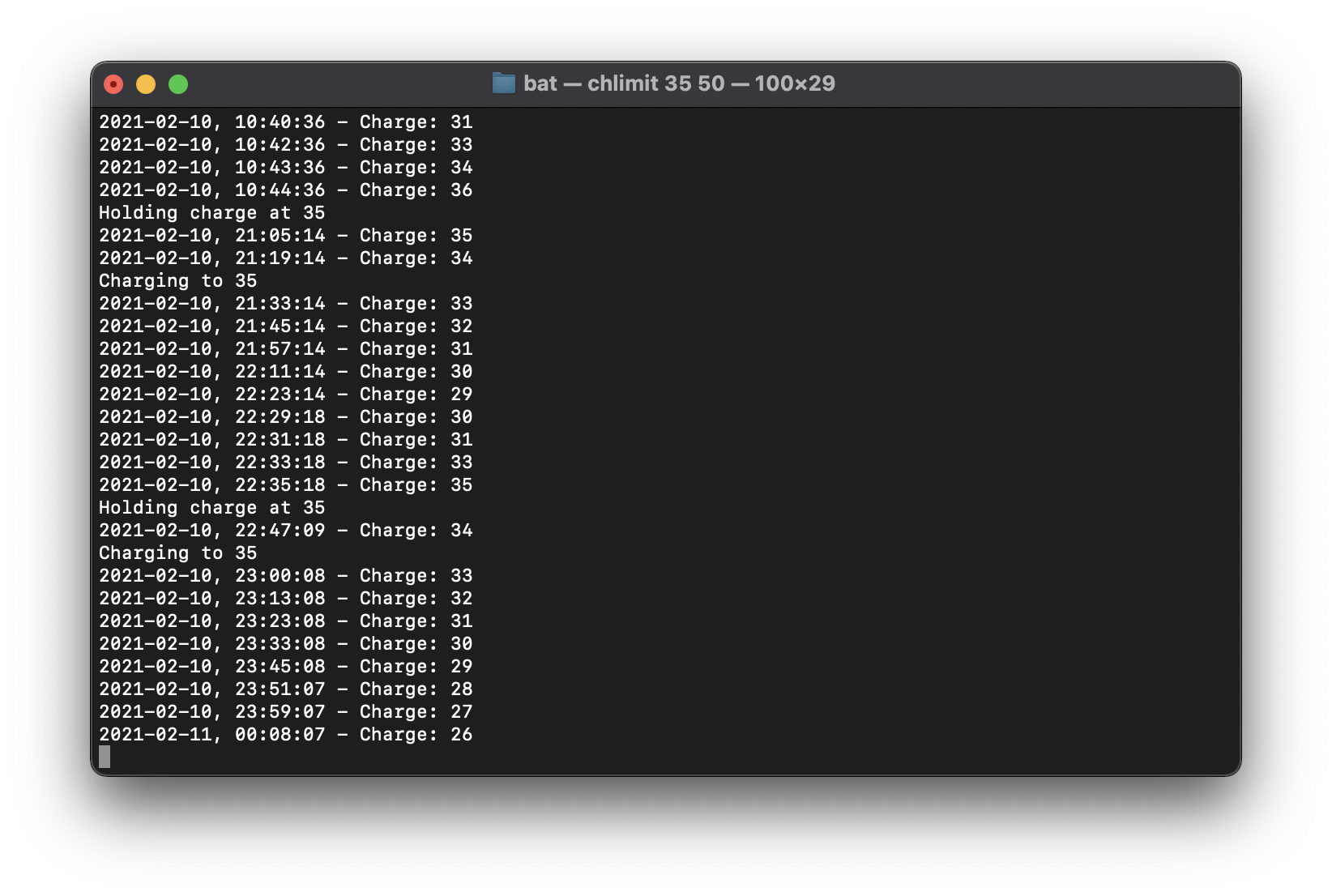
@joelucid commented on GitHub (Feb 11, 2021):
If you look at that data 1% of battery gives ~12 minutes of lazy use. This is really phenomenal. Industry disrupting change really.
@roots4x commented on GitHub (Feb 11, 2021):
Excellent news! Does this mean it will only work with the PC turned on?
@joelucid commented on GitHub (Feb 11, 2021):
If you shutdown the machine the charge limit would not get updated. This is different from how Intel Macs work - where the SMC manages charging even if the MacBook is powered off. But as long as it's running/sleeping my stuff works. I set a power management assertion to prevent sleep when charging - to avoid going beyond the limit.
I've been running this locally (with disabling apple security) for a week or so and it basically does what it should. You can close the lid and hook up power and it will still only charge to max etc.
@roots4x commented on GitHub (Feb 11, 2021):
I suppose sleeping while plugged in is unnecessary considering how efficient these machines are anyway.
@libbkmz commented on GitHub (Feb 11, 2021):
@joelucid Could you share a software point where you control charging voltage? I would like to give it a try on my M1 Pro.
@joelucid commented on GitHub (Feb 11, 2021):
I feel like I’ve got to at least make this work without disabling security before sharing. Not sure trading off security for this is worth it - so I’ll need to figure that part out. Basically just wanted to let people know there a hope :).
@Frederik441 commented on GitHub (Feb 11, 2021):
Hi, with my little sms-test I found two smc values the change the behaviour of charging. Normally those are 00 when charging or not, and when charging goes on hold it changes to 01 or 02 or 03 (typical 02). Yet I down't know what the nonzero values means, but changing them to 02 stop charging as the rawlog shows (no current flows to/from the battery):
AC; Not Charging; 79%; Cap=79: FCC=100; Design=4382; Time=0:00; 0mA; Cycles=6/1000; Location=0;
Polled boot=02/10/21 20:15:33; Full=02/11/21 17:25:58; User visible=02/11/21 17:33:58
The values are: CH0C and CH0B (C - H - zero - B).
BR, Frederik
@Frederik441 commented on GitHub (Feb 11, 2021):
Yay, it works - we can now stop charging at any battery level with writing 01 and start charging with 00 to those smc values.
Looking a little further show me that: 00 means normal charging, 01 means not charging 02 means charing on hold with timer and 03 stop charging.
BR, Frederik
@leeummm commented on GitHub (Feb 11, 2021):
So it is necessary to write 01 to both keys? Any idea why the need for 2 keys?
@Frederik441 commented on GitHub (Feb 11, 2021):
Ok, it is enough doing it on C - the B will also change automatically.
@PapaSchlumpf70 commented on GitHub (Feb 11, 2021):
Great job Frederik.
My Mac holds the level now .
Thanks a lot
@leeummm commented on GitHub (Feb 11, 2021):
How are you implementing this on your side?
@PapaSchlumpf70 commented on GitHub (Feb 11, 2021):
I did compile smcFanControl (only the smc-command) and run it with sudo ./smc -k CH0C -w 01
You will need XCode. Just download smcFanControl and type 'make' in the smc-command folder in a terminal window.
@tairasu commented on GitHub (Feb 11, 2021):
yay, it works! thank you!
i compiled it for anyone who doesn't want to download Xcode: https://drive.google.com/file/d/1SiOys4UfKsMZifXZFdzyGza2mzOQAMXE/view?usp=sharing
unzip and just go into the folder with terminal. then type
sudo ./smc -k CH0C -w 01as PapaSchlumpf70 said@Harry1993 commented on GitHub (Feb 11, 2021):
CH0Cis confirmed on my MacBook Air M1 base model.@joelucid commented on GitHub (Feb 11, 2021):
Nice find. I finally got my solution to work without disabling security this morning. But just writing an smc key is so simple!
@leeummm commented on GitHub (Feb 11, 2021):
If you save the script as a .command file, you can click and toggle charging on and off (working on my MBA M1)
@diebridge commented on GitHub (Feb 11, 2021):
I don't know why I got no response from the script.
sudo ./smc -k CH0C -w 01MBP M1.
@roots4x commented on GitHub (Feb 11, 2021):
Did you download and compile smc-command? You have to run the smc script from the smc-command directory.
@diebridge commented on GitHub (Feb 11, 2021):
I have download the zip file from aomizu. Then I've extracted the directory and changed directory, then executed the command.
@roots4x commented on GitHub (Feb 11, 2021):
did you get the sudo authentication prompt?
@diebridge commented on GitHub (Feb 11, 2021):
Yes. It seems successful. However, the status of the charging doesn't change, no matter which value (00, 01, 02, or 03) was applied.
@roots4x commented on GitHub (Feb 11, 2021):
I noticed my status took forever to change. however, looking at real battery stats shows it is not charging. And eventually I get the status updated on the menu bar.
@roots4x commented on GitHub (Feb 11, 2021):
I wrote a super hacky apple script to change to 00 or 01 based on battery level. I'm not very familiar, but would it be easy to set this up to run every few minutes other than a cron job? Warning: you would need to use your admin password in cleartext and update the path of the smc executable to get this to work. Does anyone have any ideas how to automate it?
charger script.txt
@diebridge commented on GitHub (Feb 11, 2021):
I think I have done it right but got nothing...
@mwc-max commented on GitHub (Feb 11, 2021):
Can confirm this is working on M1 MBP
@roots4x commented on GitHub (Feb 11, 2021):
You have to unplug the charger until you get down to your target battery charge (I am doing 75%) then plug it back in. You should see the battery does not charge.
@tairasu commented on GitHub (Feb 12, 2021):
I did exactly that :)
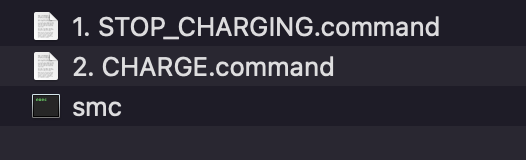
if anyone wants it, here you go: https://drive.google.com/drive/folders/1rgOf2ch3nNHb--3XcltTuMG3XsRw70I5?usp=sharing
it's very basic but anyone can just double-click "STOP CHARGING" or "CHARGE" and not bother with finding the right folder with terminal. you only need to type in your macOS password because of the sudo command.
note: you won't get any feedback from the terminal whether it worked or not.


if you see this:
instead of this:
then you did it right and the battery is holding. it's best to unplug and plug in again if you don't see a change.
@leeummm commented on GitHub (Feb 12, 2021):
If you name them something like "ChargerOn" and "ChargerOff" it becomes quite easy to activate via spotlight :)
@DevNulPavel commented on GitHub (Feb 12, 2021):
Maybe "Optimized battery charge" must be disabled for valid changing CH0C flag

@thloh85 commented on GitHub (Feb 12, 2021):
I wrote a simple script that checks charge level and if it goes above the charge level, it will run the smc command.
Run this shell script from your terminal and it will limit it to 65 (change it to whatever number you want in the script)
The script needs to be placed in the same location as your smc command that @PapaSchlumpf70 compile.
In short, compile or copy the script and smc command in the same folder, open a terminal, and run
sudo sh limit_charging.txtlimit_charging.txt
You might also want to turn on the "System Preferences -> Battery -> Power Adapter -> Prevent computer from turning off" as the script needs to be running to detect the battery level, once the Macbook M1 goes to sleep, the script will stop running, thus will stop detecting.
This should help serve as a temporal solution until @Frederik441 or @davidwernhart finds a better solution.
PS: I'll probably try to write an AppleScript later if I have time for easier use than a terminal command.
@DevNulPavel
My Macbook have "Optimized battery charge" turned on and CH0C flag is still working if I write it.
@joelucid commented on GitHub (Feb 12, 2021):
Here's my little tool for test purposes now using the smc method. Use this way:
sudo ./chlimit 30to limit charging to 30. This should work in sleep states, too.chlimit.zip
@theTitanhunter commented on GitHub (Feb 12, 2021):
@joelucid Starting the script with
su ./chlimit 30does not work for me. I get a "sorry" message. However if I get into a root shell withsudo suand start it there with./chlimit 30it seems to work. As I understand the script always needs to run in the background?Edit: nice find by the way. Thanks to everyone. Gonna report if it's working for me.
@PapaSchlumpf70 commented on GitHub (Feb 12, 2021):
It works fine for me. Think you have to start it with sudo and not su. At least sudo works for me.
@joelucid commented on GitHub (Feb 12, 2021):
Sorrry yeah
sudoit is@joelucid commented on GitHub (Feb 12, 2021):
Yeah I just leave it running in a terminal window. It's a nice way to monitor battery history too.
@joelucid commented on GitHub (Feb 12, 2021):
This one now has virtual unplugging to discharge too. The key is CH0J. Use:
sudo ./chlimit min% max%. If battery <min%it will charge. If it's >=min%it will stop charging and if >max%it will pull the plug. Say you need the laptop a long time. Do asudo ./chlimit 100 100to charge up to 100%. After your meeting/travel/whatever dosudo ./chlimit 30 50to actively discharge down to 50% and start charging once power falls below 30%.Currently active discharge doesn't prevent sleep so you'll have to prevent sleep otherwise or be patient. It's good to have the
max%a bit higher thanmin%to avoid back and forth between unplugged and not charging states (since there is some delay in the system).chlimit.zip
@miketeix commented on GitHub (Feb 12, 2021):
@joelucid this is awesome! Do you have the script in repo or gist form?
@stanleydesu commented on GitHub (Feb 12, 2021):
@joelucid do you have a source for that information, I thought it was 60% from what I've read (BatteryUniversity).
@theTitanhunter commented on GitHub (Feb 12, 2021):
Works fine for me. I set it up to stop charging at 80% which it did.
Edit: I also have optimized battery charging activated. Seems to have no impact. Also stopped charging while in sleep mode.
@joelucid commented on GitHub (Feb 12, 2021):
I've basically read everything on this subject. Rg storage being optimal at ~20% watch https://youtu.be/9qi03QawZEk?t=4020.
Unfortunately most of the recent literature is on chemistries other than LiCoO2. All these say store as close to 0% as possible but don't go under. Only detriment of going <20% is that internal resistance at lowest state of charge will increase - still that's why I try not to spend too much time <20%.
This here is applicable to LiCoO2. Unfortunately its not free access but the images are. This one makes the point very well:
Check out how much better 0%-60% is than everything else. And it's much better than 40%-60% though smaller discharges are typically better. I think its since <40% is so much better than everything else.
@joelucid commented on GitHub (Feb 12, 2021):
But then it also depends on the battery at hand. Newer batteries have additives which slow aging at high charge levels. But manufacturers then just charge them higher still to get more capacity and you get the same aging rate - potentially even worse. Best example: iPhone 10-12 with their 4.45V batteries. If you keep them charged 100% at high temperature they will die rather quickly. Hence Apple's "Optimized Battery Charging" feature.
One vision I have is to make this into a tool for everybody and collect usage/temperature/charge data as well as cycles and state of health. That way we could crowd source what really works best for a given battery. I doubt even the manufacturers know with precision at this point (and if they did they couldn't be trusted to tell us).
@joelucid commented on GitHub (Feb 12, 2021):
It's barely been 3 months but least so far my iPhone 12 is doing well on a 20%-35% schedule.
@stanleydesu commented on GitHub (Feb 12, 2021):
https://batteryarchive.org/index.html looks pretty cool.
Thanks for all your insights
@itsDaniel-23 commented on GitHub (Feb 12, 2021):
Hi I'm new here and just wanted to know what I need to do if I wanted to undo the changes that I made to the charging procedure. How can I get back to the "normal" charging schedule like it was originally? Thanks for the effort
@joelucid commented on GitHub (Feb 12, 2021):
For chlimit just run
sudo ./chlimit 101. This will connect the plug and remove the charge inhibition. You can then stop the tool. I'll need to add some code to do this automatically whenever you stop the utility.@timension commented on GitHub (Feb 12, 2021):
What do you mean by "actively discharge"? What's the difference in behavior between 100=>50 and 50=>30?
@joelucid commented on GitHub (Feb 12, 2021):
Actively discharge means even though the charger might be connected it will not power the laptop. The laptop will run from battery and its charge level will therefore decrease until it hits 50.
@leeummm commented on GitHub (Feb 12, 2021):
Until it hits 30, right? The charge level will increase until 50%, decrease to 30%, and then charge back to 50%? Rinse and repeat...
@timension commented on GitHub (Feb 12, 2021):
And then? After it hits 50%? Will it continue discharge until it hits 30%? You write yourself: "start charging once power falls below 30%". So until then it will keep discharging? What's the difference between discharging 100%=>50% and 50%=>30% then?
@leeummm commented on GitHub (Feb 12, 2021):
It looks like the script is set to 43%, not 65%. Can you confirm?
@inprealpha commented on GitHub (Feb 12, 2021):
The %min part works while the machine is asleep, right? @joelucid
Also as someone new to Macs, can you not cmd + c to close the terminal process? Doesn't seem to work.
@davidwernhart commented on GitHub (Feb 12, 2021):
Great work guys. We also managed to get it working on M1 Macs and are in the process of updating AlDente for Apple Silicon. It will be released soon. We have also started working on a pro version of AlDente with advanced features several weeks ago. Since we have put a lot of hours into developing the app, it will cost a little. However, there will always be this free and open source version of AlDente updated with the new M1 SMC keys. Also, everyone who has been active on this thread and helped reverse engineering the new keys, will get special treatment regarding the pro version. In the meantime, stay safe and keep your battery fresh. David & Matthias
@joelucid commented on GitHub (Feb 12, 2021):
It'll just stay at 30 then. The only reason for picking something significantly higher than your min charge level is if you have previously charged higher and don't want to "burn it off". Say you charged to 100 for a special event. You end up not using your laptop. Now you don't want it staying at 100 - but you might also not want to go all the way down to 30. Take the edge off (down to 50 say) but keep some of the extra charge for unplugged use.
@joelucid commented on GitHub (Feb 12, 2021):
Yeah min works while asleep. It's ctrl + C to end the app but the current settings will stay in place at the moment.
@timension commented on GitHub (Feb 12, 2021):
So, the script will discharge the battery down to 50% even if I don't use the laptop? Where does the energy go? If not, still don't understand the differens between the discharge from 100 to 50 ("active discharge"?) and from 50 to 30.
@libbkmz commented on GitHub (Feb 12, 2021):
Could you please share the source code of this script?
@roots4x commented on GitHub (Feb 12, 2021):
It will force your laptop to use battery instead of AC to power itself. My Surface laptop does this by default when you set the battery storage mode in its BIOS. It rapidly discharges to 50% (even when plugged in) and stays there forever until you change the setting in BIOS again.
@joelucid commented on GitHub (Feb 12, 2021):
Yeah exactly. And sometimes you want that other times you don't. If you're always desk-bound and connected to a charger you need active discharge to ever reach a lower target charge level. If you are often unplugged but with frequent opportunity to charge then its enough to just actively discharge down from dangerously high levels and then burn off the rest as you go.
It's a tradeoff between the increase in load cycles that active discharge causes and the increase in calendar ageing that a higher state of charge causes. For my iPhone for example I charge to 35% during the day and 20% at night. I don't burn it off though - I just don't charge higher than 20% to keep the iPhone at the healthier charge level if its already there while I'm asleep.
@timension commented on GitHub (Feb 12, 2021):
Ok, I think I start getting it. 🙂 I still have to use the laptop to get it down to 50 %. Eventually it will get there, even if plugged to AC. It will stop discharging at 50%. If it gets disconnected from AC the charge will obviously drop and if connected again the laptop won't charge unless the battery level is below 30%.
Thank you for the clarification, even if it took a while to get it. 🙂
@solie commented on GitHub (Feb 13, 2021):
Does it log the history to any file? I found /tmp/powerlog but it's empty
@user858753257 commented on GitHub (Feb 13, 2021):
How did you do this with your iPhone ?
Instead of sleeping you look at your phone and wait until you can pull the plug ? 🤣🙈
@thloh85 commented on GitHub (Feb 13, 2021):
Yup my bad, I was experimenting with the value :(
@joelucid commented on GitHub (Feb 13, 2021):
It doesn't automatically but you can redirect the output to a file. For example you could do
sudo ./chlimit 35 > /tmp/chlimit.log. This should really become a background process later on.@joelucid commented on GitHub (Feb 13, 2021):
Lol - that would definitely count as unhealthy over-focus on battery maintenance :). No I've just written a bunch of iOS shortcuts which notify a server of critical battery level changes. The server then automates some Meross Wifi ac-plugs to provide or cut power. Initially I tried HomeKit but that wouldn't work reliably.
Looks something like this:
I had to spend a week in hospital over new year and found that the Meross plugs will work using the iPhone's wifi hotspot as internet connection. So the setup isn't quite as inflexible as it seems. But it's far from ideal.
@joelucid commented on GitHub (Feb 13, 2021):
Just found one paper again which I find very thorough although it's on NCA chemistry and therefore not 1:1 translatable (but the main points are the same). This is a good weekend read to get an overview of the issues.
This has a good image on the effects of calendar ageing at different SOCs on internal resistance at different levels of charge - the small problem which does get worse at SOC levels < 20%.
@LeshawnG commented on GitHub (Feb 14, 2021):
This command
sudo ./chlimit 101setsTarget charge: 101, Maximum charge: 102. How is this different from using the commandsudo ./chlimit 100which sets it toTarget charge: 100, Maximum charge: 101? Is there any reason that theTarget chargeandMaximum chargeshould be above 100%?Essentially, doesn't
sudo ./chlimit 100execute the same command assudo ./chlimit 100 100both keepingTarget chargeat 100% butsudo ./chlimit 100sets theMaximum chargeto 101%? So I realize that thesudo ./chlimit %command basically setsTarget charge = %, Maximum charge = %+1I'm trying to understand why set the
Target chargeto 102% instead of 100% when trying to return charging to its normal state. Why would we needCharging to 101to revert to original settings? Shouldn't it be okay usingsudo ./chlimit 100 100command which setsTarget charge: 100, Maximum charge: 100to revert settings? Only assuming here 100% for both those limits should be where it's normally at.Last question, what will the command
sudo ./chlimit 50 50do? Since it sets target and max to the same level, will it not drain the battery and only use AC power?Thank you thus far for providing your software and for all the work you've put into it! @joelucid
@joelucid commented on GitHub (Feb 14, 2021):
If the target charge is at 100 chlimit will stop charging when the laptop reaches 100%. Since it uses Apple charge levels 100% is actually not max but a little less. Using 101% will never set a charge limit and thus to disable the charge limit in the general case you need to use 101%. As for 50/50 - yeah it should never drain the battery. What I've seen in some cases though since the battery system updates charge levels only once per minute and since stopping charging takes some time to take effect is that charge ends up say at 51 instead - and then active discharge kicks in to bring back down to 50. That's why I like to use 50 51 instead.
I think from a user perspective it's probably easier if max charge is always at 100 and if there's an added feature which allows explicit active discharge requests by the user down to a given charge level. The tool would then effectively set max level to the requested one until the laptop has discharged to that level and then reset to 100. That's what I'm doing in the UI I'm putting together anyway.
@joelucid commented on GitHub (Feb 14, 2021):
This is what I have now:
This basically handles my personal use cases:
Feel free to test it out and let me know if it works.
EternalPower.zip
@HNXKNNX commented on GitHub (Feb 14, 2021):
wow thank you - I give it a try on my MacBook Air M1
@timension commented on GitHub (Feb 14, 2021):
Wow, thank you very much for your effort!
I wonder what will happen if I quit the application? Will the default values be restored? Or do I have to reboot the Mac to restore the values? Is the reboot sufficient at all to restore the values?
@joelucid commented on GitHub (Feb 14, 2021):
If you want to disable charge limiting just slide the Normal Charge Limit all the way to the right to 100. The UI just configures the background service parameters (essentially the old cclimit). So restarting it won't have any effects by itself since the config is stored elsewhere.
@HNXKNNX commented on GitHub (Feb 14, 2021):
works fine for the first minutes!!! It stops charging at my desired Level!! And now only using the power supply without charging. Really good work!
@MatthiasKerbl commented on GitHub (Feb 14, 2021):
AlDente for Apple Silicon (M1 MacBooks) is out now. We thank everyone who has helped us here in the forum and hope you like it. If you have any feature requests or ideas for AlDente Pro, let us know. If you want to get notified, when AlDente Pro comes out, just enter your email at https://apphousekitchen.com/aldente/ David & Matthias
@davidwernhart commented on GitHub (Feb 14, 2021):
@joelucid Congrats on your new tool! You really did some great work, and it seems to work great for now on the M1 MBP I bought. I have to admit, it is kind of bitter to be beaten to the minute in releasing the first GUI tool for M1 notebooks, but you guys absolutely earned it!
It is really great to see that such a bright community has emerged from this little project.
Also, I think that it is finally time to close this Issue after all this months.
Thank you guys and lots of love
David ❤️
@joelucid commented on GitHub (Feb 14, 2021):
Thanks @davidwernhart and congrats to you guys, too! I'll need to check out AlDente 2.0 soon as well. Sorry for high-jacking this thread a bit - but as you said it just seemed natural to discuss in this special community you guys have built here. I hope to make my little project available in some more appropriate way soon, too. Looking forward to check out your "plus" edition once it's ready.
@gramss commented on GitHub (Feb 15, 2021):
Hey @joelucid , will you release your app also as open source?
Or will you place it at the Mac App Store?
I'm just a bit sceptic to just install "stuff" I find on the interwebs.. :) But your tool looks really promising and cool!
Let's see if AlDente can add all those features as well.. :)
I think you covered all the use cases I would love to do with my new M1 MBP..
@joelucid commented on GitHub (Feb 15, 2021):
I don't think apps with this level of system access can be distributed through the App Store unfortunately. I want to make the tool available for free - not yet sure whether open source or not. I understand the concern rg "stuff from the interwebs".
As far as I know there's a way to get apps notarised by Apple and it's possible that this would be available for this kind of app. This would have Apple check automatically that there are no viruses etc in the app. But it requires an Apple Developer account which is $100 per year and that's not a no-brainer for a free app.
I still have to clean up some things in the app but once its ready I'll post a link here so people can try it out.
@inprealpha commented on GitHub (Feb 15, 2021):
Btw @joelucid @davidwernhart How do your respective programs check for the current charge level when the laptop is asleep?
Does it prevent the laptop from sleeping, or is there some other way?
Sorry for the stupid question lol...
@davidwernhart commented on GitHub (Feb 15, 2021):
@inprealpha From my knowledge, it is not possible for an application to get any CPU time while the system is asleep. Since this necessary for the M1 version because charge has to be inhibited in just the right moment, AlDente stops the System from going to sleep until the desired value is reached. This is done using IOPMAssertions.
Hope that helps,
David
@inprealpha commented on GitHub (Feb 15, 2021):
Yup, really helpful! Was just curious really.
@thloh85 commented on GitHub (Feb 15, 2021):
@davidwernhart I think the best choice is to just prevent sleep in the battery settings, but from what I understand from your source, Aldente should just work correctly, although I wonder if there are any corner cases that you didn't cover, eg. Keep laptop plugged in, charge to desired percentage, unplug (thus the laptop goes to sleep), then after a while, plug it back in. I wonder what will be the behaviour of that use case.
@davidwernhart commented on GitHub (Feb 15, 2021):
@thloh85 if the laptop is plugged in while asleep, I am afraid there is nothing you can do about it from an application perspective as stated before. If the laptop is plugged in and active, AlDente renews the disable sleep assertion until the desired percentage is reached again. But you are right, I am for sure prepared for some late night bugfixing regarding weird edge cases.
@thloh85 commented on GitHub (Feb 15, 2021):
Yeah. I think you technically don't need to overengineer this application (but if you do, then you might catch more audience). All user will need to do is to check the "prevent laptop from going to sleep when display is off". I personally tested this and it works correctly with a whole bunch of testing.
@thloh85 commented on GitHub (Feb 15, 2021):
Also, since M1 mac runs on ARM, I wonder if Apple is going to eventually open up the possibility of running small background tasks like on iPad since they sip so little power during sleep.
@HNXKNNX commented on GitHub (Feb 15, 2021):
congratulations for Al Dente for M1 Macs!!
@joelucid : where can we find future updates for "eternal power"? I think this thread is not the best place for this?
@joelucid commented on GitHub (Feb 15, 2021):
For now find updates here. It's github so we can track issues and have conversations there as well. Just pushed the very first beta as universal binary for both M1 and Intel based Macs - tested on Big Sur only so far. All features supported on both architectures.
Spent hours on making a nice status bar icon for EternalPower. Also UI is cleaned up and simple deinstallation of the background service is now available.
No docs yet whatsoever - just didn't get to that yet and now have to do some work work. Pretty happy with where it's at now though!
@timension commented on GitHub (Feb 15, 2021):
Neat icon and great name for the app! 👍🙂
@joelucid commented on GitHub (Feb 15, 2021):
Thanks - I had another idea for the name shortly after renaming everything to EternalPower: ForeverYoung. I find ForeverYoung more entertaining - but then EternalPower at least alludes to what stays good forever.
@Frederik441 commented on GitHub (Feb 15, 2021):
I don't think that software "force discharge" is a good idea. It will increase charge cycles over time. If you have external power to you MB - use it!.
When external power is connected and CH0C is one (battery disconnected) the battery will very slowly discharge as it would be the case if just storing a battery on the shelf. Of course it should be recharge to f.x. 80% after it reach a minimum level (lets say 30%). If you want to take the MB with you on the go and want max battery - charge it to max!
Also have the battery always on f.x. 80% when connected to external power is not so good because it will recharge all the time in small steps.
BR. Frederik
@joelucid commented on GitHub (Feb 15, 2021):
I'm not sure what CH0C = 1 does exactly but I've been running with this setting for maybe a week and have not seen the battery voltage come down significantly. macOS always uses the battery for peak load if the charger can't deliver the amps. Overall I assume that CH0C means maintain current charge level but run the laptop from AC as much as possible.
No doubt Forced Discharge needs to be used with caution. But it will at times serve to improve battery longevity: the higher the SOC the larger the calendar aging component compared to the cycle aging component. A laptop that's always plugged in and charged to 100% will have very little cycle aging but age far more quickly than one that's charged to 100% overnight and used exclusively on battery between 20% and 100%. That's since the calendar aging alone at 100% is much higher than cycle and calendar aging combined at an average charge of 60%.
My use case is this: during the week my work laptop is on charger exclusively. During the weekend I often drive to our cottage where I use the laptop mostly without charger. If on Sunday evening the laptop sits at 90% then discharging to 30% to avoid at least 5 days of calendar aging at such a high charge level is definitely worth it.
What you don't want to do is operate the laptop between 20% and 35% and each night discharge down to 20% to get a bit less calendar aging. At these levels cycle aging is much more expensive than calendar aging. What does make sense is to leave the laptop at 20% if it happens to be there in the evening and only charge to 35% in the morning. Of course you have to do that manually - at least currently 🙂...
@Frederik441 commented on GitHub (Feb 15, 2021):
The 30W power supply is more than enough to drive the M1 MB (max TPD 20W).
If CH0C is one the charger is disconnected to the battery (as CH0J disconnect the external power). The MB is always connected to the battery via a diode function and if external power is less than the battery power the battery will deliver power else it does not charge the battery and all external power goes to running the MB.
Different batteries has different SOC's, there is an battery optimum with ideal temperature, battery level and charge cycles. We don't know what those values are for the M1 MB's battery.
BR. Frederik
@joelucid commented on GitHub (Feb 15, 2021):
Do you have a pointer that shows that this is detrimental? The mental model I use is that cycle aging converges against zero with cycle depth of discharge going to zero. So that in the limit of constantly held battery voltage aging would mirror pure calendar aging.
@LeshawnG commented on GitHub (Feb 15, 2021):
@Frederik441 I have the M1 MBP 13" and after all the hardware workaround discussions, I ended up using the 18W charger from my iPhone 11 Pro. It charged relatively slow, however it did charge the battery with active use (moderate load) and screen brightness usually between 50-60%. The 18W charger supplies 2A, 5V and the included 61W charger supplies 3A, 5V. The 18W seems to be sufficient in powering the MBP off-battery.
Additionally, Apple recommends long term storage of devices with 50% charge within a temp range of -20° to 45° C. Of course Apple won't give the technical supporting evidence to back up why 50% is optimum for storage but it's worth mentioning what they recommend. Also the YouTube link posted by @joelucid earlier was very educational, suggestions were made for the coolest storage temp possible. Taking that into account, keep the battery/device as cool as you can during use to extend longevity. It would be nice to get a spec sheet or something that can direct us to the optimal SOC and voltage for the MB battery storage.
Using the new softwares, I'm most likely going to stick around 50% and for sure avoid SOC <20% because that does seem detrimental for sure.
Everyone interested, refer to the research papers @joelucid posted earlier. I haven't read all yet but I'm sure we'd get good insight from it.
https://youtu.be/9qi03QawZEk?t=4020
https://www.apple.com/batteries/maximizing-performance/
@Limeybastid commented on GitHub (Feb 15, 2021):
Just wanted to thank you guys for the great work.
@ZeyadFathallah commented on GitHub (Feb 17, 2021):
Is AIDente software "force discharge"? Or were you referring to EternalPower?
@joelucid commented on GitHub (Feb 18, 2021):
I think he was just referring to the concept we discussed. EternalPower does have forced discharge - but it's just something the user can do explicitly if he wants to run the battery down to a certain percent. The latest release prevents sleep in that case even with lid closed - so it'll get there moderately quickly. It does add cycle ageing so should be used with caution.
@joelucid commented on GitHub (Feb 18, 2021):
Hey guys - I'm making some good progress on the issue which first prompted me to start thinking about how to treat lipos well. My problem was was a 2018 MacBook Pro 15" which after two years had pretty much a shot battery (battery health ~80%). In the process I dug through my laptop and found a couple of interesting things - which cause new worry :).
Maybe most interestingly the internal resistance of the individual cells can be read out using
ioreg -l | grep RaTableRaw. This is obviously highly useful diagnostic information. Unpacking it on my new M1 with 9 cycles:This the first two bytes are flash. And then each pair
[a,b]is the[lsb, msb]of the internal resistance at one state of charge - starting with full for the first two bytes. And here comes the worrying bit: My cell 3 has a significantly higher internal resistance than the other two. This is not good at all.I'd like to get a sense for how normal this is - could a few of you paste the output of a
ioreg -l | grep RaTableRawhere so we can get a sense? It would be much appreciated!@PapaSchlumpf70 commented on GitHub (Feb 18, 2021):
My Battery has 18 cycles.
| | | | "BatteryData" = {"Ra03"=0,"Ra10"=0,"CellWom"=(0,0),"RaTableRaw"=(<00000060004e00550064007b00540064006b00710079007b009700ea01d902f3>,<00000063005100560066007d005c006d0076007c00810085009800e901e70300>,<00000069005700620074008f0067007600850085008a008b00a100eb01d702f5>),"Qstart"=0,"AdapterPower"=1082274913,"DailyMinSoc"=40,"Ra04"=0,"Ra11"=0,"CellVoltage"=(3812,3811,3811),"PackCurrentAccumulator"=18446744073705704412,"PassedCharge"=1054,"Flags"=16777217,"PresentDOD"=(57,57,57),"Ra05"=0,"Ra12"=0,"FccComp1"=4354,"ChemID"=10037,"iMaxAndSocSmoothTable"=<0000000000000000000000000000000000000000000000000000000000000000>,"FccComp2"=4354,"PackCurrentAccumulatorCount"=174203,"DOD0"=(5824,5824,5824),"Ra06"=0,"ResScale"=0,"Ra13"=0,"WeightedRa"=0,"FilteredCurrent"=0,"RSS"=0,"CellCurrentAccumulatorCount"=0,"Serial"="F5D0465JQBPPJYVAW","DailyMaxSoc"=40,"Ra07"=0,"Ra14"=0,"MaxCapacity"=100,"ChemicalWeightedRa"=0,"Ra00"=0,"BatteryHealthMetric"=0,"DesignCapacity"=4382,"Ra08"=0,"BatteryState"=<000000000000000043e4000280000010>,"CellCurrentAccumulator"=(0,0),"AlgoChemID"=10037,"MfgData"=<00000000100200012735000003313731033030320341544c001b000000000000>,"ManufactureDate"=58485394978866,"ISS"=0,"Ra01"=0,"Soc1Voltage"=0,"QmaxDisqualificationReason"=0,"ChargeAccum"=0,"SimRate"=0,"Qmax"=(4623,4618,4612),"PMUConfigured"=1424,"ITMiscStatus"=0,"StateOfCharge"=40,"Ra09"=0,"GaugeFlagRaw"=192,"CycleCount"=18,"Voltage"=11433,"SystemPower"=1082157913,"LifetimeData"={"Raw"=<00000000000411ef0000026500000000007db6e20000e447b24000000000000001d8004f10fc0e3432ea2af00df8f5ac1102f447fc94fc1600cf00008f090004>,"UpdateTime"=1613659067,"ResistanceUpdatedDisabledCount"=0,"TimeAtHighSoc"=<000000004a0000000000000000000000>,"TemperatureSamples"=36617,"TotalOperatingTime"=2288,"MaximumDischargeCurrent"=18446744073709548972,"MinimumPackVoltage"=10992,"MaximumPackVoltage"=13034,"MaximumChargeCurrent"=3576,"AverageTemperature"=18446744073709551567,"MinimumTemperature"=79,"RDISCnt"=0,"MaximumTemperature"=472},"Ra02"=0}
@joelucid commented on GitHub (Feb 18, 2021):
Interestingly the very same pattern with the 3rd cell about 10% higher resistance. So maybe its normal? Thanks for the data!
@PapaSchlumpf70 commented on GitHub (Feb 18, 2021):
You are welcome.
Thanks for your good work
@joelucid commented on GitHub (Feb 18, 2021):
Actually kind of makes sense. The cells don't look identical. Cell 3 also has slightly more capacity - that might be how they even it out.
@smoothdvd commented on GitHub (Feb 19, 2021):
"BatteryData" = {"Ra03"=0,"Ra10"=0,"CellWom"=(0,0),"RaTableRaw"=(<0000005c004d004e0057006f0054005f005c0065006a006f007e00c60194028b>,<0055006b0059005c0067008300670071006d0075007e0083009300e901ef031a>,<00000073005d0062006b0084006e007800740078007c0082009700d801ab02a6>),"Qstart"=0,"AdapterPower"=1077947497,"DailyMinSoc"=54,"Ra04"=0,"Ra11"=0,"CellVoltage"=(3870,3870,3869),"PackCurrentAccumulator"=18446744073703262095,"PassedCharge"=0,"Flags"=16777217,"PresentDOD"=(46,46,46),"Ra05"=0,"Ra12"=0,"FccComp1"=4255,"ChemID"=10037,"iMaxAndSocSmoothTable"=<0000000000000000000000000000000000000000000000000000000000000000>,"FccComp2"=4255,"PackCurrentAccumulatorCount"=702452,"DOD0"=(7616,7616,7616),"Ra06"=0,"ResScale"=0,"Ra13"=0,"WeightedRa"=0,"FilteredCurrent"=0,"RSS"=0,"CellCurrentAccumulatorCount"=0,"Serial"="D860473A1T8PJYRAD","DailyMaxSoc"=54,"Ra07"=0,"Ra14"=0,"MaxCapacity"=100,"ChemicalWeightedRa"=0,"Ra00"=0,"BatteryHealthMetric"=0,"DesignCapacity"=4382,"Ra08"=0,"BatteryState"=<000000000000000043e4000241000100>,"CellCurrentAccumulator"=(0,0),"AlgoChemID"=10037,"MfgData"=<00000000100200012735000003313731033030320341544c003a000000000000>,"ManufactureDate"=60684418234418,"ISS"=0,"Ra01"=0,"Soc1Voltage"=0,"QmaxDisqualificationReason"=0,"ChargeAccum"=0,"SimRate"=0,"Qmax"=(4633,4635,4603),"PMUConfigured"=2320,"ITMiscStatus"=0,"StateOfCharge"=54,"Ra09"=0,"GaugeFlagRaw"=192,"CycleCount"=27,"Voltage"=11611,"SystemPower"=1078030853,"LifetimeData"={"Raw"=<000f637c0013e281000156c700000000007c3de30000e447b24000000000000001d8005b10f50e2732d52ac50ddcf5eb1117f484fbfafb1600c800008d5c0002>,"UpdateTime"=1613705698,"ResistanceUpdatedDisabledCount"=0,"TimeAtHighSoc"=<18010000690100001800000000000000>,"TemperatureSamples"=36188,"TotalOperatingTime"=2261,"MaximumDischargeCurrent"=18446744073709549035,"MinimumPackVoltage"=10949,"MaximumPackVoltage"=13013,"MaximumChargeCurrent"=3548,"AverageTemperature"=18446744073709551560,"MinimumTemperature"=91,"RDISCnt"=0,"MaximumTemperature"=472},"Ra02"=0}
@tomschlenkhoff commented on GitHub (Feb 19, 2021):
➜ ~ ioreg -l | grep RaTableRaw
| | | | | "BatteryData" = {"Ra03"=0,"Ra10"=0,"CellWom"=(0,0),"RaTableRaw"=(<0055007e006c007800840096006c006b00720077007d0077008a00ca01580210>,<005500720064006f007c008a006300610066006c00770073008d00e101ad028e>,<0000007700660074007e0091006a006b006e0073007a0078008d00cd0167022a>),"Qstart"=0,"AdapterPower"=1092019490,"DailyMinSoc"=13,"Ra04"=0,"Ra11"=0,"CellVoltage"=(3756,3759,3757),"PackCurrentAccumulator"=18446744073703916484,"PassedCharge"=379,"Flags"=16777216,"PresentDOD"=(81,81,81),"Ra05"=0,"Ra12"=0,"FccComp1"=5170,"ChemID"=9216,"iMaxAndSocSmoothTable"=<0000000000000000000000000000000000000000000000000000000000000000>,"FccComp2"=5170,"PackCurrentAccumulatorCount"=10406,"DOD0"=(12352,12288,12288),"Ra06"=0,"ResScale"=0,"Ra13"=0,"WeightedRa"=0,"FilteredCurrent"=0,"RSS"=0,"CellCurrentAccumulatorCount"=0,"Serial"="D860505A9FPL3L2ED","DailyMaxSoc"=46,"Ra07"=0,"Ra14"=0,"MaxCapacity"=100,"ChemicalWeightedRa"=0,"Ra00"=0,"BatteryHealthMetric"=0,"DesignCapacity"=5103,"Ra08"=0,"BatteryState"=<000000000000000003e4400244000012>,"CellCurrentAccumulator"=(0,0),"AlgoChemID"=9216,"MfgData"=<00000000100200012400000003313533033030330341544c013f000000000000>,"ManufactureDate"=52987853617202,"ISS"=314,"Ra01"=0,"Soc1Voltage"=0,"QmaxDisqualificationReason"=0,"ChargeAccum"=0,"SimRate"=0,"Qmax"=(5509,5531,5507),"PMUConfigured"=1048,"ITMiscStatus"=0,"StateOfCharge"=15,"Ra09"=0,"GaugeFlagRaw"=128,"CycleCount"=19,"Voltage"=11256,"SystemPower"=1085816071,"LifetimeData"={"Raw"=<00002b7a0007d8310000000000000000005b4c7b0080e467b240000000000000016a004511050adf3302243210d8f2b71491f0bbfc06fb6700cf000067e1000a>,"UpdateTime"=1613733183,"ResistanceUpdatedDisabledCount"=0,"TimeAtHighSoc"=<030000008e0000000000000000000000>,"TemperatureSamples"=26593,"TotalOperatingTime"=1662,"MaximumDischargeCurrent"=18446744073709548215,"MinimumPackVoltage"=9266,"MaximumPackVoltage"=13058,"MaximumChargeCurrent"=4312,"AverageTemperature"=18446744073709551567,"MinimumTemperature"=69,"RDISCnt"=0,"MaximumTemperature"=362},"Ra02"=0}
(19 cycles according to OS)
@joelucid commented on GitHub (Feb 19, 2021):
@smoothdvd, yours is a bit more varied:
3rd cell still with higher resistance than the others but its more of a mixed bag. These laptops overall don't seem to have very well matched cells.
@joelucid commented on GitHub (Feb 19, 2021):
@tomschlenkhoff:
This one seems different - less of a difference in cell 3. Is this also an air or a pro 13?
@joelucid commented on GitHub (Feb 19, 2021):
https://www.ti.com/lit/an/slua364b/slua364b.pdf?ts=1613743898155
Good recommended read. This is the algorithm apple's battery controllers use. It's quite eye opening actually. Like any changes in battery max charge capacity won't be detected unless you discharge at least 37% of design(!) capacity. And of course the estimate of full charge capacity depends a lot on the internal resistance estimates in particular at lower SOCs.
I suspect that's why many people will recommend to always charge to 100% but never go below 20%. This regimen will lead to rapid internal resistance increases at low SOCs. But if you never discharge that low the MacBook will never learn how resistance there has increased and thus overestimate state of health.
@joelucid commented on GitHub (Feb 19, 2021):
BTW the internal resistances are available in SMC at B0R[0-2]. Managed to talk to the battery controller via smbus today but it's sealed and I can't unlock it to do more interesting stuff. Whats interesting is that reading the RaTableRaw data from the battery requires unsealing the chip. I'm guessing the SMC knows it at least on x86.
@stanleydesu commented on GitHub (Feb 20, 2021):
"BatteryData" = {"Ra03"=0,"Ra10"=0,"CellWom"=(0,0),"RaTableRaw"=(<005500550046004d005d006b004e005c0065006a00710073008e00db01bb02c4>,<005500550046004b005a0067004b005c00620066006b006f008300c4019a028d>,<0055005d004e00570069007900590069007500750079007a008f00d101a4029e>),"Qstart"=0,"AdapterPower"=1075048306,"DailyMinSoc"=34,"Ra04"=0,"Ra11"=0,"CellVoltage"=(3807,3806,3805),"PackCurrentAccumulator"=738582,"PassedCharge"=1055,"Flags"=16777217,"PresentDOD"=(58,58,58),"Ra05"=0,"Ra12"=0,"FccComp1"=4374,"ChemID"=10037,"iMaxAndSocSmoothTable"=<0000000000000000000000000000000000000000000000000000000000000000>,"FccComp2"=4374,"PackCurrentAccumulatorCount"=39333,"DOD0"=(6016,6016,6032),"Ra06"=0,"ResScale"=0,"Ra13"=0,"WeightedRa"=0,"FilteredCurrent"=0,"RSS"=0,"CellCurrentAccumulatorCount"=0,"Serial"="F5D102730EYPJYVAQ","DailyMaxSoc"=39,"Ra07"=0,"Ra14"=0,"MaxCapacity"=100,"ChemicalWeightedRa"=0,"Ra00"=0,"BatteryHealthMetric"=0,"DesignCapacity"=4382,"Ra08"=0,"BatteryState"=<000000000000000047e4000245000012>,"CellCurrentAccumulator"=(0,0),"AlgoChemID"=10037,"MfgData"=<00000000100200012735000003313731033030320341544c001a000000000000>,"ManufactureDate"=54087348402482,"ISS"=0,"Ra01"=0,"Soc1Voltage"=0,"QmaxDisqualificationReason"=0,"ChargeAccum"=0,"SimRate"=0,"Qmax"=(4634,4627,4619),"PMUConfigured"=1424,"ITMiscStatus"=0,"StateOfCharge"=39,"Ra09"=0,"GaugeFlagRaw"=192,"CycleCount"=3,"Voltage"=11419,"SystemPower"=1076355458,"LifetimeData"={"Raw"=<00000000000139f80000023700000000003672e70000e447b24000000000000001c1001a10f80e4e32e42b1b0866f64e0a74f4eafc96fc0400c600003df30003>,"UpdateTime"=1613828405,"ResistanceUpdatedDisabledCount"=0,"TimeAtHighSoc"=<00000000160000000000000000000000>,"TemperatureSamples"=15859,"TotalOperatingTime"=991,"MaximumDischargeCurrent"=18446744073709549134,"MinimumPackVoltage"=11035,"MaximumPackVoltage"=13028,"MaximumChargeCurrent"=2150,"AverageTemperature"=18446744073709551558,"MinimumTemperature"=26,"RDISCnt"=0,"MaximumTemperature"=449},"Ra02"=0}
M1 Air @ 3 cycles
@joelucid commented on GitHub (Feb 21, 2021):
@stanley-su - interestingly you have a bit set which I also had active: it's in
BatteryState. The47in there - or bit 3 specifically - means that internal resistance table updates are disabled, so the data inRaRawTableis stale. I've yet to figure out what exactly triggers this - but at least I've l just found out how to fix it: charge to 100% and keep sitting there for a while. That will clear the bit. Happened with mine just about when the first open cell voltage was successfully read (settingDOD0to the current discharge level and clearingPassedCharge.@stanleydesu commented on GitHub (Feb 21, 2021):
Cool! I don't think I'm ever touching 100% SoC again though 😂 I'm staying at 30% for now
@sebashb commented on GitHub (Feb 21, 2021):
M1 MacBook Pro 9 Cycles
@LeshawnG commented on GitHub (Feb 21, 2021):
"BatteryData" = {"Ra03"=0,"Ra10"=0,"CellWom"=(0,0),"RaTableRaw"=(<0000007b00680077008000890069006a006e00700072006d008000b5013301dd>,<0055005f0050005c0064006e005100540057005b0062005d007000b3012601c7>,<0000007500620073007b00860067006a0070007100740070008400bf014d0204>),"Qstart"=0,"AdapterPower"=1099527886,"DailyMinSoc"=46,"Ra04"=0,"Ra11"=0,"CellVoltage"=(3944,3925,3941),"PackCurrentAccumulator"=917786,"PassedCharge"=18446744073709551524,"Flags"=16777216,"PresentDOD"=(46,46,46),"Ra05"=0,"Ra12"=0,"FccComp1"=5125,"ChemID"=9216,"iMaxAndSocSmoothTable"=<0000000000000000000000000000000000000000000000000000000000000000>,"FccComp2"=5125,"PackCurrentAccumulatorCount"=77820,"DOD0"=(7936,7952,7952),"Ra06"=0,"ResScale"=0,"Ra13"=0,"WeightedRa"=0,"FilteredCurrent"=0,"RSS"=0,"CellCurrentAccumulatorCount"=0,"Serial"="D860422A8JXL3L2EV","DailyMaxSoc"=53,"Ra07"=0,"Ra14"=0,"MaxCapacity"=100,"ChemicalWeightedRa"=0,"Ra00"=0,"BatteryHealthMetric"=0,"DesignCapacity"=5103,"Ra08"=0,"BatteryState"=<000000000000000007e40002cd000012>,"CellCurrentAccumulator"=(0,0),"AlgoChemID"=9216,"MfgData"=<00000000100200012400000003313533033030330341544c0040000000000000>,"ManufactureDate"=55186843318322,"ISS"=984,"Ra01"=0,"Soc1Voltage"=0,"QmaxDisqualificationReason"=0,"ChargeAccum"=0,"SimRate"=0,"Qmax"=(5453,5436,5422),"PMUConfigured"=1896,"ITMiscStatus"=0,"StateOfCharge"=54,"Ra09"=0,"GaugeFlagRaw"=128,"CycleCount"=15,"Voltage"=11810,"SystemPower"=1085452998,"LifetimeData"={"Raw"=<000000000014bf220000d0db0000000000ada08d0000e447b24000000000000001a2003d10ff0da732ef292a10fcf2b814f3f0aff5a9f37a00fe0000c58d0004>,"UpdateTime"=1613932442,"ResistanceUpdatedDisabledCount"=0,"TimeAtHighSoc"=<00000000790100000e00000000000000>,"TemperatureSamples"=50573,"TotalOperatingTime"=3160,"MaximumDischargeCurrent"=18446744073709548216,"MinimumPackVoltage"=10538,"MaximumPackVoltage"=13039,"MaximumChargeCurrent"=4348,"AverageTemperature"=18446744073709551614,"MinimumTemperature"=61,"RDISCnt"=0,"MaximumTemperature"=418},"Ra02"=0}
@joelucid Going to try make some more sense of this myself now.
According to BetterBattery2, date of manufacture was Oct 12, 2020 (4.4 months old).
Started using this MBP M1 on Dec 5, 2020 and currently on 15 charge cycles. Used to charge between 50/60 - 80% before Eternal Power and AlDente were released one week ago.
@bigyanphobia commented on GitHub (Feb 23, 2021):
@joelucid commented on GitHub (Feb 23, 2021):
Yeah it's weird - I've trying to make sense of what the gas gauge does in MacBooks. Especially when it updates qmax (the no load capacity of a cell). It doesn't look like it behaves like it should according to the technical manual of the chip.
So far it seems that qmax is only updated after the first discharge after a full charge. This would be bad since it requires periodic full charging to keep track of battery health. And resistance updates get disabled after some time until full charge as well. Given apples "optimized" battery charging it's possible that a 80% charge counts as full charge for this. Currently testing if that's true.
I think getting to the bottom of how to get a realistic battery health measurement is essential to make use of a tool like AlDente or EternalPower intelligently. We don't want to optimize the coconut bat full charge capacity if our regimen prevents it from updating to reality :).
@tomschlenkhoff commented on GitHub (Feb 23, 2021):
This is an Mac Book Pro 13.
@tomschlenkhoff commented on GitHub (Feb 23, 2021):
This is the same MBP again, now after spending 12h being charged to 100% to check if this changes anything:
{"Ra03"=0,"Ra10"=0,"CellWom"=(0,0),"RaTableRaw"=(<0000007e006c007800840096006c006b00720077007d0077008a00ca01580210>,<000000720064006f007c008a006300610066006c00770073008d00e101ad028e>,<0055007600650073007d00900069006a006d0073007a0078008d00cd0166022a>),"Qstart"=0,"AdapterPower"=963952690,"DailyMinSoc"=86,"Ra04"=0,"Ra11"=0,"CellVoltage"=(4085,4088,4084),"PackCurrentAccumulator"=18446744073707152949,"PassedCharge"=669,"Flags"=16777217,"PresentDOD"=(15,15,15),"Ra05"=0,"Ra12"=0,"FccComp1"=5176,"ChemID"=9216,"iMaxAndSocSmoothTable"=<0000000000000000000000000000000000000000000000000000000000000000>,"FccComp2"=5176,"PackCurrentAccumulatorCount"=10591,"DOD0"=(528,512,544),"Ra06"=0,"ResScale"=0,"Ra13"=0,"WeightedRa"=0,"FilteredCurrent"=0,"RSS"=0,"CellCurrentAccumulatorCount"=0,"Serial"="D860505A9FPL3L2ED","DailyMaxSoc"=99,"Ra07"=0,"Ra14"=0,"MaxCapacity"=100,"ChemicalWeightedRa"=0,"Ra00"=0,"BatteryHealthMetric"=0,"DesignCapacity"=5103,"Ra08"=0,"BatteryState"=<000000000000000043e4000205000002>,"CellCurrentAccumulator"=(0,0),"AlgoChemID"=9216,"MfgData"=<00000000100200012400000003313533033030330341544c013f000000000000>,"ManufactureDate"=52987853617202,"ISS"=18446744073709551046,"Ra01"=0,"Soc1Voltage"=0,"QmaxDisqualificationReason"=0,"ChargeAccum"=0,"SimRate"=0,"Qmax"=(5509,5531,5507),"PMUConfigured"=0,"ITMiscStatus"=0,"StateOfCharge"=86,"Ra09"=0,"GaugeFlagRaw"=192,"CycleCount"=20,"Voltage"=12243,"SystemPower"=1089035415,"LifetimeData"={"Raw"=<00002b7a0007ff5200000000000000000060d61f0080e467b240000000000000016a004511050adf3302243210d8f2b71491f0bbfc06fb6700cf00006e2e000b>,"UpdateTime"=1614073115,"ResistanceUpdatedDisabledCount"=0,"TimeAtHighSoc"=<03000000910000000000000000000000>,"TemperatureSamples"=28206,"TotalOperatingTime"=1762,"MaximumDischargeCurrent"=18446744073709548215,"MinimumPackVoltage"=9266,"MaximumPackVoltage"=13058,"MaximumChargeCurrent"=4312,"AverageTemperature"=18446744073709551567,"MinimumTemperature"=69,"RDISCnt"=0,"MaximumTemperature"=362},"Ra02"=0}@joelucid commented on GitHub (Feb 25, 2021):
Kind of shocking how relevant a good cycling routine is to battery health measurement. My 2018 MacBook pro 15" used to flagged as needing battery service with ~77% of battery health. A couple of cycles between 75% and 10% with about 2 hours wait time at each level and I'm back in good standing with battery health of 82%, sometimes up to 85%. Qmax is still increasing each cycle:
I think the core problem which caused the bad battery warning was cycling the battery with external 4k display connected. The discrete graphics card just draws too much to work well with a battery. These new cycles were done without external display at a power draw of about 10W.
The laptop can draw 56W if its busy doing graphics. I think that pushes the battery internal resistance into the non linear range and messes up the calibration. And of course sitting at 40 C and 100% SOC for two years can't have helped.
BTW there's also some evidence that capacity lost by sitting or cycling at very high SOC can be recovered by resting or even cycling at lower state of charge. Not sure if that was a factor in the rejuvenation of this laptop. If it was then running a couple of calibration cycles might have unmasked the improvement.
@joelucid commented on GitHub (Feb 25, 2021):
Much worse news for the MacBook Air M1. It's battery sucks. It's only been at 100% battery health since I never cycled it in the region where the underlying calibration data is updated. After a couple of cycles like above it's now at 96% battery health - after 12 cycles total. Looks like I got a rather bad battery. I'll keep cycling it until the calibration steadies and then I'll try to get a replacement.
@joelucid commented on GitHub (Feb 25, 2021):
Long term I think one calibration cycle per month is absolutely necessary to keep track of its battery health. Good that 75% max charge is enough and you don't have to torture the battery at 100% for it.
@bigyanphobia commented on GitHub (Feb 26, 2021):
Sorry for the stupid question but I'm wondering to what percentage must we discharge for calibration?
@joelucid commented on GitHub (Feb 26, 2021):
I've had success getting qmax updated when charging to 100% and then discharging to 0% or 55%. And 75% to 10% also works. Important is to let the battery sit both charged and discharged for a long time - like two hours. Once the DOD0 updates you can move on. Important is you need to charge to >= 70% and then discharge to >=~50% or <= ~10%. And the difference between both levels needs to be >40%.
If your battery has been at a constant charge level for years you'll have to do this a couple of times. qmax needs to be updated and the RaTable as well. And both interact: for example when qmax is increased the gauge also decreases the values in the RaTable. So it takes a couple cycles to converge.
Of course for true knowledge of capacity you need to do 0% - 100%. Did this with my iPhone and that really is still at 105%. For my laptop I'll probably just monitor how 75% to 10% changes with time. Should give a good indication of aging.
@stanleydesu commented on GitHub (Feb 27, 2021):
Turned off charge limiter overnight to see if MacOS's BHM would work. Have been on AC at least 95% of the time in the past 2 weeks (device is ~3 weeks old).

Woke up to 100%, seems MacOS still hasn't learned my charging patterns.
@joelucid commented on GitHub (Feb 28, 2021):
You might need to have the laptop sit at 100% for it to kick in. At first I thought the “machine learning” they use in it was just marketing but the PowerUI agent really does run neural networks to somehow decide what to do with your battery. It’s baffling.
@manuelmenzella commented on GitHub (Mar 20, 2021):
These are fantastic tools, thank you!
@joelucid, I was wondering -- is there any downside to repeatedly writing to the CH0B key? Is this actually writing to some kind of NVRAM that may have limited number of writes? Can this degrade the non-volatile memory?
@cjmaria commented on GitHub (Mar 20, 2021):
@manuelmenzella My guess would be that the "NVRAM" cells in the M1 chip are still capacitor-based memory that does not wear out like NAND flash does. At least on the M1 mac mini, there is still a NVRAM battery that could support this functionality. On the M1 MBP, perhaps they just use the device's main battery to do this.
@inprealpha commented on GitHub (Mar 26, 2021):
@manuelmenzella Would you say that the risk is substantial? Doesn't the system itself write far more often to the NVRAM when charging and doing other stuff?
@manuelmenzella commented on GitHub (Apr 16, 2021):
@inprealpha I think you're probably right; I don't really have a good intuition for how often writes happen, though.
@cjmaria good to know, thank you. It would be great to have some confirmation but I suspect this is safe.
@MatthiasKerbl commented on GitHub (Apr 23, 2021):
Hi Guys,
AlDente Pro is finally out. You can check it out on our new website: https://apphousekitchen.com/
As promised, everyone who has helped reverse-engineering the new keys will get a 50% discount on AlDente Pro.
Just send us an email to support@apphousekitchen.com with your request for the discount.
Best regards,
David & Matthias
@krackers commented on GitHub (Jan 5, 2022):
@joelucid Excellent insights, and your conclusion that SOC of ~30% is good for storage matches with my research as well. See [1], [2], [3]. I think you already covered this with the 20% lower bound, but since the battery is used for burst current draw even when plugged in, another factor in the mental model should be the battery resistance at varying SOC.
Luckily since as you mentioned newer laptops expose this information in the SMC we can query that directly. I'm not sure precisely how the intervals are broken up, but assuming each interval is the same there seem to be 16 intervals so I'll assume that each region is about 7% SOC. On my laptop the resistance was roughly the same (
0x33, not sure what units though) from 40-20, rose after 20 (and especially sharply after 10), was the lowest (~0x27) around 40-80, and rose after 80+.So anywhere from 40-20 seems to be a fine region for regular use (low calendar aging, relatively low resistance during active use, and low resistance after aging as seen in one of your charts). If you are always plugged in and never use battery, then 30% seems like a decent value to use?
I also agree that people probably cite ~40-50% storage SOC to account for discharge buffer, but for a battery that's plugged in this is irrelevant. Another factor might be what they're considering 0% SOC though? The first paper you linked stated that they considered 20% SOC as 3.6V I believe. You can also query this information from SMC to try to match it up (I'm getting 3.7-ish V at 30%).
One question: What are your thoughts on maintaining a target charge level (i.e. just setting BCLM directly and having the laptop trickle-charge as needed to maintain that level) vs. setting a lower and upper bound (what AlDente calls "sailing mode")? The former has lower DoD, but most charge limiters from Manufacturers (e.g. Lenovo) implement the latter approach, so I wonder if it has any advantages?
[1] https://old.reddit.com/r/batteries/comments/qu60z2/halfcharged_vs_halfdischarged_lithium_ion_battery/hkq6gy6/?context=999
[2] https://old.reddit.com/r/batteries/comments/pyn6fr/tip_how_to_increase_battery_life_and_battery/hf6psuu/
[3] https://old.reddit.com/r/batteries/comments/owjt2j/the_4080_rule_myth_or_truth/h7gmhlu/?context=999
@joelucid commented on GitHub (Jan 5, 2022):
@krackers: the internal resistance table isn't scaled linearly since more resolution is needed at the lower end where internal resistance changes more. Here's how to interpret the table (from https://www.ti.com/lit/an/slua511b/slua511b.pdf?ts=1641374769571&ref_url=https%253A%252F%252Fwww.ti.com%252Fproduct%252FBQ20Z45-R1):
For CellN R_aM where:
I log all this data in my current version of EternalPower.
I don't have an opinion on sailing vs trickle charge - don't remember seeing anything on that. My guess would be that trickle charge is better unless you're at a very high SOC (say 100%) and sailing lowers the average SOC.
This might be a good opportunity to share some other things I've learned about the M1 and its battery management:
fccComp: 3828, 3901- macOS uses the lower one while the higher one is the real max charge capacity based on maxQ and internal resistance.Other data:
@krackers commented on GitHub (Jan 6, 2022):
@joelucid Thank you for the link to the manual, it was an interesting read and it means that the 20-30% soc region has even lower resistance than I originally thought, and the bulk of the resistance increase happens from 15% downwards. That would also explains why dropping to 20% SoC is not at all sufficient for calibration since half of the table is dedicated to SoCs < 20%.
As for
This might possibly be related to the "Manage battery longevity" feature, which can be optionally disabled on Intel machines but seems to be always on in M1. This feature is orthogonal to the 80% charge limit ("optimized charging" feature), and as you noted it effectively reduces the max capacity the system sees which I guess would have a similar effect of preventing charge to 100% of true SoC.
I also have to correct myself when I mentioned "trickle charge" since it appears that term as defined in the literature applies only to non-lithium ion batteries, and with LiIon batteries the behavior approaching 100% is to reduce current, then once 100% is reached the BMS will cut charging until it falls below a certain threshold voltage, at which point a top-up charge is applied.
This in principle seems just like sailing mode, just with a delta soc threshold on the order of few percentage and reduced current. In the TI doc that you linked, I see there is a section for "Termination Config" which specifies the voltage at which to reduce current as approach 100%. I'm also not certain, but since I didn't see anything in there about specifying an RSOC at which to terminate charging I assume the
BCLMSMC key does not actually set anything on the BMS and instead involves only the SMC which means we wouldn't get any sort of tapering behavior when setting charge limit viaBCLM.I'm not sure how the SMC actually behaves when BCLM is set – does it attempt to maintain the charge at the fixed level exactly (i.e. effectively a 1% SOC window), which could theoretically lead to rapid switching between charging/discharging under heavy draw (or a really shot battery)? Or is it smart enough to apply some hysteresis?
I also recall the behavior (at least in past versions of osx) at 100% SOC was to wait until 95% discharge before beginning charging; I do not know if this is implemented at the SMC or BMS level though. This makes we wonder if there is an SMC key that controls this behavior [1], which could be used to natively implement "sailing mode", or if the tapering threshold of the BMS is exposed.
Another point of minor note from the TI doc is that the displayed battery percentage is RSOC instead of ASOC ( / fcc) instead of (/ design capacity), and there is indeed a reserve even at 0% SOC which I think corresponds to
PackReserveas seen inioreg(~200, or 3% of total). I assume in the literature when they mean SOC they are referring to RSOC (since otherwise charging to 100% ASOC would be terrible).One more question, @joelucid – I noticed a lot of sources suggest storing at 3.6-3.7V, which I presume to mean 3.6V when not under load. Correlating SOC with the
CellVoltagekey though, 3.7V would be under 20% soc (on my machine at least) when not under any load (i.e. when connected to the mains). So then that leads to a natural question: should optimal storage condition be based on SOC or cell voltage? On one hand voltage curves will differ between compositions and additives and so may not be generally applicable, but on the other voltage seems more indicative of the underlying chemistry compared to SoC where manufacturers may set their own cutoffs.For instance, the study you linked which discussed resistance after aging at different storage SoC used a 3.0V cutoff as 0% SOC I believe. I have not actually checked on my machine, but I'd suspect on the macbook 0% might be 3.3 or slightly higher. The
CellVoltageon my mac is ~3.8V @ 30% SOC and ~3.7V @ 20% SOC (both plugged in, not charging). If we wanted to use voltage instead of SoC as the guideline then the optimal would seem to be around 10%-20% (lower bound needs to be checked carefully since |dV/dSoC| rises sharply at those lower levels).By the way, out of curiosity was the first version of EternalPower (the one that didn't use the SMC key and required SIP disable) based off the
PowerUIprivate framework? I see some functions forstopChargingandstartChargingin there (assuming they're the same as in ios since I have not dumped the dyld shared cache on mac). If so, shouldn't you be able to link against and invoke it without needing to disable SIP?[1] If you haven't already seen it, there was a talk by Ionescu about dumping SMC firmware, and others in the hackintosh community have made a turnkey solution to flash an smc with auth bypassed from which you can dump a memory image and analyze in Ghidra. Would be nice to reverse engineer this and attempt to work out what other useful SMC values exist, or if we can talk to the BMS and get it to do anything useful (e.g. lower charging current).
@krackers commented on GitHub (Jan 6, 2022):
Actually there's definitely a difference between setting BCLM and letting it stay at that max charge limit versus lowering BCLM once the target is reached (i.e. implementing sailing mode). In the former I'm getting IOPS callbacks once a minute, but in the latter I'm not getting any callbacks. So in the former there is some battery state change happening once a minute. I need to investigate this further to see why this callback is triggered.Edit; I just tried again and I cannot replicate. Hm very strange. It's possible it had something to do with time remaining computations causing the trigger.
@krackers commented on GitHub (Jan 10, 2022):
After looking at the literature a bit more i'm fairly convinced that the SOC should be taken in relation to the lower and upper voltage limits. See this paper which albeit not on the same chemistry has the quote
which explicitly states that ultimately the voltage level is what is crucial, and the SOC is merely a user-facing presentation of that. I've seen a trend that in the literature most setups use a lower bounds of ~3V @ 0% SOC, but in most consumer electronics this seems to be set a more conservative 3.3V @ 0% SOC.
With this in mind, we can see that the recommendations of storage at 3.6 - 3.8V storage would correspond to anywhere between 10 - 40% SOC depending on how the lower bound is defined, which I think also plays a role in the variation between what people say online.
For the specific case of the macbook pro, I've found that for my non M1 machine the voltage vs. SOC very roughly corresponds with one shown here (3.3V lower bound), but take note that any point measurements will vary over time due to different loads, temperature, etc.
We also have another datapoint on which to base our analysis for the MBP: the resistance table mentioned in previous discussions which stays pretty flat around ~
0x30from 40% to 15% SOC and only starts rapidly increasing below 10% SOC.Based on this, I think it's reasonable to conclude that on battery use when optimizing for longevity a hard-upper bound of 40%, suggested-upper bound of 30% suggested-lower bound of around 15%, and hard lower bound of around 10% would be fine. Note that the lower bound is lower than the threshold cited by joelucid but from what I saw the study showing increased resistance below 20% SOC was based on a 3.0V cutoff; a 10% lower bound also being "safe" also accords with the resistance not really changing much up to that point. Take note though since both voltage and resistance start to rise sharply after 10% the soft-lower bound is probably better to use in practice. And of course the upper bound can be reduced for better longevity at the expense of reduced runtime, although the studies seem to indicate that the marginal benefit from doing so is much less than the benefit from going from 80->60->40->30.
For cases where you will be almost always plugged in, seems like a target SOC somewhere between 20% - 15% seems like a good choice.
@Robiemaan commented on GitHub (Jan 10, 2022):
Would be cool to show these ranges of SOC in the slider bar or have a few
buttons for 'presets' there:
[image: image.png]
Rob van Haaren
On Mon, Jan 10, 2022 at 1:17 AM krackers @.***> wrote:
@actuallymentor commented on GitHub (Jan 24, 2022):
@joelucid I see you referencing
CH0Cbut see @davidwernhart's AlDente code usingCH0B, was there a consensus on the difference between these keys?@joelucid commented on GitHub (Jan 24, 2022):
@actuallymentor yeah I'm using CH0C. I have no idea what the difference between the two is. Long time since I looked at it. CH0C controls whether the laptop charges the battery from the power adapter. If it's 0 then only the operating power will get taken from the charger.
@joelucid commented on GitHub (Jan 24, 2022):
@krackers
It actually does taper current as it reaches target charge.
Nah - it does connect the charger to the laptop for operation. So it would only start recharging once the battery voltage drops either if the charger couldn't deliver enough or by self discharge. Not sure how much hysteresis it uses.
There is actually quite a bit of buffer between 100% and 99% in the old macs (IIRC 99% is more like 95%) - so that might be what leads to the hysteresis. But I'm not sure. I don't really think sailing mode is very useful unless you want to stress the battery. I have a cycling functionality in my app for that. It'll either wait for the BMS to record the OCV before switching for calibration - or just switch directly when reaching either limit (for stress testing).
Yeah they charge to a voltage obviously. BTW this is a bit of an issue generally: RSOC can vary by applied load and internal resistance. So a percentage may or may not be close to the voltage which makes sense from a longevity perspective. I had thought about allowing specifying the charge levels in voltage terms but never got to that. It's important for calibration: an old battery needs to go down much further than a new one to reach the OCV which enables calibration. Since the internal resistance disables the lower SOC range from use.
I had experimented with various ways to access the functionality. I think other than discharging with connected charger I had everything working without SIP disable in the end. But since then everything worked with SMC that just seemed like it was the easier path.
Yeah that's all true. Of course we don't really know what the best voltage to target is though. Clearly the chemistry has been tuned to allow higher voltages (I think iPhones now go up to 4.45 IIRC) likely using additives - not clear what the effects are overall. I'd go for maybe around 3.6V for storage.
Right - also note that there is something like a local internal resistance maximum around 60% charge. From what I've read this is due to a phase transition in an electrode - I believe the li ions accumulate in layers and a new layer is opened then which leads to extra stress due to expansion. So I'm trying to avoid passing 60% generally even if I need more capacity.
@joelucid commented on GitHub (Jan 24, 2022):
For illustration here is my 2018 MacBook pro. Discard first two data values. Then it's 100%, 90%, ... - notice the local maximum at 60%.
RaDataCell0: 00 55 00 56 00 4E 00 5A 00 5F 00 6E 00 63 00 62 00 74 00 85 00 9A 00 B5 00 F8 01 7B 02 77 08 31RaDataCell1: 00 00 00 58 00 54 00 5B 00 5C 00 68 00 61 00 5D 00 6C 00 78 00 8F 00 AD 01 04 01 C2 03 07 0E 0FRaDataCell2: 00 55 00 63 00 60 00 65 00 69 00 72 00 68 00 69 00 83 00 99 00 A3 00 B3 00 E4 01 63 02 43 08 07You'll often see this effect in the literature even if its not discussed. That discharge cycles with a constant delta SOC around different average SOCs improve the lower you go in average SOC. But if 60% is included its bad. E.g. 50% - 70% is likely worse than 70% - 90%.
@actuallymentor commented on GitHub (Jan 26, 2022):
For the CLI aficionados in here, I made a little open source tool in the same vein @joelucid's GUI that adds the following CLI commands:
battery charging on: sets CH0B to 00 (allow charging)battery charging off: sets CH0B to 02 (disallow charging)Open source and without warranty.
@double-thinker commented on GitHub (Aug 14, 2023):
In case this could be useful new firmwares has a new flag (CHWA) to set a 80% limit managed natively. This limit works while the mac is sleeping. I modified @actuallymentor's tool (PR) to implement this based on Asahi's reverse engineering efforts (kudos to Asahi team for this)