mirror of
https://github.com/AppHouseKitchen/AlDente-Battery_Care_and_Monitoring.git
synced 2026-09-09 03:11:54 +02:00
AlDente Free : Discharge button missing #332
Assignees
 adam (Adam Melkus)
Clear assignees
adam (Adam Melkus)
No Assignees
Notifications
Due Date
No due date set.
Dependencies
No dependencies set.
Reference: starred/AlDente-Battery_Care_and_Monitoring#332
Reference in New Issue
Block a user
Originally created by @rramchar on GitHub (Dec 6, 2021).
At some point the Discharge button in the UI disappeared.
After that my 2018 MBP doesn't stay at 80% and charges to 100%
@MatthiasKerbl commented on GitHub (Dec 6, 2021):
Hi @rramchar,
Do you have the Intel Mode activated?
Cheers,
Matthias
@rramchar commented on GitHub (Dec 6, 2021):
Yes I do.
@rramchar commented on GitHub (Dec 6, 2021):
Attached pictures
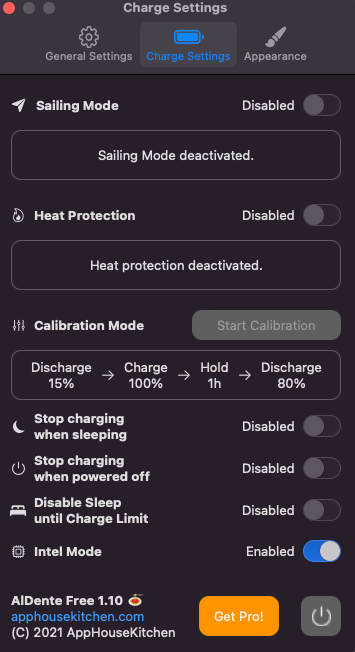
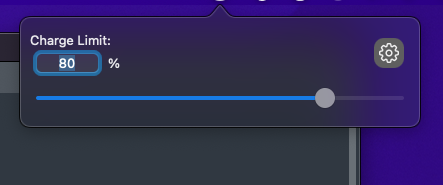
@simulatxd commented on GitHub (Dec 8, 2021):
hi, btw iI have same issue, I should turn off intel mode to make appear discharge button.
@rramchar commented on GitHub (Dec 8, 2021):
@simulatxd does the Discharge button immediately show up when you disable "Intel mode"?
@rramchar commented on GitHub (Dec 8, 2021):
Had someone point out to me this FAQ entry
https://apphousekitchen.com/feature-explanation-intel-mode/
Intel mode doesn't mean "for Intel MacBooks" as I incorrectly assumed. Disabling "Intel Mode" makes the discharge button visible and the MacBook is currently discharging.
Closing this issue.