mirror of
https://github.com/AppHouseKitchen/AlDente-Battery_Care_and_Monitoring.git
synced 2026-05-11 10:20:18 +02:00
[Bug] Sailing mode not functional #313

Reference in New Issue
Block a user
Delete Branch "%!s()"
Deleting a branch is permanent. Although the deleted branch may continue to exist for a short time before it actually gets removed, it CANNOT be undone in most cases. Continue?
Originally created by @0sps on GitHub (Nov 17, 2021).
Device: 2021 MacBook Pro M1
Versions: Monterey 12.0.1, AlDente Pro 1.10
Issue: Every time the charge goes up to the charge limit (I have mine set to 79%), it just stays there and charge never changes or ever dips below 79. The only solution I have found for this is to disconnect the charger.
Steps taken to troubleshoot: Completely uninstall and reinstall AlDente Pro, uninstall and reinstall the helper, restart MBP, disable sailing mode and re-enable sailing mode, disable heat protection. (Note: Optimized battery charging is disabled in System Prefs)
Also just wanted to say that I appreciate all the hard work the dev team puts into ADP! Even if this issue can't be fully troubleshooted or resolved I still love the utility and will absolutely using it. Thanks :)
@MatthiasKerbl commented on GitHub (Nov 18, 2021):
Hi @0sps,
Depending on your MacBook model, charger, and usage it can take a long time until you notice your battery percentage to drop in Sailing Mode. However, it most likely still works. You can read more about the details regarding the Sailing Mode in our blog: https://apphousekitchen.com/feature-explanation-sailing-mode/
Thank you for the positive feedback, we really appreciate it and I am glad you like our little tool. :)
Cheers,
Matthias
@0sps commented on GitHub (Nov 19, 2021):
Hi again,
Thanks for the response. I unfortunately do not have any confirmation of sailing mode functioning as intended, so I think there may be an issue.
Take a look at the following screenshot:
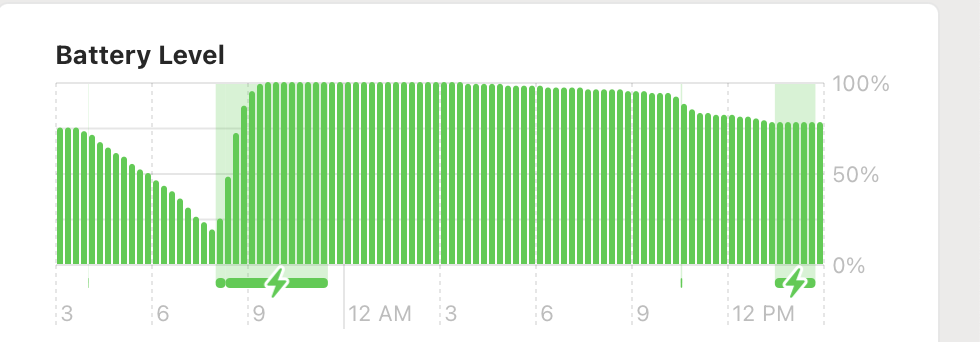
At the beginning of the timeframe, AD was set to discharge the battery. This worked as intended, and you can see that the battery did actually discharge at the left end of the graph and only began to charge once it reached 15%. However, on the right side of the graph, notice how the charger icon is being indicated for the last several hours? AD was set to sailing mode after charging up to the charge limit, and is just keeping the battery at that charge level-- not letting it decrease at all. For this reason I believe there may be a bug in the program, as I have had to use discharge mode for the battery to go down at all when using AD, otherwise the battery just stays at the current level and never drops. This is also evidenced by how the charge level did not change even 1% over several hours of usage, which would be impossible if the charger weren't connected.
With this in mind, do you think there is any possibility that sailing mode is not working here?
@MatthiasKerbl commented on GitHub (Nov 20, 2021):
Hi @0sps,
Please keep in mind that Discharge and Sailing Mode do two completely different things. Discharge internally disconnects your power adapter from your MacBook. The result is that your MacBook uses 100% of the power from the battery. Sailing Mode, on the other hand, just stops charging even if the battery percentage would drop for the reasons described in the article but the energy is still coming from the power brick. Furthermore, both features do not work while your MacBooks is in Sleep or Powered Off.
Please read the following articles for more information:
https://apphousekitchen.com/feature-explanation-sailing-mode/
https://apphousekitchen.com/feature-explanation-discharge/
Cheers,
Matthias
@0sps commented on GitHub (Nov 20, 2021):
Oh, I am so sorry if I misunderstood!!
So in this case, sailing mode causes the Mac to use 100% of power from the power adapter, and does nothing to the battery until it decreases to the set level on its own, through natural discharging over time or use from when the power adapter doesn't supply enough energy.
This makes sense now-- thank you SO much for explaining!! I'm sorry I filed a whole bug report about this! 😂
Thanks so much,
-Sean