mirror of
https://github.com/AppHouseKitchen/AlDente-Battery_Care_and_Monitoring.git
synced 2026-09-08 19:01:58 +02:00
Charges Past Specified Level #294
Assignees
 adam (Adam Melkus)
Clear assignees
adam (Adam Melkus)
No Assignees
Notifications
Due Date
No due date set.
Dependencies
No dependencies set.
Reference: starred/AlDente-Battery_Care_and_Monitoring#294
Reference in New Issue
Block a user
Originally created by @abeldemoz on GitHub (Nov 5, 2021).
I have a 13-inch 2020 MacBook Pro. When I use the 61W power adapter, everything is fine. When I use a 96W power adapter, it charges past the limit I specified. I set the limit to 80% when connected to the 96W adapter and it charged to 91%.
@MatthiasKerbl commented on GitHub (Nov 6, 2021):
Hi @abeldemoz,
Are you certain that you get different behavior with different power adapters? Or could it be that your MacBook went into sleep or got powered off while you used it with the 96% power adapter?
Since AlDente's capabilities of controlling charging while your MacBook is in sleep or powered off is highly limited.
You can read more about this topic on our blog:
I have always different charging adapters with different charging powers in use and have never experienced issues with AlDente while using different charging adapters.
Cheers,
Matthias
@abeldemoz commented on GitHub (Nov 6, 2021):
This behaviour occurs even when the MacBook Pro is awake and in use. The 61W doesn’t charge past the charging limit, whereas the 96W frequently charges past the charging limit.
@MatthiasKerbl commented on GitHub (Nov 6, 2021):
Do you have an Intel or Apple Silicon M1 MacBook?
@abeldemoz commented on GitHub (Nov 6, 2021):
Intel MacBook Pro 13" 2020 i5 2.0GHz 4-core 16GB RAM 512GB SSD
@MatthiasKerbl commented on GitHub (Nov 7, 2021):
Hi @abeldemoz,
Unfortunately, I am currently not able to reproduce this issue. I have tried it on multiple Intel-based MacBooks with various power adapters and charging past the charge limit never occurred.
Do you have any recommendations on how I can reproduce this bug?
@tosbsas commented on GitHub (Nov 8, 2021):
I do See the Same but Not this far up. Set to 80 y get 81 or 82 After several days being connected.
Its set to 80 Max. Didnt See That be for Monterey
Intel mbp 2017.
Only thing I do is hibernate or a restart. I thought it might be the restart but anyway it should go down to 80, Right?
@abeldemoz commented on GitHub (Nov 9, 2021):
I'm not sure how to reproduce it by using a power adapter. I also experience this issue on occasion when using the MacBook Pro in clamshell mode when connected to a monitor via USB-C. The monitor charges the MBP via the USB-C cable. I see it go past the specified limit while I'm using it – the computer is not asleep. I'm not sure if this will help, but maybe the bug could be a result of different wattages from different power supplies. I'm using AlDente-Pro.
@MatthiasKerbl commented on GitHub (Nov 9, 2021):
Do you have the feature Heat Protection activated? We found a bug in the current version which results in charging above the charge limit for some users if Heat Protection is activated. If you had Heat Protection enabled, you could try it again with Heat Protection disabled.
@tosbsas commented on GitHub (Nov 9, 2021):
Will try
@tosbsas commented on GitHub (Nov 9, 2021):
I did turn off heat protection, mbp charged to 80% (limit being set by Ardente) and after a while its 81 :-((
@abeldemoz commented on GitHub (Nov 9, 2021):
Yes, I have Heat Protection enabled all of the time. Do you have a timeline for fixing this bug?
@MatthiasKerbl commented on GitHub (Nov 10, 2021):
We are currently testing a beta version of AlDente which already has the Heat Protection fix implemented. If everything is going well, we will release it soon.
@MatthiasKerbl commented on GitHub (Nov 15, 2021):
Hi @abeldemoz,
We have just released the new version of AlDente (1.10). https://github.com/davidwernhart/AlDente/releases/
It has a fix for the Heat Protection bug and please try this version, it might have fixed your issue regarding charging past the Charge Limit with high power chargers.
Cheers,
Matthias
@jameszhan9592 commented on GitHub (Nov 16, 2021):
Hi @MatthiasKerbl ,
I'm on 1.10, but the battery still always gets charged 1 or 2 percent past the specified percentage. Sometimes the charging would even pause at 2% below the specified percentage.
Any idea what caused this and how to resolve it?
Using an M1 Max MBP, macOS 12.0.1.
Best,
James
@tosbsas commented on GitHub (Nov 16, 2021):
Same here
@MatthiasKerbl commented on GitHub (Nov 17, 2021):
Hi @jameszhan9592,
I would say, 1,2,3% is in the margin of error since the battery percentage is not the most accurate number in macOS.
Cheers,
Matthias
@tosbsas commented on GitHub (Nov 17, 2021):
It definitivly is. But it was more exacto in earlier versiona
Ruben Gutknecht
Lima, Perú 🇵🇪
Cel: +51-99349-1515
Voice/Fax: 49 (0) 721-151-379204
http://telegram.me/tosbsas
paypal.me/RubenGutknecht
@.***
@reednaa commented on GitHub (Nov 23, 2021):
Mine continues charging past the specified threshold.
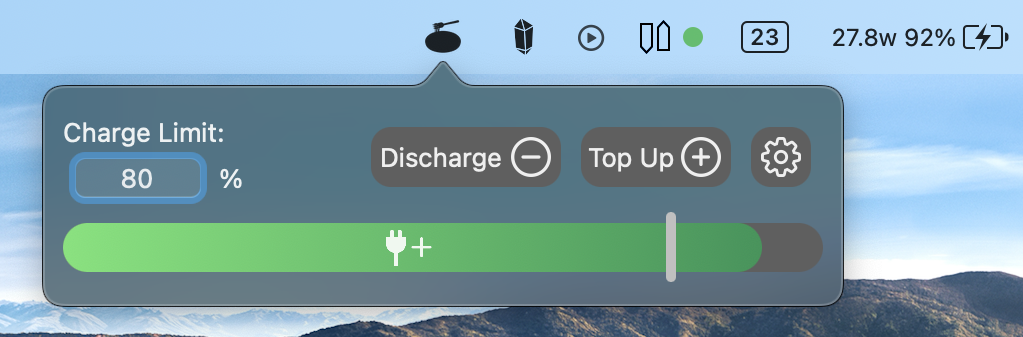
Coconut battery shows the MacBook currently charging at ~28W, which is the charging rate at when it is close to full.
Sometimes it turns on and sometimes it turns off. I am not sure what triggers it. Over time, it gradually charges fully up. This is while the computer is awake.
I have tried reinstalling the helper application.
Macbook 2021 14" M1 pro.
@MatthiasKerbl commented on GitHub (Nov 23, 2021):
Hi @reednaaxeelaa,
Do you have "Optimized battery charging" in the macOS preferences disabled?
Cheers,
Matthias
@reednaa commented on GitHub (Nov 23, 2021):
I do not.
@MatthiasKerbl commented on GitHub (Nov 23, 2021):
In order for AlDente to work, you have to disable this setting.
@reednaa commented on GitHub (Nov 23, 2021):
Ohh, I am sorry. I misread what you wrote. I do not have the setting enabled.
@MatthiasKerbl commented on GitHub (Dec 11, 2021):
Did you try a full reinstall of AlDente?
@MatthiasKerbl commented on GitHub (Jan 18, 2022):
Hi @abeldemoz,
Do you still experience this issue with our newest version AlDente 1.13 installed?