Al-Dente Pro Calibration Bug #289

Closed
opened 2025-12-30 02:20:15 +01:00 by adam · 9 comments
Owner

Originally created by @abeldemoz on GitHub (Nov 3, 2021).

Al-Dente Pro user here. My battery was at 8% and charging. I turned on calibration and the battery started discharging. It shouldn't start discharging unless it's over 15%. Please fix.

Originally created by @abeldemoz on GitHub (Nov 3, 2021). Al-Dente Pro user here. My battery was at 8% and charging. I turned on calibration and the battery started discharging. It shouldn't start discharging unless it's over 15%. Please fix.
adam added the bug label 2025-12-30 02:20:15 +01:00
adam closed this issue 2025-12-30 02:20:15 +01:00
Author
Owner

@MatthiasKerbl commented on GitHub (Nov 3, 2021):

Hi @abeldemoz,

I just tried it and you are right, AlDente starts discharging but only for half a second and immediately starts charging to 100%.
Is it the same for you?

Cheers,
Matthias

@MatthiasKerbl commented on GitHub (Nov 3, 2021): Hi @abeldemoz, I just tried it and you are right, AlDente starts discharging but only for half a second and immediately starts charging to 100%. Is it the same for you? Cheers, Matthias
Author
Owner

@abeldemoz commented on GitHub (Nov 4, 2021):

Hi @abeldemoz,

I just tried it and you are right, AlDente starts discharging but only for half a second and immediately starts charging to 100%. Is it the same for you?

Cheers, Matthias

No, it just kept discharging. I had to stop calibration by the time the battery discharged to 1% and wait for the battery to charge to 15% before starting calibration again.

Also, AlDente-Pro is causing my battery to drain overnight. I've attached an image showing the battery drain from last night. On other occasions, I quit AlDente-Pro before going to sleep and my battery doesn't drain. This is a critical bug that needs to be fixed for two reasons:

  1. The purpose of AlDente-Pro is to save battery by preserving health
  2. As a user, I shouldn't have to remember to quit AlDente-Pro every time my MacBook Pro isn't connected to power and open it again when connected to power.

I'd expect this from free software, not paid software. Please fix the battery drain issue.
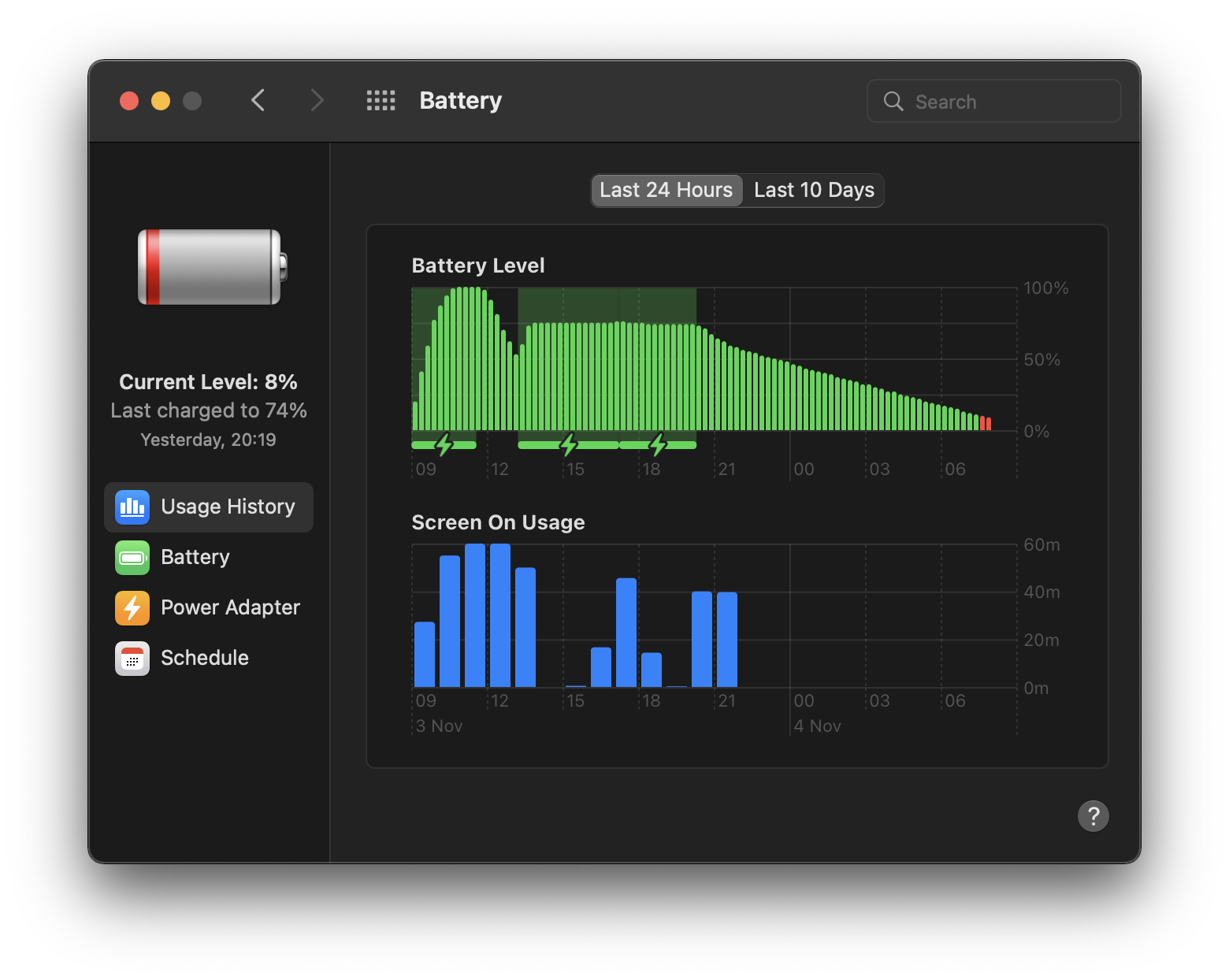
image

@abeldemoz commented on GitHub (Nov 4, 2021): > Hi @abeldemoz, > > I just tried it and you are right, AlDente starts discharging but only for half a second and immediately starts charging to 100%. Is it the same for you? > > Cheers, Matthias No, it just kept discharging. I had to stop calibration by the time the battery discharged to 1% and wait for the battery to charge to 15% before starting calibration again. Also, AlDente-Pro is causing my battery to drain overnight. I've attached an image showing the battery drain from last night. On other occasions, I quit AlDente-Pro before going to sleep and my battery doesn't drain. This is a critical bug that needs to be fixed for two reasons: 1. The purpose of AlDente-Pro is to save battery by preserving health 2. As a user, I shouldn't have to remember to quit AlDente-Pro every time my MacBook Pro isn't connected to power and open it again when connected to power. I'd expect this from free software, not paid software. Please fix the battery drain issue. <img width="780" alt="image" src="https://user-images.githubusercontent.com/86599566/140279725-0f213517-b0ac-44a9-a5bf-2d12b171cade.png">
Author
Owner

@MatthiasKerbl commented on GitHub (Nov 4, 2021):

No, it just kept discharging. I had to stop calibration by the time the battery discharged to 1% and wait for the battery to charge to 15% before starting calibration again.

Interesting that you encounter a different behavior of the Calibration Mode than I do.
Which MacBook model do you have?
Which macOS version do you have installed?
Do you use the newest version of AlDente (1.08)?

Thank you for reporting the battery drain issue, we will fix it as soon as possible.

Cheers,
Matthias

@MatthiasKerbl commented on GitHub (Nov 4, 2021): > No, it just kept discharging. I had to stop calibration by the time the battery discharged to 1% and wait for the battery to charge to 15% before starting calibration again. Interesting that you encounter a different behavior of the Calibration Mode than I do. Which MacBook model do you have? Which macOS version do you have installed? Do you use the newest version of AlDente (1.08)? Thank you for reporting the battery drain issue, we will fix it as soon as possible. Cheers, Matthias
Author
Owner

@abeldemoz commented on GitHub (Nov 4, 2021):

No, it just kept discharging. I had to stop calibration by the time the battery discharged to 1% and wait for the battery to charge to 15% before starting calibration again.

Interesting that you encounter a different behavior of the Calibration Mode than I do. Which MacBook model do you have? Which macOS version do you have installed? Do you use the newest version of AlDente (1.08)?

Thank you for reporting the battery drain issue, we will fix it as soon as possible.

Cheers, Matthias

2020 13" MacBook Pro i5 2.0GHz 16GB RAM 512GB SSD
macOS Monterey (12.0.1)
AlDente-Pro v1.08

@abeldemoz commented on GitHub (Nov 4, 2021): > > No, it just kept discharging. I had to stop calibration by the time the battery discharged to 1% and wait for the battery to charge to 15% before starting calibration again. > > Interesting that you encounter a different behavior of the Calibration Mode than I do. Which MacBook model do you have? Which macOS version do you have installed? Do you use the newest version of AlDente (1.08)? > > Thank you for reporting the battery drain issue, we will fix it as soon as possible. > > Cheers, Matthias 2020 13" MacBook Pro i5 2.0GHz 16GB RAM 512GB SSD macOS Monterey (12.0.1) AlDente-Pro v1.08
Author
Owner

@lbydev commented on GitHub (Nov 16, 2021):

I am having a problem that when I re-plug the power adapter, it does not continue to auto-calibrate。

macOS Monterey (12.0.1)
AlDente-Pro v1.09

@lbydev commented on GitHub (Nov 16, 2021): I am having a problem that when I re-plug the power adapter, it does not continue to auto-calibrate。 macOS Monterey (12.0.1) AlDente-Pro v1.09
Author
Owner

@MatthiasKerbl commented on GitHub (Nov 16, 2021):

I am having a problem that when I re-plug the power adapter, it does not continue to auto-calibrate。

macOS Monterey (12.0.1) AlDente-Pro v1.09

Hi @lbydev,

Currently, you have to keep your MacBook plugged in from start to finish of the Calibration Mode.

Cheers,
Matthias

@MatthiasKerbl commented on GitHub (Nov 16, 2021): > I am having a problem that when I re-plug the power adapter, it does not continue to auto-calibrate。 > > macOS Monterey (12.0.1) AlDente-Pro v1.09 Hi @lbydev, Currently, you have to keep your MacBook plugged in from start to finish of the Calibration Mode. Cheers, Matthias
Author
Owner

@Lennix commented on GitHub (Dec 2, 2021):

I also plugged in below 15 percent, it started charging and then I was able to click on "Start calibration" (would be great if I could enable it before plugging in - it detects that I'm already discharged below 15% and begins with the next step).
I did not charge immediately. I believe it started once it dropped another percent.

@Lennix commented on GitHub (Dec 2, 2021): I also plugged in below 15 percent, it started charging and then I was able to click on "Start calibration" (would be great if I could enable it before plugging in - it detects that I'm already discharged below 15% and begins with the next step). I did not charge immediately. I believe it started once it dropped another percent.
Author
Owner

@MatthiasKerbl commented on GitHub (Dec 2, 2021):

I also plugged in below 15 percent, it started charging and then I was able to click on "Start calibration" (would be great if I could enable it before plugging in - it detects that I'm already discharged below 15% and begins with the next step). I did not charge immediately. I believe it started once it dropped another percent.

Hi @Lennix,

Thanks for reporting the behavior of the Calibration Mode on your MacBook. It seems like it is exactly the same as on my MacBook. We will improve the algorithm of the Calibration Mode in a future update.

Cheers,
Matthias

@MatthiasKerbl commented on GitHub (Dec 2, 2021): > I also plugged in below 15 percent, it started charging and then I was able to click on "Start calibration" (would be great if I could enable it before plugging in - it detects that I'm already discharged below 15% and begins with the next step). I did not charge immediately. I believe it started once it dropped another percent. Hi @Lennix, Thanks for reporting the behavior of the Calibration Mode on your MacBook. It seems like it is exactly the same as on my MacBook. We will improve the algorithm of the Calibration Mode in a future update. Cheers, Matthias
Author
Owner

@MatthiasKerbl commented on GitHub (Jan 16, 2022):

Hi there,

We have just released a new version of AlDente the completely refreshed Calibration Mode which should fix the issues explained here.
You can download the newest version here or just do the update within the app.

Cheers,
Matthias

@MatthiasKerbl commented on GitHub (Jan 16, 2022): Hi there, We have just released a new version of AlDente the completely refreshed Calibration Mode which should fix the issues explained here. You can download the newest version [here](https://github.com/davidwernhart/AlDente/releases) or just do the update within the app. Cheers, Matthias
Sign in to join this conversation.
1 Participants
Notifications
Due Date
No due date set.
Dependencies

No dependencies set.

Reference: starred/AlDente-Battery_Care_and_Monitoring#289