Originally created by @wyfang on GitHub (Nov 1, 2021).
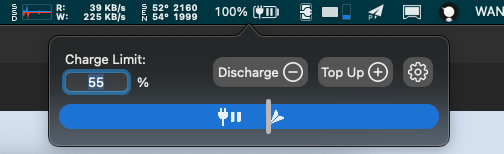
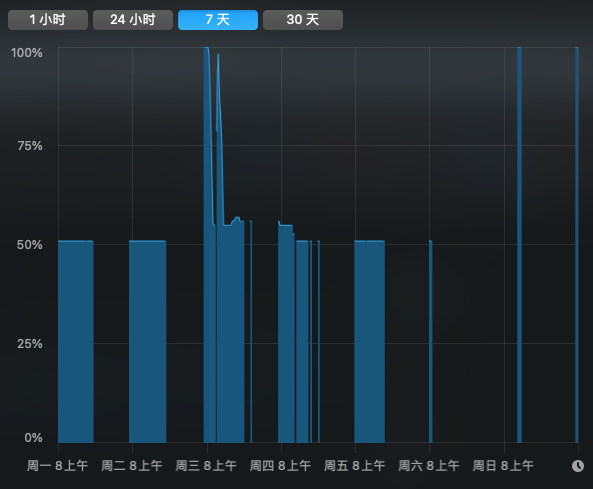
I keep my laptop in the office and if I don't work on Saturday and Sunday, I turn on my computer every Monday and it will be filled to 100%
Originally created by @wyfang on GitHub (Nov 1, 2021).
I keep my laptop in the office and if I don't work on Saturday and Sunday, I turn on my computer every Monday and it will be filled to 100%

@wyfang commented on GitHub (Nov 1, 2021):
> Hi @wyfang,
>
> Which MacBook model do you have?
>
> Cheers, Matthias
macbook pro 2016

@wyfang commented on GitHub (Nov 1, 2021):

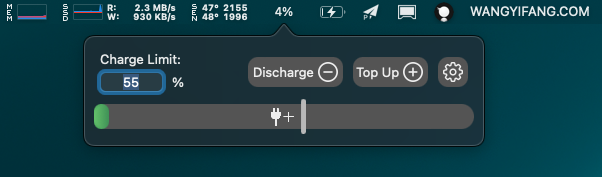
It looks like I need to reset the click to 55%.
The problem is that your MacBook is in sleep or powered off during the weekend and AlDente can't control the charging behavior while your MacBook is in sleep or powered off.
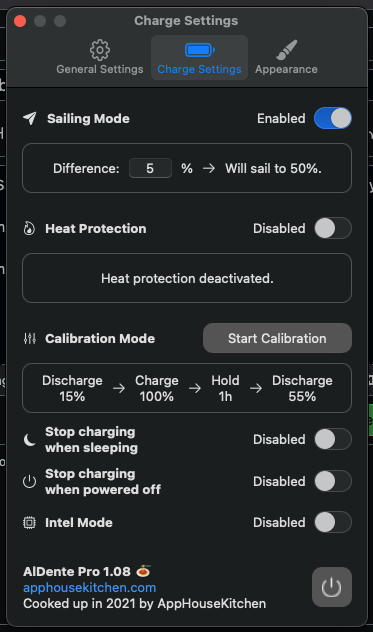
You should activate the features "Stop charging when sleeping" and "Stop charging when powered off". With those features activated, AlDente will stop charging right before your MacBook goes into sleep or before it gets powered off. Therefore, your MacBook will stay at the charge level it had right before it went into sleep or before it got powered off.
Cheers,
Matthias
@MatthiasKerbl commented on GitHub (Nov 1, 2021):
The problem is that your MacBook is in sleep or powered off during the weekend and AlDente can't control the charging behavior while your MacBook is in sleep or powered off.
You should activate the features "Stop charging when sleeping" and "Stop charging when powered off". With those features activated, AlDente will stop charging right before your MacBook goes into sleep or before it gets powered off. Therefore, your MacBook will stay at the charge level it had right before it went into sleep or before it got powered off.
Cheers,
Matthias
The problem is that your MacBook is in sleep or powered off during the weekend and AlDente can't control the charging behavior while your MacBook is in sleep or powered off. You should activate the features "Stop charging when sleeping" and "Stop charging when powered off". With those features activated, AlDente will stop charging right before your MacBook goes into sleep or before it gets powered off. Therefore, your MacBook will stay at the charge level it had right before it went into sleep or before it got powered off.
Cheers, Matthias
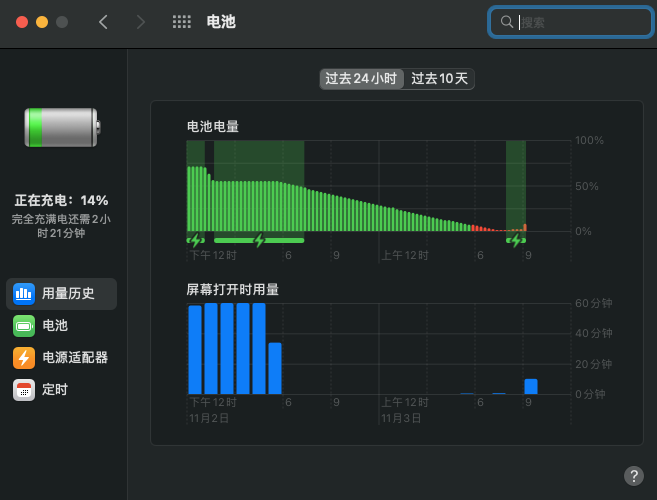
I tried activating "stop charging when sleeping" and "stop charging when switching off" and a day has passed and the battery still has 2% left. I have absolutely no idea what to do. When I switch it on, the battery becomes 2% after one day, when I switch it off, it becomes 100% after two days.
@wyfang commented on GitHub (Nov 3, 2021):
> The problem is that your MacBook is in sleep or powered off during the weekend and AlDente can't control the charging behavior while your MacBook is in sleep or powered off. You should activate the features "Stop charging when sleeping" and "Stop charging when powered off". With those features activated, AlDente will stop charging right before your MacBook goes into sleep or before it gets powered off. Therefore, your MacBook will stay at the charge level it had right before it went into sleep or before it got powered off.
>
> Cheers, Matthias
I tried activating "stop charging when sleeping" and "stop charging when switching off" and a day has passed and the battery still has 2% left. I have absolutely no idea what to do. When I switch it on, the battery becomes 2% after one day, when I switch it off, it becomes 100% after two days.


AlDente will not charge your MacBook when it is in sleep or powered off. Instead, it will just hold the current charge limit when the features "Stop charging when sleeping" and "Stop charging when powered off" are activated.
Please read our detailed explanation about those two features on our blog:
@MatthiasKerbl commented on GitHub (Nov 3, 2021):
Hi @wyfang,
AlDente will not charge your MacBook when it is in sleep or powered off. Instead, it will just hold the current charge limit when the features "Stop charging when sleeping" and "Stop charging when powered off" are activated.
Please read our detailed explanation about those two features on our blog:
- https://apphousekitchen.com/feature-explanation-stop-charging-when-powered-off-app-closed/
- https://apphousekitchen.com/feature-explanation-stop-charging-when-sleeping/
Cheers,
Matthias
Blocking a user prevents them from interacting with repositories, such as opening or commenting on pull requests or issues. Learn more about blocking a user.
Originally created by @wyfang on GitHub (Nov 1, 2021).
I keep my laptop in the office and if I don't work on Saturday and Sunday, I turn on my computer every Monday and it will be filled to 100%


@MatthiasKerbl commented on GitHub (Nov 1, 2021):
Hi @wyfang,
Which MacBook model do you have?
Cheers,
Matthias
@wyfang commented on GitHub (Nov 1, 2021):
macbook pro 2016

@wyfang commented on GitHub (Nov 1, 2021):
It looks like I need to reset the click to 55%.
@MatthiasKerbl commented on GitHub (Nov 1, 2021):
The problem is that your MacBook is in sleep or powered off during the weekend and AlDente can't control the charging behavior while your MacBook is in sleep or powered off.
You should activate the features "Stop charging when sleeping" and "Stop charging when powered off". With those features activated, AlDente will stop charging right before your MacBook goes into sleep or before it gets powered off. Therefore, your MacBook will stay at the charge level it had right before it went into sleep or before it got powered off.
Cheers,
Matthias
@wyfang commented on GitHub (Nov 3, 2021):
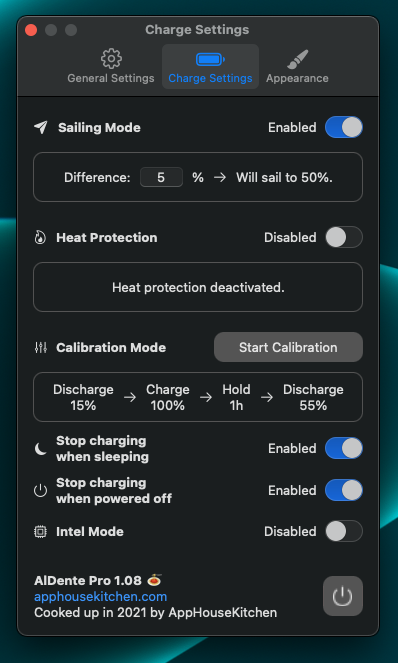
I tried activating "stop charging when sleeping" and "stop charging when switching off" and a day has passed and the battery still has 2% left. I have absolutely no idea what to do. When I switch it on, the battery becomes 2% after one day, when I switch it off, it becomes 100% after two days.
@MatthiasKerbl commented on GitHub (Nov 3, 2021):
Hi @wyfang,
AlDente will not charge your MacBook when it is in sleep or powered off. Instead, it will just hold the current charge limit when the features "Stop charging when sleeping" and "Stop charging when powered off" are activated.
Please read our detailed explanation about those two features on our blog:
Cheers,
Matthias