Originally created by @dyaskur on GitHub (May 15, 2021).
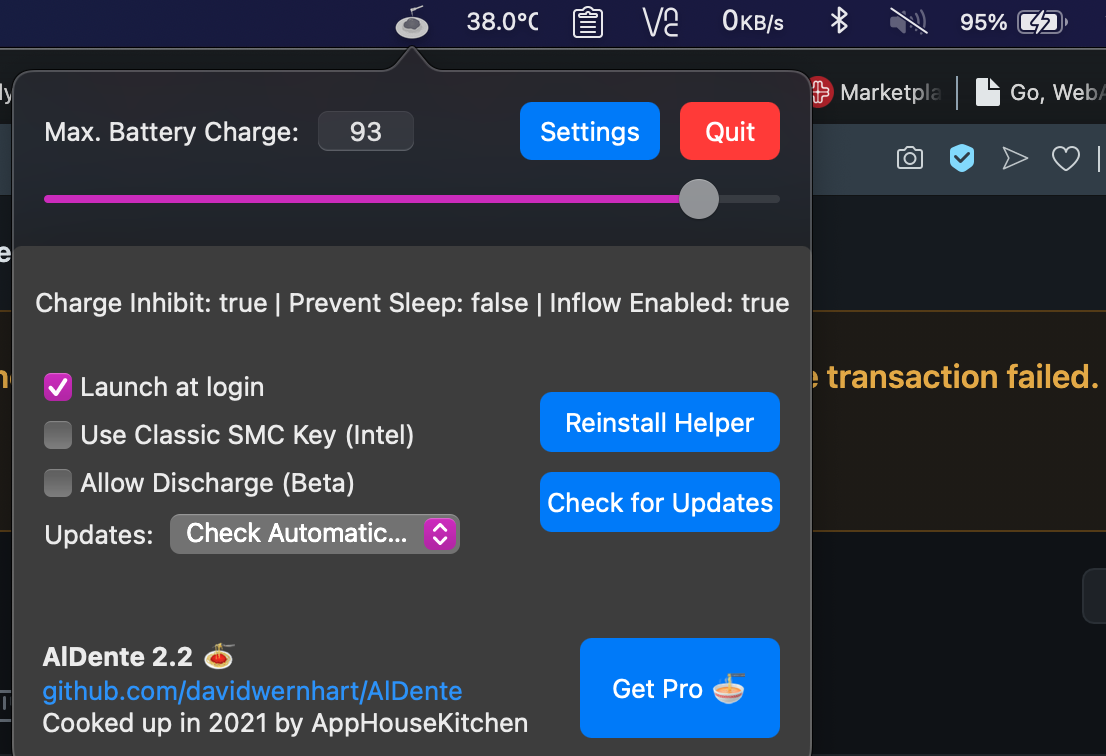
I just downloaded then restarted but still doesn't work, my MacBook Pro early 2015 still charging. Then I tried to check Allow discharge but it makes power source from battery and my charge light blinking every time
and also why still charging even above max battery charge setting?
Originally created by @dyaskur on GitHub (May 15, 2021).
I just downloaded then restarted but still doesn't work, my MacBook Pro early 2015 still charging. Then I tried to check `Allow discharge` but it makes power source from battery and my charge light blinking every time
<img width="563" alt="Screen Shot 1442-10-03 at 11 31 08 DYAS" src="https://user-images.githubusercontent.com/9539970/118371188-a244a000-b5d5-11eb-986d-b13c997ebf6b.png">
and also why still charging even above max battery charge setting?
<img width="553" alt="Screen Shot 1442-10-03 at 11 34 26 DYAS" src="https://user-images.githubusercontent.com/9539970/118371281-1a12ca80-b5d6-11eb-9182-738dde2a68b7.png">
Sometimes after I plug out and plug in again the battery status full charge for abour 1-2 secon then charging again
@dyaskur commented on GitHub (May 15, 2021):
Sometimes after I plug out and plug in again the battery status full charge for abour 1-2 secon then charging again
@MatthiasKerbl commented on GitHub (Jul 5, 2021):
Hi @dyaskur,
We just released a new version of AlDente which should solve the problem you encountered.
You can download the new version here: https://github.com/davidwernhart/AlDente/releases
Kind regards,
Matthias
I had the same issue when I connected the second monitor and used it for a while via type-c. After switching to HDMI I realized led blinking on power connector. Restarting of laptop helped me - no light blinking now.
MBP M1 14'
AIDente Pro 1.22.2
@ext452 commented on GitHub (Aug 15, 2023):
I had the same issue when I connected the second monitor and used it for a while via type-c. After switching to HDMI I realized led blinking on power connector. Restarting of laptop helped me - no light blinking now.
MBP M1 14'
AIDente Pro 1.22.2
Blocking a user prevents them from interacting with repositories, such as opening or commenting on pull requests or issues. Learn more about blocking a user.
Originally created by @dyaskur on GitHub (May 15, 2021).
I just downloaded then restarted but still doesn't work, my MacBook Pro early 2015 still charging. Then I tried to check
Allow dischargebut it makes power source from battery and my charge light blinking every timeand also why still charging even above max battery charge setting?
@dyaskur commented on GitHub (May 15, 2021):
Sometimes after I plug out and plug in again the battery status full charge for abour 1-2 secon then charging again
@MatthiasKerbl commented on GitHub (Jul 5, 2021):
Hi @dyaskur,
We just released a new version of AlDente which should solve the problem you encountered.
You can download the new version here: https://github.com/davidwernhart/AlDente/releases
Kind regards,
Matthias
@gahoo commented on GitHub (Jul 12, 2023):
Version 1.22 has the same issue on MacBook Pro late 2013. In discharge mode, the led light keep blinking.
@ext452 commented on GitHub (Aug 15, 2023):
I had the same issue when I connected the second monitor and used it for a while via type-c. After switching to HDMI I realized led blinking on power connector. Restarting of laptop helped me - no light blinking now.
MBP M1 14'
AIDente Pro 1.22.2