Mac M1: Not working Pro Version + High CPU usage #182

Closed
opened 2025-12-30 02:19:26 +01:00 by adam · 15 comments
Owner

Originally created by @Kahmoon on GitHub (May 7, 2021).

Hi guys,

i hope this is the right place for support. Yesterday i bought AlDente Pro. I followed the instructions for configuration but its not working. It say plugged + paused but it stays at 100%.

Bildschirmfoto 2021-05-07 um 09 13 36 Bildschirmfoto 2021-05-07 um 09 22 00 Bildschirmfoto 2021-05-07 um 09 26 57

Also my system is lagging quite hard because this tool is requiring 98% of my cpu
Bildschirmfoto 2021-05-07 um 09 14 25

I am on a mac m1 (mostly on clamshell mode)
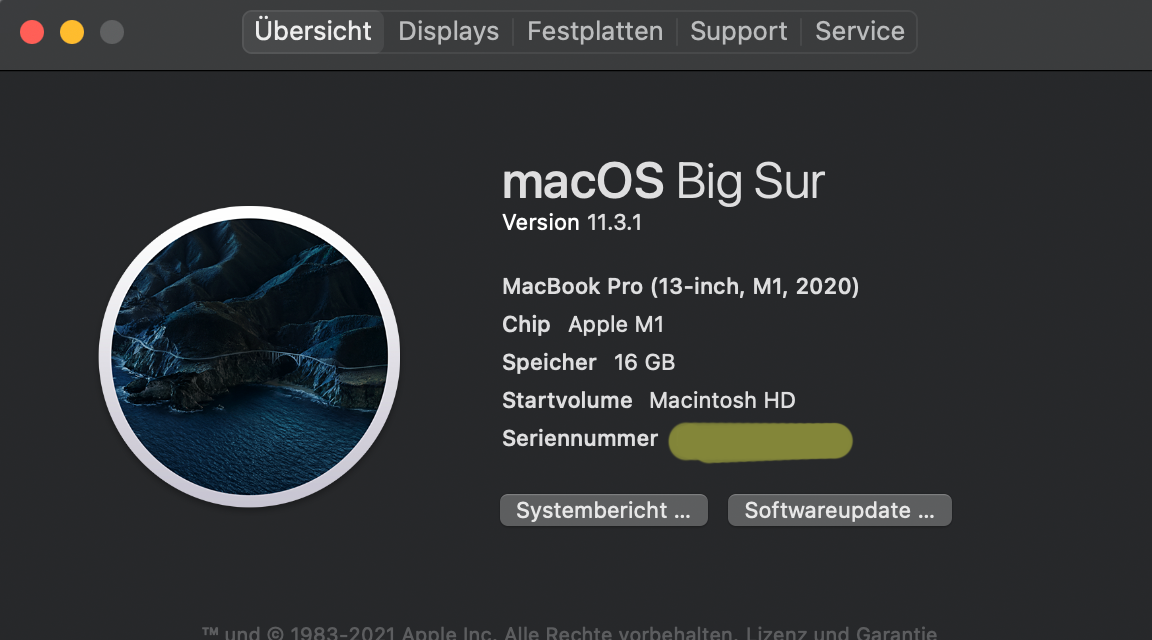
Bildschirmfoto 2021-05-06 um 19 49 29

aldentepro-debug-2021-05-07-09:25:26.pasta.zip

Im running AlDente Pro 1.01

Actually im not able to use this tool because my system gets slowed down to much.

Originally created by @Kahmoon on GitHub (May 7, 2021). Hi guys, i hope this is the right place for support. Yesterday i bought AlDente Pro. I followed the instructions for configuration but its not working. It say plugged + paused but it stays at 100%. <img width="442" alt="Bildschirmfoto 2021-05-07 um 09 13 36" src="https://user-images.githubusercontent.com/6390770/117412775-765e5600-af15-11eb-8741-ad0687a668c4.png"> <img width="420" alt="Bildschirmfoto 2021-05-07 um 09 22 00" src="https://user-images.githubusercontent.com/6390770/117412978-b6253d80-af15-11eb-8a30-cadceaaf2274.png"> <img width="356" alt="Bildschirmfoto 2021-05-07 um 09 26 57" src="https://user-images.githubusercontent.com/6390770/117413538-64c97e00-af16-11eb-9942-42c097483ef8.png"> Also my system is lagging quite hard because this tool is requiring 98% of my cpu <img width="346" alt="Bildschirmfoto 2021-05-07 um 09 14 25" src="https://user-images.githubusercontent.com/6390770/117412741-6b0b2a80-af15-11eb-936d-19cc0a808442.png"> I am on a mac m1 (mostly on clamshell mode) <img width="576" alt="Bildschirmfoto 2021-05-06 um 19 49 29" src="https://user-images.githubusercontent.com/6390770/117412884-94c45180-af15-11eb-8f7d-5b55c329caf6.png"> [aldentepro-debug-2021-05-07-09:25:26.pasta.zip](https://github.com/davidwernhart/AlDente/files/6439788/aldentepro-debug-2021-05-07-09.25.26.pasta.zip) Im running AlDente Pro 1.01 Actually im not able to use this tool because my system gets slowed down to much.
adam closed this issue 2025-12-30 02:19:26 +01:00
Author
Owner

@Kahmoon commented on GitHub (May 7, 2021):

Trying "using rosetta" workaround now

Also i updated to 1.03

@Kahmoon commented on GitHub (May 7, 2021): Trying "using rosetta" workaround now Also i updated to 1.03
Author
Owner

@davidwernhart commented on GitHub (May 7, 2021):

Hey @Kahmoon
Sorry for your inconveniences!

The new update should address some of the performance issues you are experiencing.
Also, AlDente Pro does not automatically discharge to the desired percentage if your state of charge is higher (100% in your case). You have to manually press the discharge button for this to happen.

Hope that helps,
David

@davidwernhart commented on GitHub (May 7, 2021): Hey @Kahmoon Sorry for your inconveniences! The new update should address some of the performance issues you are experiencing. Also, AlDente Pro does not automatically discharge to the desired percentage if your state of charge is higher (100% in your case). You have to manually press the discharge button for this to happen. Hope that helps, David
Author
Owner

@Kahmoon commented on GitHub (May 7, 2021):

Thanks for the fast reply. I try discharge.

I thought it would go down automatically until it reaches the 75% + sailing tollerance.

@Kahmoon commented on GitHub (May 7, 2021): Thanks for the fast reply. I try discharge. I thought it would go down automatically until it reaches the 75% + sailing tollerance.
Author
Owner

@davidwernhart commented on GitHub (May 7, 2021):

Hope that works for you!
We have decided against automatically discharging to the desired percentage since it is needed very rarely and can confuse many users if always active.
Also, Sailing Mode does not actively discharge your device. Instead, it just waits until your battery discharges on its own (which can take a lot of time, mainly depending on your power brick) to charge it up again.
You can find some more information about it here: https://apphousekitchen.com/feature-explanation-sailing-mode/

Cheers,
David

@davidwernhart commented on GitHub (May 7, 2021): Hope that works for you! We have decided against automatically discharging to the desired percentage since it is needed very rarely and can confuse many users if always active. Also, Sailing Mode does not actively discharge your device. Instead, it just waits until your battery discharges on its own (which can take a lot of time, mainly depending on your power brick) to charge it up again. You can find some more information about it here: https://apphousekitchen.com/feature-explanation-sailing-mode/ Cheers, David
Author
Owner

@Kahmoon commented on GitHub (May 7, 2021):

I´m in discharge mode since almost one hour now and it still says 100%. Even the icon "plugged and discharge" is shown correctly. By the way: Charging source comes from my monitor via USB-C. I´ll test it without the external display.

Bildschirmfoto 2021-05-07 um 10 56 19

Is there any way discharge work on clampshell mode? I m working 95% in clampshell mode on an external monitor? So its impossible to disconnect the charging power.

@Kahmoon commented on GitHub (May 7, 2021): I´m in discharge mode since almost one hour now and it still says 100%. Even the icon "plugged and discharge" is shown correctly. By the way: Charging source comes from my monitor via USB-C. I´ll test it without the external display. <img width="433" alt="Bildschirmfoto 2021-05-07 um 10 56 19" src="https://user-images.githubusercontent.com/6390770/117425203-de676900-af22-11eb-84c4-46264721d00c.png"> Is there any way discharge work on clampshell mode? I m working 95% in clampshell mode on an external monitor? So its impossible to disconnect the charging power.
Author
Owner

@davidwernhart commented on GitHub (May 7, 2021):

On M1 MacBooks, discharge can be very slow since the Apple Silicon chip really is sipping power.
You can try running a benchmark (or an 8k youtube video) to get your chip to sweat a little bit and consume more power.

Sadly, currently, we have not found a method to enable discharge in clamshell mode. Apple's software/hardware interface we are utilising does virtually disconnect all devices when enabled in clamshell mode. This means, that your monitor is getting disconnected when enabling discharge in this case, which kinda defeats the purpose.

Best regards,
David

@davidwernhart commented on GitHub (May 7, 2021): On M1 MacBooks, discharge can be very slow since the Apple Silicon chip really is sipping power. You can try running a benchmark (or an 8k youtube video) to get your chip to sweat a little bit and consume more power. Sadly, currently, we have not found a method to enable discharge in clamshell mode. Apple's software/hardware interface we are utilising does virtually disconnect all devices when enabled in clamshell mode. This means, that your monitor is getting disconnected when enabling discharge in this case, which kinda defeats the purpose. Best regards, David
Author
Owner

@Kahmoon commented on GitHub (May 7, 2021):

OK

I have a strange behaviour now. First i unplugged my macbook from the power source the batterie icon showed "-" only. Since a few minutes it says "plugged and discharge". But im definately not plugged in right now.

Bildschirmfoto 2021-05-07 um 11 07 27

After restarting the app it forces me to reinstall the helper tool. Icon is shown correctly after reinstall from helper tool

Bildschirmfoto 2021-05-07 um 11 10 11

I´ll try 8k youtube video to get rid of some juice.

@Kahmoon commented on GitHub (May 7, 2021): OK I have a strange behaviour now. First i unplugged my macbook from the power source the batterie icon showed "-" only. Since a few minutes it says "plugged and discharge". But im definately not plugged in right now. <img width="425" alt="Bildschirmfoto 2021-05-07 um 11 07 27" src="https://user-images.githubusercontent.com/6390770/117426795-9b0dfa00-af24-11eb-82ca-5ed238183bab.png"> After restarting the app it forces me to reinstall the helper tool. Icon is shown correctly after reinstall from helper tool <img width="411" alt="Bildschirmfoto 2021-05-07 um 11 10 11" src="https://user-images.githubusercontent.com/6390770/117427037-e1fbef80-af24-11eb-834c-e6d2920a5bfa.png"> I´ll try 8k youtube video to get rid of some juice.
Author
Owner

@Kahmoon commented on GitHub (May 7, 2021):

I think this tool is not working at all for me. I drained my Mac to 21%. I plugged in the power cable an it does not charge at all. Icon "plugged and paused".

Bildschirmfoto 2021-05-07 um 15 17 50

When i press my mouse on the slider and hold down my left mouse it changes to charging for a split second but goes back to paused.

IMG_4677_thumb

After i completely kill/start the app it stays on charging. If i have to do this every time this would be a bit unsatisfying :-)

Wish i had not bought this M1 at all....to many problems...

@Kahmoon commented on GitHub (May 7, 2021): I think this tool is not working at all for me. I drained my Mac to 21%. I plugged in the power cable an it does not charge at all. Icon "plugged and paused". <img width="401" alt="Bildschirmfoto 2021-05-07 um 15 17 50" src="https://user-images.githubusercontent.com/6390770/117455536-93ac1800-af47-11eb-9cdc-fb72d77610d7.png"> When i press my mouse on the slider and hold down my left mouse it changes to charging for a split second but goes back to paused. ![IMG_4677_thumb](https://user-images.githubusercontent.com/6390770/117455818-d5d55980-af47-11eb-8755-3da17fa96c3b.jpg) After i completely kill/start the app it stays on charging. If i have to do this every time this would be a bit unsatisfying :-) Wish i had not bought this M1 at all....to many problems...
Author
Owner

@davidwernhart commented on GitHub (May 7, 2021):

Hey @Kahmoon

I am really sorry to hear this!
This is definitely not the usual behavior of AlDente Pro.
Since it is working fine on our development M1-MacBook and many others, I am sure that we will be able to fix your problems.

Please uninstall the helper application via the button in the settings menu.
Then power off your MacBook and keep the lid closed for 30 seconds (This resets the SMC)
Afterward, power your notebook on like usual and start AlDente. It will prompt you to install the helper again.
Hopefully, everything will work as expected after reinstalling the helper.

Of course, you can still get a refund as a last resort, just contact our support.

Sorry for all the inconveniences,
David

@davidwernhart commented on GitHub (May 7, 2021): Hey @Kahmoon I am really sorry to hear this! This is definitely not the usual behavior of AlDente Pro. Since it is working fine on our development M1-MacBook and many others, I am sure that we will be able to fix your problems. Please uninstall the helper application via the button in the settings menu. Then power off your MacBook and keep the lid closed for 30 seconds (This resets the SMC) Afterward, power your notebook on like usual and start AlDente. It will prompt you to install the helper again. Hopefully, everything will work as expected after reinstalling the helper. Of course, you can still get a refund as a last resort, just contact our support. Sorry for all the inconveniences, David
Author
Owner

@davidwernhart commented on GitHub (May 7, 2021):

Also, do you have any other apps active that might interact with the SMC? This includes most stats apps, MacsFanControl, or the free version of AlDente. Maybe one of them is interfering with AlDente Pro since both of them want to access the SMC at the same time.

@davidwernhart commented on GitHub (May 7, 2021): Also, do you have any other apps active that might interact with the SMC? This includes most stats apps, MacsFanControl, or the free version of AlDente. Maybe one of them is interfering with AlDente Pro since both of them want to access the SMC at the same time.
Author
Owner

@Kahmoon commented on GitHub (May 7, 2021):

Hmm nah, i m not running tools like this. Also this is my first try with AlDente. Never tried free version before.

Also its charging up to 100% without stopping at my set level of 74%. It should not go over 74% right?
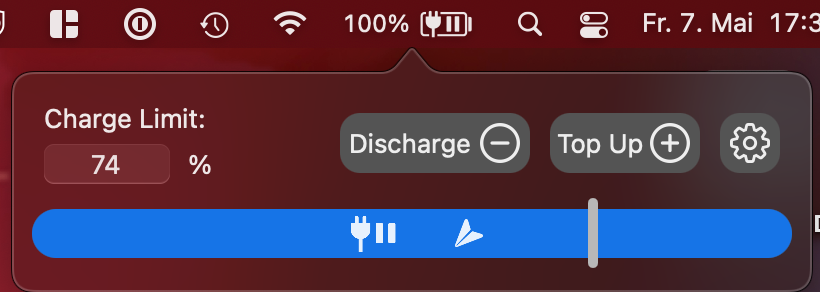
Bildschirmfoto 2021-05-07 um 17 33 03

I will give it a last try with your workaround of reinstalling helper tool tomorrow.

@Kahmoon commented on GitHub (May 7, 2021): Hmm nah, i m not running tools like this. Also this is my first try with AlDente. Never tried free version before. Also its charging up to 100% without stopping at my set level of 74%. It should not go over 74% right? <img width="410" alt="Bildschirmfoto 2021-05-07 um 17 33 03" src="https://user-images.githubusercontent.com/6390770/117473450-484f3500-af5a-11eb-97cf-1aaad59a1624.png"> I will give it a last try with your workaround of reinstalling helper tool tomorrow.
Author
Owner

@MatthiasKerbl commented on GitHub (May 7, 2021):

Hi @Kahmoon,
Do you have Optimised battery charging disabled in system preferences?

@MatthiasKerbl commented on GitHub (May 7, 2021): Hi @Kahmoon, Do you have Optimised battery charging disabled in system preferences?
Author
Owner

@Kahmoon commented on GitHub (May 8, 2021):

Jepp, see the first screenshot i posted.

@Kahmoon commented on GitHub (May 8, 2021): Jepp, see the first screenshot i posted.
Author
Owner

@Kahmoon commented on GitHub (May 10, 2021):

OK, i have to give up sorry. Every time i restart the tool it forces me to reinstall helper tool. Actually its charging to 100% (starting from 34%) again at did not stop at 75%, even i have the paused icon. (Clamshell mode)

Bildschirmfoto 2021-05-10 um 11 45 45 Bildschirmfoto 2021-05-10 um 11 46 57

I gonna contact you for a refund. Where can i do this? sorry for the circumstances.

@Kahmoon commented on GitHub (May 10, 2021): OK, i have to give up sorry. Every time i restart the tool it forces me to reinstall helper tool. Actually its charging to 100% (starting from 34%) again at did not stop at 75%, even i have the paused icon. (Clamshell mode) <img width="440" alt="Bildschirmfoto 2021-05-10 um 11 45 45" src="https://user-images.githubusercontent.com/6390770/117640423-503eed00-b185-11eb-84f7-359cd8b8eeb5.png"> <img width="471" alt="Bildschirmfoto 2021-05-10 um 11 46 57" src="https://user-images.githubusercontent.com/6390770/117640609-749ac980-b185-11eb-92f7-c73db261bb05.png"> I gonna contact you for a refund. Where can i do this? sorry for the circumstances.
Author
Owner

@Kahmoon commented on GitHub (May 11, 2021):

Well actually its working. We didn´t change anything yesterday. If you need further information or logfiles, shoot me a message or contact me directly.

One important notice: Don´t start the program on M1 with rosetta. This has to be unchecked!

Thanks for the support.

@Kahmoon commented on GitHub (May 11, 2021): Well actually its working. We didn´t change anything yesterday. If you need further information or logfiles, shoot me a message or contact me directly. **One important notice: Don´t start the program on M1 with rosetta. This has to be unchecked!** Thanks for the support.
Sign in to join this conversation.
1 Participants
Notifications
Due Date
No due date set.
Dependencies

No dependencies set.

Reference: starred/AlDente-Battery_Care_and_Monitoring#182