Originally created by @Maxonyks on GitHub (Mar 12, 2021).
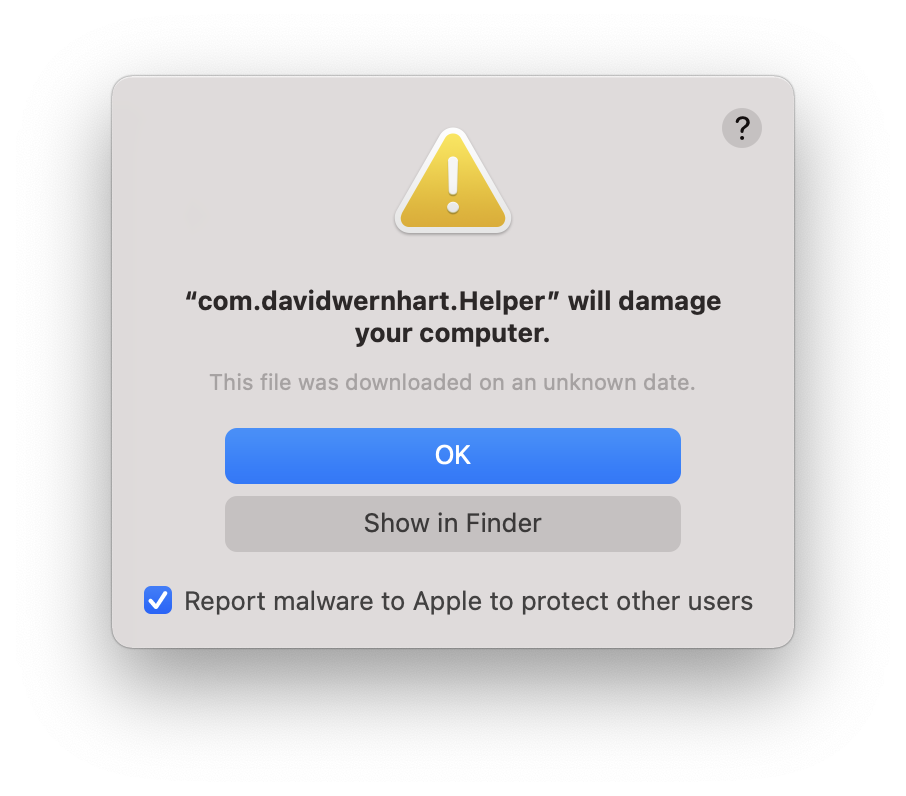
Alright, I restarted my computer and this shows up. I hit cancel and after a few seconds, I came up right back. I am using M1 MBP Big Sur 11.2.2
Originally created by @Maxonyks on GitHub (Mar 12, 2021).
<img width="409" alt="Screen Shot 2021-03-12 at 08 14 01" src="https://user-images.githubusercontent.com/80496122/110877312-cf41b180-830b-11eb-8d7d-3e570fdb9d3b.png">
Alright, I restarted my computer and this shows up. I hit cancel and after a few seconds, I came up right back. I am using M1 MBP Big Sur 11.2.2
Okay I just downloaded the new update and it fixes the problem, but still there is another warning sign that pops up, is this safe? Thank you in advance.
@Maxonyks commented on GitHub (Mar 12, 2021):
Okay I just downloaded the new update and it fixes the problem, but still there is another warning sign that pops up, is this safe? Thank you in advance.
<img width="453" alt="Screen Shot 2021-03-12 at 08 25 16" src="https://user-images.githubusercontent.com/80496122/110877905-cc938c00-830c-11eb-841f-1cc072c14e4c.png">
The version from homebrew still gives the first dialog. Had to download the one from github to allow me run.
Regards
@AdrianLicu commented on GitHub (Mar 12, 2021):
The version from homebrew still gives the first dialog. Had to download the one from github to allow me run.
Regards
@MatthiasKerbl commented on GitHub (Mar 12, 2021):
Hi @Maxonyks,
here is the clarification on this issue: Due to an expired developer certificate, all versions of AlDente prior to 2.1.2 are not working anymore. We have just released an updated and fixed version (AlDente 2.1.2, https://github.com/davidwernhart/AlDente/releases) signed with our new official developer account. However, some might need to delete the old helper files manually (instructions are in the release notes).
@MatthiasKerbl commented on GitHub (Mar 12, 2021):
Hi @Maxonyks,
here is the clarification on this issue: Due to an expired developer certificate, all versions of AlDente prior to 2.1.2 are not working anymore. We have just released an updated and fixed version (AlDente 2.1.2, https://github.com/davidwernhart/AlDente/releases) signed with our new official developer account. However, some might need to delete the old helper files manually (instructions are in the release notes).
@MatthiasKerbl commented on GitHub (Mar 12, 2021):
The version from homebrew still gives the first dialog. Had to download the one from github to allow me run.
Regards
Hi @AdrianLicu,
since homebrew has not updated to our new version, it includes our old version which is signed with our expired developer account. Therefore, it can't be used anymore.
@MatthiasKerbl commented on GitHub (Mar 12, 2021):
> The version from homebrew still gives the first dialog. Had to download the one from github to allow me run.
>
> Regards
Hi @AdrianLicu,
since homebrew has not updated to our new version, it includes our old version which is signed with our expired developer account. Therefore, it can't be used anymore.
Blocking a user prevents them from interacting with repositories, such as opening or commenting on pull requests or issues. Learn more about blocking a user.
Originally created by @Maxonyks on GitHub (Mar 12, 2021).
Alright, I restarted my computer and this shows up. I hit cancel and after a few seconds, I came up right back. I am using M1 MBP Big Sur 11.2.2
@Maxonyks commented on GitHub (Mar 12, 2021):
Okay I just downloaded the new update and it fixes the problem, but still there is another warning sign that pops up, is this safe? Thank you in advance.

@AdrianLicu commented on GitHub (Mar 12, 2021):
The version from homebrew still gives the first dialog. Had to download the one from github to allow me run.
Regards
@MatthiasKerbl commented on GitHub (Mar 12, 2021):
Hi @Maxonyks,
here is the clarification on this issue: Due to an expired developer certificate, all versions of AlDente prior to 2.1.2 are not working anymore. We have just released an updated and fixed version (AlDente 2.1.2, https://github.com/davidwernhart/AlDente/releases) signed with our new official developer account. However, some might need to delete the old helper files manually (instructions are in the release notes).
@MatthiasKerbl commented on GitHub (Mar 12, 2021):
Hi @AdrianLicu,
since homebrew has not updated to our new version, it includes our old version which is signed with our expired developer account. Therefore, it can't be used anymore.