
10 KiB
Internal User Data Module
Configuration in this directory renders the appropriate user data for the given inputs. There are a number of different ways that user data can be utilized and this internal module is designed to aid in making that flexibility possible as well as providing a means for out of bands testing and validation.
See the examples/user_data/ directory for various examples of using the module.
Combinations
At a high level, AWS EKS users have two methods for launching nodes within this EKS module (ignoring Fargate profiles):
- EKS managed node group
- Self managed node group
EKS Managed Node Group
When using an EKS managed node group, users have 2 primary routes for interacting with the bootstrap user data:
-
If the EKS managed node group does NOT utilize a custom AMI, then users can elect to supply additional user data that is pre-pended before the EKS managed node group bootstrap user data. You can read more about this process from the AWS supplied documentation
-
Users can use the following variables to facilitate this process:
pre_bootstrap_user_data = "..."
-
-
If the EKS managed node group does utilize a custom AMI, then per the AWS documentation, users will need to supply the necessary bootstrap configuration via user data to ensure that the node is configured to register with the cluster when launched. There are two routes that users can utilize to facilitate this bootstrapping process:
- If the AMI used is a derivative of the AWS EKS Optimized AMI , users can opt in to using a template provided by the module that provides the minimum necessary configuration to bootstrap the node when launched, with the option to add additional pre and post bootstrap user data as well as bootstrap additional args that are supplied to the AWS EKS bootstrap.sh script
- Users can use the following variables to facilitate this process:
enable_bootstrap_user_data = true # to opt in to using the module supplied bootstrap user data template
pre_bootstrap_user_data    = "..."
bootstrap_extra_args       = "..."
post_bootstrap_user_data   = "..."
- Users can use the following variables to facilitate this process:
- If the AMI is not an AWS EKS Optimized AMI derivative, or if users wish to have more control over the user data that is supplied to the node when launched, users have the ability to supply their own user data template that will be rendered instead of the module supplied template. Note - only the variables that are supplied to the
templatefile()for the respective platform/OS are available for use in the supplied template, otherwise users will need to pre-render/pre-populate the template before supplying the final template to the module for rendering as user data.- Users can use the following variables to facilitate this process:
user_data_template_path  = "./your/user_data.sh" # user supplied bootstrap user data template
pre_bootstrap_user_data  = "..."
bootstrap_extra_args     = "..."
post_bootstrap_user_data = "..."
- Users can use the following variables to facilitate this process:
- If the AMI used is a derivative of the AWS EKS Optimized AMI , users can opt in to using a template provided by the module that provides the minimum necessary configuration to bootstrap the node when launched, with the option to add additional pre and post bootstrap user data as well as bootstrap additional args that are supplied to the AWS EKS bootstrap.sh script
ℹ️ When using bottlerocket as the desired platform, since the user data for bottlerocket is TOML, all configurations are merged in the one file supplied as user data. Therefore, pre_bootstrap_user_data and post_bootstrap_user_data are not valid since the bottlerocket OS handles when various settings are applied. If you wish to supply additional configuration settings when using bottlerocket, supply them via the bootstrap_extra_args variable. For the linux platform, bootstrap_extra_args are settings that will be supplied to the AWS EKS Optimized AMI bootstrap script such as kubelet extra args, etc. See the bottlerocket GitHub repository documentation for more details on what settings can be supplied via the bootstrap_extra_args variable. |
|---|
Self Managed Node Group
When using a self managed node group, the options presented to users is very similar to the 2nd option listed above for EKS managed node groups. Since self managed node groups require users to provide the bootstrap user data, there is no concept of appending to user data that AWS provides; users can either elect to use the user data template provided for their platform/OS by the module or provide their own user data template for rendering by the module.
- If the AMI used is a derivative of the AWS EKS Optimized AMI , users can opt in to using a template provided by the module that provides the minimum necessary configuration to bootstrap the node when launched, with the option to add additional pre and post bootstrap user data as well as bootstrap additional args that are supplied to the AWS EKS bootstrap.sh script
- Users can use the following variables to facilitate this process:
enable_bootstrap_user_data = true # to opt in to using the module supplied bootstrap user data template
pre_bootstrap_user_data    = "..."
bootstrap_extra_args       = "..."
post_bootstrap_user_data   = "..."
- Users can use the following variables to facilitate this process:
- If the AMI is not an AWS EKS Optimized AMI derivative, or if users wish to have more control over the user data that is supplied to the node upon launch, users have the ability to supply their own user data template that will be rendered instead of the module supplied template. Note - only the variables that are supplied to the
templatefile()for the respective platform/OS are available for use in the supplied template, otherwise users will need to pre-render/pre-populate the template before supplying the final template to the module for rendering as user data.- Users can use the following variables to facilitate this process:
user_data_template_path  = "./your/user_data.sh" # user supplied bootstrap user data template
pre_bootstrap_user_data  = "..."
bootstrap_extra_args     = "..."
post_bootstrap_user_data = "..."
- Users can use the following variables to facilitate this process:
Logic Diagram
The rough flow of logic that is encapsulated within the _user_data internal module can be represented by the following diagram to better highlight the various manners in which user data can be populated.
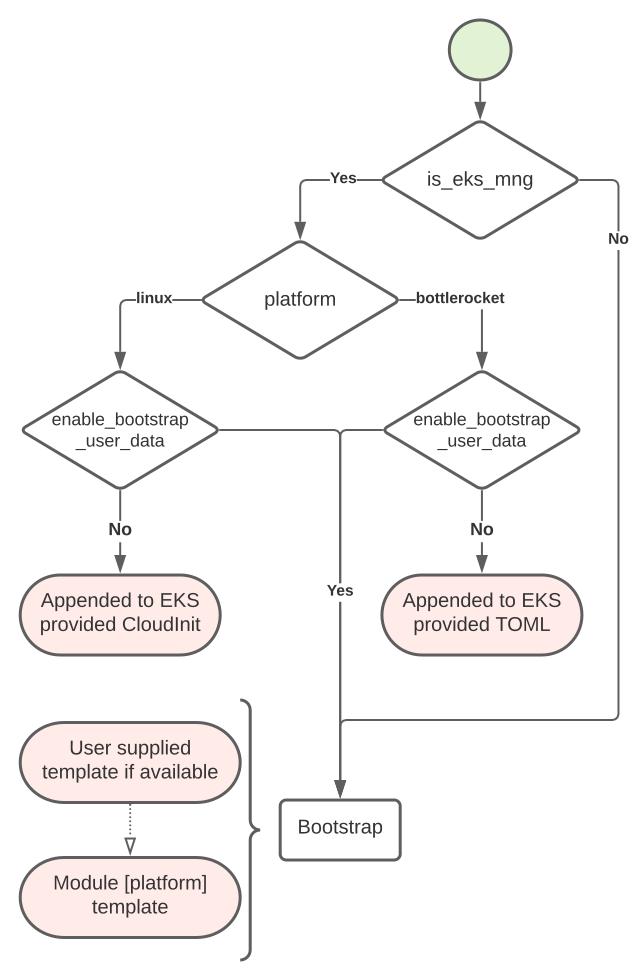
Requirements
| Name | Version |
|---|---|
| terraform | >= 0.13.1 |
| cloudinit | >= 2.0 |
Providers
| Name | Version |
|---|---|
| cloudinit | >= 2.0 |
Modules
No modules.
Resources
| Name | Type |
|---|---|
| cloudinit_config.linux_eks_managed_node_group | data source |
Inputs
| Name | Description | Type | Default | Required |
|---|---|---|---|---|
| bootstrap_extra_args | Additional arguments passed to the bootstrap script. When platform = bottlerocket; these are additional settings that are provided to the Bottlerocket user data |
string |
"" |
no |
| cluster_auth_base64 | Base64 encoded CA of associated EKS cluster | string |
"" |
no |
| cluster_endpoint | Endpoint of associated EKS cluster | string |
"" |
no |
| cluster_name | Name of the EKS cluster | string |
"" |
no |
| cluster_service_ipv4_cidr | The CIDR block to assign Kubernetes service IP addresses from. If you don't specify a block, Kubernetes assigns addresses from either the 10.100.0.0/16 or 172.20.0.0/16 CIDR blocks | string |
null |
no |
| create | Determines whether to create user-data or not | bool |
true |
no |
| enable_bootstrap_user_data | Determines whether the bootstrap configurations are populated within the user data template | bool |
false |
no |
| is_eks_managed_node_group | Determines whether the user data is used on nodes in an EKS managed node group. Used to determine if user data will be appended or not | bool |
true |
no |
| platform | Identifies if the OS platform is bottlerocket, linux, or windows based |
string |
"linux" |
no |
| post_bootstrap_user_data | User data that is appended to the user data script after of the EKS bootstrap script. Not used when platform = bottlerocket |
string |
"" |
no |
| pre_bootstrap_user_data | User data that is injected into the user data script ahead of the EKS bootstrap script. Not used when platform = bottlerocket |
string |
"" |
no |
| user_data_template_path | Path to a local, custom user data template file to use when rendering user data | string |
"" |
no |
Outputs
| Name | Description |
|---|---|
| user_data | Base64 encoded user data rendered for the provided inputs |