# AWS EKS Terraform module
Terraform module which creates AWS EKS (Kubernetes) resources
## Available Features
- AWS EKS Cluster
- AWS EKS Cluster Addons
- AWS EKS Identity Provider Configuration
- All [node types](https://docs.aws.amazon.com/eks/latest/userguide/eks-compute.html) are supported:
- [EKS Managed Node Group](https://docs.aws.amazon.com/eks/latest/userguide/managed-node-groups.html)
- [Self Managed Node Group](https://docs.aws.amazon.com/eks/latest/userguide/worker.html)
- [Fargate Profile](https://docs.aws.amazon.com/eks/latest/userguide/fargate.html)
- Support for custom AMI, custom launch template, and custom user data
- Support for Amazon Linux 2 EKS Optimized AMI and Bottlerocket nodes
- Windows based node support is limited to a default user data template that is provided due to the lack of Windows support and manual steps required to provision Windows based EKS nodes
- Support for module created security group, bring your own security groups, as well as adding additional security group rules to the module created security group(s)
- Support for providing maps of node groups/Fargate profiles to the cluster module definition or use separate node group/Fargate profile sub-modules
- Provisions to provide node group/Fargate profile "default" settings - useful for when creating multiple node groups/Fargate profiles where you want to set a common set of configurations once, and then individual control only select features
## Usage
```hcl
module "eks" {
source = "terraform-aws-modules/eks/aws"
cluster_name = "my-cluster"
cluster_version = "1.21"
cluster_endpoint_private_access = true
cluster_endpoint_public_access = true
cluster_addons = {
coredns = {
resolve_conflicts = "OVERWRITE"
}
kube-proxy = {}
vpc-cni = {
resolve_conflicts = "OVERWRITE"
}
}
cluster_encryption_config = [{
provider_key_arn = "ac01234b-00d9-40f6-ac95-e42345f78b00"
resources = ["secrets"]
}]
vpc_id = "vpc-1234556abcdef"
subnet_ids = ["subnet-abcde012", "subnet-bcde012a", "subnet-fghi345a"]
# Self Managed Node Group(s)
self_managed_node_group_defaults = {
instance_type = "m6i.large"
update_launch_template_default_version = true
iam_role_additional_policies = ["arn:aws:iam::aws:policy/AmazonSSMManagedInstanceCore"]
}
self_managed_node_groups = {
one = {
name = "spot-1"
public_ip = true
max_size = 5
desired_size = 2
use_mixed_instances_policy = true
mixed_instances_policy = {
instances_distribution = {
on_demand_base_capacity = 0
on_demand_percentage_above_base_capacity = 10
spot_allocation_strategy = "capacity-optimized"
}
override = [
{
instance_type = "m5.large"
weighted_capacity = "1"
},
{
instance_type = "m6i.large"
weighted_capacity = "2"
},
]
}
pre_bootstrap_user_data = <<-EOT
echo "foo"
export FOO=bar
EOT
bootstrap_extra_args = "--kubelet-extra-args '--node-labels=node.kubernetes.io/lifecycle=spot'"
post_bootstrap_user_data = <<-EOT
cd /tmp
sudo yum install -y https://s3.amazonaws.com/ec2-downloads-windows/SSMAgent/latest/linux_amd64/amazon-ssm-agent.rpm
sudo systemctl enable amazon-ssm-agent
sudo systemctl start amazon-ssm-agent
EOT
}
}
# EKS Managed Node Group(s)
eks_managed_node_group_defaults = {
ami_type = "AL2_x86_64"
disk_size = 50
instance_types = ["m6i.large", "m5.large", "m5n.large", "m5zn.large"]
vpc_security_group_ids = [aws_security_group.additional.id]
}
eks_managed_node_groups = {
blue = {}
green = {
min_size = 1
max_size = 10
desired_size = 1
instance_types = ["t3.large"]
capacity_type = "SPOT"
labels = {
Environment = "test"
GithubRepo = "terraform-aws-eks"
GithubOrg = "terraform-aws-modules"
}
taints = {
dedicated = {
key = "dedicated"
value = "gpuGroup"
effect = "NO_SCHEDULE"
}
}
tags = {
ExtraTag = "example"
}
}
}
# Fargate Profile(s)
fargate_profiles = {
default = {
name = "default"
selectors = [
{
namespace = "kube-system"
labels = {
k8s-app = "kube-dns"
}
},
{
namespace = "default"
}
]
tags = {
Owner = "test"
}
timeouts = {
create = "20m"
delete = "20m"
}
}
}
tags = {
Environment = "dev"
Terraform = "true"
}
}
```
## Node Group Configuration
⚠️ The configurations shown below are referenced from within the root EKS module; there will be slight differences in the default values provided when compared to the underlying sub-modules (`eks-managed-node-group`, `self-managed-node-group`, and `fargate-profile`).
### EKS Managed Node Groups
ℹ️ Only the pertinent attributes are shown for brevity
1. AWS EKS Managed Node Group can provide its own launch template and utilize the latest AWS EKS Optimized AMI (Linux) for the given Kubernetes version:
```hcl
eks_managed_node_groups = {
default = {}
}
```
2. AWS EKS Managed Node Group also offers native, default support for Bottlerocket OS by simply specifying the AMI type:
```hcl
eks_managed_node_groups = {
bottlerocket_default = {
ami_type = "BOTTLEROCKET_x86_64"
platform = "bottlerocket"
}
}
```
3. AWS EKS Managed Node Groups allow you to extend configurations by providing your own launch template and user data that is merged with what the service provides. For example, to provide additional user data before the nodes are bootstrapped as well as supply additional arguments to the bootstrap script:
```hcl
eks_managed_node_groups = {
extend_config = {
# This is supplied to the AWS EKS Optimized AMI
# bootstrap script https://github.com/awslabs/amazon-eks-ami/blob/master/files/bootstrap.sh
bootstrap_extra_args = "--container-runtime containerd --kubelet-extra-args '--max-pods=20'"
# This user data will be injected prior to the user data provided by the
# AWS EKS Managed Node Group service (contains the actually bootstrap configuration)
pre_bootstrap_user_data = <<-EOT
export CONTAINER_RUNTIME="containerd"
export USE_MAX_PODS=false
EOT
}
}
```
4. The same configurations extension is offered when utilizing Bottlerocket OS AMIs, but the user data is slightly different. Bottlerocket OS uses a TOML user data file and you can provide additional configuration settings via the `bootstrap_extra_args` variable which gets merged into what is provided by the AWS EKS Managed Node Service:
```hcl
eks_managed_node_groups = {
bottlerocket_extend_config = {
ami_type = "BOTTLEROCKET_x86_64"
platform = "bottlerocket"
# this will get added to what AWS provides
bootstrap_extra_args = <<-EOT
# extra args added
[settings.kernel]
lockdown = "integrity"
EOT
}
}
```
5. Users can also utilize a custom AMI, but doing so means that AWS EKS Managed Node Group will NOT inject the necessary bootstrap script and configurations into the user data supplied to the launch template. When using a custom AMI, users must also opt in to bootstrapping the nodes via user data and either use the module default user data template or provide your own user data template file:
```hcl
eks_managed_node_groups = {
custom_ami = {
ami_id = "ami-0caf35bc73450c396"
# By default, EKS managed node groups will not append bootstrap script;
# this adds it back in using the default template provided by the module
# Note: this assumes the AMI provided is an EKS optimized AMI derivative
enable_bootstrap_user_data = true
bootstrap_extra_args = "--container-runtime containerd --kubelet-extra-args '--max-pods=20'"
pre_bootstrap_user_data = <<-EOT
export CONTAINER_RUNTIME="containerd"
export USE_MAX_PODS=false
EOT
# Because we have full control over the user data supplied, we can also run additional
# scripts/configuration changes after the bootstrap script has been run
post_bootstrap_user_data = <<-EOT
echo "you are free little kubelet!"
EOT
}
}
```
6. Similarly, for Bottlerocket there is similar support:
```hcl
eks_managed_node_groups = {
bottlerocket_custom_ami = {
ami_id = "ami-0ff61e0bcfc81dc94"
platform = "bottlerocket"
# use module user data template to bootstrap
enable_bootstrap_user_data = true
# this will get added to the template
bootstrap_extra_args = <<-EOT
# extra args added
[settings.kernel]
lockdown = "integrity"
[settings.kubernetes.node-labels]
"label1" = "foo"
"label2" = "bar"
[settings.kubernetes.node-taints]
"dedicated" = "experimental:PreferNoSchedule"
"special" = "true:NoSchedule"
EOT
}
}
```
See the [`examples/eks_managed_node_group/` example](https://github.com/terraform-aws-modules/terraform-aws-eks/tree/master/examples/eks_managed_node_group) for a working example of these configurations.
### Self Managed Node Groups
ℹ️ Only the pertinent attributes are shown for brevity
1. By default, the `self-managed-node-group` sub-module will use the latest AWS EKS Optimized AMI (Linux) for the given Kubernetes version:
```hcl
cluster_version = "1.21"
# This self managed node group will use the latest AWS EKS Optimized AMI for Kubernetes 1.21
self_managed_node_groups = {
default = {}
}
```
2. To use Bottlerocket, specify the `platform` as `bottlerocket` and supply the Bottlerocket AMI. The module provided user data for Bottlerocket will be used to bootstrap the nodes created:
```hcl
cluster_version = "1.21"
self_managed_node_groups = {
bottlerocket = {
platform = "bottlerocket"
ami_id = data.aws_ami.bottlerocket_ami.id
}
}
```
### Fargate Profiles
Fargate profiles are rather straightforward. Simply supply the necessary information for the desired profile(s). See the [`examples/fargate_profile/` example](https://github.com/terraform-aws-modules/terraform-aws-eks/tree/master/examples/fargate_profile) for a working example of the various configurations.
### Mixed Node Groups
ℹ️ Only the pertinent attributes are shown for brevity
Users are free to mix and match the different node group types that meet their needs. For example, the following are just an example of the different possibilities:
- AWS EKS Cluster with one or more AWS EKS Managed Node Groups
- AWS EKS Cluster with one or more Self Managed Node Groups
- AWS EKS Cluster with one or more Fargate profiles
- AWS EKS Cluster with one or more AWS EKS Managed Node Groups, one or more Self Managed Node Groups, one or more Fargate profiles
It is also possible to configure the various node groups of each family differently. Node groups may also be defined outside of the root `eks` module definition by using the provided sub-modules. There are no restrictions on the the various different possibilities provided by the module.
```hcl
self_managed_node_group_defaults = {
vpc_security_group_ids = [aws_security_group.additional.id]
iam_role_additional_policies = ["arn:aws:iam::aws:policy/AmazonSSMManagedInstanceCore"]
}
self_managed_node_groups = {
one = {
name = "spot-1"
public_ip = true
max_size = 5
desired_size = 2
use_mixed_instances_policy = true
mixed_instances_policy = {
instances_distribution = {
on_demand_base_capacity = 0
on_demand_percentage_above_base_capacity = 10
spot_allocation_strategy = "capacity-optimized"
}
override = [
{
instance_type = "m5.large"
weighted_capacity = "1"
},
{
instance_type = "m6i.large"
weighted_capacity = "2"
},
]
}
pre_bootstrap_user_data = <<-EOT
echo "foo"
export FOO=bar
EOT
bootstrap_extra_args = "--kubelet-extra-args '--node-labels=node.kubernetes.io/lifecycle=spot'"
post_bootstrap_user_data = <<-EOT
cd /tmp
sudo yum install -y https://s3.amazonaws.com/ec2-downloads-windows/SSMAgent/latest/linux_amd64/amazon-ssm-agent.rpm
sudo systemctl enable amazon-ssm-agent
sudo systemctl start amazon-ssm-agent
EOT
}
}
# EKS Managed Node Group(s)
eks_managed_node_group_defaults = {
ami_type = "AL2_x86_64"
disk_size = 50
instance_types = ["m6i.large", "m5.large", "m5n.large", "m5zn.large"]
vpc_security_group_ids = [aws_security_group.additional.id]
}
eks_managed_node_groups = {
blue = {}
green = {
min_size = 1
max_size = 10
desired_size = 1
instance_types = ["t3.large"]
capacity_type = "SPOT"
labels = {
Environment = "test"
GithubRepo = "terraform-aws-eks"
GithubOrg = "terraform-aws-modules"
}
taints = {
dedicated = {
key = "dedicated"
value = "gpuGroup"
effect = "NO_SCHEDULE"
}
}
update_config = {
max_unavailable_percentage = 50 # or set `max_unavailable`
}
tags = {
ExtraTag = "example"
}
}
}
# Fargate Profile(s)
fargate_profiles = {
default = {
name = "default"
selectors = [
{
namespace = "kube-system"
labels = {
k8s-app = "kube-dns"
}
},
{
namespace = "default"
}
]
tags = {
Owner = "test"
}
timeouts = {
create = "20m"
delete = "20m"
}
}
}
```
See the [`examples/complete/` example](https://github.com/terraform-aws-modules/terraform-aws-eks/tree/master/examples/complete) for a working example of these configurations.
### Default configurations
Each node group type (EKS managed node group, self managed node group, or Fargate profile) provides a default configuration setting that allows users to provide their own default configuration instead of the module's default configuration. This allows users to set a common set of defaults for their node groups and still maintain the ability to override these settings within the specific node group definition. The order of precedence for each node group type roughly follows (from highest to least precedence):
- Node group individual configuration
- Node group family default configuration
- Module default configuration
These are provided via the following variables for the respective node group family:
- `eks_managed_node_group_defaults`
- `self_managed_node_group_defaults`
- `fargate_profile_defaults`
For example, the following creates 4 AWS EKS Managed Node Groups:
```hcl
eks_managed_node_group_defaults = {
ami_type = "AL2_x86_64"
disk_size = 50
instance_types = ["m6i.large", "m5.large", "m5n.large", "m5zn.large"]
}
eks_managed_node_groups = {
# Uses defaults provided by module with the default settings above overriding the module defaults
default = {}
# This further overrides the instance types used
compute = {
instance_types = ["c5.large", "c6i.large", "c6d.large"]
}
# This further overrides the instance types and disk size used
persistent = {
disk_size = 1024
instance_types = ["r5.xlarge", "r6i.xlarge", "r5b.xlarge"]
}
# This overrides the OS used
bottlerocket = {
ami_type = "BOTTLEROCKET_x86_64"
platform = "bottlerocket"
}
}
```
## Module Design Considerations
### General Notes
While the module is designed to be flexible and support as many use cases and configurations as possible, there is a limit to what first class support can be provided without over-burdening the complexity of the module. Below are a list of general notes on the design intent captured by this module which hopefully explains some of the decisions that are, or will be made, in terms of what is added/supported natively by the module:
- Despite the addition of Windows Subsystem for Linux (WSL for short), containerization technology is very much a suite of Linux constructs and therefore Linux is the primary OS supported by this module. In addition, due to the first class support provided by AWS, Bottlerocket OS and Fargate Profiles are also very much fully supported by this module. This module does not make any attempt to NOT support Windows, as in preventing the usage of Windows based nodes, however it is up to users to put in additional effort in order to operate Windows based nodes when using the module. User can refer to the [AWS documentation](https://docs.aws.amazon.com/eks/latest/userguide/windows-support.html) for further details. What this means is:
- AWS EKS Managed Node Groups default to `linux` as the `platform`, but `bottlerocket` is also supported by AWS (`windows` is not supported by AWS EKS Managed Node groups)
- AWS Self Managed Node Groups also default to `linux` and the default AMI used is the latest AMI for the selected Kubernetes version. If you wish to use a different OS or AMI then you will need to opt in to the necessary configurations to ensure the correct AMI is used in conjunction with the necessary user data to ensure the nodes are launched and joined to your cluster successfully.
- AWS EKS Managed Node groups are currently the preferred route over Self Managed Node Groups for compute nodes. Both operate very similarly - both are backed by autoscaling groups and launch templates deployed and visible within your account. However, AWS EKS Managed Node groups provide a better user experience and offer a more "managed service" experience and therefore has precedence over Self Managed Node Groups. That said, there are currently inherent limitations as AWS continues to rollout additional feature support similar to the level of customization you can achieve with Self Managed Node Groups. When requesting added feature support for AWS EKS Managed Node groups, please ensure you have verified that the feature(s) are 1) supported by AWS and 2) supported by the Terraform AWS provider before submitting a feature request.
- Due to the plethora of tooling and different manners of configuring your cluster, cluster configuration is intentionally left out of the module in order to simplify the module for a broader user base. Previous module versions provided support for managing the aws-auth configmap via the Kubernetes Terraform provider using the now deprecated aws-iam-authenticator; these are no longer included in the module. This module strictly focuses on the infrastructure resources to provision an EKS cluster as well as any supporting AWS resources. How the internals of the cluster are configured and managed is up to users and is outside the scope of this module. There is an output attribute, `aws_auth_configmap_yaml`, that has been provided that can be useful to help bridge this transition. Please see the various examples provided where this attribute is used to ensure that self managed node groups or external node groups have their IAM roles appropriately mapped to the aws-auth configmap. How users elect to manage the aws-auth configmap is left up to their choosing.
### User Data & Bootstrapping
There are a multitude of different possible configurations for how module users require their user data to be configured. In order to better support the various combinations from simple, out of the box support provided by the module to full customization of the user data using a template provided by users - the user data has been abstracted out to its own module. Users can see the various methods of using and providing user data through the [user data examples](https://github.com/terraform-aws-modules/terraform-aws-eks/tree/master/examples/user_data) as well more detailed information on the design and possible configurations via the [user data module itself](https://github.com/terraform-aws-modules/terraform-aws-eks/tree/master/modules/_user_data)
In general (tl;dr):
- AWS EKS Managed Node Groups
- `linux` platform (default) -> user data is pre-pended to the AWS provided bootstrap user data (bash/shell script) when using the AWS EKS provided AMI, otherwise users need to opt in via `enable_bootstrap_user_data` and use the module provided user data template or provide their own user data template to bootstrap nodes to join the cluster
- `bottlerocket` platform -> user data is merged with the AWS provided bootstrap user data (TOML file) when using the AWS EKS provided AMI, otherwise users need to opt in via `enable_bootstrap_user_data` and use the module provided user data template or provide their own user data template to bootstrap nodes to join the cluster
- Self Managed Node Groups
- `linux` platform (default) -> the user data template (bash/shell script) provided by the module is used as the default; users are able to provide their own user data template
- `bottlerocket` platform -> the user data template (TOML file) provided by the module is used as the default; users are able to provide their own user data template
- `windows` platform -> the user data template (powershell/PS1 script) provided by the module is used as the default; users are able to provide their own user data template
Module provided default templates can be found under the [templates directory](https://github.com/terraform-aws-modules/terraform-aws-eks/tree/master/templates)
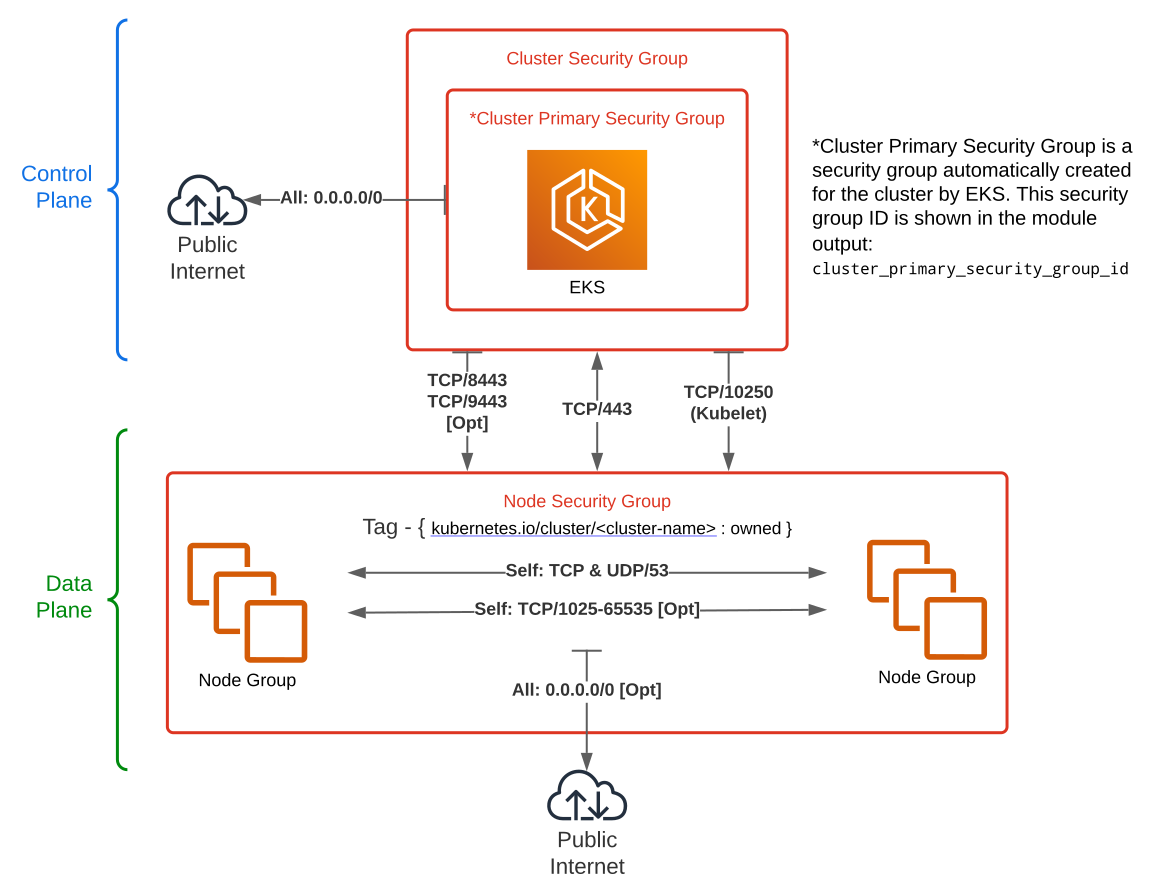
### Security Groups
- Cluster Security Group
- This module by default creates a cluster security group ("additional" security group when viewed from the console) in addition to the default security group created by the AWS EKS service. This "additional" security group allows users to customize inbound and outbound rules via the module as they see fit
- The default inbound/outbound rules provided by the module are derived from the [AWS minimum recommendations](https://docs.aws.amazon.com/eks/latest/userguide/sec-group-reqs.html) in addition to NTP and HTTPS public internet egress rules (without, these show up in VPC flow logs as rejects - they are used for clock sync and downloading necessary packages/updates)
- The minimum inbound/outbound rules are provided for cluster and node creation to succeed without errors, but users will most likely need to add the necessary port and protocol for node-to-node communication (this is user specific based on how nodes are configured to communicate across the cluster)
- Users have the ability to opt out of the security group creation and instead provide their own externally created security group if so desired
- The security group that is created is designed to handle the bare minimum communication necessary between the control plane and the nodes, as well as any external egress to allow the cluster to successfully launch without error
- Users also have the option to supply additional, externally created security groups to the cluster as well via the `cluster_additional_security_group_ids` variable
- Node Group Security Group(s)
- Each node group (EKS Managed Node Group and Self Managed Node Group) by default creates its own security group. By default, this security group does not contain any additional security group rules. It is merely an "empty container" that offers users the ability to opt into any addition inbound our outbound rules as necessary
- Users also have the option to supply their own, and/or additional, externally created security group(s) to the node group as well via the `vpc_security_group_ids` variable
The security groups created by this module are depicted in the image shown below along with their default inbound/outbound rules:
## Notes
- Setting `instance_refresh_enabled = true` will recreate your worker nodes without draining them first. It is recommended to install [aws-node-termination-handler](https://github.com/aws/aws-node-termination-handler) for proper node draining. See the [instance_refresh](https://github.com/terraform-aws-modules/terraform-aws-eks/tree/master/examples/instance_refresh) example provided.
Frequently Asked Questions
Why are nodes not being registered?
Often an issue caused by one of two reasons:
1. Networking or endpoint mis-configuration.
2. Permissions (IAM/RBAC)
At least one of the cluster public or private endpoints must be enabled to access the cluster to work. If you require a public endpoint, setting up both (public and private) and restricting the public endpoint via setting `cluster_endpoint_public_access_cidrs` is recommended. More info regarding communication with an endpoint is available [here](https://docs.aws.amazon.com/eks/latest/userguide/cluster-endpoint.html).
Nodes need to be able to contact the EKS cluster endpoint. By default, the module only creates a public endpoint. To access the endpoint, the nodes need outgoing internet access:
- Nodes in private subnets: via a NAT gateway or instance along with the appropriate routing rules
- Nodes in public subnets: ensure that nodes are launched with public IPs is enabled (either through the module here or your subnet setting defaults)
Important: If you apply only the public endpoint and configure the `cluster_endpoint_public_access_cidrs` to restrict access, know that EKS nodes will also use the public endpoint and you must allow access to the endpoint. If not, then your nodes will fail to work correctly.
Cluster private endpoint can also be enabled by setting `cluster_endpoint_private_access = true` on this module. Node communication to the endpoint stays within the VPC. Ensure that VPC DNS resolution and hostnames are also enabled for your VPC when the private endpoint is enabled.
Nodes need to be able to connect to other AWS services plus pull down container images from container registries (ECR). If for some reason you cannot enable public internet access for nodes you can add VPC endpoints to the relevant services: EC2 API, ECR API, ECR DKR and S3.
How can I work with the cluster if I disable the public endpoint?
You have to interact with the cluster from within the VPC that it is associated with; either through a VPN connection, a bastion EC2 instance, etc.
How can I stop Terraform from removing the EKS tags from my VPC and subnets?
You need to add the tags to the Terraform definition of the VPC and subnets yourself. See the [basic example](https://github.com/terraform-aws-modules/terraform-aws-eks/tree/master/examples/basic).
An alternative is to use the aws provider's [`ignore_tags` variable](https://www.terraform.io/docs/providers/aws/#ignore_tags-configuration-block). However this can also cause terraform to display a perpetual difference.
Why are there no changes when a node group's desired count is modified?
The module is configured to ignore this value. Unfortunately, Terraform does not support variables within the `lifecycle` block. The setting is ignored to allow the cluster autoscaler to work correctly so that `terraform apply` does not accidentally remove running workers. You can change the desired count via the CLI or console if you're not using the cluster autoscaler.
If you are not using autoscaling and want to control the number of nodes via terraform, set the `min_size` and `max_size` for node groups. Before changing those values, you must satisfy AWS `desired_size` constraints (which must be between new min/max values).
Why are nodes not recreated when the `launch_template` is recreated?
By default the ASG for a self-managed node group is not configured to be recreated when the launch configuration or template changes; you will need to use a process to drain and cycle the nodes.
If you are NOT using the cluster autoscaler:
- Add a new instance
- Drain an old node `kubectl drain --force --ignore-daemonsets --delete-local-data ip-xxxxxxx.eu-west-1.compute.internal`
- Wait for pods to be Running
- Terminate the old node instance. ASG will start a new instance
- Repeat the drain and delete process until all old nodes are replaced
If you are using the cluster autoscaler:
- Drain an old node `kubectl drain --force --ignore-daemonsets --delete-local-data ip-xxxxxxx.eu-west-1.compute.internal`
- Wait for pods to be Running
- Cluster autoscaler will create new nodes when required
- Repeat until all old nodes are drained
- Cluster autoscaler will terminate the old nodes after 10-60 minutes automatically
You can also use a third-party tool like Gruntwork's kubergrunt. See the [`eks deploy`](https://github.com/gruntwork-io/kubergrunt#deploy) subcommand.
Alternatively, use a managed node group instead.
How can I use Windows workers?
To enable Windows support for your EKS cluster, you should apply some configuration manually. See the [Enabling Windows Support (Windows/MacOS/Linux)](https://docs.aws.amazon.com/eks/latest/userguide/windows-support.html#enable-windows-support).
Windows based nodes require an additional cluster role (`eks:kube-proxy-windows`).
Worker nodes with labels do not join a 1.16+ cluster
As of Kubernetes 1.16, kubelet restricts which labels with names in the `kubernetes.io` namespace can be applied to nodes. Labels such as `kubernetes.io/lifecycle=spot` are no longer allowed; instead use `node.kubernetes.io/lifecycle=spot`
See your Kubernetes version's documentation for the `--node-labels` kubelet flag for the allowed prefixes. [Documentation for 1.16](https://v1-16.docs.kubernetes.io/docs/reference/command-line-tools-reference/kubelet/)
[
  "audit",
  "api",
  "authenticator"
]
| no |
| [cluster\_encryption\_config](#input\_cluster\_encryption\_config) | Configuration block with encryption configuration for the cluster | list(object({
provider_key_arn = string
resources = list(string)
})) | `[]` | no |
| [cluster\_endpoint\_private\_access](#input\_cluster\_endpoint\_private\_access) | Indicates whether or not the Amazon EKS private API server endpoint is enabled | `bool` | `false` | no |
| [cluster\_endpoint\_public\_access](#input\_cluster\_endpoint\_public\_access) | Indicates whether or not the Amazon EKS public API server endpoint is enabled | `bool` | `true` | no |
| [cluster\_endpoint\_public\_access\_cidrs](#input\_cluster\_endpoint\_public\_access\_cidrs) | List of CIDR blocks which can access the Amazon EKS public API server endpoint | `list(string)` | [
"0.0.0.0/0"
]
| no |
| [cluster\_identity\_providers](#input\_cluster\_identity\_providers) | Map of cluster identity provider configurations to enable for the cluster. Note - this is different/separate from IRSA | `any` | `{}` | no |
| [cluster\_name](#input\_cluster\_name) | Name of the EKS cluster | `string` | `""` | no |
| [cluster\_security\_group\_additional\_rules](#input\_cluster\_security\_group\_additional\_rules) | List of additional security group rules to add to the cluster security group created | `any` | `{}` | no |
| [cluster\_security\_group\_description](#input\_cluster\_security\_group\_description) | Description of the cluster security group created | `string` | `"EKS cluster security group"` | no |
| [cluster\_security\_group\_id](#input\_cluster\_security\_group\_id) | Existing security group ID to be attached to the cluster. Required if `create_cluster_security_group` = `false` | `string` | `""` | no |
| [cluster\_security\_group\_name](#input\_cluster\_security\_group\_name) | Name to use on cluster security group created | `string` | `null` | no |
| [cluster\_security\_group\_tags](#input\_cluster\_security\_group\_tags) | A map of additional tags to add to the cluster security group created | `map(string)` | `{}` | no |
| [cluster\_security\_group\_use\_name\_prefix](#input\_cluster\_security\_group\_use\_name\_prefix) | Determines whether cluster security group name (`cluster_security_group_name`) is used as a prefix | `string` | `true` | no |
| [cluster\_service\_ipv4\_cidr](#input\_cluster\_service\_ipv4\_cidr) | The CIDR block to assign Kubernetes service IP addresses from. If you don't specify a block, Kubernetes assigns addresses from either the 10.100.0.0/16 or 172.20.0.0/16 CIDR blocks | `string` | `null` | no |
| [cluster\_tags](#input\_cluster\_tags) | A map of additional tags to add to the cluster | `map(string)` | `{}` | no |
| [cluster\_timeouts](#input\_cluster\_timeouts) | Create, update, and delete timeout configurations for the cluster | `map(string)` | `{}` | no |
| [cluster\_version](#input\_cluster\_version) | Kubernetes `.` version to use for the EKS cluster (i.e.: `1.21`) | `string` | `null` | no |
| [create](#input\_create) | Controls if EKS resources should be created (affects nearly all resources) | `bool` | `true` | no |
| [create\_cloudwatch\_log\_group](#input\_create\_cloudwatch\_log\_group) | Determines whether a log group is created by this module for the cluster logs. If not, AWS will automatically create one if logging is enabled | `bool` | `true` | no |
| [create\_cluster\_security\_group](#input\_create\_cluster\_security\_group) | Determines if a security group is created for the cluster or use the existing `cluster_security_group_id` | `bool` | `true` | no |
| [create\_iam\_role](#input\_create\_iam\_role) | Determines whether a an IAM role is created or to use an existing IAM role | `bool` | `true` | no |
| [create\_node\_security\_group](#input\_create\_node\_security\_group) | Determines whether to create a security group for the node groups or use the existing `node_security_group_id` | `bool` | `true` | no |
| [eks\_managed\_node\_group\_defaults](#input\_eks\_managed\_node\_group\_defaults) | Map of EKS managed node group default configurations | `any` | `{}` | no |
| [eks\_managed\_node\_groups](#input\_eks\_managed\_node\_groups) | Map of EKS managed node group definitions to create | `any` | `{}` | no |
| [enable\_irsa](#input\_enable\_irsa) | Determines whether to create an OpenID Connect Provider for EKS to enable IRSA | `bool` | `false` | no |
| [fargate\_profile\_defaults](#input\_fargate\_profile\_defaults) | Map of Fargate Profile default configurations | `any` | `{}` | no |
| [fargate\_profiles](#input\_fargate\_profiles) | Map of Fargate Profile definitions to create | `any` | `{}` | no |
| [iam\_role\_additional\_policies](#input\_iam\_role\_additional\_policies) | Additional policies to be added to the IAM role | `list(string)` | `[]` | no |
| [iam\_role\_arn](#input\_iam\_role\_arn) | Existing IAM role ARN for the cluster. Required if `create_iam_role` is set to `false` | `string` | `null` | no |
| [iam\_role\_description](#input\_iam\_role\_description) | Description of the role | `string` | `null` | no |
| [iam\_role\_name](#input\_iam\_role\_name) | Name to use on IAM role created | `string` | `null` | no |
| [iam\_role\_path](#input\_iam\_role\_path) | Cluster IAM role path | `string` | `null` | no |
| [iam\_role\_permissions\_boundary](#input\_iam\_role\_permissions\_boundary) | ARN of the policy that is used to set the permissions boundary for the IAM role | `string` | `null` | no |
| [iam\_role\_tags](#input\_iam\_role\_tags) | A map of additional tags to add to the IAM role created | `map(string)` | `{}` | no |
| [iam\_role\_use\_name\_prefix](#input\_iam\_role\_use\_name\_prefix) | Determines whether the IAM role name (`iam_role_name`) is used as a prefix | `string` | `true` | no |
| [node\_security\_group\_additional\_rules](#input\_node\_security\_group\_additional\_rules) | List of additional security group rules to add to the node security group created | `any` | `{}` | no |
| [node\_security\_group\_description](#input\_node\_security\_group\_description) | Description of the node security group created | `string` | `"EKS node shared security group"` | no |
| [node\_security\_group\_id](#input\_node\_security\_group\_id) | ID of an existing security group to attach to the node groups created | `string` | `""` | no |
| [node\_security\_group\_name](#input\_node\_security\_group\_name) | Name to use on node security group created | `string` | `null` | no |
| [node\_security\_group\_tags](#input\_node\_security\_group\_tags) | A map of additional tags to add to the node security group created | `map(string)` | `{}` | no |
| [node\_security\_group\_use\_name\_prefix](#input\_node\_security\_group\_use\_name\_prefix) | Determines whether node security group name (`node_security_group_name`) is used as a prefix | `string` | `true` | no |
| [openid\_connect\_audiences](#input\_openid\_connect\_audiences) | List of OpenID Connect audience client IDs to add to the IRSA provider | `list(string)` | `[]` | no |
| [prefix\_separator](#input\_prefix\_separator) | The separator to use between the prefix and the generated timestamp for resource names | `string` | `"-"` | no |
| [self\_managed\_node\_group\_defaults](#input\_self\_managed\_node\_group\_defaults) | Map of self-managed node group default configurations | `any` | `{}` | no |
| [self\_managed\_node\_groups](#input\_self\_managed\_node\_groups) | Map of self-managed node group definitions to create | `any` | `{}` | no |
| [subnet\_ids](#input\_subnet\_ids) | A list of subnet IDs where the EKS cluster (ENIs) will be provisioned along with the nodes/node groups. Node groups can be deployed within a different set of subnet IDs from within the node group configuration | `list(string)` | `[]` | no |
| [tags](#input\_tags) | A map of tags to add to all resources | `map(string)` | `{}` | no |
| [vpc\_id](#input\_vpc\_id) | ID of the VPC where the cluster and its nodes will be provisioned | `string` | `null` | no |
## Outputs
| Name | Description |
|------|-------------|
| [aws\_auth\_configmap\_yaml](#output\_aws\_auth\_configmap\_yaml) | Formatted yaml output for base aws-auth configmap containing roles used in cluster node groups/fargate profiles |
| [cloudwatch\_log\_group\_arn](#output\_cloudwatch\_log\_group\_arn) | Arn of cloudwatch log group created |
| [cloudwatch\_log\_group\_name](#output\_cloudwatch\_log\_group\_name) | Name of cloudwatch log group created |
| [cluster\_addons](#output\_cluster\_addons) | Map of attribute maps for all EKS cluster addons enabled |
| [cluster\_arn](#output\_cluster\_arn) | The Amazon Resource Name (ARN) of the cluster |
| [cluster\_certificate\_authority\_data](#output\_cluster\_certificate\_authority\_data) | Base64 encoded certificate data required to communicate with the cluster |
| [cluster\_endpoint](#output\_cluster\_endpoint) | Endpoint for your Kubernetes API server |
| [cluster\_iam\_role\_arn](#output\_cluster\_iam\_role\_arn) | IAM role ARN of the EKS cluster |
| [cluster\_iam\_role\_name](#output\_cluster\_iam\_role\_name) | IAM role name of the EKS cluster |
| [cluster\_iam\_role\_unique\_id](#output\_cluster\_iam\_role\_unique\_id) | Stable and unique string identifying the IAM role |
| [cluster\_id](#output\_cluster\_id) | The name/id of the EKS cluster. Will block on cluster creation until the cluster is really ready |
| [cluster\_identity\_providers](#output\_cluster\_identity\_providers) | Map of attribute maps for all EKS identity providers enabled |
| [cluster\_oidc\_issuer\_url](#output\_cluster\_oidc\_issuer\_url) | The URL on the EKS cluster for the OpenID Connect identity provider |
| [cluster\_platform\_version](#output\_cluster\_platform\_version) | Platform version for the cluster |
| [cluster\_primary\_security\_group\_id](#output\_cluster\_primary\_security\_group\_id) | Cluster security group that was created by Amazon EKS for the cluster. Managed node groups use this security group for control-plane-to-data-plane communication. Referred to as 'Cluster security group' in the EKS console |
| [cluster\_security\_group\_arn](#output\_cluster\_security\_group\_arn) | Amazon Resource Name (ARN) of the cluster security group |
| [cluster\_security\_group\_id](#output\_cluster\_security\_group\_id) | ID of the cluster security group |
| [cluster\_status](#output\_cluster\_status) | Status of the EKS cluster. One of `CREATING`, `ACTIVE`, `DELETING`, `FAILED` |
| [eks\_managed\_node\_groups](#output\_eks\_managed\_node\_groups) | Map of attribute maps for all EKS managed node groups created |
| [fargate\_profiles](#output\_fargate\_profiles) | Map of attribute maps for all EKS Fargate Profiles created |
| [node\_security\_group\_arn](#output\_node\_security\_group\_arn) | Amazon Resource Name (ARN) of the node shared security group |
| [node\_security\_group\_id](#output\_node\_security\_group\_id) | ID of the node shared security group |
| [oidc\_provider\_arn](#output\_oidc\_provider\_arn) | The ARN of the OIDC Provider if `enable_irsa = true` |
| [self\_managed\_node\_groups](#output\_self\_managed\_node\_groups) | Map of attribute maps for all self managed node groups created |
## License
Apache 2 Licensed. See [LICENSE](https://github.com/terraform-aws-modules/terraform-aws-rds-aurora/tree/master/LICENSE) for full details.